
Why Did the Radio Lock and Ask for a Code?
Ford SYNC 1 and Sony-branded radios from 2007–2014 use the same power-loss anti-theft system as older Ford radios. Any loss in battery power activates the lock at next startup:
- Battery replacement or disconnect — the most frequent cause.
- Dead battery — a fully drained battery triggers the code prompt just like a manual disconnect.
- Radio removal — removing the unit for service cuts the power connection, triggering the lock when reinstalled.
Note: SYNC 1-integrated systems (with Bluetooth) may also require a code after a battery event, even though SYNC the connectivity system is separate from the radio anti-theft. Entering the correct code restores the radio; SYNC connectivity typically reconnects automatically once the radio is back to normal.
Fast Ford B-Max Radio Unlock Process Explained
- Skip long troubleshooting discussions or service visits - you can retrieve the code online with the radio serial number.
- Start by finding your radio's serial. It is always present on the unit itself, and in some cases you can see it on the B-Max's display.
- Enter it into the form above, and the software will identify the correct 2014 B-Max unlock code.
- When you receive the code, type it in using B-Max's radio buttons to unlock the system successfully.
- The entire process takes less than a minute for most users and requires no VIN, documents, or technical knowledge.
Unlocking the Radio After Code Generation
After generating the correct unlock code based on the S/N, you can restore default functionality by entering it into the unit.
The code entry process depends on the control layout, but most 2014 B-Max systems follow a similar structure using preset buttons, touch controls, or rotary knobs - depending on if it's a factory or an aftermarket unit.
You will typically see CODE displayed on screen.
Detailed Input Instructions for B-Max 2014
To enter the code on the 2014 Ford B-Max:
- Ignition ON. Radio shows "CODE" or "SAFE".
- Press buttons 1-4 to cycle through each digit of the 4-digit code. Each press increments the digit.
- Press button 5 (or OK) to submit the code.
Lockout: 10 wrong entries triggers "LOCKED" or "WAIT". Leave the radio switched on for up to 1 hour — it will return to the code prompt automatically. If "Locked 10" appears, try holding button 6 while switching the radio on for 3 more attempts.
Detailed Entering Instructions for B-Max 2014
With the correct four-digit code, the entry sequence on the 2014 B-Max uses the preset row on the radio fascia as a digit pad.
Limited Attempt Warning: the Visteon Ford head units only permit a small number of incorrect attempts before locking with a WAIT message that requires the ignition to remain on for an extended countdown. Verify each digit before submitting.
For all three factory variants - the 5000 RDS, the 6000 CD and the Sony 1.5DIN - the process is identical. Turn the ignition to ACC and power on the radio; the display should show CODE followed by four dashes. Press preset 1 repeatedly until the first digit matches your code, then preset 2 for the second digit, preset 3 for the third and preset 4 for the fourth. Once all four digits are correct on the display, press and hold preset 5 to confirm. A correct code restores normal radio operation. An incorrect code shows WAIT or increments the failure counter on the display.
How to Find the Serial Number on Your 2014 Ford B-Max Radio?
The initial step is writing down the radio serial number.
Many people assume the code depends on the Ford model or year, but actually, the unlock process depends on the unique radio's serial number.
The serial is the key used to calculate the correct unlock code.
This is actually better, because if you have an aftermarket radio, the VIN or other Ford-specific data wouldn't help.
Depending on the radio version used, you may be able to retrieve the serial directly from the screen or by looking at the label on the radio chassis.
Identify Your 2014 B-Max's Factory Radio
For 2014, the B-Max carried over its existing Visteon-built audio range with no supplier or part change. The factory unit is one of three closely related variants.
The Ford 5000 RDS is the simplest unit, with a single-line display and reduced controls, fitted to base Studio trim. The Ford 6000 CD is the most common 2014 head unit, offering a single CD slot, USB and AUX inputs, a multi-line dot-matrix display and Bluetooth on higher trims; it is standard on Zetec and Titanium. The Sony 1.5DIN unit is Sony-branded on the fascia with a chrome-ringed central knob and dedicated branding, standard on Titanium X and available as an option elsewhere.
All three share the underlying Visteon hardware platform and therefore the same procedures for serial display, removal and code entry.
Display-Based Serial Number Retrieval
These are the steps you need to follow for 2014 Ford B-Max:
The 2014 Ford B-Max may be equipped with a Ford SYNC or Ford 6000CD radio. Ford radios typically lack an on-screen serial display method.
The serial number must be found from the physical label on the radio unit itself. Partial removal of the radio is required. See instructions below.
Try this first (Ford 6000CD): Press and hold buttons 1 and 6 together for approximately 3 seconds. The radio cycles through system information — the serial (e.g., V197905) is shown last. If nothing appeared, try holding buttons 2 and 6 for the M serial variant. Certain SYNC and Sony modules might not respond to this method — continue with physical removal if the button combination has no effect.
Occasionally the serial appears split across two screens — combine both parts to get the complete serial.
Accessing the Serial Number Through the Radio Menu
On the 2014 B-Max factory audio units, a hidden diagnostic cycle exposes the serial number on the front panel display.
Ford 5000 RDS / 6000 CD / Sony 1.5DIN
Turn the ignition key to ACC and wait for the radio to power on. Press and hold preset buttons 1 and 6 together for around three seconds. The display begins scrolling through internal diagnostic data and eventually shows a line starting with M or V followed by six digits - that string is the serial. If 1+6 produces no response, try the alternate combination 2 and 6 on the same buttons. Record the full alphanumeric string exactly, then switch the ignition off to exit the cycle.
B-Max's Hardware Label Method
If the serial number cannot be accessed through menu, use the hardware method.
Most Ford B-Max original radios include a sticker with the serial number printed on the casing.
Step-by-Step Approach:
- Switch off the vehicle.
- Detach the dashboard frame surrounding the radio.
- Release the mounting bolts.
- Pull the unit outward to access the label.
The serial number is usually located near the manufacturer sticker.
To retrieve the serial on the 2014 Ford B-Max:
- Power down the vehicle.
- For Ford 6000CD/4500: Use extraction keys in the four extraction slots on both sides of the radio. Push until they click, then slide the unit forward.
- For SYNC/Sony integrated units: Pry off the dashboard bezel with a trim removal tool, then remove the four screws and pull the unit forward.
- Locate the serial number label on the top of the unit. It begins with M or V.
Tip: Vehicles with Sony premium audio may have a larger display module. The SYNC units are usually screw-mounted rather than key-released.
Locate Serial on B-Max's Radio Chassis
When the display method does not work, the printed serial label on the radio chassis is the reliable alternative. The B-Max unit fits a 1.5DIN aperture secured by spring clips.
Safety: switch the ignition off, withdraw the key, disconnect the negative battery terminal and wait several minutes for any residual power to dissipate. Do not touch yellow SRS airbag connectors near the centre console.
You will need four Ford-pattern DIN release keys (the matched pair set with notched ends), a plastic trim removal wedge, a flashlight and a camera or phone.
Insert one release key fully into each of the four small holes on the radio fascia. Push the keys outwards to spread the internal clips, then pull straight back using the keys as handles to slide the chassis from the dash. Ease the unit out only as far as the wiring harness permits - do not yank or twist. Locate the white serial sticker on the top or side of the metal chassis; it is labelled S/N or Serial next to a barcode and reads as a single letter prefix plus six digits. Photograph the label under good lighting so you can verify characters before reinstalling. The unlock code itself is never printed on the radio - only the serial number is recorded on the label.
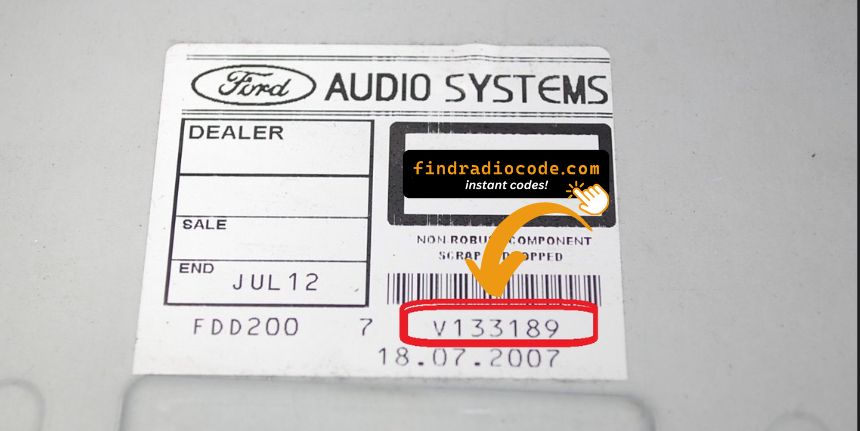
Example: Ford B-Max serial number label location
Typical Serial Number Examples for 2014 B-Max
The 2014 Ford B-Max radio serial number format:
M######– Standard Ford serial prefixV######– Alternate serial prefix
Radio types for the 2014 B-Max: Ford 6000CD (base), Sony (premium), Ford SYNC (with Bluetooth). Regardless of radio type use the same M or V format.
Reminder The serial is the prefix letter plus 6 digits. Just the M or V serial is required for code generation.
Common Serial Number Structures
The Visteon platform shared across all 2014 B-Max factory radios produces a recognisable serial style regardless of which fascia is fitted.
The serial typically begins with the letter M followed by six numeric digits when read from the chassis label, for example a seven-character pattern of one letter plus six numerics. When read via the on-screen diagnostic cycle the prefix is more often V, also followed by six digits. The total length is commonly seven characters in either presentation.
A long Ford part number printed elsewhere on the label (typically containing dashes and letter pairs such as alphanumeric mouldings) is not the serial and should be ignored. On certain labels the serial appears embedded in a longer string such as FDMCD0V027722 - in that case, the relevant submission is the trailing seven-character block starting with M or V.
Validation tips: distinguish 0 from capital O, and 1 from capital I, before submitting. Never submit a barcode-only number or a Ford part number in place of the serial.
Understanding Unlock Issues with Your B-Max
When the radio powers on without showing a "CODE" prompt:
- The unit might not be code-locked — test normal AM/FM and Bluetooth operation to confirm.
- Certain SYNC 1 units display "SAFE" momentarily before the code screen — wait a moment for it to change to the full code entry screen.
- For Sony premium audio trims: the Sony branding screen may appear first before the code prompt — wait 5–10 seconds for the system to fully boot.
An unresponsive screen usually indicates a power or fuse issue rather than a lockout. Inspect the radio fuse in the fuse box panel prior to further troubleshooting.
Ford SYNC 1 and Sony-era radios employ preset buttons 1–4 for digit entry and button 5 (or OK) to confirm — identical to the older Ford 6000CD platform:
- Buttons 1–4 — press each multiple times to advance through digits for that position in the 4-digit code.
- Button 5 or OK — press to confirm the complete entry.
For SYNC-integrated units with a dot-matrix display, the entered digits appears on screen as you press — making it straightforward to check each digit before confirming. Sony units work the same way.
On these Ford radios, a rejected code is nearly always caused by a misread serial. SYNC-integrated units cannot display the serial — it has to be read from the physical sticker on the unit. Make sure the serial begins with M or V and is exactly seven characters long.
After a failed entry, do not entering further guesses — 10 tries are available before a lockout. Contact support for a free recheck to verify the serial before retrying.
Ford SYNC 1 and Sony-equipped radios go into lockout after 10 incorrect entries. Recovery steps:
- Leave the radio switched on — do not turning it off during the wait.
- Allow up to 1 hour. The radio should automatically return to the "CODE" display.
- Should "Locked 10" appears, try holding button 6 while switching the radio on to get 3 more attempts.
Should the unit remains stuck in LOCKED after waiting the full hour, a dealer visit or module replacement may be needed.
Ford SYNC and Sony radios from this era carry the same serial format as all Ford OEM radios:
M######— M followed by six digits (most typical format).V######— V followed by 6 digits (used on Visteon-supplied modules).
SYNC 1 and Sony units do not have an on-screen serial display — the serial is only accessible from the physical label on the radio chassis, which means extracting the radio. See the removal section above for step-by-step instructions. The part number on the same label (e.g., AM5T-18C815-...) should not be submitted as the serial.