
Unlock Your 2017 Ford B-Max Radio in Minutes - How It Works
- Instead of contacting Ford dealer or searching forums you can find the code online with the radio S/N.
- Identify the serial number. You will always find it on the unit itself, and in some cases it can be visible on the B-Max's radio screen.
- Type it into the generator above, and the software will retrieve the correct 2017 B-Max unlock code.
- After receiving your code, type it in using B-Max's radio controls to unlock the system successfully.
- The entire process takes just a short moment and requires zero paperwork and no dealer visit.
Can't Locate Your Unit's S/N? Follow The Steps Below for Ford B-Max 2017
The first part is to find and write down the radio's serial number.
Based on the head unit type fitted in your 2017 B-Max, the S/N can be found either through the display menu or by checking the label on the radio itself.
Below are the most common methods to identify your serial quickly.
Identify Your 2017 B-Max's Factory Radio
The 2017 model year was the final year of European B-Max production. The audio lineup carried over without supplier change: the Visteon-built 1.5DIN family plus optional SYNC 1.
The Ford 5000 RDS remained on base Studio trim with a simpler single-line display. The Ford 6000 CD was the volume head unit on Zetec and Titanium, offering a single CD slot, USB and AUX inputs, a multi-line dot-matrix display, and Bluetooth on higher trims. The Sony 1.5DIN variant is the Sony-branded version of the 6000 CD platform, standard on Titanium X. The SYNC 1 system was optional, identified by a 4.2-inch monochrome centre screen and a steering-wheel VOICE button - SYNC 1 does not use the four-digit anti-theft code system covered on this page.
The quick check: a 4.2-inch screen above the climate panel and a VOICE button on the wheel means SYNC 1; otherwise the car has one of the three Visteon 1.5DIN units.
Quick Method: Find the Serial Number on the Screen
These are the steps you need to follow for 2017 Ford B-Max:
The 2017 Ford B-Max may have a Ford Sony or Ford 6000CD radio. Ford radios generally lack an on-screen serial display method.
The serial number must be read from the physical label on the radio unit chassis. Extraction of the radio is required. See instructions below.
Try this first (Ford 6000CD): Press and hold buttons 1 and 6 together for 2–3 seconds. The radio cycles through system information — the serial (e.g., V197905) is shown last. If no serial showed, try holding buttons 2 and 6 for the M serial variant. Certain SYNC or Sony modules might not respond to this method — proceed with manual removal if the button combination doesn't work.
On some units the serial is split across two screens — combine both parts to get the complete serial.
Display-Based Serial Number Retrieval
The 2017 B-Max Visteon factory radios expose the serial through a hidden diagnostic cycle on the front panel. SYNC 1 is not covered here because it does not use the same code system.
Ford 5000 RDS / 6000 CD / Sony 1.5DIN
Turn the ignition key to ACC and wait for the radio to power on. Press and hold preset buttons 1 and 6 together for around three seconds. The display starts scrolling through internal test strings and eventually settles on a line beginning with M or V followed by six digits - that string is the serial. If the 1+6 combination produces no response, release and try 2 and 6 instead. Record the full alphanumeric string carefully and switch the ignition off to exit the cycle.
Serial Number on the Unit
If the serial does not appear in menu, the next step is checking the radio itself.
Many Ford radios require physical access to the serial tag attached to the unit.
Common approach:
- Start by completely shutting off the engine - pull the key out.
- Then detach the dashboard bezel.
- Next, release the mounting points and pull the radio forward.
- Look for a factory sticker showing the serial number.
To access the serial on the 2017 Ford B-Max:
- Turn off the vehicle.
- For Ford 6000CD/4500: Use Ford release keys in the 4 pin holes on each side of the radio. Insert until they click, then slide the unit forward.
- For SYNC/Sony integrated units: Detach the center stack trim with a trim removal tool, then unscrew the 4 bolts and pull the unit out.
- Locate the serial number label on the rear of the unit. It starts with M or V.
Note: Models with Sony premium audio may have a larger unit. The SYNC units are usually bolt-mounted rather than pin-released.
Manufacturer Label Inspection
When the on-screen procedure does not produce a serial, the chassis label is the reliable fallback for Visteon-built 2017 B-Max units. SYNC 1 units are integrated with the centre stack and typically require professional removal.
Safety: switch the ignition off, withdraw the key from the barrel, disconnect the negative battery terminal and wait several minutes for residual power to drain. Stay clear of yellow SRS connectors around the centre console.
You will need four Ford-pattern DIN release keys, a plastic trim wedge, a flashlight and a camera or phone. Insert one release key fully into each of the four small holes on the radio fascia. Push the keys outwards to spread the internal spring clips, then pull straight back to draw the chassis from the dash. Slide the unit forward only as far as the wiring harness allows - do not yank or twist the assembly. Locate the white serial sticker on the top or side of the metal chassis; it is labelled S/N or Serial near a barcode and shows a single letter prefix plus six digits. Photograph the label under good lighting so you can compare characters carefully (0 vs O, 1 vs I) before reinstalling.
For SYNC 1 cars, removal is best left to a professional. The unlock code is never printed on the radio - only the serial number appears on the label.
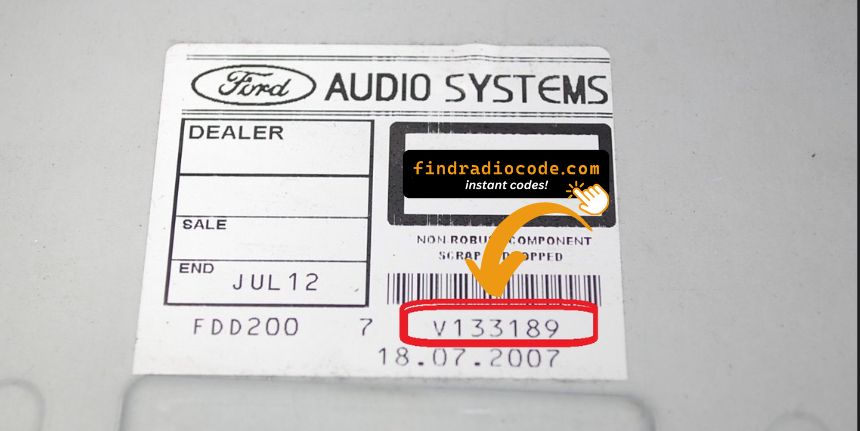
Example: Ford B-Max serial number label location
Serial Number Format Guide for 2017 Ford B-Max
The 2017 Ford B-Max radio serial number pattern:
M######– Most common Ford serial prefixV######– Visteon serial prefix
Radio types for the 2017 B-Max: Ford 6000CD (base), Sony (premium), Ford SYNC (with Bluetooth). Regardless of radio type use the same serial format.
Reminder The serial is the prefix letter plus 6 digits. Just the M or V serial is required for code retrieval.
What a Valid Serial Number Looks Like
The Visteon platform shared across all 2017 B-Max factory radios produces a recognisable serial style regardless of fascia branding. SYNC 1 uses a different identifier (ESN) and is not part of the four-digit code system.
The serial typically begins with M followed by six numeric digits when read from the chassis label, giving a total of seven characters. When read via the on-screen diagnostic cycle the prefix is more often V, also followed by six digits, again seven characters total. A long Ford part number elsewhere on the label is not the serial and should be ignored; on some labels the serial appears embedded in a longer string such as FDMCD0V027722, in which case the relevant submission is the trailing seven-character block starting with M or V.
Validation tips: distinguish 0 from capital O and 1 from capital I before submitting. Never submit a barcode-only number or a Ford part number in place of the serial.
How Code Entry Works on Your Ford Radio
Once the system gives you 2017 Ford B-Max radio code from the S/N, you're ready to reactivate the radio.
Some drivers hesitate at this stage because input process can look different across radio versions, but it's usually quick.
When the radio shows dashed lines, it means the unit is waiting for the correct numbers.
Entering Process
To enter the code on the 2017 Ford B-Max:
- Ignition ON. Radio shows "CODE" or "SAFE".
- Press buttons 1-4 to set each digit of the 4-digit code. Each press advances the digit.
- Press button 5 (or OK) to confirm the code.
Lockout: 10 wrong entries causes "LOCKED" or "WAIT". Leave the radio switched on for up to 1 hour — it should return to the code prompt automatically. If "Locked 10" appears, try holding button 6 while switching the radio on for 3 more attempts.
The Correct Way to Enter It
With the correct four-digit code obtained, the entry sequence on the 2017 B-Max Visteon units uses the preset row on the radio fascia as a digit pad. SYNC 1 cars do not use this procedure.
Limited Attempt Warning: the Visteon Ford head units only permit a small number of wrong entries before locking out with a WAIT message that requires the ignition to remain on for a long countdown. Verify each digit before submitting.
For the 5000 RDS, the 6000 CD and the Sony 1.5DIN units, the process is identical. Turn the ignition to ACC and let the radio power on - the display should show CODE followed by four dashes. Press preset 1 repeatedly until the first digit matches your code, then preset 2 for the second digit, preset 3 for the third and preset 4 for the fourth. Once all four digits are correct on the display, press and hold preset 5 to confirm. A correct code restores normal radio operation; an incorrect code displays WAIT or increments the failure counter.
Understanding Unlock Issues with Your B-Max
Ford SYNC 1 and Sony-equipped radios display "LOCKED" after 10 incorrect entries. To recover:
- Leave the radio switched on — do not turning it off during the wait.
- Wait up to 1 hour. The radio should automatically return to the "CODE" prompt.
- Should "Locked 10" appears, try holding button 6 while switching the radio on to get 3 more attempts.
If the radio remains stuck in LOCKED after waiting the full hour, a dealer visit or module replacement could be required.
On these Ford radios, a rejected code is nearly always caused by the wrong serial being submitted. SYNC-integrated units do not show the serial — it has to be read from the label on the radio chassis. Verify the serial begins with M or V and is exactly seven characters long.
If the code was rejected, do not entering further attempts — ten attempts are available before a lockout. Contact support for a free recheck to confirm the serial prior to retrying.
When the radio powers on without showing a "CODE" prompt:
- The radio may not be locked — test normal radio and audio operation to confirm.
- Some SYNC 1 units show "SAFE" briefly before the code screen — wait a few seconds for it to transition to the full code entry screen.
- On Sony-equipped versions: the Sony branding screen often shows first before the code prompt — allow several seconds for the system to fully boot.
A blank screen usually indicates a power or fuse issue rather than a lockout. Inspect the radio fuse in the fuse box panel before further troubleshooting.
Ford SYNC 1 and Sony-era radios employ preset buttons 1–4 for digit entry and button 5 (or OK) to confirm — identical to the older Ford 6000CD platform:
- Buttons 1–4 — press each repeatedly to advance through digits for that position in the 4-digit code.
- Button 5 or OK — press to confirm the complete entry.
For SYNC-integrated units that also have a dot-matrix display, the current digit are shown on screen as you press — this makes it easy to verify each digit before confirming. Sony units work the same way.
Ford SYNC and Sony radios from this era carry the same serial format as all Ford OEM radios:
M######— M followed by six digits (most typical format).V######— V followed by 6 digits (used on Visteon-supplied units).
SYNC 1 and Sony units do not have an on-screen serial display — the serial can only be read from the sticker on the unit casing, which requires partially removing the radio. Refer to the removal section above for step-by-step guidance. The part number on the adjacent label (e.g., AM5T-18C815-...) should not be submitted as the serial.
Why Is the Radio Asking for a Code?
Ford SYNC 1 and Sony-branded radios of this era use the same battery-disconnect security system as older Ford radios. Any interruption in the power supply engages the lock at next startup:
- Battery replacement or disconnect — the usual cause.
- Dead battery — a completely flat battery activates the code prompt just like a manual disconnect.
- Radio removal — taking the radio out for service severs the power connection, triggering the lock when reinstalled.
Worth mentioning: true Ford SYNC 1 systems (with Bluetooth) may also require a code after a battery event, even though SYNC itself is separate from the radio anti-theft. Entering the correct code restores the radio; SYNC itself usually reconnects automatically once the radio is unlocked.