
Finding the Radio S/N for Ford
The important fact to know is that factory radios use a unique serial number to identify each unit.
Your security system matches the code directly to this serial.
Different from vehicle-specific data such as VIN or registration information, it is not determined by the model or production year, so you'll be able to generate it even if you have a radio that you bought afterwards.
Depending on the manufacturer and radio installed in your Ford B-Max, the retrieval method varies.
These are the best ways to find it.
Factory Radios on the 2015 Ford B-Max
The 2015 model-year B-Max introduced the optional SYNC 1 system alongside the existing Visteon audio range. Most cars still left the factory with the conventional 1.5DIN head unit; SYNC was an option pack.
- Ford 5000 RDS - retained on entry trim, single-line display, no CD on some market builds.
- Ford 6000 CD - the volume seller for 2015, single CD slot, USB/AUX, multi-line dot-matrix display, Bluetooth on higher trims.
- Ford Sony 1.5DIN - Sony-branded fascia variant of the 6000 CD platform, fitted to Titanium X and as a paid option.
- Ford SYNC 1 - new option for 2015, identified by a small 4.2-inch monochrome screen in the centre console, dedicated voice-control button on the steering wheel and a different fascia layout. SYNC 1 is paired to the vehicle and does not use the same four-digit anti-theft code system as the 1.5DIN units.
Quick field test: if you see a 4.2-inch screen above the climate panel and a VOICE button on the wheel, the car has SYNC 1; otherwise it is one of the three Visteon 1.5DIN units.
Find the Serial on the Radio Display
These are the steps you need to follow for 2015 Ford B-Max:
The 2015 Ford B-Max may have a Ford Sony or Ford 6000CD radio. These units generally do not include an on-screen serial display function.
The serial number must be found from the sticker on the radio unit chassis. Partial removal of the radio is necessary. See instructions below.
Try this first (Ford 6000CD): Press and hold buttons 1 and 6 together for 2–3 seconds. The radio cycles through system information — the serial (e.g., V197905) is shown last. If no serial showed, try holding buttons 2 and 6 for the M serial variant. Certain SYNC or Sony units may not support this method — continue with manual removal if the button combination doesn't work.
Occasionally the serial is split across two screens — combine both parts to get the full serial.
Check the Display First - Serial Retrieval Without Tools
The conventional 2015 B-Max audio units expose the serial through a hidden diagnostic cycle. The SYNC 1 unit does not use this anti-theft code system and is therefore not described here.
Ford 5000 RDS / 6000 CD / Sony 1.5DIN
- Switch the ignition to ACC and let the radio power on.
- Press and hold preset buttons 1 and 6 together for about three seconds.
- The display cycles through internal test strings and shows a line beginning with
MorVfollowed by six digits. - If 1+6 has no effect, try the alternate 2 and 6 combination.
- Note the prefix letter and the six digits, then switch the ignition off to exit.
Releasing the Unit to View the S/N on the Tag
If the serial number cannot be accessed through menu, use the pull-out method.
Most Ford B-Max OEM radios include a label with the serial number printed on the housing.
Step-by-Step Approach:
- Power down the vehicle.
- Detach the bezel surrounding the radio.
- Unscrew the fasteners.
- Pull the unit slightly out to access the label.
The serial number is usually located near the manufacturer sticker.
To retrieve the serial on the 2015 Ford B-Max:
- Turn off the vehicle.
- For Ford 6000CD/4500: Use Ford release keys in the four extraction slots on each side of the radio. Insert until they click, then slide the unit forward.
- For SYNC/Sony integrated units: Pry off the radio surround with a plastic pry tool, then remove the 4 screws and pull the unit forward.
- Locate the serial number label on the top of the unit. It starts with M or V.
Tip: Models with SYNC may have an integrated unit. The integrated units are usually screw-mounted rather than key-released.
Find the S/N by Pulling Out the Radio Unit
When the display method does not produce a serial, the printed label on the chassis is the fallback for Visteon-built B-Max units. SYNC 1 units are deeply integrated and typically require professional service for removal.
Safety: switch the ignition off, remove the key, disconnect the negative battery terminal and wait several minutes before working around the dash. Avoid yellow SRS connectors near the centre console.
- Tools: four Ford-pattern DIN release keys, plastic trim wedge, flashlight and a phone for photographs.
- Insert one release key into each of the four small holes on the radio fascia.
- Push the keys outwards to spread the spring clips, then pull straight back to draw the chassis from the dash.
- Ease the unit forward only as far as the wiring loom permits - the quadlock and aerial leads remain attached.
- Locate the white sticker on the top or side of the chassis, labelled
S/NorSerial. - Photograph the label, then re-check characters carefully under good lighting before reinstalling.
For SYNC 1 cars, the head unit is part of a larger infotainment assembly and is best left to professional installation if access is needed. The unlock code is never printed on the radio - only the serial number is.
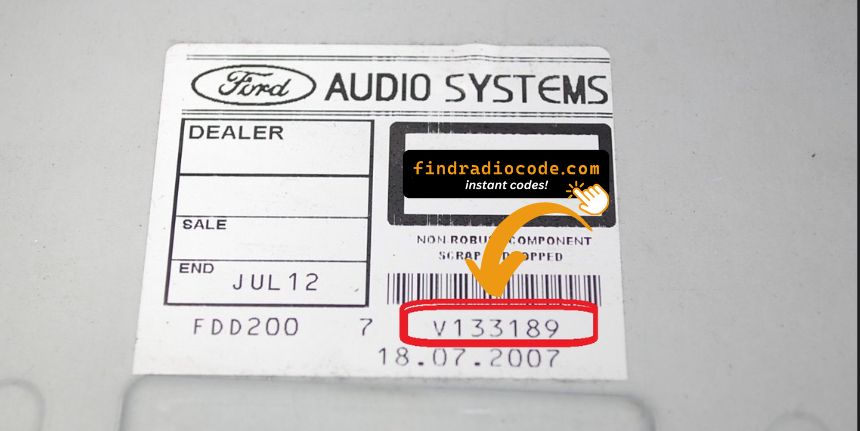
Example: Ford B-Max serial number label location
Typical Serial Number Examples for 2015 B-Max
The 2015 Ford B-Max radio serial number pattern:
M######– Primary Ford serial prefixV######– Visteon serial prefix
Radio types for the 2015 B-Max: Ford 6000CD (base), Sony (premium), Ford SYNC (with Bluetooth). Regardless of radio type use the same M or V format.
Reminder The serial is the prefix letter plus 6 digits. Just the M or V serial is needed for code generation.
Typical Serial Number Examples for 2015 B-Max
The Visteon platform across the 2015 B-Max audio range produces a consistent serial style. SYNC 1 uses a different identification scheme (ESN) and is not part of the four-digit code system.
- Typically begins with M followed by six numeric digits when read from the chassis label (one letter plus six numerics, seven characters total).
- Often shows a V prefix instead when read via the on-screen diagnostic cycle, also seven characters total.
- A long Ford part number printed nearby on the label is not the serial - ignore it.
- If the label shows a longer string such as
FDMCD0V027722, the submitted serial is the trailing seven-character block.
Validation tips: distinguish 0 from O, 1 from I, and verify the prefix letter is M or V before submitting. Do not submit a barcode-only number or a part number.
Code Entry Process for 2015 B-Max
Now that you've generated 2015 Ford B-Max radio code from the S/N, you're ready to reactivate the radio.
Many drivers get stuck at this stage because input methods can look different across radio versions, but it's usually easy.
When the radio shows CODE, it means the unit is waiting for the correct numbers.
Entering Process
To input the code on the 2015 Ford B-Max:
- Ignition ON. Radio shows "CODE" or "SAFE".
- Press buttons 1-4 to select each digit of the 4-digit code. Each press cycles the digit.
- Press button 5 (or OK) to enter the code.
Lockout: 10 wrong entries triggers "LOCKED" or "WAIT". Leave the radio switched on for up to 1 hour — it will return to the code prompt automatically. Should "Locked 10" appears, try holding button 6 while switching the radio on for additional attempts.
Correct Entering Process
Once the four-digit code is known, the entry sequence on the 2015 B-Max factory units uses the preset row on the fascia. SYNC 1 cars do not use this anti-theft code procedure and are not addressed here.
Limited Attempt Warning: the Visteon Ford units permit only a small number of wrong entries before locking out with a WAIT message that requires the ignition to stay on for a long countdown. Confirm each digit before submitting.
Ford 5000 RDS / 6000 CD / Sony 1.5DIN
- Turn the ignition to ACC and let the radio power on.
- The display should read
CODEfollowed by four dashes. - Press preset 1 repeatedly until the first digit matches your code.
- Use preset 2 for the second digit, preset 3 for the third, preset 4 for the fourth.
- Press and hold preset 5 to confirm.
- A correct code restores normal operation; an incorrect code shows
WAITor counts up the failure tally.
Fast Ford B-Max Radio Unlock Process Explained
- Instead of contacting Ford dealer or searching forums you can find the code online using the radio serial number.
- First locate your radio's serial. The best place to search is on the unit itself, and sometimes you can see it on the B-Max's radio screen.
- Type it into the field above, and our software will identify the correct 2015 B-Max unlock code.
- When you receive the code, type it in using B-Max's radio buttons to release the blockade fully.
- The entire process takes less than a minute for most users and requires zero paperwork and no dealer visit.
Why Did the Radio Lock and Ask for a Code?
Ford SYNC 1 and Sony-branded radios from 2007–2014 use the same power-loss anti-theft system as older Ford radios. Any cut in the power supply triggers the lock at next startup:
- Battery replacement or disconnect — the most frequent cause.
- Dead battery — a completely flat battery triggers the code prompt just like a manual disconnect.
- Radio removal — taking the radio out for service cuts the power connection, triggering the lock when reinstalled.
Note: true Ford SYNC 1 systems (with Bluetooth) can also require a code after a battery event, even though SYNC the connectivity system is separate from the radio anti-theft. Supplying the correct code restores the radio; SYNC itself typically reconnects automatically once the radio is back to normal.
Troubleshooting Common Radio Problems - B-Max 2015
When the radio turns on without displaying a "CODE" prompt:
- The unit might not be code-locked — try normal radio and audio operation first.
- Certain SYNC 1 units display "SAFE" briefly before the code screen — allow a few seconds for it to transition to the full code entry screen.
- For Sony premium audio trims: the startup logo often shows first before the code prompt — wait several seconds for the system to fully boot.
A blank screen typically indicates a fuse problem rather than a lockout. Check the relevant fuse in the fuse box panel before further troubleshooting.
Ford SYNC 1 and Sony-era radios employ preset buttons 1–4 for digit entry and button 5 (or OK) to confirm — same as the older Ford 6000CD platform:
- Buttons 1–4 — press each multiple times to cycle through digits for that position in the 4-digit code.
- Button 5 or OK — press to confirm the complete entry.
For SYNC-integrated units that also have a dot-matrix display, the entered digits appears on screen as you press — making it straightforward to check each digit before confirming. Sony units work the same way.
SYNC 1 and Sony radios from this era use the same serial format as all Ford OEM radios:
M######— M followed by 6 digits (most typical format).V######— V followed by six digits (used on Visteon-supplied units).
SYNC 1 and Sony units have no an on-screen serial display — the serial can only be read from the sticker on the unit casing, which means partially removing the radio. Refer to the removal section above for step-by-step guidance. The part number on the same label (e.g., AM5T-18C815-...) must not be submitted as the serial.
For the Ford SYNC 1 and Sony era, a rejected code is nearly always caused by a misread serial. Sony premium audio units have no on-screen display for the serial — it has to be read from the physical sticker on the unit. Verify the serial starts with M or V and is exactly seven characters long.
If the code was rejected, do not entering further attempts — ten attempts are available before a lockout. Reach out for a free recheck to confirm the serial prior to retrying.
Ford SYNC 1 and Sony-equipped radios display "LOCKED" after 10 incorrect entries. Recovery steps:
- Leave the radio switched on — do not turning it off during the wait.
- Wait up to 1 hour. The radio will automatically return to the "CODE" display.
- If "Locked 10" appears, try holding button 6 while switching the radio on to get additional attempts.
Should the unit remains stuck in LOCKED after waiting the full hour, a dealer visit or unit replacement could be required.