
Why Is the Radio Asking for a Code?
Ford SYNC 1 and Sony-branded radios of this era include the same power-loss anti-theft system as older Ford radios. Any loss in battery power engages the lock at next startup:
- Battery replacement or disconnect — the most common cause.
- Dead battery — a completely flat battery triggers the code prompt the same as a manual disconnect.
- Radio removal — taking the radio out for service severs the power connection, triggering the lock when reinstalled.
Note: true Ford SYNC 1 systems (with Bluetooth) may also lock after a battery event, even though SYNC itself is separate from the radio anti-theft. Entering the correct code re-enables the radio; SYNC itself typically reconnects automatically once the radio is unlocked.
How to Find the Serial Number on Your 2018 Ford C-Max Radio?
Very important fact to know is that factory radios use a unique S/N to identify each unit.
Your security system links the code directly to the serial.
Unlike vehicle-specific data such as VIN or registration information, it is not determined by the model or production year, so you'll be able to get it even if you have a radio that you bought afterwards.
Depending on the maker and radio installed in your Ford C-Max, the access method is different.
These are the best ways to find it.
Which Head Unit Is in Your 2018 C-Max?
The 2018 C-Max is offered with Ford SYNC 3 on most trims and the Ford 6000 CD single-DIN head unit on selected entry trims in some European markets. Grand C-Max 7-seat versions follow the same fitment.
SYNC 3 is identified by the 8-inch capacitive touchscreen with five icons along the bottom and Apple CarPlay / Android Auto support. The 6000 CD is the familiar single-DIN unit with a narrow monochrome display.
View Your Serial via the Radio Display
The method for 2018 Ford C-Max is this:
The 2018 Ford C-Max may be equipped with a Ford Sony or Ford 6000CD radio. Ford radios generally do not include an on-screen serial display method.
The serial number must be located from the sticker on the radio unit chassis. Extraction of the radio is required. See instructions below.
Try this first (Ford 6000CD): Press and hold buttons 1 and 6 together for 2–3 seconds. The radio cycles through system information — the serial (e.g., V197905) appears toward the end. If no serial showed, try holding buttons 2 and 6 for the M serial variant. Some SYNC or Sony modules may not support this method — proceed with physical removal if the button combination doesn't work.
On some units the serial appears split across two screens — combine both parts to get the full serial.
Find the Serial Number on the Radio Display
The 6000 CD in 2018 Mk2 C-Max cars typically exposes the serial via a hidden self-test screen.
Ford 6000 CD
With the ignition in accessory and the radio switched on, press and hold preset 1 and preset 6 together for several seconds. The display cycles through internal data and shows a serial line that typically begins with V. If the display does not change, the hidden mode is disabled on that build and you should remove the unit instead.
Ford SYNC 3 is VIN-paired and does not expose a user-entry radio code via the screen; the ESN visible in the About SYNC menu is for navigation map updates, not a user-entry unlock code, so this method does not apply to SYNC 3 cars.
Releasing the Unit to See the S/N on the Tag
If the serial does not appear on screen, the next step is checking the radio itself.
Many Ford radios require physical access to the serial sticker attached to the unit.
Typical approach:
- Start by completely turning off the engine - pull the key out.
- Then remove the radio surround.
- Next, release the mounting points and slide the radio forward.
- Look for a factory sticker showing the serial number.
To access the serial on the 2018 Ford C-Max:
- Power down the vehicle.
- For Ford 6000CD/4500: Use Ford release keys in the 4 pin holes on both sides of the radio. Insert until they click, then pull the unit forward.
- For SYNC/Sony integrated units: Remove the radio surround with a plastic pry tool, then unscrew the 4 bolts and pull the unit out.
- Locate the serial number label on the side of the unit. It starts with M or V.
Tip: Vehicles with Sony premium audio may have a heavier display module. The SYNC units are typically bolt-mounted rather than pin-released.
View the S/N by Pulling Out the Radio Unit
If the display method is unavailable on the 6000 CD, the single-DIN unit releases from the DIN cage using Ford extraction keys.
Safety: ignition off, key removed, disconnect the negative battery terminal, wait a few minutes. Avoid yellow SRS connectors behind the dash trim.
Tools: Ford U-shaped radio extraction keys, a plastic trim removal tool, a flashlight and a phone camera.
Insert one extraction key into each of the four side slots until the internal clips release, then pull both keys outward in parallel to slide the radio forward. Disconnect the antenna lead and rear connector only once the chassis is clear of the cage; do not power the radio while it is partially disconnected.
The serial sticker is on the top or left side of the metal chassis. Read the line marked S/N or Serial, photograph the label, and double-check 0 versus O and 1 versus I. The unlock code is not printed on the unit.
Ford SYNC 3 is a multi-piece integrated infotainment system (APIM, 8-inch display module, media hub) that is VIN-paired. Removal is complex and is not required for a user-entry radio code; consult a Ford service technician for any SYNC 3 hardware work.
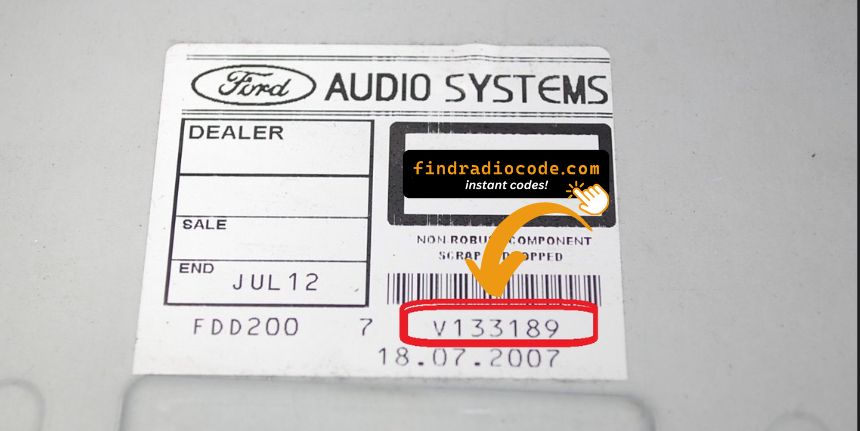
Example: Ford C-Max serial number label location
These are the Common Serial Formats
The 2018 Ford C-Max radio serial number format:
M######– Primary Ford serial prefixV######– Visteon serial prefix
Radio types for the 2018 C-Max: Ford 6000CD (base), Sony (premium), Ford SYNC (with Bluetooth). All types use the same M or V format.
Reminder The serial is 7 characters total. Just the M or V serial is required for code generation.
S/N Patterns and Prefixes
The serial format is determined by the supplier of the head unit, not by Ford. Verifying the expected layout keeps the wrong field off the form.
The Ford 6000 CD on 2018 cars typically uses a serial that starts with V followed by six characters. Ford SYNC 3 is VIN-paired and does not use a manual user-entry code; the ESN shown in the About SYNC menu is for navigation map updates and is not a user-entry unlock code.
Validation: take the line marked S/N or Serial, ignore the part number, and double-check 0 vs O and 1 vs I before submitting.
Unlocking the Radio After Code Generation
Once the system gives you 2018 Ford C-Max anti-theft code from the S/N, you're ready to reactivate the radio.
Some drivers hesitate at this stage because input process can look different across radio versions, but it's usually easy.
When the radio shows CODE, it means the unit is waiting for the correct numbers.
The Correct Way to Enter It
To input the code on the 2018 Ford C-Max:
- Ignition ON. Radio shows "CODE" or "SAFE".
- Press buttons 1-4 to select each digit of the 4-digit code. Each press increments the digit.
- Press button 5 (or OK) to confirm the code.
Lockout: Ten wrong codes triggers "LOCKED" or "WAIT". Leave the radio switched on for up to 1 hour — it will return to the code prompt automatically. Should "Locked 10" appears, try holding button 6 while switching the radio on for 3 more attempts.
Entering Process Explained
Enter the four-digit code carefully on the 6000 CD head unit. Digits are selected with preset 1 to 4 and the entry is confirmed with preset 5.
Limited Attempt Warning: the Ford 6000 CD allows ten total attempts. After ten incorrect entries the display reads LOCKED 10 and a hidden bypass releases three further attempts; if those fail, LOCKED 13 indicates a permanent user-level lock.
Ford 6000 CD
Switch the ignition to accessory and turn the radio on. Wait for the CODE - - - - prompt, then press preset 1 repeatedly until the first digit appears. Repeat with preset 2, preset 3 and preset 4 for the remaining digits and press preset 5 to submit. If WAIT or CODE INCORRECT PLEASE WAIT is shown, leave the radio on with ignition in accessory until the wait state clears - do not retry during that interval.
Ford SYNC 3 is VIN-paired and does not use a manual user-entry code; the steps above do not apply to a SYNC 3 system.
Step-by-Step Ford C-Max 2018 Radio Code Retrieval Guide
Car radios use security codes tied to the radio unit itself rather than the model or production year.
- The system uses the C-Max's radio serial to retrieve the unlock code.
- Once the serial number is submitted, the system identifies the radio unit and generates the code that you need.
- Simply input the digits into the C-Max stereo.
- Compared to Ford dealer retrieval, this method is faster and more convenient.
Understanding Unlock Issues with Your C-Max
Ford SYNC and Sony radios from this era carry the same serial format as all Ford OEM radios:
M######— M followed by six digits (the most common format).V######— V followed by six digits (found on Visteon-supplied modules).
These radios have no an on-screen serial display — the serial is only accessible from the physical label on the unit casing, which requires partially removing the radio. Refer to the removal section above for step-by-step guidance. The part number on the same label (e.g., AM5T-18C815-...) must not be submitted as the serial.
On these Ford radios, a rejected code is usually caused by the wrong serial being submitted. Sony premium audio units do not show the serial — it must be read from the physical sticker on the unit. Verify the serial begins with M or V and is exactly seven characters long.
If the code was rejected, do not entering further attempts — ten attempts are available before a lockout. Contact support for a no-charge reverification to verify the serial prior to retrying.
If the Ford SYNC 1 or Sony radio powers on without displaying a "CODE" prompt:
- The unit might not be code-locked — try normal radio and audio operation first.
- Certain SYNC 1 units show "SAFE" briefly before the code screen — allow a moment for it to change to the full code prompt.
- On Sony-equipped versions: the startup logo often shows first before the code prompt — allow 5–10 seconds for the system to fully boot.
An unresponsive screen usually indicates a fuse problem rather than a lockout. Check the relevant fuse in the under-dash panel prior to further troubleshooting.
Ford SYNC 1 and Sony-equipped radios lock after 10 incorrect entries. Recovery steps:
- Leave the radio switched on — avoid turning it off during the wait.
- Allow up to 1 hour. The radio will automatically return to the "CODE" prompt.
- If "Locked 10" appears, try holding button 6 while switching the radio on to get additional attempts.
If the radio remains permanently locked after waiting the full hour, a dealer visit or unit replacement may be needed.
Ford SYNC 1 and Sony-era radios employ preset buttons 1–4 for digit entry and button 5 (or OK) to confirm — same as the older Ford 6000CD platform:
- Buttons 1–4 — press each multiple times to advance through digits for that slot in the 4-digit code.
- Button 5 or OK — press to confirm the complete entry.
For SYNC-integrated units that also have a dot-matrix display, the entered digits are shown on screen as you press — making it straightforward to check each digit before confirming. Sony premium units use the identical method.