
Why Did the Radio Lock and Ask for a Code?
Ford's older radios (6000CD, 4500 RDS, 5000C) carry a built-in anti-theft system that locks whenever the radio is disconnected from the battery. Common triggers include:
- Battery replacement — the most frequent cause; even a brief battery disconnect activates the lock.
- Flat or dead battery — a fully discharged battery also triggers the code prompt.
- Radio removal for repair or theft — removing the radio severs its power connection, triggering the anti-theft when reinstalled.
Ford included this to deter theft by making a removed radio non-functional in another vehicle. Entering the correct code immediately re-enables normal operation.
How to Unlock a Ford Connect Radio After Power Loss
To get the code, you'll take only a few easy steps.
- Locate your radio's serial - this is the only info required by our side.
The difference with the dealership lookup is that no VIN is needed. - Enter the serial number into our generator above.
Our system checks it against a database of supported factory radios and automatically retrieves the matching radio code. - In most cases, the code appears instantly on the screen after you pay and is also sent to your email , just in case.
If manual verification is required (rare situations), you'll be informed before checkout. - When you receive it, simply enter it into the radio to restore the functionality.
How to Enter the Radio Code
Now that you've found the radio serial and received the unlock code, the last step is entering it into your radio.
Ford factory radios display a CODE prompt when ready for input.
The process is straightforward, but button layouts and confirmation methods may change depending on the radio version installed in your Connect.
In-depth Input Instructions for Connect 2002
To enter the unlock code on the 2002 Ford Connect's Ford radio:
- Turn ignition to ON. The radio displays "CODE" or "ENTER KEY CODE".
- Press preset buttons 1-4 to enter the 4-digit code:
- Press button 1 multiple times to cycle to the first digit
- Press button 2 for the second digit, and so on
- Press button 5 or OK to confirm the code.
Lockout: After ten incorrect entries, the radio shows "LOCKED" or "WAIT". Leave the radio switched on for up to 1 hour — it will return to the code prompt automatically. Should "Locked 10" appears, try holding button 6 while switching the radio on to receive 3 more attempts.
Entering Process Explained
Once the correct 4-digit code is in hand, it must be entered carefully on the factory unit to avoid pushing the radio into a locked state.
- Limited Attempt Warning: these Visteon-built units permit only a small number of attempts. Repeated incorrect entries can push the radio into a wait or locked state, after which further attempts may be refused. Confirm the code before entering anything.
- Turn the ignition to the accessory or ON position and wait for the CODE prompt to appear.
- Press preset button 1 until the first digit of the code is shown on the display.
- Press preset button 2 until the second digit is shown.
- Press preset button 3 for the third digit and preset button 4 for the fourth digit.
- Press preset button 5 to confirm and submit the code.
- If the code is accepted the unit returns to normal operation; if it is rejected, do not retry without verifying the serial and code.
Where to Find the Serial Number on your Connect
The initial step is to find and write down the radio's serial num.
Depending on the radio unit fitted in your 2002 Connect, the S/N can be found either through the display menu or by checking the label on the radio itself.
Follow the steps below to identify your serial quickly.
Factory Radios on the 2002 Ford Transit Connect
Launch-year Transit Connect Mk1 (V227) vans were fitted with Visteon-built single-DIN utility head units coded against vehicle theft. The lineup centred on basic RDS cassette and CD options matched to van trim level.
- 4500 RDS - basic single-DIN unit fitted to base-trim Transit Connect vans, identifiable by simple LCD display and rotary volume knob.
- 5000 RDS - mid-tier RDS head unit with expanded display, typically found on higher trims with extra speakers.
- 6000 CD - top single-DIN CD option, recognised by the centre CD slot and 6 numbered preset buttons across the fascia.
View Your S/N via the Radio Screen
The method for 2002 Ford Connect is this:
The 2002 Ford Connect is equipped with a Ford 6000CD radio. Unlike some manufacturers don't include an on-screen method to show the serial.
The serial number must be located directly from the radio unit. Refer to the removal instructions below.
Try this first (Ford 6000CD): Press and hold buttons 1 and 6 together for 2–3 seconds. The radio displays system information — the serial (e.g., V197905) is shown last. If no serial showed, try holding buttons 2 and 6 for the M serial variant. On some units the serial appears split across two screens — combine both parts to get the complete serial.
If the screen method fails, proceed with the manual removal method below.
Quick Method: Find the Serial Number on the Screen
On the 2002 Transit Connect, only the 6000 CD supports on-screen serial retrieval. Older RDS cassette and basic CD units do not show the serial on the display and require unit removal.
Ford 6000 CD
- Turn the ignition to the accessory or ON position so the radio powers up.
- Press and hold preset buttons 1 and 6 together for several seconds.
- Wait until the display cycles through diagnostic information.
- Read the serial that appears, beginning with the letter M or V followed by six digits.
- Photograph the display or write the serial down before powering the radio off.
Check the Serial by Pulling Out the Unit
If the serial number cannot be accessed on-screen, use the hardware method.
Most Ford Connect factory radios include a tag with the serial number printed on the chassis.
Steps:
- Switch off the vehicle.
- Lift the dashboard frame surrounding the radio.
- Unscrew the mounting bolts.
- Pull the unit forward to access the label.
The serial number is usually located near the manufacturer sticker.
To retrieve the serial number on the 2002 Ford Connect's radio, you must partially remove the unit:
- Switch off the vehicle.
- Locate the extraction holes on both sides of the radio front panel. Ford radios from this era use 4 release pins (two per side).
- Insert extraction keys into the 4 holes. Insert them in until you hear a release.
- Ease the radio out using the keys as grips.
- Find the serial number printed on a white label on the back of the unit. It starts with M or V.
Note: Extraction tools are inexpensive and easily found online. They are flat metal tools shaped like a U that slide into the extraction slots.
View the Serial by Pulling Out the Unit
For the 4500 RDS and 5000 RDS units fitted to 2002 Transit Connect vans, the serial is printed on a sticker on the radio chassis and requires the unit to be partially withdrawn from the dash.
- Safety first: turn the ignition off, remove the key, disconnect the negative battery terminal and wait a few minutes before working on the dash. Avoid any yellow airbag connectors or SRS wiring.
- Gather tools: a set of four Ford DIN release keys, a flashlight, and a phone to photograph the label.
- Insert one DIN key into each of the four slot openings on the corners of the fascia, curved notch facing inward, until they click into place.
- Pull all four keys outward at the same time so the spring clips release and the unit slides forward in the cage.
- Withdraw the radio just far enough to read the manufacturer label on the top or side of the chassis.
- Locate the line marked S/N, Serial, or SN. Photograph it and double-check easily confused characters such as 0 and O, 1 and I.
- Do not power the radio up while the harness is partly disconnected.
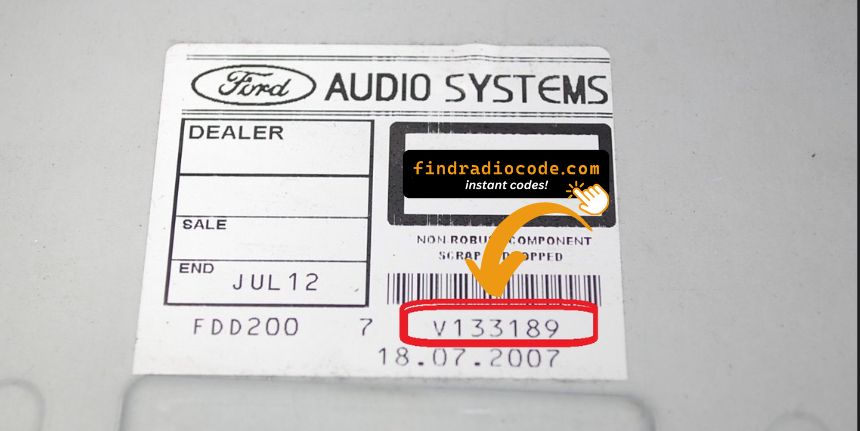
Example: Ford Connect serial number label location
Standard Serial Number Patterns on This Radio
The 2002 Ford Connect radio serial number has the prefix one of these codes:
M######– Primary Ford radio serial prefix (seven digits after the M)V######– Some Ford unit serial prefix
The radio in the 2002 Connect is typically a Ford 4500 RDS unit. The serial number is located on a white or silver label on the unit chassis.
Important The serial must begin with M or V. Don't confuse it with the part number (which starts with different characters). The serial is 6-7 digits plus the prefix letter.
Typical Serial Number Formats for 2002 Connect Radios
Serial format is determined by the radio supplier rather than the vehicle. Transit Connect Mk1 head units were built by Visteon for Ford, so the format tends to be consistent across the 4500 RDS, 5000 RDS and 6000 CD variants.
- Serials typically begin with the letter M or V.
- The prefix is commonly followed by six digits, for example M123456 or V123456.
- The label on the chassis or display is usually marked S/N, Serial, or SN.
- Do not submit the part number, barcode reference or model number printed elsewhere on the unit.
- Recheck the characters that are easy to confuse: zero versus the letter O, the digit 1 versus the letter I.
Troubleshooting Common Radio Problems - Connect 2002
Older Ford radio serials must start with M or V:
M######— standard Ford serial format (M + 6 digits).V######— found on Visteon-manufactured radios (V + 6 digits).
The label on the top or back of the unit also shows a Ford part number — this is different from the serial and must not be submitted. Should they appear printed side by side, the correct value is the one starting with M or V. If the label is worn, physical removal of the radio is the sole way to read the label — there is no on-screen serial display on these early Ford units.
Older Ford radios (Ford 6000CD, 4500) permit up to 10 attempts before showing "LOCKED" or "WAIT". To exit the lockout:
- Leave the radio switched on — avoid turning it off during the lockout wait.
- Allow up to 1 hour. The radio should automatically return to the "CODE" prompt.
- If the display shows "Locked 10", try holding button 6 while switching the radio on to unlock 3 more attempts.
Should it display "LOCKED" permanently even after waiting the full hour, the unit may need a dealer reset.
Older Ford radios (6000CD, 4500 RDS) use preset buttons 1–4 for digit entry and button 5 to confirm:
- Button 1 — each press cycles through digits for the first position of the 4-digit code.
- Buttons 2, 3, 4 — identical process for the second, third, and fourth digits.
- Button 5 — press to confirm the complete code.
Some Ford 4500 and 5000C models may use an AM/FM or AS button rather than button 5 to confirm — consult your owner's manual if button 5 fails to accept the code. Every preset button cycle digits from 1 to 9 then 0.
When a Ford 6000CD or 4500 powers on but skips a "CODE" prompt:
- The anti-theft may not have engaged — try normal radio operation first.
- Certain older Ford units show "SAFE" before the code prompt — give it a few seconds for the full prompt to appear.
- Should nothing appear on screen, check the radio fuse — early 2000s Ford units often have a separate radio fuse in the fuse panel.
Ford 6000CD and 4500 radios from this period use their own extraction tool to remove — if you can't see the screen clearly, shine a flashlight to check the display before assuming it's blank.
A common cause of a rejected code on older Ford radios (6000CD, 4500 RDS) is using a code generated from the wrong serial. The serial must come from the label on the back or top of the radio casing — it always begins with M or V followed by 6 digits.
Ford part codes on the same label look different but can be confused for the serial. After a rejection, avoid entering more guesses — ten attempts are allowed before a 30-minute lockout. Contact support for a free reverification if needed.