Why Did the Radio Lock and Ask for a Code?
The single most common cause behind a locked radio on Renault vehicles, but there are a few others worth knowing:
- Battery replacement: The most frequent cause by far on Renaults. Renault radios lock every time the battery is disconnected or replaced. This is extremely common, even during a very short disconnect.
- Second-hand purchase: The radio code is rarely passed on when a car changes hands. Private sellers and dealers often do not have it.
- Flat battery from sitting: A battery drained from sitting unused triggers the code request when power is restored.
- Workshop or service work: Service that disconnects the battery — even routine maintenance — may activate the code request.
Understanding the 1997 Renault Clio Radio Code Retrieval Process
- Instead of contacting Renault dealer or searching forums you can find the code online with the radio S/N.
- Start by finding the serial number. The best place to search is on the unit itself, and sometimes it can be visible on the Clio's display.
- Enter it into the generator above, and the software will generate the correct 1997 Clio unlock code.
- After getting it, type it in using Clio's radio controls to release the blockade fully.
- The entire process takes just a short moment and requires no VIN, documents, or technical knowledge.
Final Step - Enter the Radio Code
Now that you've generated 1997 Renault Clio unlock code from the serial number, you're ready to reactivate the radio.
Some drivers hesitate at this stage because input methods can look different across radio versions, but it's usually easy.
When the radio shows ENTER CODE, it means the unit is waiting for the correct numbers.
Detailed Entering Instructions for Clio 1997
To input the code on the 1997 Renault Clio:
- Ignition ON. Radio displays "CODE" or four dashes (----).
- Use preset buttons 1-4 to enter each digit of the 4-digit code. Each press advances the digit (0-9).
- Hold button 5 or button 6 to confirm.
Lockout: Several wrong entries will cause a lockout. Turn off the radio for approximately half an hour, then retry.
Step-by-Step Code Input Guide
Limited Attempt Warning: after a few incorrect attempts the unit triggers a WAIT state with progressively longer intervals. Confirm the 4-digit code is correct before pressing any preset.
- Turn the ignition to ON or accessory and power the radio. The display should read 0000 or prompt for CODE.
- Press preset 1 repeatedly until the first digit of the unlock code is shown.
- Press preset 2 for the second digit, preset 3 for the third, preset 4 for the fourth.
- Press and hold preset 6 (preset 5 on a small number of units) for about 5 seconds until a confirmation beep sounds.
- If WAIT or ERROR appears, leave the radio powered on with the ignition active until the lockout timer expires. Battery disconnection restarts the timer.
Can't Locate Your Unit's Serial Number? Follow The Steps Below for Renault Clio 1997
The first step is to find and write down the radio's serial num.
Depending on the radio unit used in your 1997 Clio, the serial can usually be found either through the display menu or by pulling the unit out and checking the label on the radio itself.
Follow the steps below to identify your S/N the right way.
Radios Offered in the 1997 Clio
For 1997 the Mk1 Clio continued with Philips-supplied Renault single-DIN cassette head units, with RDS now widespread.
- Renault Cassette (base): mono or stereo cassette with 1-6 preset buttons, Renault badge on the faceplate.
- Renault Cassette RDS: visually similar but with an RDS indicator on the display, typical on RT/RXE grades.
- Quick check: cassette slot present, Renault diamond on the front, no CD slot. CD changers when fitted are remote boot-mounted units controlled from the head unit.
Find Your Serial via the Radio Display
The method for 1997 Renault Clio is this:
The 1997 Renault Clio features a Philips OEM radio or MediaNav system. Most Renault radios don't have an on-screen serial number retrieval method.
The serial number is located on a sticker on the radio chassis. The radio must be extracted to access it. Certain newer Clio with MediaNav may show the serial in Settings → System.
Taking Out the Unit to View the S/N on the Tag
If the serial number cannot be accessed via display, use the pull-out method.
Most Renault Clio original radios include a sticker with the serial number printed on the chassis.
Step-by-Step:
- Turn off the vehicle.
- Detach the dashboard frame surrounding the radio.
- Unscrew the clips.
- Pull the unit outward to access the label.
The serial number is usually located near the printed code.
To access the serial on the 1997 Renault Clio:
- Turn off the vehicle.
- Locate the release slots on each side of the radio. Renault radios typically use pin-release removal holes.
- Insert radio release keys and pull the radio forward.
- Locate the serial on the manufacturer label on the casing. It starts with BP.
Note: Renault radio release keys are the standard European-style tools used for Fiat vehicles.
Find the S/N by Pulling Out the Unit
The 1997 unit is single-DIN cassette held by a standard cage with side spring clips. Serial information lives on a chassis label.
- Ignition off, key removed, negative battery terminal disconnected, then wait several minutes. Do not disturb any yellow airbag wiring.
- Insert Renault DIN release keys into the two holes on each side of the faceplate until the internal clips give way.
- Pull both keys outward in parallel so the unit slides forward in its cage. Do not force the fascia if resistance is high.
- Disconnect the antenna lead and rear ISO connectors once the unit is free. Do not power the unit while partially disconnected.
- Inspect the top, side, and rear of the chassis for a white sticker showing S/N or Serial, normally near a 7700 / 8200 / 2811 Renault part-number band. Photograph the label.
- Validate the characters with a flashlight: 0 vs O, 1 vs I, 8 vs B.
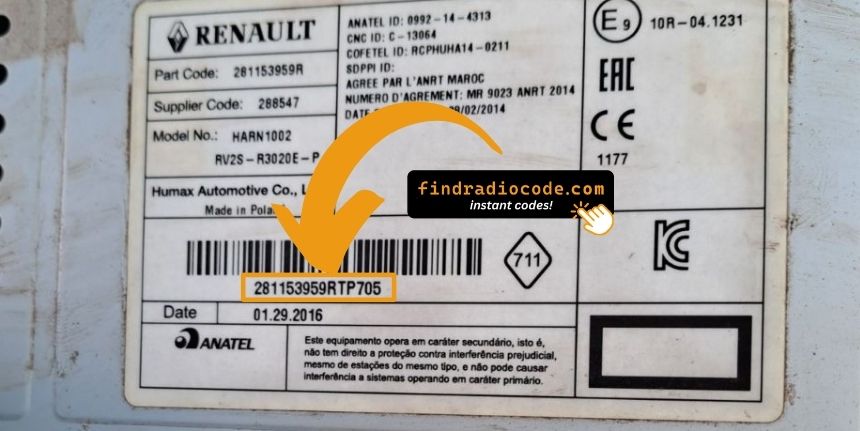
Example: Renault Clio serial number label location
What a Valid Serial Number Looks Like
The 1997 Renault Clio radio serial prefixes:
BP####– Blaupunkt radio serial (standard)CC####– Continental radio serialPH####– Philips radio serialPR####– Other Renault OEM prefix
The serial is found on the radio unit. Don't confuse it with the vehicle part number.
S/N Patterns and Prefixes
The serial pattern is determined by the radio supplier. Philips-built Renault cassette units carry the serial on a printed chassis label.
- Look for the field marked S/N or Serial on the white sticker; the longer 7700 / 8200 / 2811 sequence is a Renault part number and is not the radio serial.
- The serial is typically a short alphanumeric string of several characters next to the label heading.
- Before submitting, double-check 0 vs O and 1 vs I and confirm you have not copied a barcode-only line.
Fixing Common Code Entry Problems for 1997 Clio
Should the radio refuse your code, check these points before entering it again.
- Verify the serial prefix: Renault radios use serials starting with BP, CC, PH, or PR. Make sure you entered the full serial from the radio label — not any other sticker inside the car.
- Look for digit confusion: On worn or faded labels, 0 and O, 1 and I, and 8 and B look similar. Photograph the label and zoom in.
- Entry method: Pressing button 1 cycles digit 1 from 0 to 9. Rapid pressing may go past the right number. Press deliberately and count. Hold button 5 or 6 to confirm only after all four digits are set.
Still getting the wrong code? Contact us with your serial number and we'll check and reissue if needed.
Code entry on Renault Clio radios relies on the preset station buttons to dial in the code digit by digit.
- Button 1 sets the first digit — each press cycles from 0 to 9.
- Button 2 sets digit 2, button 3 digit 3, button 4 digit 4.
- After setting all digits, press and hold button 5, button 6, or the Enter / AM-FM button to submit the entry.
Note: Some later Renault models use an on-screen keypad instead of preset buttons. Tap the digits on the on-screen number pad. The touchscreen confirms automatically.
The screen reads "WAIT" / "SAFE" after 3 wrong code attempts, locking out further input until the timer expires.
To clear the lockout: Turn the ignition to ON and leave it there for a full 60 minutes. Switching off mid-wait restarts the 60-minute timer. The timer resets every time power is cut.
With Renault vehicles, voltage can drop if the ignition is on for an extended period without the engine running. Keep the engine idling or use a battery maintainer where practical to keep voltage stable.
Should "CODE" or the four dashes not appear, try the following:
- Force the code prompt: Disconnect the battery for 30 seconds, reconnect, and turn the ignition on. The radio should then request the code.
- It may already be working: If the radio plays stations and responds to all controls, it is already unlocked. You do not need to do anything.
- On MediaNav touchscreen versions: Renault MediaNav uses a different interface. Look under Settings and System for unlock-related options.
- Ignition position: Some Blaupunkt/Philips units may only show the code prompt when the ignition is in ACC or ON. Try both.
Finding the serial on Renault radios can be found on a sticker on the rear or side of the radio unit, only accessible after removing the unit.
- Expected format: Look for a string beginning with BP, CC, PH, or PR then 8–10 alphanumeric characters.
- Label condition: Labels on higher-mileage vehicles are sometimes worn. Photograph under good light and zoom in — a camera often reveals characters the eye misses.
- How to access the serial: Pin-release extraction tools work on all Renault models. Insert them into the holes on both sides of the radio and draw the unit out far enough to read the rear label.
Never submit the VIN or a part number — they are not the radio serial and will generate the wrong result.