
Why Did the Radio Lock and Ask for a Code?
Battery replacement is the number one reason behind a locked radio on Renault vehicles, but several other situations to be aware of:
- Battery replacement: The most frequent cause by far on Renaults. The lock activates any time 12V power is interrupted. It catches many owners off-guard, even when the battery is only disconnected briefly.
- Buying a used Renault: The radio code is rarely passed on when a car changes hands. Private sellers and dealers frequently cannot provide it.
- Discharged battery: A battery drained from sitting unused triggers the code request when power is restored.
- Workshop or service work: Service that disconnects the battery — even routine maintenance — can trigger the lock.
Locate the Serial Number Needed to Generate Renault Clio 2007 Radio Code
The first step is to locate the radio's S/N.
Based on the head unit type fitted in your 2007 Clio, the serial can usually be found either through the screen menu or by checking the label on the radio itself.
Below are the most common methods to identify your serial the right way.
2007 Clio - Which Radio Did You Get?
The 2007 Renault Clio Mk3 continued with the single-DIN Renault-Bosch head unit family, with minor cosmetic updates depending on trim.
- Renault-Bosch Tuner List: Single-DIN unit with a small segmented display and six numbered preset buttons. Standard on the entry trims.
- Renault-Bosch Tuner List with CD: Adds a single CD slot above the display panel. Found on mid and higher trims.
- Visual cues: Renault logo on the fascia, four small DIN release holes at the corners and rotary volume on the left.
Accessing the Serial Number Through the Radio Menu
Try the following for your 2007 Renault Clio:
The 2007 Renault Clio is equipped with a Blaupunkt OEM radio or MediaNav system. Most Renault radios do not have an on-screen serial display method.
The serial number can be found on a sticker on the radio unit. The radio must be partially removed to access it. Certain newer Clio with MediaNav may show the serial in Settings → System.
Display-Based Serial Number Retrieval
On the Renault-Bosch Tuner List, the four-character precode can be read directly from the radio display without removing the unit.
Renault-Bosch Tuner List
- Turn the ignition to ACC and power the radio on.
- If the radio shows CODE, leave that prompt active.
- Press and hold preset buttons 1 and 6 simultaneously for around five seconds.
- The display will return a four-character precode in the format letter + three digits.
- Record the value exactly as shown; this is the serial used by the code service.
Pulling Out the Unit to See the S/N on the Tag
If the serial number cannot be accessed via display, use the hardware method.
Most Renault Clio OEM radios include a label with the serial number printed on the housing.
Process details:
- Remove key from ignition.
- Carefully remove surrounding panel pieces.
- Loosen screws holding the radio.
- Pull forward to inspect the label.
To find the serial on the 2007 Renault Clio:
- Power down the vehicle.
- Find the release slots on both sides of the radio. Renault radios typically use DIN-style extraction holes.
- Insert extraction tools and pull the radio forward.
- Locate the serial on the manufacturer label on the chassis. It starts with CC.
Tip: Renault radio release keys are the same European-style tools used for Fiat vehicles.
Locate Serial on Clio's Radio Chassis
When the display method is not available, the chassis label provides the secondary serial reference. The Mk3 single-DIN unit is held by spring clips inside a cage and is released with four DIN keys.
Safety notice: Switch the ignition off, remove the key, disconnect the negative battery terminal and wait several minutes. Avoid all yellow airbag wiring around the dashboard. Use plastic trim tools only and stop if any panel resists.
- Tools needed: four Renault Mk3 DIN release keys (approximately 38 mm pin spacing), plastic trim removal set, small flashlight and a phone camera.
- Insert the four release keys into the corner pinholes on the radio fascia and push until the internal clips disengage.
- Pull the unit forward steadily using the keys as a grip; the chassis should slide out of its cage smoothly.
- Stop sliding once the rear connectors are accessible, then unplug the antenna and main harness if needed.
- Locate the manufacturer label on the top or side of the chassis; the serial is printed or barcoded next to S/N or Serial.
- Photograph the label and verify ambiguous characters (0 vs O, 1 vs I, 8 vs B) before submitting.
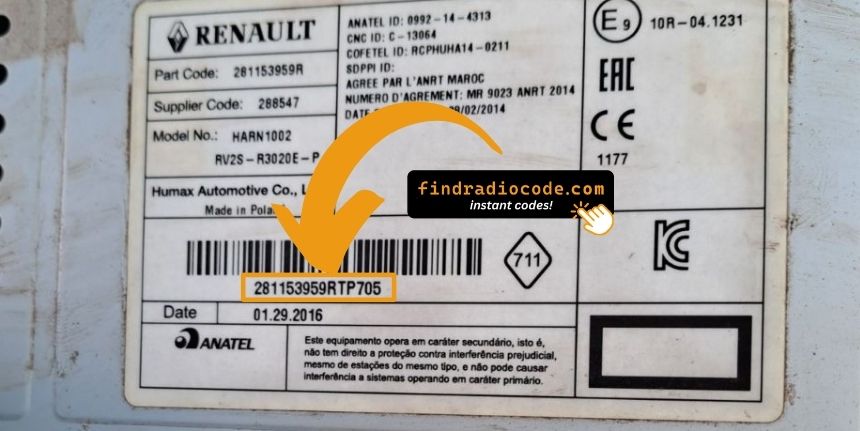
Example: Renault Clio serial number label location
How Serial Numbers Usually Look on These Clio Radios
The 2007 Renault Clio radio serial formats:
BP####– Blaupunkt radio serial (most common)CC####– Continental radio serialPH####– Philips radio serialPR####– Alternate Renault OEM prefix
The serial is printed on the radio unit. Do not mistake it with the vehicle part number.
Common S/N Formats Used on 2007 Clio Units
The Tuner List uses two distinct identifiers: a short four-character precode shown on the display, and a longer chassis serial printed on the manufacturer label.
- Display precode: typically one letter followed by three digits, four characters total (for example A123 or V456).
- Chassis label serial: a longer alphanumeric string often preceded by a Renault part number block such as 8200; useful as a secondary cross-check.
- Avoid submitting the vehicle VIN (begins with VF1 on European Clios) as a radio serial; the two are unrelated.
- Watch for character confusion between letter O and digit 0, and between digit 1 and letter I.
Entering Your Unlock Code
After locating the S/N and received the unlock code, the next part is entering it into your radio.
Renault original head units display a locked screen when ready for input.
The process is straightforward, but button layouts and confirmation methods may change depending on the radio version installed in your Clio.
Detailed Entering Instructions for Clio 2007
To input the code on the 2007 Renault Clio:
- Ignition ON. Radio shows "CODE" or four dashes (----).
- Use preset buttons 1-4 to enter each digit of the 4-digit code. Each press advances the digit (0-9).
- Hold button 5 or button 6 to accept.
Lockout: Several wrong entries will trigger a lockout. Leave the radio for approximately half an hour, then retry.
Correct Entering Process
Entering the unlock code on the 2007 Clio Tuner List requires careful digit selection because the unit imposes a lockout after a small number of errors.
Limited Attempt Warning: The Tuner List allows only a few wrong attempts before triggering a WAIT lockout. Confirm the code character by character before pressing the hold button.
- Turn the ignition to ACC and switch the radio on; the display should show CODE or 0000.
- Use preset button 1 to step the first digit of the code up to the required value.
- Use preset button 2 to set the second digit.
- Use preset button 3 to set the third digit.
- Use preset button 4 to set the fourth digit.
- Press and hold preset button 6 for approximately five seconds to confirm; the unit should beep and resume.
- If WAIT or ERROR appears, leave the radio powered on in ACC and allow the internal timer to reset.
Steps to Unlock Your 2007 Renault Clio Radio
- Skip long troubleshooting discussions or service visits - you can retrieve the code online using the radio S/N.
- Identify the serial number. You will always find it on the unit itself, and sometimes it can be visible on the Clio's radio screen.
- Enter it into the form above, and our system will identify the correct 2007 Clio unlock code.
- After receiving your code, input it using Clio's radio buttons to release the blockade successfully.
- The entire process takes less than a minute for most users and requires minimal effort.
Clio 2007 Common Radio Problems
When the radio starts but does not ask for a code, work through these steps:
- Trigger the code request: Pull the radio fuse briefly, refit, and turn the ignition on. The CODE prompt should appear.
- It may already be working: If the radio plays stations and responds to all controls, it is not locked. You do not need to do anything.
- On MediaNav touchscreen versions: Renault MediaNav uses a different interface. Check Settings → System for unlock or serial options.
- Ignition position: Some Blaupunkt/Philips units may only show the code prompt when the ignition is in ACC or ON. Try both.
Entering the unlock code on Renault Clio radios relies on the preset station buttons to dial in the code digit by digit.
- Button 1 controls the first digit — each press cycles from 0 to 9.
- Button 2 controls digit 2, button 3 digit 3, button 4 digit 4.
- After setting all digits, hold down button 5, button 6, or the Enter / AM-FM button to confirm.
Note: Newer Renault models with a MediaNav touchscreen use a touchscreen code entry pad. If a number pad appears on screen, tap it directly. The touchscreen confirms automatically.
The serial number on Renault radios is on a label on the rear or side of the radio unit, only accessible once the radio is pulled forward.
- Expected format: The serial starts with BP, CC, PH, or PR then 8–10 alphanumeric characters.
- Label condition: Older Renault labels can be faded. Take a well-lit close-up photo — detail is easier to read in a zoomed image.
- Removal tools: Standard DIN release keys work on all Renault radios. Insert them into the holes on both sides of the radio and draw the unit out far enough to read the rear label.
Never submit the VIN or a part number — these produce an incorrect code.
If the radio rejects your code, check these points before making another attempt.
- Verify the serial prefix: Renault radios use serials starting with BP, CC, PH, or PR. Confirm you entered the full serial from the radio label — not any other sticker inside the car.
- Look for digit confusion: With older Blaupunkt/Philips stickers, 0 and O, 1 and I, and 8 and B look similar. Photograph the label and zoom in.
- Entry method: Each press of a preset button advances the digit by one. Rapid pressing may go past the right number. Press deliberately and count. Hold button 5 or 6 to confirm only after all four digits are set.
If it keeps failing? Contact us with your serial number and we will re-verify immediately.
The screen reads "WAIT" or "SAFE" after 3 wrong code attempts, locking out further input until the timer expires.
How to reset it: Turn the ignition to ON and leave it there for a full 60 minutes. Turning the ignition off resets the countdown to zero. This is particularly important — the timer does not pause, it restarts.
With Renault vehicles, voltage can drop if the ignition is on for an extended period without the engine running. Keep the engine idling or connect a charger if possible to prevent the timer restarting.