Radio Serial Number Explained - Finding It on Your Renault
The initial step is locating the radio serial number.
Many people assume the code depends on the Renault model or year, but in reality, the unlock process depends on the unique radio's serial number.
The serial is the key used to calculate the correct unlock code.
This is actually better, because if you have an aftermarket radio, the VIN or other Renault-specific data wouldn't be of much use.
Depending on the radio used, you may be able to see the serial directly from the screen or by checking the label on the radio chassis.
Which Head Unit Is in Your 2001 Kangoo?
The 2001 Kangoo Mk1 continued with the same pre-facelift audio range. Coded factory audio remained the Tuner Cassette; base panel vans were still frequently radio-prep only.
- Renault Tuner Cassette (Tuner List) - Continental/Becker single-DIN cassette unit; identifiable by a small two-line display, four numbered preset buttons across the lower fascia and a cassette slot.
- Blank single-DIN plate - indicates radio prep / no factory head unit. Speakers and antenna are wired but no coded radio is fitted.
Using Hidden Radio Menus to Find the Serial
The method for 2001 Renault Kangoo is this:
The 2001 Renault Kangoo comes with a Blaupunkt OEM radio or MediaNav system. Most Renault radios don't have an on-screen serial number retrieval method.
The serial number can be found on a sticker on the radio chassis. The radio must be extracted to access it. Certain more recent Kangoo with MediaNav may show the serial in Settings → System.
Check the Display First - Serial Retrieval Without Tools
The Tuner Cassette supports an on-screen pre-code readout that avoids the need to remove the unit in most cases.
Renault Tuner Cassette (Tuner List)
- Set the ignition to the accessory position; the radio powers up without engine start.
- Wait for the standby screen or the
CODEprompt to appear. - Press and hold presets 1 and 6 together for about 5 seconds.
- Read off the displayed value (one letter + three digits, for example
D833). - Record the pre-code exactly; this is the value used to derive the unlock code.
Manufacturer Label Inspection
If the serial number cannot be accessed on-screen, use the removal method.
Most Renault Kangoo OEM radios include a sticker with the serial number printed on the casing.
Steps:
- Turn off the vehicle.
- Lift the dashboard frame surrounding the radio.
- Release the mounting bolts.
- Move the unit slightly out to access the label.
The serial number is usually located near the barcode.
To access the serial on the 2001 Renault Kangoo:
- Power down the vehicle.
- Locate the release slots on each side of the radio. Renault radios commonly use DIN-style extraction slots.
- Insert radio release keys and slide the radio forward.
- Read the serial on the barcode label on the chassis. It starts with CC.
Note: Renault extraction tools are the same DIN-style tools used for many European vehicles.
Manufacturer Label Inspection
If the pre-code does not show on the display, the same data is printed on the chassis sticker. The Tuner Cassette is held by a single-DIN cage that releases with four extraction keys.
Safety notice: turn the ignition off, remove the key, disconnect the negative battery terminal and wait several minutes. Avoid yellow airbag connectors and never power the radio while it is partially disconnected.
- Tools: four Renault U-shaped DIN extraction keys, a plastic trim wedge, a flashlight, and a phone for photographing the label.
- Insert keys: push one fully into each corner hole of the radio fascia until the clips release.
- Withdraw the unit: apply gentle outward pressure to the keys and pull straight back without twisting.
- Disconnect cables: support the chassis and unplug the rear ISO and antenna leads once the unit is clear of the cage.
- Read the label: the white sticker on the top or side carries the serial starting with
T0+ 1 letter + 3 digits, and the pre-code in a Security field. - Verify and photograph: double-check 0 vs O, 1 vs I; then refit in reverse order.
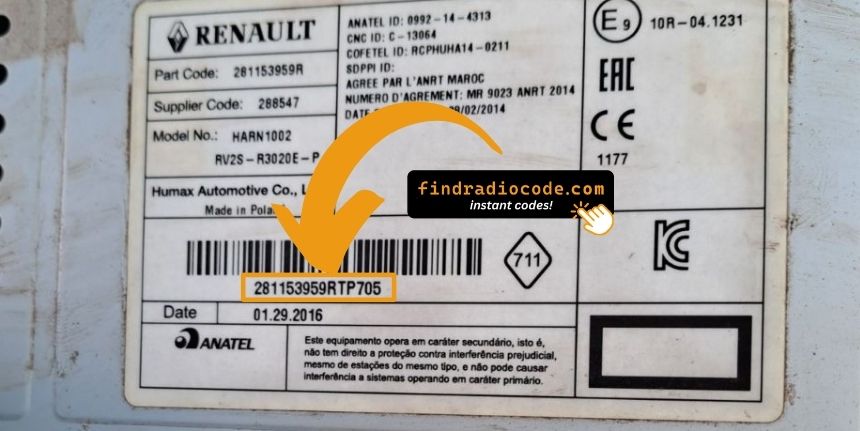
Example: Renault Kangoo serial number label location
S/N Patterns and Prefixes
The 2001 Renault Kangoo radio serial prefixes:
BP####– Blaupunkt radio serial (most common)CC####– Continental radio serialPH####– Philips radio serialPR####– Other Renault OEM format
The serial is found on the radio unit. Do not mistake it with the Renault part number.
S/N Patterns and Prefixes
Serial format on the 2001 Kangoo audio system is set by the Continental/Becker hardware. The chassis serial and the pre-code are two distinct values printed on the same side label.
- Chassis serial: typically
T0followed by one letter and three digits. - Pre-code: always one letter and three digits (examples include
V248,H635,O390) found in the Security field on the label and via the 1+6 hold method. - Length check: the pre-code is always 4 characters. Anything longer is not the pre-code.
- Common mistakes: do not submit the part number, EAN barcode digits, or the order number printed elsewhere on the label.
Got the Code? Here's How to Enter It
Once you have the radio serial and received the unlock code, the last step is entering it into your radio.
Renault original head units display a ENTER CODE message when ready for input.
The process is usually quick, but button layouts and confirmation methods may differ slightly depending on the radio version installed in your Kangoo.
Step-by-Step - The Correct Way to Enter It
To enter the code on the 2001 Renault Kangoo:
- Ignition ON. Radio shows "CODE" or four dashes (----).
- Press preset buttons 1-4 to enter each digit of the 4-digit code. Each press cycles the digit (0-9).
- Hold button 5 or button 6 to accept.
Lockout: Several incorrect entries will cause a lockout. Turn off the radio for about half an hour, then retry.
Entering Process Explained
The 4-digit unlock code is entered on the Tuner Cassette via preset buttons. The procedure is brief and rejects errors strictly.
Limited Attempt Warning: the Tuner Cassette typically permits only 3 attempts. After repeated wrong entries the radio locks out for an extended period. Verify the pre-code and the derived code before starting.
Renault Tuner Cassette (Tuner List)
- Switch the ignition to accessory so the radio powers up and shows
CODE. - Press preset 1 repeatedly until the first digit of the unlock code is displayed.
- Press preset 2 for the second digit, preset 3 for the third digit and preset 4 for the fourth digit.
- Hold the confirm preset (commonly 6) for a few seconds. A beep and the return of normal audio confirm a successful unlock.
- If the code is rejected, the display shows an error and the attempt counter increments; stop and re-verify before any further attempt.
From Serial Number to Unlock Code for your Renault Kangoo - Explained
Car radios use security codes tied to the radio unit itself instead of the vehicle model or production year.
- The system uses the Kangoo's radio serial to retrieve the unlock code.
- After entering the serial into the form above, the system identifies the radio family and retrieves the corresponding code.
- You can then enter the code directly into your Renault radio.
- Compared to Renault dealer retrieval, this method is faster and more convenient.
Fixing Common Code Entry Problems for 2001 Kangoo
If the radio powers on without prompting for a code, work through these steps:
- Trigger the code request: Disconnect the battery for 30 seconds, reconnect, and power up the radio. The radio should then request the code.
- Check if already unlocked: If the radio plays stations and responds to all controls, it is already unlocked. You do not need to do anything.
- On MediaNav touchscreen versions: Renault MediaNav uses a different interface. Look under Settings and System for unlock-related options.
- Ignition position: Older Renault radios may only show the code prompt when the ignition is in ACC or ON. Check both positions.
If the radio rejects your code, work through the following before making another attempt.
- Verify the serial prefix: Renault radios use serials starting with BP, CC, PH, or PR. Make sure you submitted the full serial from the radio label — not the vehicle part number or chassis number.
- Check for misread characters: With older Blaupunkt/Philips stickers, characters are easily confused. Photograph the label and zoom in.
- Button sequence: Pressing button 1 cycles digit 1 from 0 to 9. Pressing too quickly can skip over the correct digit. Press deliberately and count. Hold button 5 or 6 to confirm only after all four digits are set.
If it keeps failing? Send us your serial and order number and we will re-verify immediately.
The radio shows "WAIT" or "SAFE" after 3 wrong code attempts, locking out further input until the timer runs down.
Clearing the wait: Turn the ignition to ON and leave it there for a full 60 minutes. Switching off mid-wait restarts the 60-minute timer. This is particularly important — the timer does not pause, it restarts.
On Renault models, voltage can drop if the ignition is on for an extended period without the engine running. Run the engine or connect a charger where practical to keep voltage stable.
Finding the serial on Renault radios is on a label on the rear or side of the radio unit, only accessible after removing the unit.
- Expected format: The serial starts with BP, CC, PH, or PR followed by 8–10 alphanumeric characters.
- If the label is hard to read: Older Renault labels can be faded. Photograph under good light and zoom in — a camera often reveals characters the eye misses.
- How to access the serial: Pin-release extraction tools work on all Renault radios. Insert into the release slots on each side and draw the unit out far enough to read the rear label.
Do not use the vehicle VIN or dashboard label number — these produce an incorrect code.
Code entry on Renault Kangoo radios relies on the preset station buttons to dial in the code digit by digit.
- Button 1 sets the first digit — pressing it cycles from 0 to 9.
- Button 2 controls digit 2, button 3 digit 3, button 4 digit 4.
- After setting all digits, press and hold button 5, button 6, or the Enter / AM-FM button to submit the entry.
Important: Some later Renault models use an on-screen keypad instead of preset buttons. Tap the digits on the on-screen number pad. The touchscreen confirms automatically.
Why Did the Radio Lock and Ask for a Code?
Battery replacement is the number one reason for a locked radio on Renault vehicles, but there are a few others worth knowing:
- Battery replacement: Battery replacement is the top reason across all Renault models. The lock activates any time 12V power is interrupted. It catches many owners off-guard, even during a very short disconnect.
- Second-hand purchase: The radio code is rarely passed on when a car changes hands. Both trade and private sellers often do not have it.
- Flat battery from sitting: A completely flat battery activates the lock on reconnection or recharge.
- Service disconnect: Any work involving the battery — including an MOT, tyre change, or oil change — can trigger the lock.