
Why Is the Radio Asking for a Code?
Battery replacement is the number one reason behind a locked radio on Renault vehicles, but there are a few others to be aware of:
- Battery replacement: Battery replacement is the top reason across all Renault models. Renault radios lock every time the battery is disconnected or replaced. It catches many owners off-guard, even when the battery is only disconnected briefly.
- Second-hand purchase: The original code is seldom included when a car changes hands. Private sellers and dealers often do not have it.
- Flat battery from sitting: A battery drained from sitting unused activates the lock on reconnection or recharge.
- Workshop or service work: Any work involving the battery — including an MOT, tyre change, or oil change — can trigger the lock.
Can't Find Your Radio S/N? Follow The Steps Below for Renault Kangoo 2004
The first part is to find the radio's serial num.
Depending on the radio unit fitted in your 2004 Kangoo, the serial can usually be accessed either through the screen menu or by pulling the unit out and checking the label on the radio itself.
Below are the most common methods to identify your S/N quickly.
Identify Your 2004 Kangoo's Factory Radio
The post-facelift 2004 Kangoo Mk1 offered a wider Tuner List family. Coded factory units share the same Continental/Becker security architecture across cassette and CD variants.
- Renault Tuner Cassette (Tuner List) - single-DIN cassette unit on entry-level trims; small monochrome display, four numbered preset buttons (1 to 4) and a cassette slot.
- Renault Tuner List CD - single-DIN CD variant fitted on better-equipped trims; CD slot replaces the tape mechanism, otherwise the same preset layout and CODE prompt architecture.
- Blank single-DIN plate - base panel vans were still frequently supplied without a coded factory radio.
Check the Display First - Serial Retrieval Without Tools
Try the following for your 2004 Renault Kangoo:
The 2004 Renault Kangoo comes with a Renault OEM radio or MediaNav system. Most Renault radios do not have an on-screen serial number retrieval method.
The serial number is located on a label on the radio unit. The radio must be partially removed to read it. Some more recent Kangoo with MediaNav may show the serial in Settings → System.
Display-Based Serial Number Retrieval
The Tuner List family in the 2004 Kangoo can output its pre-code directly to the display via a hidden button combination.
Renault Tuner Cassette / Tuner List CD
- Set the ignition to accessory so the head unit powers up without engine start.
- Wait for the standby screen or the
CODEprompt to appear. - Press and hold preset buttons 1 and 6 together for around 5 seconds.
- Read off the displayed value (one letter + three digits, for example
S103orT657). - Record the pre-code exactly; this is the value used to derive the 4-digit unlock code.
Serial Number on the Unit
If the serial does not appear on display, the next step is checking the radio itself.
Many Renault radios require physical access to the serial sticker attached to the unit.
Common approach:
- Start by completely powering down the engine - pull the key out.
- Then remove the trim panel.
- Next, unscrew the mounting points and pull the radio forward.
- Look for a barcode label showing the serial number.
To find the serial on the 2004 Renault Kangoo:
- Power down the vehicle.
- Locate the extraction holes on both sides of the radio. Renault radios typically use pin-release removal slots.
- Insert radio release keys and pull the radio forward.
- Find the serial on the barcode label on the casing. It begins with PH.
Tip: Renault extraction tools are the same European-style tools used for many European vehicles.
Locate Serial on Kangoo's Radio Chassis
When the on-screen pre-code is unavailable, the same value is printed on a chassis sticker. The Tuner List units mount in a single-DIN cage released by four extraction keys.
Safety notice: ignition off, key removed, negative battery terminal disconnected, then wait a few minutes. Do not touch yellow airbag connectors and do not power the radio while harnesses are partially disconnected.
- Tools: four U-shaped Renault DIN extraction keys, a plastic trim wedge, a flashlight and a phone for the label photograph.
- Insert keys: push one fully into each corner hole on the radio fascia until the internal clips release.
- Withdraw the unit: apply gentle outward pressure to the keys and pull the chassis straight back from the dash without twisting.
- Disconnect cables: support the radio once it clears the cage and unplug the rear ISO and antenna leads.
- Read the label: the white sticker on the top or side carries the chassis serial starting with
T0+ 1 letter + 3 digits, and the pre-code in a Security field on the same label. - Verify and photograph: double-check 0 vs O and 1 vs I, photograph the sticker, then refit in reverse.
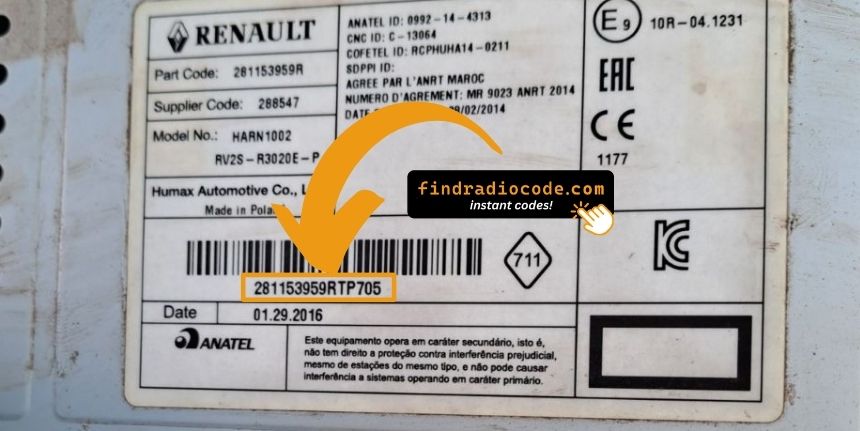
Example: Renault Kangoo serial number label location
Typical Serial Number Examples for 2004 Kangoo
The 2004 Renault Kangoo radio serial prefixes:
BP####– Blaupunkt radio serial (standard)CC####– Continental radio serialPH####– Philips radio serialPR####– Other Renault OEM format
The serial is printed on the radio casing. Do not mistake it with the Renault part number.
Common Serial Number Structures
The 2004 Kangoo's Tuner Cassette and Tuner List CD are both Continental/Becker products. The chassis serial and the pre-code are two distinct values printed on the same side sticker.
- Chassis serial: typically
T0followed by one letter and three digits. - Pre-code: always one letter and three digits (examples:
V248,D833,O390) in the Security field on the label and via the 1+6 hold method. - Length check: the pre-code is always 4 characters. Anything longer is not the pre-code.
- Common mistakes: do not submit the part number, EAN barcode digits, or an order number printed elsewhere on the label.
Unlocking the Radio After Code Generation
After receiving 2004 Renault Kangoo radio code from the serial, you're ready to reactivate the radio.
Many drivers get stuck at this stage because input methods can look different across radio versions, but it's usually quick.
When the radio shows ENTER CODE, it means the unit is waiting for the correct numbers.
Step-by-Step Code Input Guide
To enter the code on the 2004 Renault Kangoo:
- Ignition ON. Radio displays "CODE" or four dashes (----).
- Use preset buttons 1-4 to enter each digit of the 4-digit code. Each press cycles the digit (0-9).
- Press and hold button 5 or button 6 to submit.
Lockout: Several wrong entries will trigger a lockout. Turn off the radio for approximately 30 minutes, then retry.
Step-by-Step Code Input Guide
The 4-digit unlock code is entered on the Tuner List head unit through preset buttons 1 to 4 and confirmed with a hold of the dedicated preset.
Limited Attempt Warning: the Tuner List family typically allows only 3 attempts. After repeated incorrect entries the radio enters a lockout state requiring an extended waiting period before further attempts are accepted. Confirm the values before beginning entry.
Renault Tuner Cassette / Tuner List CD
- Switch the ignition to accessory; the radio powers up and shows
CODE. - Press preset 1 repeatedly until the first digit of the unlock code is displayed.
- Press preset 2 for the second digit, preset 3 for the third digit and preset 4 for the fourth digit.
- Hold the confirm preset (commonly 6) for several seconds until a beep and the return of normal audio confirm a successful unlock.
- If the value is rejected, the display shows an error and the attempt counter advances; stop and re-verify before any further attempt.
How 2004 Renault Kangoo Radio Code Lookup Works
- Instead of contacting Renault dealer or searching forums you can retrieve the code online using the radio serial number.
- First locate your radio's serial. The best place to search is on the unit itself, and sometimes it can be visible on the Kangoo's radio screen.
- Type it into the form above, and the software will identify the correct 2004 Kangoo unlock code.
- After getting it, input it using Kangoo's radio controls to unlock the system fully.
- The entire process takes less than a minute for most users and requires zero paperwork and no dealer visit.
Kangoo 2004 Common Radio Problems
Code entry on Renault Kangoo radios uses the preset station buttons to dial in the code digit by digit.
- Button 1 controls the first digit — each press cycles from 0 to 9.
- Button 2 controls digit 2, button 3 digit 3, button 4 digit 4.
- After setting all digits, press and hold button 5, button 6, or the Enter / AM-FM button to submit the entry.
Important: Some later Renault models use a touchscreen code entry pad. Tap the digits on the on-screen number pad. No hold-to-confirm is needed.
Should the radio refuse your code, check the following before making another attempt.
- Verify the serial prefix: Renault radios use serials starting with BP, CC, PH, or PR. Confirm you submitted the full serial from the radio label — not the vehicle part number or chassis number.
- Check for misread characters: On worn or faded labels, characters are easily confused. Take a clear photo and examine it carefully.
- Button sequence: Each press of a preset button advances the digit by one. Pressing too quickly can skip over the correct digit. Count each press and take it slowly. Hold button 5 or 6 to confirm only after all four digits are set.
If it keeps failing? Send us your serial and order number and we will re-verify immediately.
The display shows "WAIT" / "SAFE" after 3 wrong code attempts, locking out further input until the timer runs down.
Clearing the wait: Turn the ignition to ON and keep it in that position for a full 60 minutes. Any power interruption resets the countdown to zero. The timer resets every time power is cut.
On Renault models, battery drain during a long wait is possible. Keep the engine idling or use a battery maintainer where practical to prevent the timer restarting.
When the radio starts but does not ask for a code, try the following:
- Force the code prompt: Pull the radio fuse briefly, refit, and power up the radio. The radio should then request the code.
- Check if already unlocked: When all functions work normally without restriction, it is not locked. No code entry is needed.
- On MediaNav touchscreen versions: Renault MediaNav uses a different interface. Check Settings → System for unlock or serial options.
- Some units need ACC or ON: Some Blaupunkt/Philips units may only show the code prompt when the ignition is in ACC or ON. Check both positions.
Finding the serial on Renault radios can be found on a sticker on the rear or side of the radio unit, only accessible once the radio is pulled forward.
- What to look for: The serial starts with BP, CC, PH, or PR followed by 8–10 alphanumeric characters.
- If the label is hard to read: Labels on higher-mileage vehicles are sometimes worn. Photograph under good light and zoom in — detail is easier to read in a zoomed image.
- Removal tools: Pin-release extraction tools work on all Renault models. Insert them into the holes on both sides of the radio and pull forward.
Do not use the vehicle VIN or dashboard label number — these produce an incorrect code.