Need the Unlock Code for Your Chrysler RB1 Alpine?
Alpine | Chrysler | Instant Retrieval
See the full guarantee terms.
Some RB1 variants use the following prompts when locked. Match the message on your display to the explanation below:
- CODE: The radio is asking for its 4-digit unlock code.
- REPEAT: The number you entered did not match. Recheck the code before another attempt.
- WAIT: Further entries are paused after failed attempts. Let the code screen return before retrying.
- ON: Your code has worked. The radio is ready to use again.
Accepted Serial Number Formats
| Serial Prefix | Status |
|---|---|
TQ1AA |
Supported |
TT1AA |
Supported |
TH1AA |
Supported |
THAAA |
Supported |
TCAAA |
Supported |
If your serial starts with one of these, we can retrieve your code.
What you need to do
The whole process needs one piece of information and a few minutes.
- 1 Get the serial off the radio The serial sits on a label on the radio chassis, not in the car's paperwork. Ease the unit forward with release keys to see it.
- 2 Enter it in the form Copy it character for character. We check the format before checkout, so a typo never costs you anything.
- 3 The code comes back instantly The code appears the moment the payment clears, and a copy goes to your email. Keep it - the same four digits work for the life of the radio.
Covered by a full refund if the code does not work on your unit.
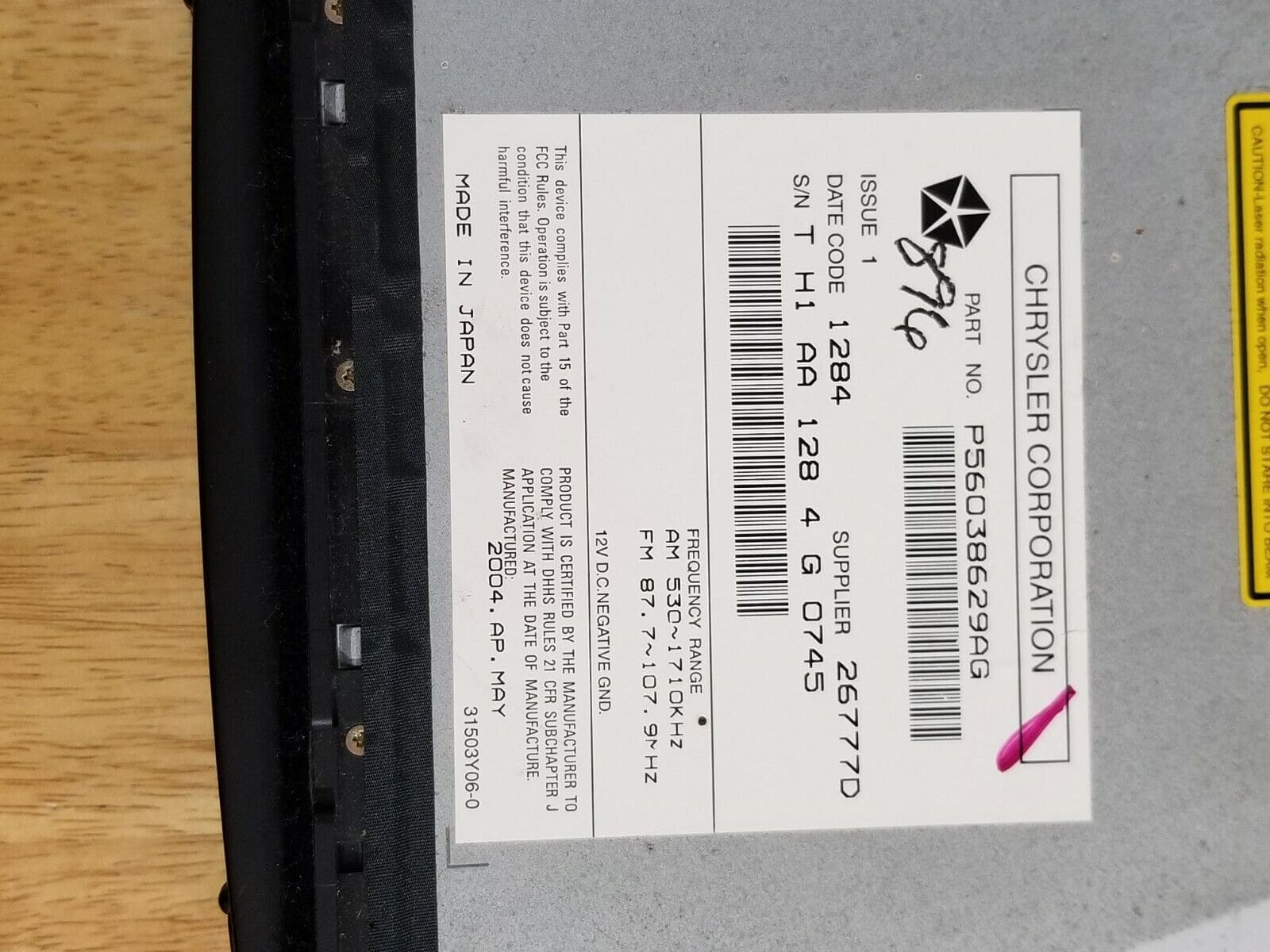
This is an example label - the one in your car sits in the same place and looks much like it.
What a valid serial looks like
Real Chrysler serials, so you know what you are looking for:
TQ1AA067945500
(prefix: TQ1AA)
TT1AA2179M3571
(prefix: TT1AA)
TH1AA1366J4777
(prefix: TH1AA)
THAAA1357K1794
(prefix: THAAA)
TCAAA1544K0931
(prefix: TCAAA)
Usual starting characters: TQ1AA, TT1AA, TH1AA, THAAA, TCAAA
How to Identify the Chrysler RB1 Alpine
Before requesting a radio code it is important to confirm the exact model. Match the design, controls, display and features below with the unit in your dashboard.
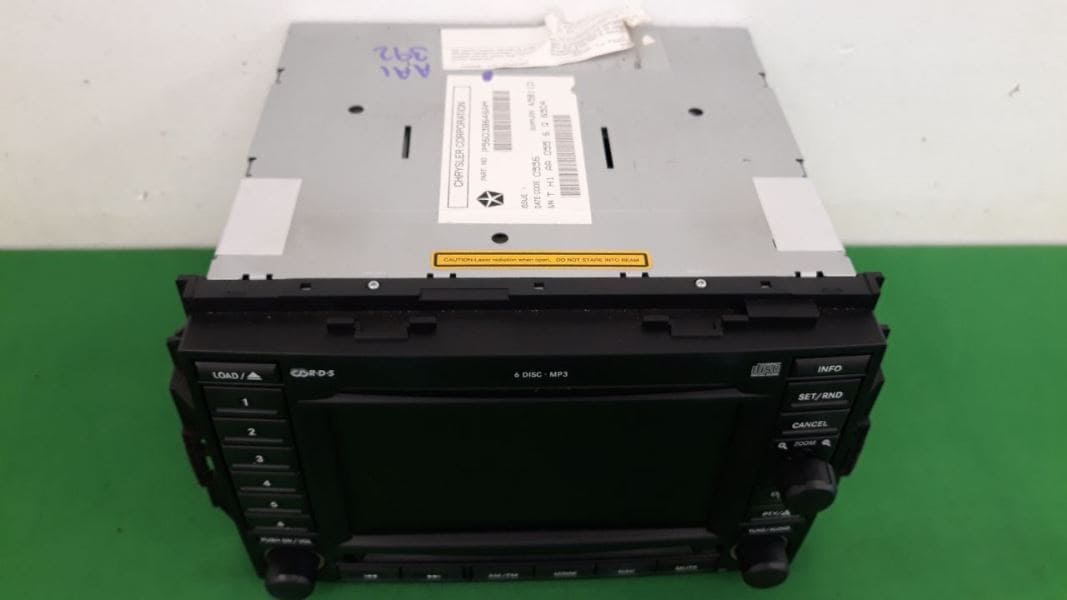
What the Chrysler RB1 Alpine looks like:
- Built-in navigation with factory map data
- RB1 printed on the factory label
- Serial number starting with TQ1AA, TT1AA, TH1AA, THAAA, TCAAA
This is probably your radio if:
- RB1 appears as the sales code on the label
- the label serial begins with TQ1AA, TT1AA, TH1AA, THAAA, TCAAA
- the model year sits within 2004-2007
RB1 has hard buttons around a narrow nav display - no touchscreen. If your screen accepts taps, you have a MyGIG REC/REJ/REL/REQ instead. RB1 part numbers use the P56038629, P82206406 and P82208715 blocks.
Everything You Need to Know About the Chrysler RB1 Alpine
Fitted as factory equipment in selected Chrysler models, the Chrysler RB1 Alpine handles audio playback and vehicle integration from the factory. Depending on the version, it can also add Bluetooth, touchscreen operation, CD/DVD playback, navigation or wider multimedia support.
RB1 is the early Alpine-audio MyGIG-precursor head unit - it is a double-DIN with an integrated CD player and an early monochrome navigation display option (REC RB1 nav variant). The face has a wider screen than RAE/RAD but no touchscreen; navigation is operated with hard buttons around the screen.
Chrysler used the Chrysler RB1 Alpine on selected models produced between 2004-2007, typically alongside the Alpine multimedia platform. It is one of the factory units most often encountered from that era.
Features you may find on the Chrysler RB1 Alpine:
AM/FM radio
Navigation built in, with factory map data
CD player
CD playback
AUX and USB input*
Steering wheel control support
Anti-theft security code
*Availability depends on the vehicle specification.
Like many factory-installed radios, the Chrysler RB1 Alpine is protected by an anti-theft system. If power is interrupted after replacing or disconnecting the vehicle battery, the unit may request the original radio code before it can be used again.
Background on the platform itself is published by Alps Alpine, the unit's manufacturer.
How to Get the Serial Number From Your Radio
Your unlock code is bound to the radio's serial number, so it is the one detail the form asks for. The number lives on the label stuck to the chassis of the radio itself.
Where exactly: Top of the chassis on a white sticker, toward the rear-right corner. The radio is held by two T20 Torx screws on each side rail; once the bezel is off, the unit slides forward. No on-screen display of the serial.
How to reach the number:
- Pull the unit forward with release keys (a few dollars online) - the wiring can stay connected.
- Find the white label on the housing and read the serial off it - it sits beside the barcode.
- Enter it character for character - no spaces, no dashes.
Serial number location on this unit
How Owners End Up on This Page
Nearly all of the Chrysler RB1 Alpine codes we generate follow one of these four events.
New battery, locked radio
The most common trigger by far: the moment the battery is swapped, the radio forgets it was ever unlocked and asks for its code on the next start.
Back from the mechanic, radio locked
Mechanics routinely disconnect the battery before electrical work. The car comes back fixed and the radio comes back locked - expected, not a fault.
A used car with a locked radio
Second and third owners almost never get the code card. The radio itself still carries everything needed - its serial number.
A unit from a breaker
A radio from a scrapyard or an online sale comes with its own serial, so it needs its own code - use the serial on the newly installed unit.
Whichever of these applies, the fix is identical: the serial number off the radio, the form at the top of this page, and the code is emailed in seconds.
OEM Technical Specifications
| Specification | Value |
|---|---|
| Manufacturer | Alpine |
| Radio Family | Alpine |
| Variant | RB1 |
| Vehicle Brand | Chrysler / Dodge / Jeep |
| Production Years | 2004-2007 |
| Navigation | Yes |
| Serial Prefixes | TQ1AA, TT1AA, TH1AA, THAAA, TCAAA |
The exact functionality of the Chrysler RB1 Alpine depends on the vehicle it was installed in. Some versions include advanced multimedia features like navigation and Bluetooth, others ship in a more basic configuration. Features vary by production year, trim and regional specification.
Supported Part Numbers 15
All of the part numbers listed here are supported. Match the one printed on your unit's label and you are in the right place.
Behind the 15 references sit 3 base part numbers; suffix letters like AA or ZD separate factory revisions of the same hardware, all of them covered here.
P56038629AB P56038629AE P56038629AG P56038629AH P56038629AI P82206406 P82206406AB P82206406AC P82206406AD P82208715AB P82208715AC P82208715AD P82208715AE P82208715AF P82208715AG You will find the part number on the factory sticker of the unit, normally alongside the serial. A match in this list confirms you are on the right page for the Chrysler RB1 Alpine.
Which Vehicles Use the Chrysler RB1 Alpine?
| Vehicle Model | Typical Production Years | Notes |
|---|---|---|
| Chrysler 300, 300C (early premium nav) | 2004-2007 | |
| Dodge Magnum, Charger (premium nav) | 2004-2007 | |
| Jeep Grand Cherokee WK, Commander (premium nav) | 2004-2007 |
Vehicle compatibility can vary between trims, model years and regional versions. Because the same car could leave the factory with different radios, confirm your unit before placing an order.
Once the code arrives
It takes under a minute once you have the four digits.
- Turn the key so the unit boots to its code screen.
- On power-up the screen shows "CODE" with four dashes. Use preset buttons 1-4 to step each digit, then press preset 5 (or the small OK/ENTER button below the screen on later builds) to verify.
- Enter the right digits and the unit returns to normal operation immediately.
Troubleshooting the Chrysler RB1 Alpine
Too many wrong attempts
After a few wrong entries the radio stops accepting codes for a while - cutting power only restarts the clock. Three wrong entries triggers a 60-minute "WAIT" lockout. The timer counts down only while the radio has continuous 12V applied.
The label is not where I expected
Only the radio itself carries it - bring the unit out and the label is right there. Top of the chassis on a white sticker, toward the rear-right corner. The radio is held by two T20 Torx screws on each side rail; once the bezel is off, the unit slides forward. No on-screen display of the serial.
Locked again after it was fine
Nothing is broken. Any interruption to the 12V supply brings the lock screen back. Battery disconnect, jump-start failure, or removal of the head unit during dash repair.
Making sure it is the right unit
The differences are easy to miss, so check this before ordering. RB1 has hard buttons around a narrow nav display - no touchscreen. If your screen accepts taps, you have a MyGIG REC/REJ/REL/REQ instead. RB1 part numbers use the P56038629, P82206406 and P82208715 blocks.
Write the code down - the same four digits work for the life of the unit.
Chrysler RB1 Alpine FAQ
Recent Reviews From Our Customers
Left by customers after their radio came back to life. See the reviews page for all of them.
"It's definitely legit. My code came less the 3 minutes and I'm a car dealer and don't have time for scam websites. You guys are now my go to. Thanks"
I paid the $20 with hesitation but this worked perfect, got my code immediately. Thanks!!!
Kevin Kennedy - Chrysler
Thank you!!!!
Darius - Chrysler
What You Get
The original code on screen within seconds of payment, emailed to you as well.
Full money-back guarantee if the code does not open your radio.
Runs day and night, so a locked radio never waits for opening hours.
The code never expires - keep it and future battery changes cost nothing.
You May Also Have
These units are often mixed up with the Chrysler RB1 Alpine. If the details above do not match your radio, open one of these instead.
Still not the right radio? Browse every Alpine radio we support on the Alpine radio code page.