Understanding the Radio Serial Number and How to Locate It on 2014 Insight
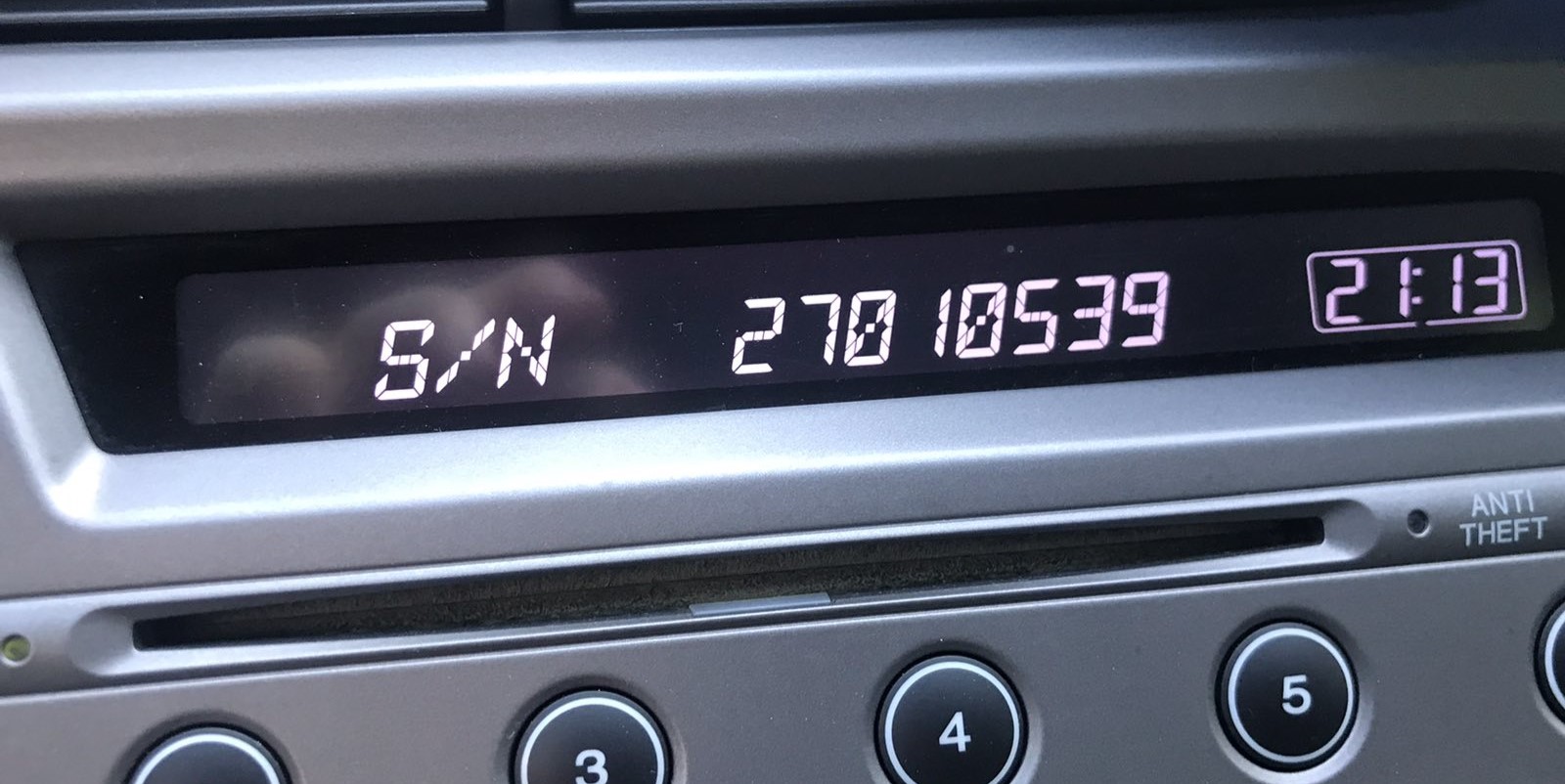
The first step is to find the radio's S/N.
Based on the head unit type used in your 2014 Insight, the serial can be found either through the screen menu or by checking the label on the radio itself.
Below are the most common methods to identify your S/N quickly.
Check the Display First - Serial Retrieval Without Tools
Try the following for your 2014 Honda Insight:
The 2014 Honda Insight is equipped with a double-DIN radio featuring a dot-matrix screen. The serial number can be retrieved using the preset button method:
- Turn ignition to ON or ACC. The radio shows "CODE" or "ENTER CODE".
- Press and hold buttons 1 and 6 together for 3-5 seconds.
- The display cycles through the serial number in two segments: first half (e.g.,
U3210) then second half (e.g.,L0482).
Note: On certain 2014 Insight radios with nav screens, the serial may show up in the Settings → System Information menu. Try this first if your vehicle has a navigation unit.
Check the Serial by Pulling Out the Radio
If the serial number cannot be accessed on-screen, use the pull-out method.
Most Honda Insight factory radios include a sticker with the serial number printed on the casing.
Process details:
- Remove key from ignition.
- Gently detach surrounding dashboard trim.
- Release clips holding the radio.
- Pull forward to inspect the label.
If the button method is unavailable on your 2014 Honda Insight:
- Switch off the vehicle.
- Pry off the dashboard surround with a trim removal tool. The 2014 Insight's double-DIN radio is surrounded by a trim panel held by clip fasteners.
- Unscrew the 4 Phillips-head screws fastening the radio to the dash.
- Slide the unit forward to view the serial label on the radio housing.
Tip: The 2014 Insight's double-DIN radio is heavier than older units. Support it firmly when sliding it out.
Example: Honda Insight serial number label location
What a Valid Serial Number Looks Like
The 2014 Honda Insight radio serial number uses the standard Honda OEM format:
U1234L5678– Primary Honda factory format – two halves displayed separately (U####thenL####), combined into a 10-character serial
Radio manufacturers for the 2014 Insight: Alpine (most common) or Panasonic. Navigation models may have a separate module but typically use the same U/L two-part serial format.
Reminder Record the complete serial carefully – a single wrong character will produce an incorrect code.
Got the Code? Here's How to Enter It
Once the system gives you 2014 Honda Insight anti-theft code from the serial number, you're ready to reactivate the radio.
Some drivers hesitate at this stage because input process can look different across radio versions, but it's usually quick.
When the radio shows CODE, it means the unit is waiting for the correct numbers.
Step-by-Step Code Input Guide
To input the code on the 2014 Honda Insight's radio:
- Ignition ON. Radio displays "CODE".
- Use preset buttons 1-5 to enter each digit of the 5-digit unlock code. Each button rotates through digits 0-9.
- Hold button 6 for a few seconds to accept.
Lockout: 3 failed attempts = 60-minute lockout. Keep ignition ON the entire time. Turning off the ignition restarts the lockout timer.
How to Get Your 2014 Honda Insight Radio Code
- Instead of contacting Honda dealer or searching forums you can find the code online using the radio S/N.
- Start by finding the serial number. The best place to search is on the unit itself, and in some cases it can be visible on the Insight's display.
- Enter it into the generator above, and our software will calculate the correct 2014 Insight unlock code.
- When you receive the code, input it using Insight's radio buttons to unlock the system successfully.
- The entire process takes less than a minute for most users and requires minimal effort.
Insight 2014 Common Radio Problems
Code rejection on the double-DIN Honda is usually traced back to a misread serial. The serial label on the radio housing carries both the serial and the part number — make sure you copied the serial (U####L####) and not the part number.
After a rejected attempt, do not entering more guesses — you only have 3 tries before a 60-minute lockout. Reach out to us with the serial for a no-charge reverification before retrying.
Following three wrong entries, the double-DIN Honda radio activates lockout mode and shows an error or refuses input. To exit it:
- Leave the ignition in the ON position — do not switch it off.
- Wait the full 60 minutes to elapse. Switching off at any point restarts the waiting period.
- Once 60 minutes have passed, the radio will display "CODE" again.
Nav 2014 Insight units follow the same 60-minute lockout process. Should it still won't accept codes after waiting, the unit may need a dealer diagnostic.
If the radio comes on without displaying the "CODE" prompt, consider these possibilities:
- It could still be unlocked — test normal operation first.
- Certain 2014 Insight radios show "ENTER CODE" rather than just "CODE" — either message means the same thing.
- On nav-equipped units: the navigation display may come up first the code screen. Wait a few seconds for the audio system to boot separately.
If no prompt ever show, verify the radio fuse — a failed radio fuse will stop the unit from showing any display.
The double-DIN Honda radio uses the same button layout as the older single-DIN platform:
- Preset buttons 1–5 — each press cycles through digits 0–9 to set that digit of the code.
- Button 6 — hold for several seconds to confirm the full code.
For some 2014 Insight navigation-equipped radios, the preset buttons may be labeled differently or supplemented by menu buttons. If that applies, the confirmation button is typically the rightmost preset or a dedicated ENTER button.
The serial number format for the mid-generation Honda radio follows one of:
U####L####— the standard two-part Honda serial (first half starts with U, second with L).HBM####— used on navigation and some premium configurations.913A####— an Alpine-specific Alpine-manufactured modules.
The part number on the same label begin with 39100 or 39101 — never submit those. If uncertain, use the 1+6 button method to display the serial on the screen itself.
Why Did the Radio Lock and Ask for a Code?
Mid-era Honda radios retain the same anti-theft system as earlier models: any interruption in battery power triggers the code prompt on the next startup. Frequent reasons include:
- Battery replacement or disconnect — the most frequent cause.
- Battery drain — a fully dead battery also activates the lock.
- Fuse replacement — swapping the radio fuse can briefly interrupt power and activate the lock.
- Workshop electrical work — any service that involves disconnecting power will cause this.
Using the correct code removes the lock and the radio resumes normal operation immediately. The lock only re-activates if power is disconnected again.