
What Caused the Radio to Lock?
Honda's Display Audio system carries the same anti-theft architecture as earlier radios: losing battery power activates a code request at next startup. Applies to both the non-touchscreen radio and the Display Audio unit.
- Battery replacement — the usual culprit.
- Battery disconnect during repairs — any work that cuts battery power will re-engage the lock.
- Completely dead battery — a drained battery has the same result.
Note: many higher-trim Display Audio models from this era do not use a traditional code-based lock — if the radio never prompted for a code after losing power, it could have a different anti-theft method linked to the vehicle VIN.
Serial Number Location Guide for Honda Insight 2019
The important thing to know is that factory radios use a specific serial number to identify each unitindividually.
The security system matches the code directly to this serial.
Unlike car-specific data such as VIN or registration info, it is not determined by the model or production year, so you'll be able to retrieve it even if you have a radio that you installed afterwards.
Depending on the manufacturer and radio installed in your Honda Insight, the retrieval method varies.
These are the most reliable ways to locate it.
Access the Serial on the Radio Screen
Try the following for your 2019 Honda Insight:
The 2019 Honda Insight may feature Honda's Display Audio touchscreen (7" depending on trim) or a base non-touchscreen radio. Either type support serial number retrieval via the 1+6 button method:
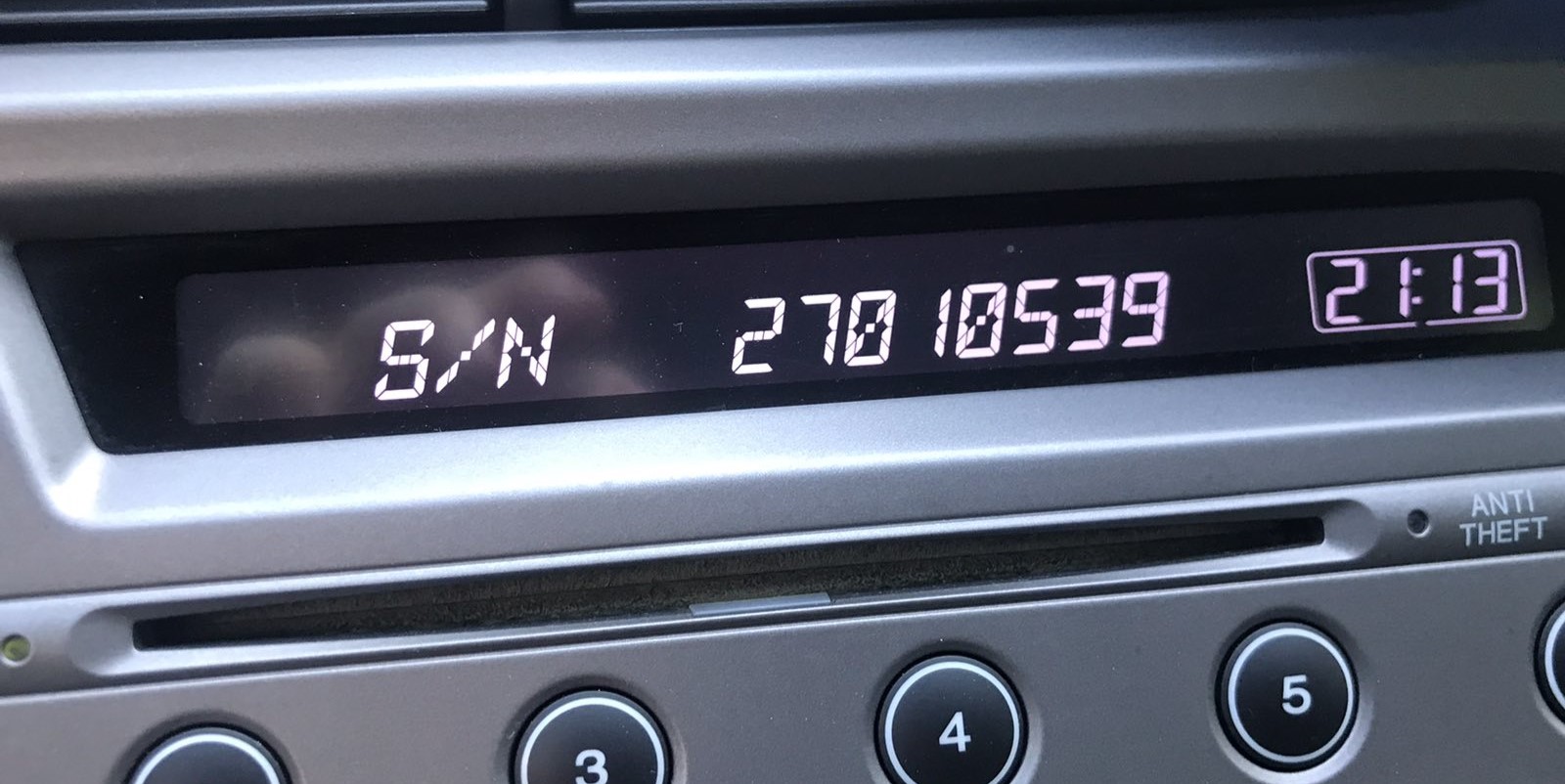
- Turn ignition to ON. Wait for the radio to boot. The screen shows "CODE" when locked.
- Hold down preset buttons 1 and 6 for about 5 seconds.
- The serial number displays in two halves (e.g.,
U3210+L0482).
Alternative: On 2019 Insight with the Display Audio touchscreen, navigate to Settings → System → Device Information – the serial may be shown there without needing the button combination.
Insight's Hardware Label Method
If the serial number cannot be accessed on-screen, use the removal method.
Most Honda Insight factory radios include a sticker with the serial number printed on the housing.
The process:
- Ensure the ignition is off.
- Gently detach surrounding mounting frame.
- Remove fasteners holding the radio.
- Move slightly to inspect the label.
If neither methods succeed on the 2019 Honda Insight:
- Turn off the vehicle.
- Pry off the dashboard trim. The 2019 Insight's modern dashboard uses snap-fit clips.
- For Display Audio models: Unscrew the mounting screws (Phillips-head) securing the display module.
- For standard radios: Remove the four screws holding the radio unit.
- Slide the unit out and locate the serial on the label on the unit casing.
Note: The Display Audio unit is wider and more tightly fitted than the standard radio. Be careful when extracting it.
Example: Honda Insight serial number label location
How Serial Numbers Usually Look on These Insight Radios
Depending on which radio installed in the 2019 Honda Insight:
U1234L5678– Most common Honda OEM formatHBM####– Found on Display Audio and nav-equipped units913A####– Some Alpine-manufactured radios
The 2019 Insight may have: base CD radio (U/L format), Display Audio 5"/7" (HBM format), or navigation unit (HBM format). All use a 5-digit unlock code.
Important Verify you read the serial number, not the part number (which starts with 39100, 39101, or similar Honda part coding).
Entering the Radio Security Code
Now that you've found the serial number and retrieved the unlock code, the next step is entering it into your radio.
Honda OEM units display a CODE prompt when ready for input.
The process is simple, but button layouts and confirmation methods may vary depending on the radio version installed in your Insight.
Step-by-Step - The Correct Way to Enter It
To input the code on the 2019 Honda Insight:
- Ignition ON. Radio shows "CODE" or "ENTER CODE".
- Non-touchscreen models: Press preset buttons 1-5 to cycle to each digit, then hold button 6 to confirm.
- Display Audio touchscreen: An on-screen keypad may appear. Tap each digit and press "Enter" or "OK".
Lockout: Three wrong codes trigger a 60-minute lockout. Leave ignition ON. Don't cycle the key or the timer resets.
How 2019 Honda Insight Radio Code Lookup Works
To get the code, you'll take only a few easy steps.
- Find your radio's serial - this is the only information required by our side.
Unlike dealership lookup, no VIN or paperwork is needed. - Enter the serial number into our generator above.
The system checks it against a database of supported units and automatically finds the matching security code. - In most cases, the code appears instantly on the screen after payment and is also sent to your email , just in case.
If manual verification is required (rare situations), you'll be notified before checkout. - Once you receive the code, just enter it into your radio to restore full functionality.
Understanding Unlock Issues with Your Insight
On the Display Audio, a rejected code most often means the serial was incorrectly noted. Both the button method and the settings menu can produce the correct serial — confirm that the serial you submitted was read off the radio unit and not from an online database.
After one failed entry, pause and reach out before trying again — another incorrect entry brings you closer to the 60-minute lockout. A free serial reverification can be done on request.
When the touchscreen powers on but shows the home screen without any "CODE" display, check the following:
- The radio may not be locked — certain battery changes don't trigger the lock if power was restored fast.
- On some Display Audio units, the code prompt shows only on the audio portion of the screen, not the navigation display — give it a few seconds after startup.
- Check the Settings → System → Device Information route; should the serial appear, the unit could still be functional without a code.
Should none of the above match, a fuse check is the next step — a failed fuse will stop the radio from showing any display at all.
The Display Audio era includes radios using different serial formats depending on which unit was fitted:
U####L####— base CD radio serial (10 characters, two halves).HBM####— Display Audio 5"/7" and navigation modules.913A####— certain Alpine OEM configurations.
Part numbers on the same label begin with 39100 or 39101 — do not submit these. If uncertain, use the Settings → Device Information menu or the 1+6 button method to retrieve the serial directly from the unit.
The Display Audio platform uses the same 3-attempt lockout as older Honda radios. To recover:
- Maintain the ignition in ON or ACC — avoid turning it off.
- Wait out the full 60-minute period. The touchscreen may go to sleep during this time — that's normal.
- After 60 minutes, the code prompt returns and another attempt is possible.
For touchscreen units, the lockout countdown runs in the background. Simply leave the vehicle running or the ignition on ACC for the full hour.
Code entry depends on the specific radio in the Display Audio-era Insight:
- Non-touchscreen base radio: Use preset buttons 1–5 to cycle to each digit, then press and hold button 6 to confirm — same as older Honda platforms.
- Display Audio 5" or 7" touchscreen: An on-screen numeric keypad is shown when the code prompt is active. Enter the digits and press OK or Enter on screen.
Should the touch input not work, try the physical preset buttons — certain units support either input method. Make sure the screen is fully booted before starting entry.