
Why Did the Radio Lock and Ask for a Code?
Honda's Display Audio system retains the same anti-theft design as earlier radios: losing battery power activates a code request at next startup. This affects both the non-touchscreen radio and the Display Audio touchscreen.
- Battery replacement — the usual culprit.
- Battery disconnect during repairs — service that interrupts battery power will re-engage the lock.
- Completely dead battery — a fully discharged battery has the same result.
Note: a number of higher-end Display Audio models from the 2014–2021 period might not use a traditional code-based lock — if the radio never prompted for a code after losing power, it could have a different anti-theft method tied to the vehicle VIN.
From Serial Number to Unlock Code for your Honda Insight - Explained
Getting your radio code takes only a few simple steps.
- Locate your radio's serial - this is the only info required to generate the correct unlock code.
Unlike dealership lookup, no VIN is needed. - When you've found the S/N, type it into the form above.
The system checks it against a database of supported factory radios and automatically finds the matching anti-theft code. - In most cases, the code appears instantly on the screen after payment and is also sent to your email , just in case.
If manual verification is required (rare situations), you'll be informed before checkout. - When you get it, simply enter it into your radio to restore the functionality.
Can't Locate Your Radio S/N? Follow The Steps Below for Honda Insight 2021
The first part is to locate the radio's S/N.
Depending on the radio unit used in your 2021 Insight, the S/N can be found either through the display menu or by pulling the unit out and checking the label on the radio itself.
Below are the most common methods to identify your serial the right way.
Access the Serial on the Radio Display
Try the following for your 2021 Honda Insight:
The 2021 Honda Insight could have Honda's Display Audio system (8" depending on trim) or a standard non-touchscreen radio. Either type support serial number retrieval via the 1+6 button method:
- Turn ignition to ON. Let the radio to turn on. The screen shows "CODE" when anti-theft is active.
- Hold down preset buttons 1 and 6 for about 5 seconds.
- The serial number displays in two halves (e.g.,
U3210+L0482).
Also: On 2021 Insight with the Display Audio touchscreen, check Settings → System → Device Information – the serial may be shown there without needing the button combination.
Manufacturer Label Inspection
If the serial does not appear on screen, the next step is checking the radio itself.
Many Honda radios require physical access to the serial sticker attached to the unit.
Common approach:
- Start by completely powering down the engine - pull the key out.
- Then remove the radio surround.
- Next, loosen the mounting points and move the radio forward.
- Look for a barcode label showing the serial number.
If none of these methods display the serial on the 2021 Honda Insight:
- Power down the vehicle.
- Remove the center stack trim panel. The 2021 Insight's integrated dashboard uses snap-fit clips.
- On touchscreen trims: Unscrew the fasteners (Phillips-head) securing the display module.
- For standard radios: Unscrew the 4 Phillips screws holding the radio unit.
- Slide the unit out and find the serial on the sticker on the unit casing.
Tip: The touchscreen unit is larger and more integrated than the base radio. Be careful when extracting it.
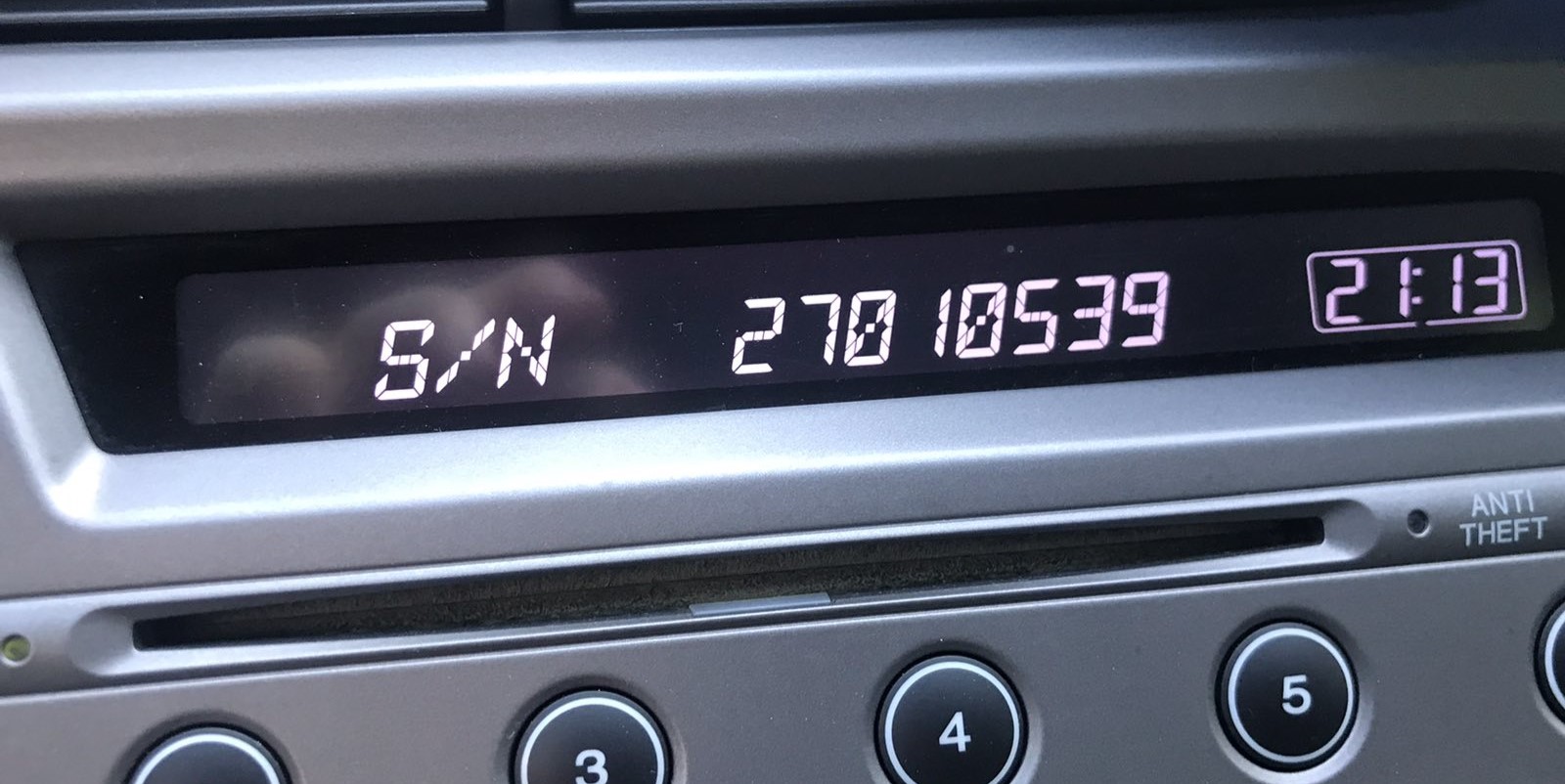
Example: Honda Insight serial number label location
How Serial Numbers Usually Look on These Insight Radios
Based on which radio fitted to the 2021 Honda Insight:
U1234L5678– Standard Honda OEM formatHBM####– Used in Display Audio and nav-equipped units913A####– Some Alpine-manufactured units
The 2021 Insight may have: base CD radio (U/L format), Display Audio 5"/7" (HBM format), or navigation unit (HBM format). All use a 5-digit unlock code.
Important Make sure you copy the serial number, not the part number (which starts with 39100, 39101, or similar Honda part coding).
Unlocking the Radio After Code Generation
When you obtain the correct unlock code based on the serial number, you can restore default functionality by entering it into the unit.
The code entry process depends on the radio interface, but most 2021 Insight systems follow a similar structure using preset buttons, touch controls, or rotary knobs - depending on if it's a factory or an aftermarket unit.
You will typically see ENTER CODE displayed on screen.
In-depth Entering Instructions for Insight 2021
To enter the code on the 2021 Honda Insight:
- Ignition ON. Radio shows "CODE" or "ENTER CODE".
- Non-touchscreen models: Press preset buttons 1-5 to cycle to each digit, then hold button 6 to confirm.
- Display Audio touchscreen: An on-screen keypad may appear. Tap each digit and press "Enter" or "OK".
Lockout: Three wrong attempts activate a 60-minute lockout. Leave ignition ON. Don't cycle the key or the timer resets.
Fixing Common Code Entry Problems for 2021 Insight
The Display Audio era covers radios using different serial formats depending on which unit was fitted:
U####L####— base CD radio serial (10 characters, two halves).HBM####— Display Audio 5"/7" and navigation modules.913A####— some Alpine OEM units.
Part numbers printed nearby start with 39100 or 39101 — do not submit these. If uncertain, use the Settings → Device Information menu or the 1+6 button method to retrieve the serial directly from the radio.
The Display Audio platform uses the same 3-attempt lockout as earlier Honda radios. To recover:
- Maintain the ignition in ON or ACC — avoid turning it off.
- Allow the full 60-minute period. The touchscreen might dim during this time — that's normal.
- After 60 minutes, the radio re-displays "CODE" and you can.
For touchscreen units, the lockout countdown runs in the background. Just leave the vehicle running or the ignition on ACC for the full hour.
If the Display Audio screen comes on but shows the home screen without any "CODE" display, consider these points:
- Anti-theft may not have triggered — some battery changes skip the lock if done quickly enough.
- On some Display Audio units, the code prompt appears only on the audio portion of the screen, not the navigation display — give it a few seconds after startup.
- Check the Settings → System → Device Information route; should the serial appear, the unit could still be functional without a code.
Should none of the above match, a fuse check is the next step — a failed fuse will stop the radio from showing any display at all.
For Display Audio-era Honda radios, a rejected code most often means the serial was incorrectly noted. Both the button method and the settings menu can produce the correct serial — double-check that the serial you submitted came from the radio itself and not from the owner's card.
After one failed entry, pause and contact support before trying again — another incorrect entry brings you closer to the 60-minute lockout. A no-charge serial reverification can be done on request.
Code entry depends on the specific radio in the Display Audio-era Insight:
- Non-touchscreen base radio: Use preset buttons 1–5 to cycle to each digit, then hold button 6 to confirm — same as older Honda platforms.
- Display Audio 5" or 7" touchscreen: An on-screen numeric keypad is shown when the code prompt is active. Enter the digits and press OK or Enter on screen.
If the touchscreen is unresponsive, try the physical preset buttons — some units accept both input method. Make sure the screen is fully powered on before starting entry.