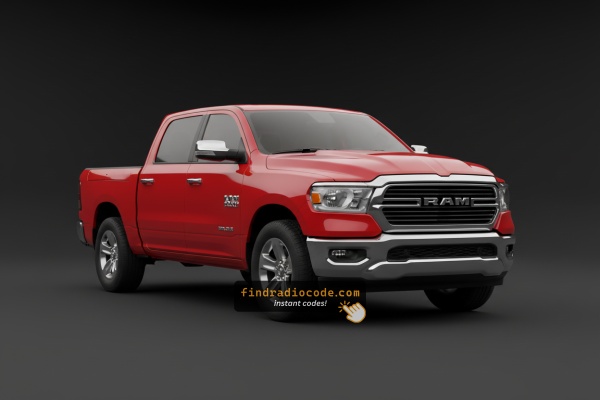
Factory Radios Used in the 2019 Ram 1500 Classic
Every card below is a radio model that shipped in the 2019 Ram 1500 Classic. Compare the screen size and buttons to find yours, then confirm where the serial is printed.
| Years | Factory radio | Serial starts with |
|---|---|---|
| 2017-2019 | Chrysler Uconnect 8.4 RE6 Panasonic |
T00AM, T00BE
|
| 2019-2023 | Aptiv Uconnect 5 VP2_5 DT Aptiv |
T0MYD
|
| 2019-2022 | Delphi Uconnect 3 RJ1 VP1 NA DS Delphi |
T0MYD
|
| 2019-2022 | Delphi Uconnect 5 VP2_5 DT Delphi |
T0MYD
|
Can't Locate Your Unit's Serial Number? Follow These Steps for Ram 1500 Classic 2019
The first step is locating the radio serial number.
Many drivers assume the code depends on the Ram model or year, but actually, the unlock process depends on the unique radio unit's serial number.
This number identifies the exact head unit installed in your Ram 1500 Classic.
This is even better, because if you have a used radio, the VIN or other Ram-specific data wouldn't be of much use.
Based on the radio version used, you can see the serial directly from the screen or by looking at the label on the radio chassis.
Factory Radios on the 2019 Ram 1500 Classic
The 2019 Ram 1500 Classic carried over the DS-body Uconnect 4 line-up directly from the outgoing 2018 truck, which is why your dash and head unit look almost identical to a 2014-2018 1500. Most build sheets show one of the following:
- Uconnect 3.0 (RA1) - small mono display, base fleet/work-truck radio with AM/FM and basic Bluetooth on some packages.
- Uconnect 5.0 (RA2 / VP2) - 5-inch colour touchscreen, no embedded navigation, the volume seller on Tradesman, Express and Big Horn trims.
- Uconnect 8.4 (RA3 / VP3) - 8.4-inch touchscreen, no factory navigation, optional on Big Horn and standard on some Lone Star packages.
- Uconnect 8.4 NAV (RA4 / VP4) - 8.4-inch touchscreen with embedded GPS navigation, top-tier option on Laramie / Limited Classic builds.
All four units share the same anti-theft architecture, so the unlock procedure is the same regardless of screen size.
Find the Serial on the Radio Display
The method for 2019 Ram 1500 Classic is this:
The 2019 Ram 1500 Classic is the carryover 4th-generation Ram alongside the newer 5th-gen, offering a value-oriented entry point. It features the Uconnect 8.4" (RA3) touchscreen. The serial number is accessible on screen via Dealer Mode:
Climate Button Method:
- Turn the ignition to ACC or ON.
- Press and hold the Climate Up, Climate Down, and Front Defrost buttons together for approximately 5 seconds.
- Dealer Mode appears on the display.
- Navigate to: System Info → Radio Part Info → Serial Number.
Alternative: Hold Temperature Up (red) and Temperature Down (blue) together for 5 seconds to open Engineering Mode, then navigate as above.
Find Your Serial Number on the Radio Display
If your 2019 Ram 1500 Classic has the 8.4-inch RA3 or RA4 head unit, you can usually pull the serial number on screen without removing anything. Try the FCA dealer/service menu shortcut:
- Turn the ignition to RUN or ACC, but do not start the engine.
- Wait for the Uconnect home screen to finish loading.
- Press and hold the driver-side temperature UP button, the temperature DOWN button, and the front DEFROST button at the same time.
- Keep all three pressed for about 5 to 7 seconds until a hidden diagnostic screen appears.
- Look under the Radio Part Information / Serial Number entry for a string that typically begins with T00AM, TM9, TQ1 or a similar Continental/Panasonic prefix.
On the base 5-inch RA2 and the small RA1, dealer mode does not reliably show the serial number, so plan on the chassis-label method below.
1500 Classic's Hardware Label Method
If the serial does not appear on display, the next step is checking the radio itself.
Many Ram radios require physical access to the serial tag attached to the unit.
Typical approach:
- Start by completely powering down the engine - pull the key out.
- Then detach the dashboard bezel.
- Next, loosen the mounting points and slide the radio forward.
- Look for a printed tag showing the serial number.
If Dealer Mode is unavailable on your 2019 Ram 1500 Classic, the RA3 radio can be removed to access the serial label. The 1500 Classic shares the 4th-gen center stack:
- Remove the center stack bezel – Use a plastic pry tool around the perimeter to pop off the friction-clipped bezel.
- Remove the 4 Torx T20 screws – Securing the radio to the dash bracket.
- Slide the radio forward – Ease the unit out to inspect the serial label on the side surface.
Wiring can remain connected while you photograph the serial.
Pulling Out the Radio Unit to See the S/N on the Tag
If the on-screen method does not work or you have the smaller RA1/RA2 radio, the serial number on the chassis label is the next reliable source. The 2019 Classic uses the familiar DS-body centre stack, so this job is forgiving with the right tools.
Safety first
- Park on level ground, set the parking brake and switch the ignition fully OFF.
- Disconnect the negative battery terminal and let any residual capacitance bleed off for at least a minute before unplugging connectors.
Tools you will want
- Plastic trim removal tool (Mopar C-4755 equivalent).
- Phillips #2 screwdriver or a 7mm socket on a short extension.
- Soft cloth or painter's tape to protect the dash and bezel.
Removal overview
- Gently pry the centre bezel that surrounds the radio and HVAC controls; start at a lower corner and work around the perimeter to release the spring clips.
- Tilt the bezel out, disconnect any switch-pack harnesses (hazard, traction control, etc.) and set the bezel aside.
- Remove the four screws holding the radio to the dash sub-frame.
- Slide the unit out, supporting it with one hand while you unplug the antenna lead, USB/AUX harness and the main multi-pin connector.
Where the serial number lives
- Look at the top or right side of the metal chassis for a white self-adhesive label.
- The label shows the part number, manufacturer code, VIN of the donor vehicle (if previously installed) and the serial number.
- Photograph the entire label - the part number and manufacturer prefix are useful cross-checks if anything is misread.
Tips
- Do not pry on the screen glass or the climate vents; both crack easily.
- If a connector resists, look for a red secondary lock that has to be lifted before the latch will release.
- Reconnect the battery only after the radio is fully reseated, otherwise you may trigger an extra anti-theft event.
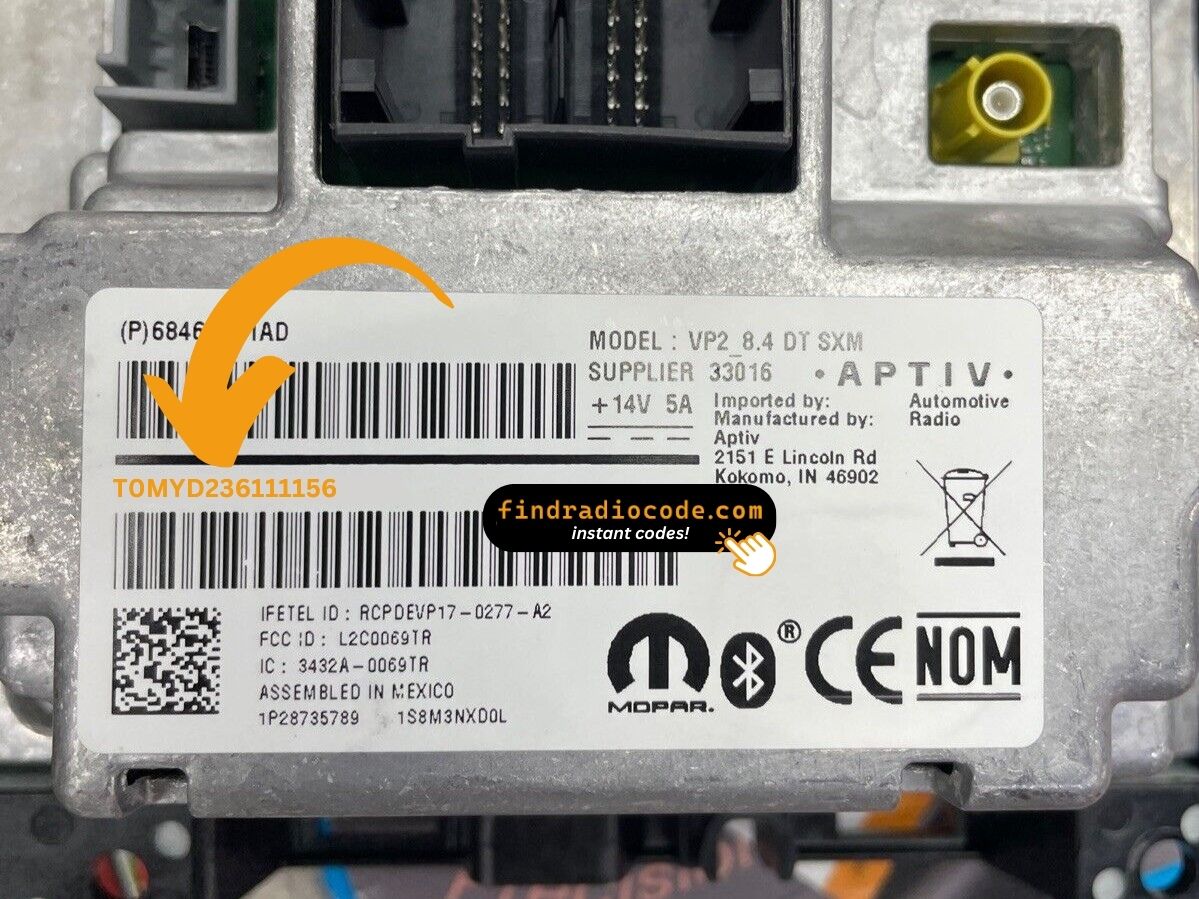
Example: Ram 1500 Classic serial number label location
How Serial Numbers Usually Look on These 1500 Classic Radios
The 2019 Ram 1500 Classic Uconnect 8.4" (RA3) serial number formats:
T00AM– Harman VP2 Uconnect (primary format)T00BE– Continental variantTM9– Earlier Harman units
Radio designation: RA3. Serial: 14 characters. The 1500 Classic retains the same 4th-gen RA3 platform through its production run.
Reminder The part number on the same label is not used for code generation.
Typical Serial Number Formats for 2019 Ram 1500 Classic Radios
The exact serial prefix on a 2019 Classic depends on which Uconnect 4 head unit was fitted at the factory. The patterns below are the ones most commonly reported for this generation, but always read the chassis label for confirmation.
Uconnect 8.4 RA3 / RA4 (Continental / Panasonic)
- Often begins with
T00AMfollowed by additional alphanumeric characters. - Older production batches may use the
TM9prefix. - Some service-replaced units carry a
TQ1or similar Continental prefix.
Uconnect 5.0 RA2 (Panasonic / Continental)
- Frequently uses the
TM9family prefix. - Length is typically a fixed alphanumeric string printed directly under the bar code on the chassis label.
Uconnect 3.0 RA1
- Reliable, publicly documented pattern data is limited for this base unit, so treat any serial transcription with extra care.
If your label shows a string that does not start with one of these prefixes, double-check that you are reading the serial number line and not the part number, hardware revision, or VIN line on the same sticker.
Steps to Unlock Your 2019 Ram 1500 Classic Radio
Getting your radio code takes only a few easy steps.
- Locate your radio's serial - this is the only info required to generate the correct unlock code.
The difference with the dealership lookup is that no VIN or paperwork is needed. - When you've found the S/N, type it into the form above.
Our system checks it against a database of supported factory radios and automatically catches the matching security code. - In most cases, the code will appear instantly on the screen after you pay and is also sent to your email for backup.
If we need to check it manually, you'll be informed before checkout. - Once you get it, simply enter it into your radio to restore full functionality.
Inputting the Security Code
Once you have the serial number and received the unlock code, the final part is entering it into your radio.
Ram original head units display a CODE prompt when ready for input.
The process is usually quick, but button layouts and confirmation methods may vary depending on the radio version installed in your 1500 Classic.
Detailed Entering Instructions for 1500 Classic 2019
To input the unlock code on the 2019 Ram 1500 Classic's Uconnect 8.4":
- The screen displays "ENTER CODE" or ---- after a battery event.
- Use the touchscreen keypad to enter each digit of the 4-digit code.
- The radio auto-unlocks after the 4th digit – nothing else needed.
Lockout: 3 wrong attempts = 60-minute lockout. Keep ignition ON. Turning it off restarts the timer.
Step-by-Step Code Input Guide
Once you have the four-digit anti-theft code that matches your serial number, the 2019 Ram 1500 Classic uses the standard Uconnect 4 entry flow.
Limited Attempt Warning
- You only get three attempts in a row.
- After three wrong codes the radio shows WAIT and locks out for roughly 30 minutes.
- The ignition has to stay in RUN during the wait, otherwise the timer restarts.
Entering the code on RA3 / RA4 (8.4-inch)
- Switch the ignition to RUN with the engine off.
- Wait for the screen prompting Enter Anti-Theft Code to appear.
- Tap the four digits in order on the on-screen keypad.
- Confirm with the on-screen OK / Enter button.
Entering the code on RA2 / RA1 (5-inch and base)
- Use radio presets 1-4 (or the tune knob, depending on prompt) to select each digit.
- Press the preset that matches the first digit, then move to the next digit.
- Confirm with the OK / SEEK button as instructed on screen.
If it fails
- Verify each digit by re-reading the chassis label or screenshot.
- Make sure you are entering a 2019 Classic 1500 code, not a code from a different vehicle's radio.
- If the unit is in WAIT, leave the ignition in RUN, wait the full 30 minutes, then try again.
What Caused the Radio to Lock?
The Ram 1500 Classic's Uconnect RA3 locks automatically whenever power is interrupted. 1500 Classic buyers encounter this most often because of:
- Battery replacement — the primary cause across all Uconnect-equipped vehicles.
- Used purchase without documentation — the 1500 Classic is a popular affordable used truck, so many owners find it locked on purchase.
- A blown fuse — triggers the lock.
- Truck stored until discharge triggers the anti-theft.
The code is tied to the radio's serial number — not the VIN.
Understanding Unlock Issues with Your 1500 Classic
The RA3 label on the 1500 Classic has the serial number (14 chars: T00AM, T00BE, or TM9) and the part number (P05... or 68...). Just the 14-char serial is used for the code.
The 1500 Classic's RA3 serial can also be read via Dealer Mode (System Info → Radio Part Info → Serial Number) without tools.
Code rejection on the 1500 Classic's Uconnect usually means the wrong serial was submitted. The RA3 label shows the serial (T00AM, T00BE, or TM9, 14 chars) and the part number (P... or 68...) — only the serial generates the code.
Re-check the label and contact support for a free re-check if needed.
No code prompt means the anti-theft hasn't triggered yet. Trigger the lock: briefly disconnect the battery, then turn ignition ON. The prompt shows on startup.
The 1500 Classic's Uconnect RA3 locks after 3 wrong entries. The screen keeps showing "ENTER CODE" but blocks all taps during the lockout.
To reset: Keep ignition ON for 60 full minutes. Turning off resets the timer.
The 1500 Classic's Uconnect 8.4" RA3 uses touchscreen-only code entry. Tap each digit on the digital keypad. No physical buttons are needed. The radio auto-unlocks after the 4th digit.