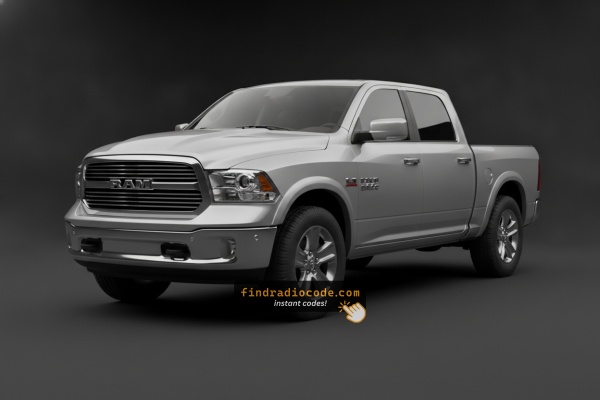
2021 Ram 1500 Classic Head Units We Cover
Even for one model year, the 2021 Ram 1500 Classic could leave the factory with different head units. Pick the unit that looks like yours.
| Years | Factory radio | Serial starts with |
|---|---|---|
| 2019-2023 | Aptiv Uconnect 5 VP2_5 DT Aptiv |
T0MYD
|
| 2019-2022 | Delphi Uconnect 3 RJ1 VP1 NA DS Delphi |
T0MYD
|
| 2019-2022 | Delphi Uconnect 5 VP2_5 DT Delphi |
T0MYD
|
Steps to Unlock Your 2021 Ram 1500 Classic Radio
Getting your radio code takes only 4 easy steps.
- Locate the radio's serial - this is the only information required to generate the correct unlock code.
The difference with the dealership lookup is that no VIN is needed. - When you've found the S/N, type it into the form above.
Our system checks it against a database of supported radios and automatically retrieves the matching anti-theft code. - In most cases, the code will appear instantly on the screen after payment and is also sent to your email for backup.
If manual verification is required (rare situations), you'll be notified before checkout. - When you receive it, simply enter it into your radio to restore the functionality.
How to Enter the Radio Code
After locating the serial number and retrieved the unlock code, the next part is entering it into your radio.
Ram factory radios display a ENTER CODE message when ready for input.
The process is usually simple, but button layouts and confirmation methods may change depending on the radio version installed in your 1500 Classic.
Correct Entering Process
Entering the unlock code on the 2021 Ram 1500 Classic's Uconnect 8.4":
- The screen shows "ENTER CODE" or ---- after a battery event.
- Tap the touchscreen keypad to enter each digit of the 4-digit code.
- The radio restores after the 4th digit – no confirm step needed.
Lockout: 3 wrong attempts = 60-minute lockout. Keep ignition ON. Turning it off resets the timer.
In-depth Entering Instructions for Ram 1500 Classic 2021
Once you have the four-digit anti-theft code matched to your 2021 Classic's serial number, the entry routine is the standard Uconnect 4 procedure used across the rest of the generation.
Limited Attempt Warning
Uconnect 4 grants three attempts in a row. After the third wrong code, the radio displays WAIT for approximately 30 minutes, and the ignition has to stay in RUN throughout the wait. Switching the truck off and back on does not shortcut the timer - it can in fact restart it - so plan to enter the code carefully on the first try.
RA3 / RA4 (8.4-inch screen)
Switch the ignition to RUN with the engine off, wait for the on-screen prompt requesting the anti-theft code, then tap each of the four digits in order on the numeric keypad and confirm with OK / Enter.
RA2 / RA1 (5-inch and base)
The smaller radios use the radio preset buttons (typically 1-4) or the tune knob to dial each digit, depending on which prompt the screen displays. Press the preset that matches each digit and confirm with OK / SEEK as the prompt indicates.
If the code is rejected
Re-read the chassis label or your saved photograph carefully (zero versus letter O is the most common mistake), confirm that the code was generated for the correct 2021 Classic radio serial, and if WAIT appears leave the ignition in RUN until the timer fully expires before trying again.
How to Find the Serial Number on Your 2021 Ram 1500 Classic Radio?
The useful fact to know is that factory radios use a specific S/N to identify each unit.
Your anti-theft system matches the code directly to this serial.
Different from car-specific data like VIN or registration info, it is not determined by the model or production year, so you'll be able to generate it even if you have a radio that you bought afterwards.
Depending on the maker and radio installed in your Ram 1500 Classic, the retrieval method is different.
These are the most reliable ways to find it.
Identify Your 2021 Ram 1500 Classic's Factory Radio
The 2021 Ram 1500 Classic continued the DS-body Uconnect 4 family unchanged. Most 2021 Classic VINs decode to one of the following head units.
Uconnect 3.0 (RA1) is the small monochrome unit reserved for the most basic Tradesman and fleet packages. Uconnect 5.0 (RA2 / VP2) is the 5-inch colour touchscreen with Bluetooth and a backup-camera input but no embedded navigation; this is the volume option on Big Horn / Lone Star trucks. Uconnect 8.4 (RA3 / VP3) is the 8.4-inch touchscreen without factory navigation, and Uconnect 8.4 NAV (RA4 / VP4) adds embedded GPS navigation in the same enclosure.
Although the screens look different, all four radios sit in the same DS dash opening, share the same connector family, and use the same four-digit anti-theft routine described later in this page.
Screen-Based Serial Lookup Method
Try the following for your 2021 Ram 1500 Classic:
The 2021 Ram 1500 Classic is the carryover 4th-generation Ram alongside the newer 5th-gen, providing a value-oriented option. It is equipped with the Uconnect 8.4" (RA3) touchscreen. The serial number is accessible on screen via Dealer Mode:
Climate Button Method:
- Turn the ignition to ACC or ON.
- Press and hold the Climate Up, Climate Down, and Front Defrost buttons simultaneously for about 5 seconds.
- Dealer Mode opens on the display.
- Go to: System Info → Radio Part Info → Serial Number.
Alternative: Hold Temperature Up (red) and Temperature Down (blue) together for 5 seconds to open Engineering Mode, then follow the same path.
Screen-Based Serial Lookup Method
Owners with the 8.4-inch RA3 or RA4 unit on a 2021 Classic can usually pull the radio serial number on the screen without taking the dash apart. Switch the ignition to RUN or ACC, wait for the Uconnect home screen, then press and hold the driver-side temperature UP button, the temperature DOWN button, and the front DEFROST button at the same time. Keep all three buttons pressed for roughly 5 to 7 seconds until the hidden Uconnect 4 service menu appears.
Once you are in the service menu, look for a Radio Part Information or similar entry. The serial number string is usually under that page and most often starts with T00AM, TM9 or a similar Continental/Panasonic prefix. Photograph the screen so you have a permanent record before you exit the menu.
If your 2021 Classic has the smaller RA2 5-inch screen or the base RA1 mono unit, dealer mode does not always display the serial number, so the chassis-label method described in the next block is the safer option.
Find the S/N by Pulling Out the Radio
If the serial number cannot be accessed through menu, use the hardware method.
Most Ram 1500 Classic factory radios include a tag with the serial number printed on the casing.
Process details:
- Shut down the car.
- Gently detach surrounding mounting frame.
- Release clips holding the radio.
- Slide outward to inspect the label.
If Dealer Mode is unavailable on your 2021 Ram 1500 Classic, the RA3 radio can be removed to access the serial label. The 1500 Classic shares the 4th-gen center stack:
- Remove the center stack bezel – Use a plastic pry tool at the lower edge to pop off the friction-clipped trim panel.
- Remove the 4 Torx T20 screws – Securing the radio to the mounting frame.
- Slide the radio forward – Pull the unit out to read the serial label on the side surface.
Cables can remain connected while you photograph the serial.
View Serial by Pulling Out the Radio Unit
When the screen method is unavailable on your 2021 Ram 1500 Classic - typically with the base RA1 or 5-inch RA2 - the chassis label is the next dependable source for the serial number.
Start by parking on level ground, setting the parking brake, switching the ignition fully OFF, and disconnecting the negative battery terminal. Give the system at least a minute to bleed before you unplug any connectors. The DS centre stack uses a soft trim bezel held by spring clips around the radio and HVAC controls. Using a plastic trim pry tool (Mopar C-4755 or equivalent), gently free the bezel starting at a lower corner and work the perimeter so each clip releases without snapping. Tilt the bezel out, unplug any switch-pack harnesses, and set it aside on a soft cloth.
The radio itself is held by four screws to the dash sub-frame; remove them with a Phillips #2 driver or a 7mm socket. Slide the unit forward, supporting it with one hand, then disconnect the antenna lead, the USB / AUX harness, and the main multi-pin connector. Look for the white self-adhesive label on the top or right side of the metal chassis - it carries the part number, manufacturer code, donor VIN, and the serial number used to generate your unlock code. Photograph the full label under good light so the prefix and digits are unambiguous.
Practical tips: never pry on the touchscreen glass, never force a connector that has a red secondary lock you have not flipped first, and only reconnect the battery once the radio is fully reseated, otherwise the truck will throw an extra anti-theft event you will need to clear.
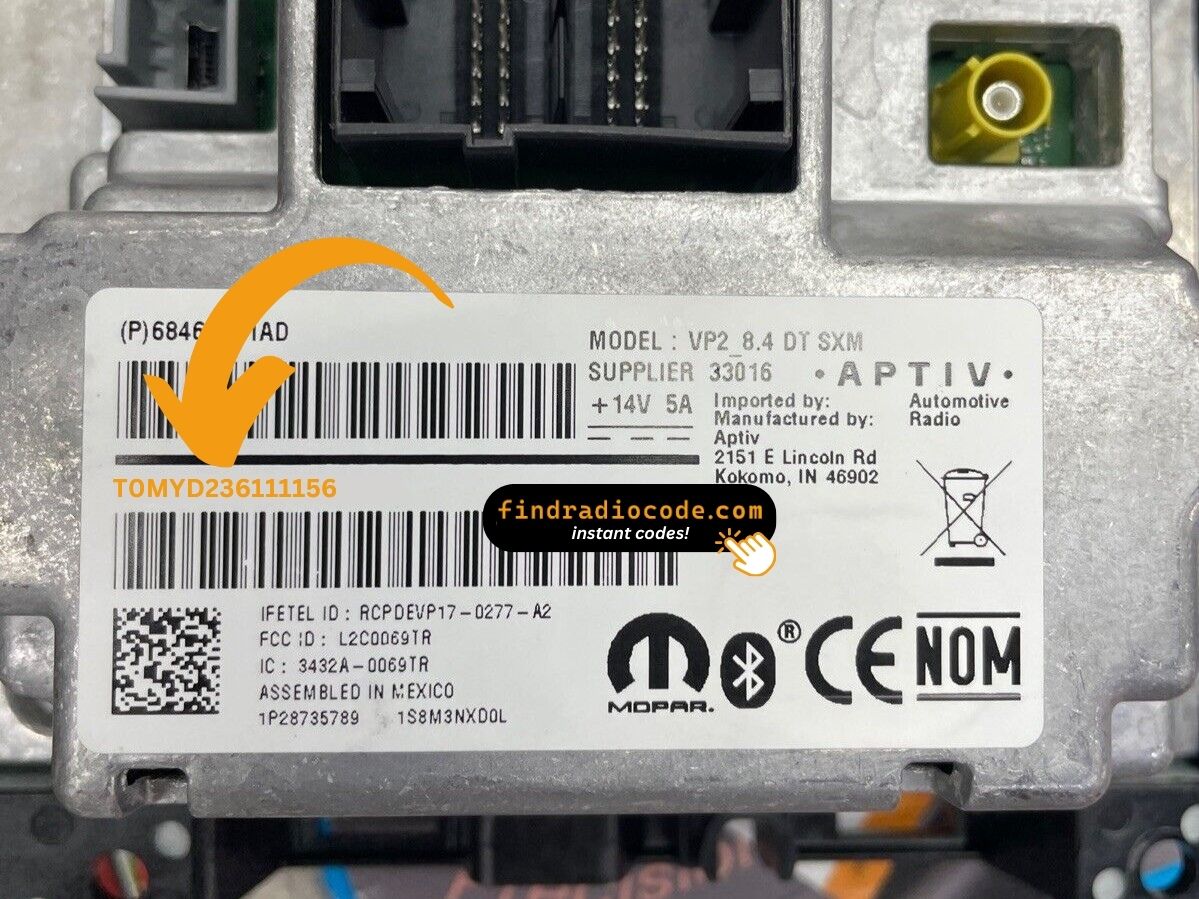
Example: Ram 1500 Classic serial number label location
Typical Radio Serial Prefixes and Formats
The 2021 Ram 1500 Classic Uconnect 8.4" (RA3) serial number formats:
T00AM– Harman VP2 Uconnect (most common format)T00BE– Continental versionTM9– Earlier Harman units
Radio designation: RA3. Serial: 14 characters. The 1500 Classic retains the same 4th-gen RA3 platform through its production run.
Reminder The part number on the same label is not the serial.
Standard Serial Number Patterns on This Radio
The 2021 Ram 1500 Classic continues to use the same Uconnect 4 hardware as the rest of the generation, so the serial-number prefixes follow well-known patterns. The chassis label is always the authoritative reading - the formats below are general expectations.
Uconnect 8.4 RA3 / RA4
These Continental / Panasonic units most commonly start with T00AM. Earlier or service-replaced inventory may instead carry TM9 or a TQ1-style prefix. The serial is printed under or beside a bar code on the same sticker that lists the part number.
Uconnect 5.0 RA2
The smaller 5-inch radio typically uses the TM9 family prefix. The serial number is a fixed-length alphanumeric string and is the safest field to use even when the part number is partly worn.
Uconnect 3.0 RA1
Publicly documented prefix data for this base unit is limited, so transcribe directly from the chassis label and double-check the line before generating a code.
If the string you wrote down does not match any of the prefixes above, confirm that you are reading the serial-number line and not the VIN, the part number, or the hardware-revision line on the same label.
Fixing Common Code Entry Problems for 2021 1500 Classic
Code rejection on the 1500 Classic's Uconnect usually means the wrong serial was submitted. The RA3 label has both the serial (T00AM, T00BE, or TM9, 14 chars) and the part number (P... or 68...) — only the serial generates the code.
Re-check the label and reach out for a free re-check if needed.
No code prompt means the anti-theft hasn't triggered yet. To force the code screen: pull the radio fuse and reinsert it, then turn ignition ON. The prompt appears on startup.
The 1500 Classic's Uconnect 8.4" RA3 uses touchscreen-only code entry. Press each digit on the digital keypad. No physical buttons are needed. The radio unlocks after the last digit.
The 1500 Classic's Uconnect RA3 enters lockout after 3 wrong entries. The screen keeps showing "ENTER CODE" but ignores all taps during the lockout.
To reset: Keep ignition ON for 60 full minutes. Turning off restarts the countdown.
The RA3 label on the 1500 Classic has the serial number (14 chars: T00AM, T00BE, or TM9) and the part number (P05... or 68...). Only the 14-char serial generates the code.
The 1500 Classic's RA3 serial is also accessible via Dealer Mode (System Info → Radio Part Info → Serial Number) without tools.
What Caused the Radio to Lock?
The Ram 1500 Classic's Uconnect RA3 activates anti-theft whenever the battery is removed or replaced. Budget-oriented 1500 Classic owners encounter this most often because of:
- Battery replacement — the most common trigger across all Uconnect-equipped vehicles.
- Used purchase without documentation — the 1500 Classic is a popular affordable used truck, so many owners arrive without the code.
- Radio fuse failure — triggers the lock.
- Truck sitting unused until discharge triggers the anti-theft.
The code is tied to the radio's serial number — not the VIN.