Get Your Original Harman Uconnect 8.4 RJ3 VP3 ROW Radio Code
Harman | Chrysler | Instant Retrieval
Complete guarantee details.
Compatible Serial Number Prefixes
| Serial Prefix | Status |
|---|---|
T00AM |
Supported |
T00BE |
Supported |
T0012 |
Supported |
If your serial starts with one of these, we can retrieve your code.
How to get your code?
One number, three steps, about two minutes.
- 1 Get the serial off the radio The serial sits on a label on the radio chassis, not in the car's paperwork. Ease the unit forward with release keys to see it.
- 2 Paste it into the box Type the full serial with your email address. A format check catches mistakes before checkout.
- 3 Your code lands in seconds The code is on screen straight away and in your inbox. It never expires and keeps working every time power is cut.
Covered by a full refund if the code turns out not to fit your unit.

The photo is a stand-in: your radio wears the same kind of label.
Serial number examples
Typical Chrysler serial numbers look like this:
T00AM1801T0282
(prefix: T00AM)
T00BE351823197
(prefix: T00BE)
T0012566327123
(prefix: T0012)
T00AM2244H1937
(prefix: T00AM)
T00BE104477269
(prefix: T00BE)
Prefixes we see most: T00AM, T00BE, T0012
Check If This Is Your Radio
Before ordering a radio code it is important to confirm the exact model. Compare the design, controls, display and features below with the unit in your dashboard.
How to recognise it:
- Centre-stack 8.4" touchscreen
- A non-navigation unit: the menus never show a map
- A Right-hand drive / Rest of World-market build
- Sales code RJ3 VP3 ROW on the chassis label
- Serial number starting with T00AM, T00BE, T0012
It is the Uconnect 8.4 RJ3 VP3 ROW when:
- the factory label reads RJ3 VP3 ROW
- the printed serial opens with T00AM, T00BE, T0012
- the model year sits within 2013-2017
- the screen is the 8.4" touchscreen fitted to the Uconnect 8.4
Non-nav RHD variant. RJ4 is the nav equivalent.
Your Uconnect 8.4 RJ3 VP3 ROW Serial Number - Where to Look
Every Uconnect 8.4 RJ3 VP3 ROW has a unique serial number, and the unlock code is worked out from it. You will find that number on the unit's own label - it is not in the service book and not on the dashboard.
On this unit: Top of the chassis. Removal required.
How to reach the number:
- Ease the radio out of the dash - most units need a pair of release keys, which cost very little online.
- Read the serial from the printed label on the housing, next to or under the barcode.
- Copy it into the form precisely as printed; the checker catches any typo before payment.
Serial number location on this unit
Two minutes of video beats a page of text

Recorded on a radio from this family; your unit behaves the same.
Introducing the Uconnect 8.4 RJ3 VP3 ROW
Fitted as original equipment in selected Chrysler models, the Uconnect 8.4 RJ3 VP3 ROW handles audio playback and vehicle integration from the factory. Depending on the version, it can also add Bluetooth, touchscreen operation, CD/DVD playback, navigation or wider multimedia support.
Uconnect 8.4 RJ3 (VP3 ROW) is the first-spec 8.4-inch non-navigation Uconnect for right-hand-drive and rest-of-world markets - 8.4-inch touchscreen, RHD-optimised UI, no built-in maps.
Look for the Uconnect 8.4 RJ3 VP3 ROW in Chrysler vehicles from 2013-2017. It shared the Harman multimedia platform and is still found in many cars from that period.
Features you may find on the Uconnect 8.4 RJ3 VP3 ROW:
8.4" touchscreen
AM/FM radio
Bluetooth hands-free and audio streaming
Media playback over USB
SiriusXM satellite radio*
Steering wheel control support
Anti-theft security code
*Availability depends on the vehicle configuration.
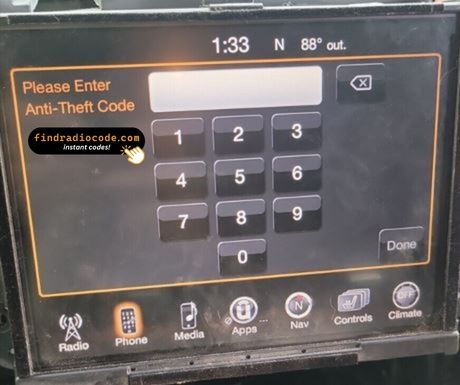
As with other Harman factory units, the Uconnect 8.4 RJ3 VP3 ROW locks itself when power is lost. After a battery disconnect or a workshop visit the screen will ask for the original security code before any audio returns.
For the manufacturer's own documentation of this platform, see the official Uconnect site.
Four Ways a Uconnect 8.4 RJ3 VP3 ROW Ends Up Locked
Almost all of the Uconnect 8.4 RJ3 VP3 ROW codes we generate follow one of these four events.
A battery swap
A replacement battery - or a flat one after the car sat for a while - cuts power to the radio, and the anti-theft system arms itself the moment power returns.
A repair cut the power
Alternator, starter or fuse-box work usually means disconnecting the battery - and the radio locks itself as a side effect of the repair.
A second-hand radio
A used unit from a donor car always arrives locked, and the code from your old radio will not fit - the code follows each radio's own serial number, so order it for the serial on the REPLACEMENT unit.
You bought the car second-hand
No handbook, no code card, seller unreachable - none of it matters. The radio's own serial number carries everything needed to calculate the code.
All four roads lead to the same solution - read the serial off the unit, enter it above, and the original code comes back instantly.
Hardware Specifications
| Specification | Value |
|---|---|
| Manufacturer | Harman |
| Radio Family | Uconnect 8.4 |
| Variant | RJ3 VP3 ROW |
| Market | Right-hand drive / Rest of World |
| Vehicle Brand | Jeep / Ram |
| Production Years | 2013-2017 |
| Display | 8.4" touchscreen |
| Navigation | No |
| Serial Prefixes | T00AM, T00BE, T0012 |
Depending on the vehicle configuration, the Uconnect 8.4 RJ3 VP3 ROW may include additional multimedia features such as Bluetooth hands-free calling, USB media playback or factory navigation. Equipment levels can vary between production years and trims.
Supported Vehicle Models
| Vehicle Model | Typical Production Years | Notes |
|---|---|---|
| Jeep Cherokee KL, Grand Cherokee WK2, Wrangler JK (UK, Australia, South Africa) | 2013-2017 | |
| Ram 1500 (RHD conversion markets) | 2013-2017 |
Vehicle compatibility can differ between trims, model years and regional versions. Because the same car could leave the factory with different radios, identify your unit before placing an order.
OEM Radio References 126
The Uconnect 8.4 RJ3 VP3 ROW was supplied under the part numbers below. Spot the one on your unit's label and you can be sure this is the right page.
The 126 references boil down to 20 base numbers - the trailing letters (AA, AB, ZC and so on) are factory revisions of the same unit, and every revision is covered.
68140964AC 68140964AD 68140964AE 68140964AF 68140964AG 68140964AH 68140964AI 68140964AJ 68140964AK 68190247AA 68190247AB 68190247AC 68190247AD 68190247AE 68190247AF 68190247AG 68206393AA 68206393AB 68206393AC 68206393AD 68206393AE 68206393AF 68206393AG 68206393AH 68206393AI 68224536AA 68224536AB 68224536AC 68224536AD 68224536AE All 126 supported references
68224536AF 68224536AG 68224536AH 68224536AI 68232035AA 68232035AB 68232035AC 68232035AD 68232035AE 68232035AF 68232035AG 68232035AH 68232035AI 68232035AJ 68232035AK 68242382AA 68242382AB 68242382AC 68242382AD 68242382AE 68242382AF 68242382AG 68242382AH 68258358AC 68258358AD 68258358AE 68258358AF 68258358AG 68258358AH 68258358AI 68258358AJ 68258386AC 68258386AD 68258386AE 68258386AF 68258386AG 68258386AH 68258386AI 68258402AA 68258402AC 68258402AD 68258402AE 68258402AF 68258402AG 68258402AH 68269796AA 68269796AB 68269796AC 68269796AD 68270659AB 68270659AC 68270659AD 68270659AE 68270659AF 68270659AG 68270659AH 68270676AC 68270676AD 68270676AE 68270676AF 68270676AG 68271066AB 68271066AC 68271066AD 68271066AE 68271066AF 68272219AA 68272219AB 68272219AC 68272219AD 68272219AE 68272221AB 68272221AC 68272221AD 68272221AE 68272221AF 68272221AG 68272221AH 68272222AB 68272222AC 68272222AD 68272222AE 68272222AF 68272222AG 68301355AA 68301355AB 68301355AC 68301355AD 68301361AB 68301361AC 68301361AD 68349247AC 68349247AD 68349247AE Z8140964AD Z8140964AE Look for the part number on the radio's identification sticker, typically beside the serial number. Any reference listed here is supported by this service.
Once the code arrives
It takes under a minute once you have the four digits.
- Put the key in accessory position so the unit powers up and asks for the code.
- A four-digit keypad appears on the display.
- Key in the code, one digit at a time, left to right.
- The unit checks the code automatically on the last digit.
- Right code in, lock screen gone - the radio is back to its usual self.
If something goes wrong
The unit will not take more codes
Wrong codes put the unit into a lockout, and the only fix is to leave it powered and wait. 30-minute WAIT after three wrong attempts.
I cannot find the serial number
It is printed on the housing, so the unit normally has to come forward to read it. Top of the chassis. Removal required.
Why it happened again
That is normal - the anti-theft system re-arms every time the unit loses power. Loss of 12V supply.
I am not sure I have the right variant
Close relatives of this unit look almost identical from the driver's seat. Non-nav RHD variant. RJ4 is the nav equivalent.
Note the four digits somewhere safe - they are permanent and reusable after any power cut.
Common Questions About the Uconnect 8.4 RJ3 VP3 ROW
From Drivers Who Unlocked Their Radio
What a few recent customers said after unlocking - every review is on the reviews page.
"I was afraid this was a scam, but I took a chance and it worked perfectly. I bought the radio from a junkyard on ebay and of course it was locked. The unlock process was very easy and I received the code within seconds."
Dang I thought it was a scam but it’s not it’s true I paid for it the code came through and I put it in and it works thank you
Vandale - Chrysler
Thank you for the code, you saved me a 140.00 and a trip to the dealer.
Matt Diekmann - Chrysler
Ordering a Uconnect 8.4 RJ3 VP3 ROW Code
Code delivered instantly once payment clears - on screen and in your inbox.
Does not work? Full refund - no questions beyond a short video.
Order at 3 a.m. or 3 p.m. - no dealership, no appointment, no towing.
Works every time - the code stays valid for the life of the radio.
Other OEM Radio Models
These units are easily confused with the Uconnect 8.4 RJ3 VP3 ROW. If the details above do not match your radio, open one of these instead.
Looking for another Harman radios? Go to the Harman radio code page.