Open Up Your Harman Uconnect 8.4 RJ3 VP4 ROW Radio
Harman | Chrysler | Instant Retrieval
Refund terms in detail.
Supported Radio Serial Prefixes
| Serial Prefix | Status |
|---|---|
T00AM |
Supported |
T00BE |
Supported |
T0012 |
Supported |
If your serial starts with any prefix above, we can recover your code.
Your code in three steps
No VIN, no paperwork, no appointment - the serial number off the radio is all we need.
- 1 Find the number on the unit Pull the radio a few centimetres forward and copy the number off its label - nothing has to be unplugged.
- 2 Paste it into the box Copy it character for character. We check the format before checkout, so a typo never costs you anything.
- 3 Unlock the radio The code is on screen in seconds and in your inbox. It never expires and works after every battery disconnect.
If it does not work, you get your money back.

An example from the same family - find the matching sticker on your unit.
What a valid serial looks like
Examples of serial numbers taken from Chrysler vehicles:
T00AM1801T0282
(prefix: T00AM)
T00BE351823197
(prefix: T00BE)
T0012566327123
(prefix: T0012)
T00AM2244H1937
(prefix: T00AM)
T00BE104477269
(prefix: T00BE)
Prefixes we see most: T00AM, T00BE, T0012
Check If This Is Your Radio
Compare the design, controls, display and features listed below with your factory-installed radio - the Uconnect 8.4 RJ3 VP4 ROW is easy to identify once you know what to look for.
Visual clues on this unit:
- Centre-stack 8.4" touchscreen
- A non-navigation unit: the menus never show a map
- A Right-hand drive / Rest of World-market build
- The chassis label carries the RJ3 VP4 ROW sales code
- A serial that begins with T00AM, T00BE, T0012
You most likely have the Uconnect 8.4 RJ3 VP4 ROW if:
- RJ3 VP4 ROW appears as the sales code on the label
- the label serial begins with T00AM, T00BE, T0012
- the vehicle was built between 2014-2018
- the screen is the 8.4" touchscreen fitted to the Uconnect 8.4
Non-nav VP4 RHD variant. RJ4 VP4 is the nav equivalent.
Understanding the Uconnect 8.4 RJ3 VP4 ROW
The Uconnect 8.4 RJ3 VP4 ROW is a dealer-installed Chrysler audio and multimedia unit. Alongside everyday radio and audio playback it may include touchscreen controls, Bluetooth, CD/DVD playback or factory navigation, depending on how the vehicle was specified.
Uconnect 8.4 RJ3 (VP4 ROW) is the second-spec 8.4-inch non-navigation Uconnect for right-hand-drive and rest-of-world markets - VP4 platform, no built-in maps.
Production of the Uconnect 8.4 RJ3 VP4 ROW ran across 2014-2018, mainly in Chrysler models built around the Harman multimedia platform, so plenty of these units are still in daily use.
Features you may find on the Uconnect 8.4 RJ3 VP4 ROW:
8.4" touchscreen
AM/FM radio
Bluetooth for hands-free calls and music streaming
Media playback over USB
SiriusXM satellite radio*
Steering wheel control support
Anti-theft security code
*Availability varies with the vehicle configuration.
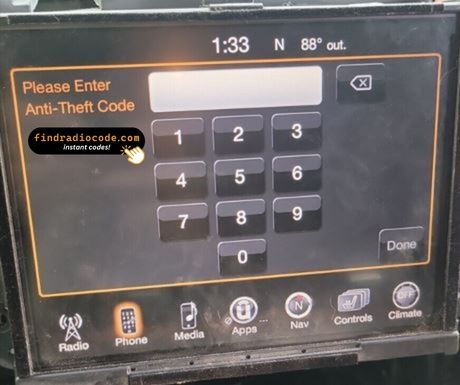
As with other Harman factory units, the Uconnect 8.4 RJ3 VP4 ROW locks itself when power is lost. After a battery disconnect or a workshop visit the screen will ask for the original security code before any audio returns.
Background on the platform itself is published by the official Uconnect site.
Finding the Serial Number on the Uconnect 8.4 RJ3 VP4 ROW
The code is calculated from the radio's own serial number, so that number is the only thing you need before ordering. It is printed on the chassis label of the unit itself, not in the vehicle documents.
On the Uconnect 8.4 RJ3 VP4 ROW: Top of the chassis label.
Getting to the label:
- Bring the radio out of its slot; release keys do it in seconds and nothing needs disconnecting.
- Read the serial from the printed label on the housing, next to or under the barcode.
- Copy it into the form letter for letter; the checker catches any typo before payment.
Where the label sits on this radio
The process on video

Recorded on a radio from this family; your unit works the same way.
What Usually Triggers the Code Screen
The lock screen almost never appears out of nowhere - one of these four situations is behind almost every locked Uconnect 8.4 RJ3 VP4 ROW we see.
The car was in the garage
Any repair that touches the 12V supply - even briefly - is enough to bring up the code screen on the next start.
You swapped the radio itself
Swapping in a refurbished radio means a new serial and therefore a new code - the one from the old unit will never work.
The code card is long gone
The code card that shipped with the car disappeared an owner or two ago. That is not a problem - the code is generated from the radio's serial, not from any paperwork.
A battery change
Any battery work counts as a power cut to the radio. It re-arms automatically and waits for the original code before playing again.
All four roads lead to the same fix - read the serial off the unit, enter it above, and the original code arrives instantly.
Factory Specifications
| Specification | Value |
|---|---|
| Manufacturer | Harman |
| Radio Family | Uconnect 8.4 |
| Variant | RJ3 VP4 ROW |
| Market | Right-hand drive / Rest of World |
| Vehicle Brand | Jeep / Ram |
| Production Years | 2014-2018 |
| Display | 8.4" touchscreen |
| Navigation | No |
| Serial Prefixes | T00AM, T00BE, T0012 |
Not every Uconnect 8.4 RJ3 VP4 ROW offers the same set of features. Bluetooth connectivity, navigation, USB support or multimedia playback may vary depending on the vehicle specification, production year and factory equipment package.
Supported Vehicle Models
| Vehicle Model | Typical Production Years | Notes |
|---|---|---|
| Jeep Cherokee KL, Grand Cherokee WK2, Wrangler JK (RHD non-nav) | 2014-2018 | |
| Ram 1500 (RHD non-nav conversions) | 2014-2018 |
The vehicles listed above are the most common factory applications for the Uconnect 8.4 RJ3 VP4 ROW. Equipment packages and regional specifications differ, so verify the radio using its design, serial number or part number before requesting a code.
Find Your Part Number 11
All of the part numbers listed here are covered. Match the one printed on your unit's label and you are in the right place.
The 11 references come down to 2 base numbers - the trailing letters (AA, AB, ZC and so on) are hardware revisions of the same unit, and every revision is supported.
68247593AA 68247593AB 68247593AC 68247593AD 68247593AE 68247593AF 68247593AG 68247593AH 68257286AA 68257286AB 68257286AC The part number is printed on the label on top of or on the side of the radio chassis, usually next to the serial number. If yours appears above, the Uconnect 8.4 RJ3 VP4 ROW is the correct page.
How to enter your Uconnect 8.4 RJ3 VP4 ROW code
Nothing to install and no tools needed - just the four digits.
- Switch the ignition on and let the radio boot to its security screen.
- The code prompt appears with its own keypad.
- Enter the four digits in the order you received them.
- As soon as the last digit lands, the radio verifies on its own.
- On a correct code the radio leaves security mode and plays again.
Troubleshooting the Uconnect 8.4 RJ3 VP4 ROW
The radio is counting down
A countdown means the anti-theft system is holding the unit. Leave the ignition on until it clears. 30-minute WAIT after three wrong attempts.
I cannot find the serial number
It is printed on the housing, so the unit normally has to come forward to read it. Top of the chassis label.
Why it happened again
That is normal - the anti-theft system re-arms every time the unit loses power. Battery service.
Same face, different radio
One glance at the label settles it - worth doing before the order. Non-nav VP4 RHD variant. RJ4 VP4 is the nav equivalent.
The code belongs to the radio and never changes, so keep it somewhere safe once you have it.
Common Questions About the Uconnect 8.4 RJ3 VP4 ROW
After the Code Arrived
Short notes from real orders; the reviews page has the rest.
"Fantastic: only to took 5seconds to receive code ..was skeptic at first..will fully recommend there services..Thanks saved alot of money : compared to taking it to the dealership..Very happy customer:"
Dang I thought it was a scam but it’s not it’s true I paid for it the code came through and I put it in and it works thank you
Vandale - Chrysler
Fast delivery Good code give me best
Gyula schmidthausen - Chrysler
What Is Included
Code delivered instantly once payment clears - on screen and in your inbox.
Full money-back guarantee if the code does not open your radio.
Order at any hour - no dealership, no appointment, no towing.
The code never expires - keep it and future battery changes cost nothing.
Looking for a Different Radio Model?
These units are often mixed up with the Uconnect 8.4 RJ3 VP4 ROW. If the details above do not match your radio, open one of these instead.
Check the Uconnect 8.4 RJ3 VP4 ROW with the rest of the Harman radios on the Harman radio codes page.