What Caused the Radio to Lock?
The ProMaster's Uconnect activates anti-theft after power is cut. ProMasters are serviced frequently and battery work is common, making this a routine occurrence.
Common causes:
- Battery replacement — top trigger
- Blown radio fuse — especially after cargo accessory installation
- Buying fleet-retired without any code documentation
- Battery fully drained from storage
The code comes from the radio's own serial number — not the vehicle registration.
Can't Locate Your Unit's Serial Number? Follow The Steps Below for Ram ProMaster 2020
The first step is writing down the radio serial number.
Many people assume the code depends on the Ram model or year, but in reality, the unlock process depends on the unique radio unit's serial number.
This number identifies the exact head unit installed in your Ram ProMaster.
This is even better, because if you have a used radio, the VIN or other Ram-specific data wouldn't help.
Depending on the radio version used, you may be able to see the serial directly from the screen or by looking at the label on the radio chassis.
Factory Radios on the 2020 Ram ProMaster
For the 2020 model year, the Ram ProMaster carried over the same Italian-platform head-unit lineup it had used since the early Ducato-based generation. There were essentially two factory choices.
The standard fitment on base cargo vans was a simple AM/FM/MP3 radio with auxiliary input and basic display - no Bluetooth, no touchscreen, and no integrated camera. It was designed for fleet buyers who valued simplicity and price over connectivity.
The optional unit was the Uconnect 3 with 5-inch colour touchscreen. This was the only Uconnect choice Ram offered on the 2020 ProMaster - the 7-inch and 8.4-inch Uconnect units fitted to the 1500 / 2500 / 3500 pickups were not part of the ProMaster's option list. The 5-inch Uconnect added Bluetooth audio and phone, USB, SiriusXM compatibility and a rear-camera input.
If you are unsure which one is in your van, the giveaway is the screen itself - the base radio has a small monochrome or two-line display, while the Uconnect 3 has a small but clearly colour 5-inch touchscreen seated in the upper dash.
Check the Display First - Serial Retrieval Without Tools
The method for 2020 Ram ProMaster is this:
The 2020 Ram ProMaster shares its platform with the Fiat Ducato and comes equipped with the Uconnect 5.0" (RA1) or Uconnect 7.0" infotainment system, depending on the trim level. Unlike other Ram trucks, the ProMaster's radio may not support Dealer Mode.
Method 1 (7" Uconnect): Attempt pressing the bottom-left and bottom-right corners of the screen bezel for 5 seconds to open Dealer Mode.
Method 2 (all models): If Dealer Mode won't open, the radio must be physically removed to access the serial number label. See removal instructions below.
Access it by Pulling Out the Radio
If the serial number cannot be accessed via display, use the removal method.
Most Ram ProMaster factory radios include a label with the serial number printed on the chassis.
Step-by-Step Approach:
- Power down the vehicle.
- Remove the bezel surrounding the radio.
- Loosen the fasteners.
- Move the unit slightly out to access the label.
The serial number is usually located near the printed code.
Removing the radio from the 2020 Ram ProMaster involves a slightly different technique compared to standard Ram trucks:
- Power down the vehicle.
- Locate the radio unit in the center of the dashboard. The ProMaster's dashboard layout is utilitarian.
- Some ProMaster radios have small release holes on each side of the radio face. Insert DIN removal keys into these holes to release the locking mechanism.
- If there are no release holes, pry off the trim ring using a plastic pry tool, then unscrew the mounting screws and slide the unit forward.
ProMaster Tip: The 2020 ProMaster may use a Fiat-style radio mounting system with extraction holes rather than the screw-mounted system found in other Ram trucks. Look for the release holes before attempting trim removal.
2020 Ram ProMaster - Which Radio Did You Get?
If your radio cannot show its serial on screen, you will need to remove the unit and read it from the chassis label. The 2020 ProMaster's Uconnect 3 sits in the upper dash and is one of the easier head units to extract.
Before You Start - Safety
Park on level ground, turn the ignition off and remove the key. Disconnect the negative battery terminal and wait a few minutes for any internal capacitor to bleed down. Keep the cabin accessible in case the central locking is affected.
Tools You Will Need
Two stiff wire pins or a bent coat hanger, a plastic trim tool, a small Phillips/Torx set, and a phone or camera to capture the serial label clearly.
Removal Overview
Carefully pry the trim bezel around the radio away from the dash, releasing the spring clips. With the bezel out of the way, insert the two wire pins into the small holes on either side of the radio face until they click. Pull both pins straight out at the same time and the head unit will slide forward. Support it, then disconnect the wiring harness, antenna lead and any USB extension.
Where to Find the Serial Number
The serial is on a printed or laser-etched white label on the side, top or back of the radio chassis. It is usually next to a part number and a barcode. Take a clear photograph of the entire label so you can refer to part numbers if the serial format is ambiguous.
Tips Before Reinstalling
Plug everything back in firmly, reconnect the battery and check that the unit powers up before clipping the bezel back on. Reset the clock, paired phones and presets once the battery has been reconnected.
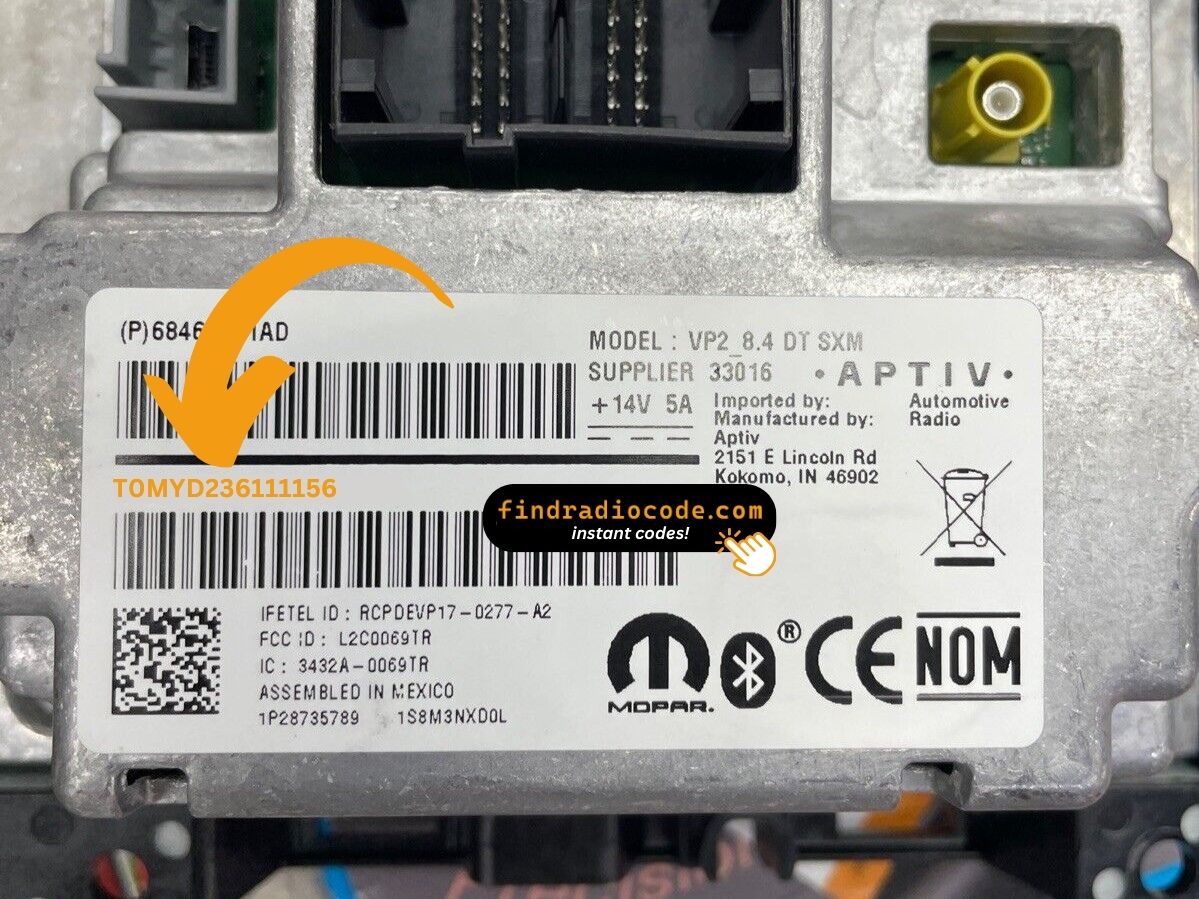
Example: Ram ProMaster serial number label location
How Serial Numbers Usually Look on These ProMaster Radios
The 2020 Ram ProMaster radio is manufactured by Harman or Continental, just like other Stellantis vehicles. Common serial number prefixes:
T00AM– Harman Uconnect units (standard prefix)T00BE– Continental unitsTM9– Older Harman production units (earlier models)
Radio models for the ProMaster: RA1 (Uconnect 5.0" base), RA2 (Uconnect 4.3"), or a 7.0" Uconnect (upgraded option). Serial numbers are 14 characters alphanumeric.
Note Since the ProMaster is based on a Fiat platform, some first-year models may have Fiat-sourced radio components. The serial format is still the same regardless.
Entering Your Unlock Code
After generating the correct unlock code based on the serial number, you can restore default functionality by entering it into the unit.
The code entry process depends on the control layout, but most 2020 ProMaster systems follow a similar structure using preset buttons, touch controls, or rotary knobs - depending on if it's a factory or an aftermarket unit.
You will typically see ENTER CODE displayed on screen.
Step-by-Step - The Correct Way to Enter It
To type in the unlock code on the 2020 Ram ProMaster's radio:
- Turn the ignition to ON. The screen shows "ENTER CODE" or "CODE".
- Touchscreen models (5.0"/7.0" Uconnect): Press the on-screen keypad to enter each digit of the 4-digit code.
- Non-touchscreen models: Press preset buttons 1-4 to select each digit. Hold Enter/OK to confirm.
Lockout: Three incorrect attempts cause a 60-minute lockout. Keep the ignition ON for the entire lockout duration. Do not turn the key off or the timer resets.
Understanding the 2020 Ram ProMaster Radio Code Retrieval Process
- Instead of contacting Ram dealer or searching forums you can generate the code online using the radio S/N.
- First locate the serial number. You will always find it on the unit itself, and in some cases you can see it on the ProMaster's display.
- Type it into the generator above, and the software will identify the correct 2020 ProMaster unlock code.
- When you receive the code, type it in using ProMaster's radio buttons to unlock the system successfully.
- The entire process takes just a short moment and requires minimal effort.
Fixing Common Code Entry Problems for 2020 ProMaster
The serial label is on the rear or side of the radio unit. As these vans sometimes have European-style radio mounts with extraction holes, removing it can be quicker than in pickups.
Serial: 14 alphanumeric characters starting with T00AM, T00BE, or TM9. Avoid the part number (P... or 68...) — it won't work.
ProMaster radios vary by trim: touchscreen models (5.0"/7.0" Uconnect) use the virtual keypad; non-touchscreen models use preset buttons 1, 2, 3, 4 to scroll each digit, then Enter/OK to confirm.
Not sure which you have: look at the radio face. A touchscreen reacts to touch; a non-touchscreen will not.
After 3 wrong entries, the radio goes into a 60-minute lockout. The display continues showing "CODE" or "ENTER CODE" but won't register all input.
To clear: Keep ignition ON for a full 60 minutes without switching off. Delivery vans used in daily routes must complete the full 60-minute wait without interruption before the next run.
No code prompt means the radio isn't engaged. To force the code screen: pull and reinsert the radio fuse, then turn ignition ON. The "ENTER CODE" prompt shows immediately on boot.
The ProMaster radio label has both a serial number (14 chars, starts with T00AM, T00BE, or TM9) and a part number (P05... or 68...). Just the 14-character serial produces the unlock code.
If the label is hard to read (vans get dusty labels), photograph it with your phone and zoom in to read each character clearly. Reach out to support for a reverification if the code still fails.