Why Did the Radio Lock and Ask for a Code?
The ProMaster's Uconnect self-locks after a battery disconnect or replacement. ProMasters are serviced frequently and battery work is common, making this a common trigger.
Common causes:
- Battery replacement — top trigger
- Failed radio fuse — often following cargo accessory installation
- Buying used without the unlock code
- Battery completely discharged from not being driven
The code comes from the radio's own serial number — not the VIN.
Locate the Serial Number Needed to Generate Ram ProMaster 2023 Radio Code
Very useful fact to know is that factory radios use a specific serial number to identify each unitindividually.
The security system links the code directly to the serial.
Different from vehicle-specific data like VIN or registration info, it is not determined by the model or production year, so you'll be able to retrieve it even if you have a radio that you bought afterwards.
Depending on the maker and radio installed in your Ram ProMaster, the retrieval method varies.
These are the most reliable ways to locate it.
Factory Radios on the 2023 Ram ProMaster
2023 is the big year for the ProMaster's infotainment - the mid-cycle facelift introduced a redesigned dash and brought Uconnect 5 to the van for the first time, finally aligning it with the rest of the Ram lineup.
The new standard fitment is the Uconnect 5 with a 7-inch touchscreen. It supports wireless Apple CarPlay and wireless Android Auto, Bluetooth with dual-phone pairing, and built-in voice assistant integration. The optional unit is the Uconnect 5 NAV with a 10.1-inch touchscreen, adding integrated TomTom-based navigation, split-screen view, SiriusXM with 360L, and a 360-degree surround-view camera on higher trims.
A simple base AM/FM unit was still listed for fleet-spec orders early in the model year, but the vast majority of 2023 ProMasters delivered carry one of the two new Uconnect 5 displays. The easiest way to identify your unit is by the screen - 7-inch units are landscape-oriented and integrated into the dash, while the 10.1-inch unit is a noticeably larger, more vertical-leaning display with the Uconnect 5 graphical interface and a permanent climate strip across the bottom.
Find Your S/N via the Radio Screen
These are the steps you should follow for 2023 Ram ProMaster:
The 2023 Ram ProMaster is based on the Fiat Ducato and uses the Uconnect 5.0" (RA1) or Uconnect 7.0" infotainment system, depending on the trim level. Unlike other Ram trucks, the ProMaster's radio does not always support Dealer Mode.
Method 1 (7" Uconnect): Attempt pressing the bottom-left and bottom-right corners of the screen bezel for 5 seconds to open Dealer Mode.
Method 2 (all models): If Dealer Mode isn't available, the radio must be physically removed to access the serial number label. See removal instructions below.
Releasing the Radio Unit to See the S/N on the Tag
If the serial number cannot be accessed through menu, use the hardware method.
Most Ram ProMaster factory radios include a label with the serial number printed on the chassis.
Step-by-Step:
- Power down the vehicle.
- Detach the trim surrounding the radio.
- Loosen the fasteners.
- Slide the unit slightly out to access the label.
The serial number is usually located near the printed code.
Removing the radio from the 2023 Ram ProMaster involves a unique method compared to other Ram models:
- Switch off the vehicle.
- Find the radio unit in the center stack area. The ProMaster's dashboard layout is van-style.
- Some ProMaster radios have small release holes on both sides of the radio face. Insert DIN removal keys into these slots to disengage the internal clips.
- If there are no release holes, remove the trim ring using a plastic pry tool, then remove the Torx screws and slide the unit forward.
ProMaster Tip: The 2023 ProMaster may use a DIN-style radio mounting system with release key slots rather than the bolt-in system found in Ram pickups. Look for the release holes before resorting to trim removal.
Removing the Radio in a 2023 Ram ProMaster
The 2023 facelift brought a redesigned upper dash, and the new Uconnect 5 head unit (especially the 10.1-inch version) is much more deeply integrated than the previous 5-inch Uconnect 3. For most owners we recommend having a Ram dealer or an experienced mobile installer pull the unit, particularly on the 10.1-inch trims.
Before You Start - Safety
Park on level ground, switch the ignition off and remove the key. Disconnect the negative battery terminal and wait several minutes - Uconnect 5 units retain power briefly after disconnection. Cabin airbag wiring runs near the upper dash, so handle the trim carefully.
Tools You Will Need
A full plastic trim tool kit, an interior panel removal lever, a Phillips/Torx driver set including T20 and T25, a magnetic tray for fasteners, and a phone with a good camera for the chassis label.
Removal Overview
The Uconnect 5 unit is retained behind a redesigned bezel that integrates climate controls and trim. The bezel is released by carefully working a plastic trim tool around its perimeter to free the clips. Once the bezel is out of the way, the head unit itself is held by Torx screws (commonly four) at the corners of the brick. Remove the screws, slide the unit forward and disconnect the multiple harness plugs, antenna lead, USB extension and the camera/HDMI connector if fitted.
Where to Find the Serial Number
The chassis label is on the side or top of the radio brick and includes the radio serial, the Mopar part number and barcodes. Photograph the whole label - on Uconnect 5 the part number is particularly useful to identify whether you have the 7-inch or 10.1-inch version.
Tips Before Reinstalling
Plug every connector back in fully, paying attention to camera and HDMI leads. Reconnect the battery, let the system boot fully (Uconnect 5 can take several minutes the first time), and verify the climate strip and reverse camera function before reassembling the bezel.
Because of the cost of damaged trim and the deeper integration of Uconnect 5, this is one of the years where we genuinely recommend professional removal if you are not comfortable with modern infotainment teardowns.
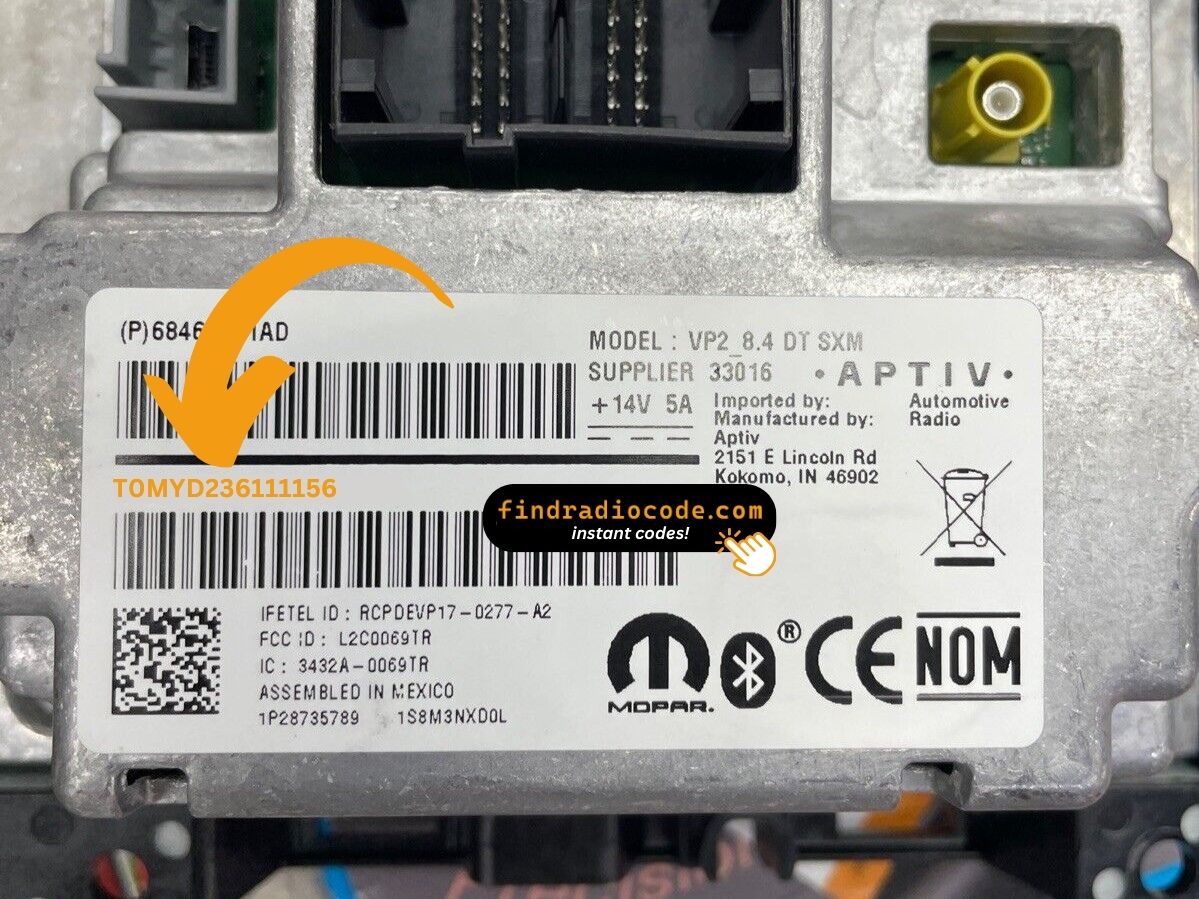
Example: Ram ProMaster serial number label location
What a Valid Serial Number Looks Like
The 2023 Ram ProMaster radio comes from Harman or Continental, just like other Stellantis vehicles. Common serial number prefixes:
T00AM– Harman Uconnect units (primary prefix)T00BE– Continental versionsTM9– Earlier Harman production units (2014-2016)
Radio models for the ProMaster: RA1 (Uconnect 5.0" base), RA2 (Uconnect 4.3"), or a 7.0" Uconnect (upgraded option). Serial numbers are 14 characters alphanumeric.
Note Since the ProMaster is based on a Fiat platform, some first-year models may have Fiat-branded radio components. The serial format is still the same either way.
Steps to Unlock Your 2023 Ram ProMaster Radio
- Rather than relying on Ram dealership lookup or online threads you can find the code online using the radio serial number.
- Identify your radio's serial. The best place to search is on the unit itself, and in some cases it can be visible on the ProMaster's display.
- Type it into the form above, and our software will calculate the correct 2023 ProMaster unlock code.
- After receiving your code, type it in using ProMaster's radio buttons to release the blockade successfully.
- The entire process takes only a few minutes and requires zero paperwork and no dealer visit.
Radio Code Input Guide
When you obtain the correct unlock code based on the S/N, you can restore default functionality by entering it into the unit.
The code entry process depends on the head unit design, but most 2023 ProMaster systems follow a similar structure using preset buttons, touch controls, or rotary knobs - depending on if it's a factory or an aftermarket unit.
You will typically see ENTER CODE displayed on screen.
In-depth Entering Instructions for ProMaster 2023
To type in the unlock code on the 2023 Ram ProMaster's radio:
- Turn the ignition to ON. The screen presents "ENTER CODE" or "CODE".
- Touchscreen models (5.0"/7.0" Uconnect): Press the on-screen keypad to enter each digit of the 4-digit code.
- Non-touchscreen models: Press preset buttons 1-4 to scroll to each digit. Press Enter/OK to confirm.
Lockout: 3 failed attempts trigger a 60-minute lockout. Keep the ignition ON for the entire lockout duration. Don't turn the key off or the timer restarts.
Fixing Common Code Entry Problems for 2023 ProMaster
No code prompt means the radio isn't engaged. To force the code screen: briefly disconnect the battery, then turn ignition ON. The "ENTER CODE" prompt shows immediately on boot.
After 3 wrong entries, the radio triggers a 60-minute lockout. The display continues showing "CODE" or "ENTER CODE" but blocks all input.
To clear: Leave ignition ON for a full 60 minutes without cutting power. Delivery vans used in daily routes need to finish the full 60-minute wait without interruption before the next run.
The serial label is on the rear or side of the radio unit. As these vans may use DIN-style radio mounts with release key slots, you may not need to remove the full dash trim.
Serial: 14 alphanumeric characters starting with T00AM, T00BE, or TM9. Avoid the part number (P... or 68...) — it won't work.
ProMaster radios differ by trim: touchscreen models (5.0"/7.0" Uconnect) use the virtual keypad; non-touchscreen models use preset buttons 1, 2, 3, 4 to cycle each digit, then Enter/OK to confirm.
If you're unsure: look at the radio face. A touchscreen reacts to touch; a non-touchscreen will not.
The ProMaster radio label has both a serial number (14 chars, starts with T00AM, T00BE, or TM9) and a part number (P05... or 68...). Only the 14-character serial generates the unlock code.
Should the label be hard to read (vans get dusty labels), photograph it with your phone and enlarge it to avoid misreading digits. Reach out to support for a re-check if the code still fails.