
Why Is the Radio Asking for a Code?
Battery replacement is the number one reason behind a locked radio on Renault vehicles, but several other situations to be aware of:
- Battery swap or disconnect: Battery replacement is the top reason across all Renault models. The lock activates any time 12V power is interrupted. It catches many owners off-guard, even during a very short disconnect.
- Second-hand purchase: The original code is seldom included when a car changes hands. Both trade and private sellers frequently cannot provide it.
- Discharged battery: A completely flat battery triggers the code request when power is restored.
- Workshop or service work: Service that disconnects the battery — even routine maintenance — may activate the code request.
Steps to Unlock Your 2013 Renault Clio Radio
To get the code, you'll take only a few easy steps.
- Find your radio's serial number - this is the only info required to generate the correct unlock code.
The difference with the dealership lookup is that no VIN is needed. - Enter the serial number into our generator above.
Our system checks it against a database of supported radios and automatically finds the matching anti-theft code. - In most cases, the code appears instantly on the screen after you pay and is also sent to your email , just in case.
If manual verification is required (rare situations), you'll be notified before checkout. - When you get it, just enter it into the radio to restore the functionality.
How Code Entry Works on Your Renault Radio
After locating the S/N and received the unlock code, the last part is entering it into your radio.
Renault OEM units display a ENTER CODE message when ready for input.
The process is simple, but button layouts and confirmation methods may change depending on the radio version installed in your Clio.
Detailed Entering Instructions for Clio 2013
To input the code on the 2013 Renault Clio:
- Ignition ON. Radio displays "CODE" or four dashes (----).
- Use preset buttons 1-4 to enter each digit of the 4-digit code. Each press advances the digit (0-9).
- Hold button 5 or button 6 to submit.
Lockout: Several incorrect entries will trigger a lockout. Turn off the radio for about 30 minutes, then retry.
The Correct Way to Enter It
Once the unlock PIN has been issued for the 2013 Clio, the entry method depends on which factory radio is fitted. Enter slowly and confirm each digit before moving on.
Limited Attempt Warning: Renault head units permit only a small number of incorrect attempts. After consecutive wrong entries the radio enters a wait state and the delay roughly doubles with each subsequent mistake (commonly reported as 1, 2, 4, 8, 16, 32 minutes). Confirm the code is correct before entering.
Renault Tuner List
- Switch the ignition to ACC and power on the radio. The display will show
CODEand then0000. - Press preset 1 repeatedly until the first digit of your PIN appears; press preset 2 for the second digit, preset 3 for the third, and preset 4 for the fourth.
- Press and hold preset 6 for approximately five seconds until a beep confirms acceptance.
- If a region prompt (OTHERS, AMERICA, JAPAN, ASIA, ARABIA) follows, scroll with the seek arrows and long-press preset 5 to confirm.
R-Link 1
- On power up the R-Link tablet displays an on-screen numeric keypad.
- Tap the four PIN digits, then tap OK or the confirmation tick.
- If the screen shows
WAITorERROR, leave the ignition on and the radio powered for the duration shown before trying again.
Locate the Serial Number Needed to Generate Renault Clio 2013 Radio Code
The important thing to know is that factory radios use a specific S/N to identify each unit.
Your security system links the code directly to this serial.
Different from car-specific data such as VIN or registration info, it is not determined by the model or production year, so you'll be able to retrieve it even if you have an aftermarket radio.
Depending on the manufacturer and radio installed in your Renault Clio, the retrieval method varies.
These are the best ways to find it.
Radios Offered in the 2013 Clio
The 2013 Clio Mk4 (X98) launched with a tiered head-unit lineup. Identification is straightforward once you compare bezel layout and screen format.
- Tuner List / Update List (Renault-Bosch): Entry-trim single-DIN radio with a small monochrome display, six preset keys across the fascia, and no touchscreen. Typically fitted to Expression and lower trims.
- R-Link 1: Optional 7-inch portrait-style touchscreen mounted as a tablet on top of the centre stack, running TomTom-customised software with steering-wheel controls and a satellite remote. Commonly found on Dynamique MediaNav and higher option packs.
- Quick field test: Press the radio power key - if a numeric preset row dominates the fascia, it is a Tuner List unit; if a 7-inch colour touchscreen lights up, it is R-Link 1.
Check the Display First - Serial Retrieval Without Tools
Try the following for your 2013 Renault Clio:
The 2013 Renault Clio features a Renault OEM radio or MediaNav system. Many Renault radios don't support an on-screen serial number retrieval method.
The serial number is located on a label on the radio unit. The radio must be extracted to read it. Certain more recent Clio with MediaNav may show the serial in Settings → System.
Display-Based Serial Number Retrieval
Only the Tuner List unit fitted to the 2013 Clio is documented to reveal its pre-code via the front panel.
Renault Tuner List
- Turn the ignition to ACC so the radio powers up but the engine is off.
- Press and hold preset buttons 1 and 6 simultaneously for approximately five seconds.
- The display will switch to a four-character pre-code in the format letter + three digits, for example
V123. - Note the pre-code exactly as shown; do not confuse the digit 0 with the letter O.
R-Link 1 head units do not surface a user-readable pre-code on screen and rely on dealer-side identification; for those, fall back to the chassis label method below.
Taking Out the Unit to View the S/N on the Tag
If the serial number cannot be accessed on-screen, use the hardware method.
Most Renault Clio original radios include a sticker with the serial number printed on the casing.
Steps:
- Power down the vehicle.
- Lift the trim surrounding the radio.
- Loosen the fasteners.
- Pull the unit outward to access the label.
The serial number is usually located near the barcode.
To retrieve the serial on the 2013 Renault Clio:
- Turn off the vehicle.
- Locate the extraction holes on both sides of the radio. Renault radios commonly use DIN-style removal holes.
- Insert extraction tools and slide the radio out.
- Locate the serial on the manufacturer label on the housing. It starts with CC.
Note: Renault radio release keys are the same DIN-style tools used for many European vehicles.
View the Serial by Pulling Out the Unit
If the on-screen pre-code method is unavailable or your 2013 Clio has the R-Link 1 tablet, the serial label on the chassis is the reliable fallback.
- Safety first: switch the ignition off, remove the key, disconnect the negative battery terminal, and wait several minutes before touching the dash.
- Avoid all yellow connectors and SRS airbag wiring during the procedure.
- Tools: pair of Renault DIN radio release keys (the original Tuner List uses two release holes per side, roughly 38 mm apart), plastic trim removal tools, small Phillips/Torx set, flashlight, and a phone to photograph the label.
- For the Tuner List unit: insert the four release keys fully into the side slots until they click, then pull the radio straight out by the keys.
- For R-Link 1: gently pry the surrounding tablet bezel with plastic tools, remove the visible mounting screws, then slide the screen module forward. The unit is more deeply integrated - if resistance is high, consult a professional.
- Once the unit is out, do not power it while partially disconnected. Locate the manufacturer barcode label on the top or side of the chassis.
- Look for a four-character code printed near a
SecurityorSECUtag, or the trailing four characters of the long barcode (letter + three digits). That is the pre-code, not the unlock code itself. - Photograph the label and verify ambiguous characters (0 vs O, 1 vs I, 8 vs B) before submission.
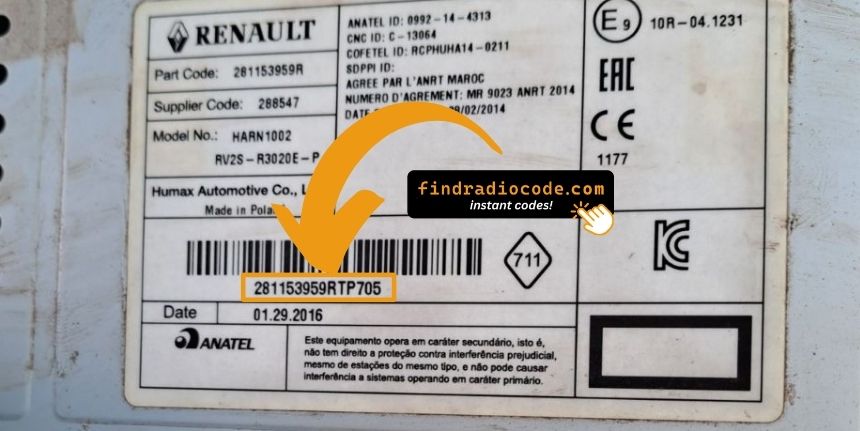
Example: Renault Clio serial number label location
Common Serial Number Structures
The 2013 Renault Clio radio serial prefixes:
BP####– Blaupunkt radio serial (most common)CC####– Continental radio serialPH####– Philips radio serialPR####– Other Renault OEM prefix
The serial is printed on the radio casing. Do not mistake it with the Renault part number.
Typical Serial Number Formats for 2013 Clio Radios
The pre-code used to retrieve the unlock PIN is determined by the radio manufacturer, not by the Clio model itself. For the 2013 Clio Mk4 there are two distinct format families.
Renault-Bosch Tuner List
- Pre-code typically consists of one letter followed by three digits, for example
A123orS432. - On the chassis label the longer Renault part number commonly begins with
2811; the trailing four characters of that string are usually the pre-code. - The label often marks the relevant block as
Security,SECU, orPRE-CODE.
R-Link 1
- R-Link units identify by an internal serial used by Renault; an externally readable four-character pre-code is not consistently exposed.
- Most users on R-Link 1 retrieve the unlock code by VIN rather than by a user-visible serial.
Validation tips: pre-codes are commonly four characters for Tuner List, and do not submit the long part number, EAN barcode, or option code as a serial. Re-check 0 vs O and 1 vs I before submitting.
Understanding Unlock Issues with Your Clio
The radio shows "WAIT" / "SAFE" after 3 wrong code attempts, locking out further input until the timer expires.
Clearing the wait: Turn the ignition to ON and leave it there for a full 60 minutes. Any power interruption restarts the 60-minute timer. This is particularly important — the timer does not pause, it restarts.
With Renault vehicles, battery drain during a long wait is possible. Keep the engine idling or connect a charger where practical to prevent the timer restarting.
Entering the unlock code on Renault passenger car radios uses the preset station buttons to build the code digit by digit.
- Button 1 sets the first digit — each press cycles from 0 to 9.
- Button 2 controls digit 2, button 3 digit 3, button 4 digit 4.
- Once all four digits are correct, hold down button 5, button 6, or the Enter / AM-FM button to confirm.
Note: Newer Renault models with a MediaNav touchscreen use a touchscreen code entry pad. If a number pad appears on screen, tap it directly. The touchscreen confirms automatically.
If the radio powers on without prompting for a code, work through these steps:
- Force the code prompt: Disconnect the battery for 30 seconds, reconnect, and turn the ignition on. The radio should then request the code.
- It may already be working: When all functions work normally without restriction, it is already unlocked. No code entry is needed.
- On MediaNav touchscreen versions: Renault MediaNav does not show a code prompt the same way. Check Settings → System for unlock or serial options.
- Ignition position: Some Blaupunkt/Philips units may only show the code prompt when the ignition is in ACC or ON. Check both positions.
Should the radio refuse your code, check the following before entering it again.
- Verify the serial prefix: Renault radios take serials starting with BP, CC, PH, or PR. Make sure you submitted the full serial from the radio label — not any other sticker inside the car.
- Look for digit confusion: On worn or faded labels, 0 and O, 1 and I, and 8 and B look similar. Take a clear photo and examine it carefully.
- Button sequence: Each press of a preset button advances the digit by one. Rapid pressing may go past the right number. Count each press and take it slowly. Only confirm once all four digits are correct.
If it keeps failing? Contact us with your serial number and we'll check and reissue if needed.
Finding the serial on Renault radios can be found on a sticker on the rear or side of the radio unit, only accessible once the radio is pulled forward.
- Expected format: Look for a string beginning with BP, CC, PH, or PR followed by numbers and letters.
- Label condition: Labels on higher-mileage vehicles are sometimes worn. Take a well-lit close-up photo — detail is easier to read in a zoomed image.
- How to access the serial: Pin-release extraction tools fit all Renault models. Insert them into the holes on both sides of the radio and pull forward.
Do not use the vehicle VIN or dashboard label number — these produce an incorrect code.