Unlock Your 2016 Renault Clio Radio in Minutes - How It Works
Car radios use security codes tied to the radio unit itself rather than the vehicle model or production year.
- Our lookup service works by matching your Renault Clio radio's serial number.
- After entering the serial into the form above, the system identifies the radio family and retrieves the corresponding code.
- You can then enter the code directly into your Renault radio.
- Compared to Renault dealer retrieval, this method is faster and more convenient.
How to Enter the Radio Code
Once the system gives you 2016 Renault Clio radio code from the S/N, you're ready to reactivate the radio.
Some drivers get stuck at this stage because input methods can look different across radio versions, but it's usually easy.
When the radio shows ENTER CODE, it means the unit is waiting for the correct numbers.
In-depth Entering Instructions for Clio 2016
To enter the code on the 2016 Renault Clio:
- Ignition ON. Radio shows "CODE" or four dashes (----).
- Use preset buttons 1-4 to enter each digit of the 4-digit code. Each press cycles the digit (0-9).
- Hold button 5 or button 6 to submit.
Lockout: Multiple incorrect entries will cause a lockout. Turn off the radio for approximately half an hour, then try again.
The Correct Way to Enter It
Once the PIN is issued for the 2016 Clio, the entry method depends on which factory radio is installed.
Limited Attempt Warning: Renault head units permit only a small number of incorrect attempts. After consecutive wrong entries the radio enters a wait state and the delay roughly doubles with each mistake (commonly 1, 2, 4, 8, 16, 32 minutes). Confirm the code before pressing accept.
Renault Tuner List
- Set the ignition to ACC and power on the radio. The display shows
CODEand then0000. - Press preset 1 repeatedly until the first digit appears, preset 2 for the second, preset 3 for the third, and preset 4 for the fourth.
- Press and hold preset 6 for around five seconds until a beep confirms acceptance.
- If a region prompt (OTHERS, AMERICA, JAPAN, ASIA, ARABIA) follows, scroll with the seek arrows and long-press preset 5 to confirm.
MediaNav Evolution and R-Link Evolution
- On power up the screen presents an on-screen numeric keypad.
- Tap the four PIN digits and confirm with OK or the tick icon.
- If
WAITorERRORappears, leave the ignition on and the unit powered until the timer expires before retrying.
Can't Locate Your Radio Serial Number? Follow These Steps for Renault Clio 2016
The starting step is finding the radio S/N.
Most people assume the code depends on the Renault model or year, but actually, the unlock process depends on the unique radio's serial number.
This number identifies the exact head unit installed in your Renault Clio.
This is actually better, because if you have a used radio, the VIN or other vehicle-specific data wouldn't help.
Depending on the radio used, you may be able to retrieve the serial directly from the screen or by checking the label on the radio chassis.
Which Head Unit Is in Your 2016 Clio?
The 2016 Clio is the facelift model year (Phase 2). The head-unit ladder splits across three variants in this transition year, so identification matters.
- Renault-Bosch Tuner List: entry single-DIN unit with monochrome display and six fascia preset keys; carried over on base trims.
- MediaNav Evolution: 7-inch landscape touchscreen with a single-processor architecture, basic multimedia and (on the Evolution variant) integrated mapping; commonly fitted to mid trims after the facelift.
- R-Link Evolution: 7-inch portrait touchscreen running the updated R-Link platform with TomTom navigation, steering-wheel and satellite-remote controls; fitted to higher trims and option packs.
- Quick field test: numeric preset row across the fascia means Tuner List; a landscape 7-inch screen with a more basic UI means MediaNav Evolution; a portrait 7-inch tablet with R-Link branding indicates R-Link Evolution.
View the Serial via the Radio Screen
The method for 2016 Renault Clio is this:
The 2016 Renault Clio comes with a Blaupunkt OEM radio or MediaNav system. Most Renault radios don't have an on-screen serial display method.
The serial number can be found on a sticker on the radio chassis. The radio must be extracted to read it. Certain more recent Clio with MediaNav may show the serial in Settings → System.
Check the Display First - Serial Retrieval Without Tools
The on-screen pre-code shortcut is documented only for the Tuner List unit on the 2016 Clio.
Renault Tuner List
- Set the ignition to ACC so the radio powers on without starting the engine.
- Press and hold preset 1 and preset 6 together for approximately five seconds.
- The display switches to a four-character pre-code in the format letter + three digits, for example
S432. - Record it carefully; double-check 0 vs O and 1 vs I.
MediaNav Evolution and R-Link Evolution do not expose a user-readable pre-code on the touchscreen and are typically resolved by VIN-based retrieval or by reading the chassis label.
Taking Out the Radio Unit to Access the S/N on the Tag
If the serial does not appear on display, the next step is checking the radio itself.
Many Renault radios require physical access to the ID label attached to the unit.
Typical approach:
- Start by completely powering down the engine - pull the key out.
- Then lift the dashboard bezel.
- Next, release the mounting points and move the radio forward.
- Look for a barcode label showing the serial number.
To find the serial on the 2016 Renault Clio:
- Power down the vehicle.
- Locate the extraction holes on both sides of the radio. Renault radios commonly use DIN-style extraction slots.
- Insert extraction tools and pull the radio out.
- Locate the serial on the barcode label on the chassis. It starts with CC.
Note: Renault extraction tools are the standard DIN-style tools used for many European vehicles.
Pulling Out the Radio to View the S/N on the Tag
If the on-screen method is unavailable for your 2016 Clio, the chassis label is the reliable source for the pre-code.
- Safety: ignition off, key removed, negative battery terminal disconnected, wait several minutes before touching the centre stack.
- Avoid yellow connectors and any SRS airbag wiring throughout the procedure.
- Tools: Renault DIN release keys (Tuner List uses two release slots per side around 38 mm apart), plastic trim removal tools, a small Phillips/Torx set, flashlight, and a phone to photograph the label.
- For Tuner List: insert all four keys fully into the side slots until they click, then pull the unit straight out by the keys.
- For MediaNav Evolution or R-Link Evolution: carefully ease the bezel surround with plastic tools, remove the mounting screws, and slide the screen module forward. These touchscreen units are more integrated than a DIN radio - if resistance is high or connector arrangement is unclear, consult a professional rather than force the assembly.
- Do not power the unit while partially disconnected.
- Locate the manufacturer barcode label on the top, side, or rear of the chassis. The pre-code is the four-character group printed near a
Security/SECUmarker, or the last four characters of the long Renault part number. - Photograph the label and re-check ambiguous characters (0 vs O, 1 vs I) before submission. The unlock code itself is never printed on the unit.
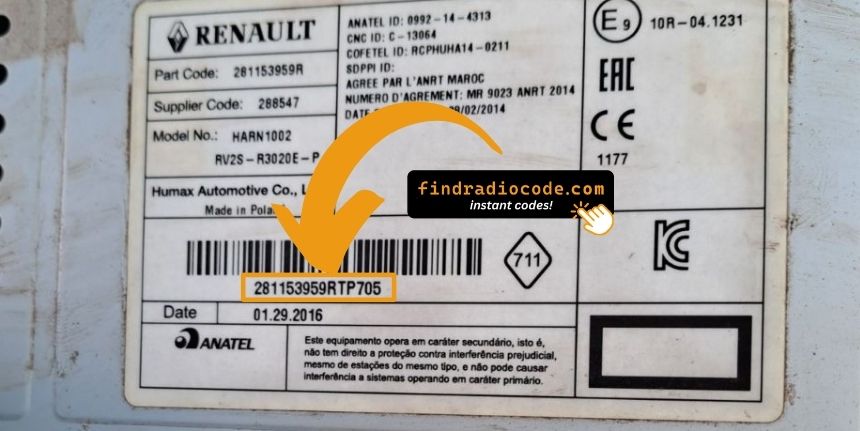
Example: Renault Clio serial number label location
Typical Serial Number Formats for 2016 Clio Radios
The 2016 Renault Clio radio serial prefixes:
BP####– Blaupunkt radio serial (standard)CC####– Continental radio serialPH####– Philips radio serialPR####– Other Renault OEM prefix
The serial is printed on the radio unit. Do not mistake it with the Renault part number.
S/N Patterns and Prefixes
Serial format is set by the radio supplier rather than the Clio nameplate. Across the 2016 model year three variants exist.
Renault-Bosch Tuner List
- Pre-code typically consists of one letter followed by three digits, for example
A123. - The longer Renault part number commonly begins with
2811; the trailing four characters are usually the pre-code. - Label often marks the block as
Security,SECU, orPRE-CODE.
MediaNav Evolution and R-Link Evolution
- Touchscreen head units use internal Renault identifiers that are not consistently surfaced as a clean four-character user-readable pre-code.
- Unlock for these is usually retrieved by VIN.
Validation tips: do not submit a long part number, EAN barcode, or option code as the serial. Re-check 0 vs O, 1 vs I, and 8 vs B before submission.
Why Is the Radio Asking for a Code?
Battery replacement is the number one reason for a locked radio on Renault vehicles, but there are a few others to be aware of:
- Battery swap or disconnect: Battery replacement is the top reason across all Renault models. The lock activates any time 12V power is interrupted. This is extremely common, even when the battery is only disconnected briefly.
- Second-hand purchase: The original code is seldom included when a car changes hands. Both trade and private sellers frequently cannot provide it.
- Flat battery from sitting: A battery drained from sitting unused triggers the code request when power is restored.
- Workshop or service work: Any work involving the battery — including an MOT, tyre change, or oil change — may activate the code request.
Understanding Unlock Issues with Your Clio
When the radio starts but does not ask for a code, work through these steps:
- Force the code prompt: Pull the radio fuse briefly, reconnect, and turn the ignition on. The radio should then request the code.
- Check if already unlocked: When all functions work normally without restriction, it is already unlocked. No code entry is needed.
- On MediaNav touchscreen versions: Renault MediaNav does not show a code prompt the same way. Look under Settings and System for unlock-related options.
- Some units need ACC or ON: Some Blaupunkt/Philips units may only show the code prompt when the ignition is in ACC or ON. Try both.
If the radio rejects your code, check the following before entering it again.
- Check the serial format: Renault radios take serials starting with BP, CC, PH, or PR. Confirm you entered the full serial from the radio label — not the vehicle part number or chassis number.
- Look for digit confusion: With older Blaupunkt/Philips stickers, characters are easily confused. Photograph the label and zoom in.
- Entry method: Each press of a preset button advances the digit by one. Rapid pressing may go past the right number. Count each press and take it slowly. Hold button 5 or 6 to confirm only after all four digits are set.
If it keeps failing? Contact us with your serial number and we'll check and reissue if needed.
Finding the serial on Renault radios can be found on a sticker on the rear or side of the radio unit, only accessible once the radio is pulled forward.
- Expected format: Look for a string beginning with BP, CC, PH, or PR then 8–10 alphanumeric characters.
- If the label is hard to read: Older Renault labels can be faded. Photograph under good light and zoom in — detail is easier to read in a zoomed image.
- How to access the serial: Pin-release extraction tools work on all Renault radios. Insert into the release slots on each side and pull forward.
Never submit the VIN or a part number — these produce an incorrect code.
Entering the unlock code on Renault passenger car radios uses the preset station buttons to build the code digit by digit.
- Button 1 controls the first digit — each press cycles from 0 to 9.
- Button 2 sets digit 2, button 3 digit 3, button 4 digit 4.
- After setting all digits, press and hold button 5, button 6, or the Enter / AM-FM button to confirm.
Note: Some later Renault models use a touchscreen code entry pad. Tap the digits on the on-screen number pad. No hold-to-confirm is needed.
The display shows "WAIT" / "SAFE" after 3 wrong code attempts, preventing further input until the timer resets.
How to reset it: Turn the ignition to ON and leave it there for a full 60 minutes. Any power interruption restarts the 60-minute timer. This is particularly important — the timer does not pause, it restarts.
With Renault vehicles, battery drain during a long wait is possible. Run the engine or use a battery maintainer if possible to prevent the timer restarting.