What Caused the Radio to Lock?
The single most common cause behind a locked radio on Renault vehicles, but several other situations to be aware of:
- Battery swap or disconnect: The most frequent cause by far on Renaults. The lock activates any time 12V power is interrupted. It catches many owners off-guard, even during a very short disconnect.
- Buying a used Renault: The original code is rarely passed on when a car changes hands. Both trade and private sellers often do not have it.
- Flat battery from sitting: A completely flat battery activates the lock on reconnection or recharge.
- Workshop or service work: Any work involving the battery — even routine maintenance — may activate the code request.
How 2018 Renault Clio Radio Code Lookup Works
Vehicle radios use anti-theft codes tied to the radio unit itself rather than the vehicle model or production year.
- The system uses the Clio's radio serial to retrieve the unlock code.
- When you input the serial into the generator, the system identifies the radio unit and generates the code that you need.
- Use the code to unlock the radio immediately.
- This approach saves time compared to traditional methods for 2018 Renault Clio.
How to Find the Serial Number on Your 2018 Renault Clio Radio?
The first step is to find and write down the radio's serial num.
Depending on the radio unit installed in your 2018 Clio, the S/N can usually be found either through the display menu or by checking the label on the radio itself.
Below are the most common methods to identify your S/N the right way.
2018 Clio - Which Radio Did You Get?
The 2018 Clio carries the post-facelift head-unit ladder unchanged. Three variants apply.
- Renault-Bosch Tuner List: entry single-DIN radio with a monochrome display and six fascia preset keys.
- MediaNav Evolution: 7-inch landscape touchscreen with single-processor architecture and integrated mapping on the Evolution variant.
- R-Link Evolution: 7-inch portrait touchscreen tablet with TomTom navigation, steering-wheel and satellite-remote controls.
- Quick field test: a numeric preset row across the fascia indicates Tuner List; a 7-inch landscape touchscreen with a basic UI indicates MediaNav Evolution; a 7-inch portrait tablet labelled R-Link indicates R-Link Evolution.
Fast Serial Lookup Using Radio Controls
Try the following for your 2018 Renault Clio:
The 2018 Renault Clio comes with a Philips OEM radio or MediaNav system. Most Renault radios do not support an on-screen serial display method.
The serial number can be found on a sticker on the radio chassis. The radio must be partially removed to read it. Certain more recent Clio with MediaNav may show the serial in Settings → System.
Display-Based Serial Number Retrieval
Only the Tuner List unit on the 2018 Clio exposes its pre-code through the front panel.
Renault Tuner List
- Set the ignition to ACC so the radio powers on without starting the engine.
- Press and hold preset 1 together with preset 6 for approximately five seconds.
- The display switches to a four-character pre-code in the format letter + three digits, for example
S432. - Record the pre-code carefully and check for 0 vs O and 1 vs I.
MediaNav Evolution and R-Link Evolution do not surface a user-readable pre-code on the touchscreen. For those, use the chassis label method or retrieval by VIN.
Releasing the Radio to Access the S/N on the Tag
If the serial number cannot be accessed via display, use the removal method.
Most Renault Clio factory radios include a label with the serial number printed on the housing.
Step-by-Step Approach:
- Turn off the vehicle.
- Detach the dashboard frame surrounding the radio.
- Unscrew the fasteners.
- Move the unit forward to access the label.
The serial number is usually located near the barcode.
To access the serial on the 2018 Renault Clio:
- Power down the vehicle.
- Find the release slots on both sides of the radio. Renault radios typically use DIN-style removal slots.
- Insert extraction tools and pull the radio forward.
- Find the serial on the manufacturer label on the casing. It starts with BP.
Tip: Renault extraction tools are the same DIN-style tools used for Fiat vehicles.
Releasing the Radio Unit to See the S/N on the Tag
Use the chassis label method when the on-screen pre-code is unavailable on your 2018 Clio.
- Switch the ignition off, remove the key, disconnect the negative battery terminal, and wait a few minutes before touching the centre stack.
- Avoid yellow connectors and any SRS airbag wiring throughout the procedure.
- Gather tools: Renault DIN release keys (Tuner List uses two release slots per side at roughly 38 mm centre spacing), plastic trim removal tools, a small Phillips or Torx driver, flashlight, and a phone for label photography.
- For the Tuner List, insert all four keys fully into the side slots until they click, then pull the unit straight out by the keys.
- For MediaNav Evolution or R-Link Evolution, carefully ease the bezel with plastic tools, remove the mounting screws, and slide the screen module forward. These touchscreen modules are more integrated; if resistance is high or the wiring is unclear, consult a professional rather than force the assembly.
- Do not power the unit while partially disconnected.
- Locate the manufacturer barcode label on the top, side, or rear of the chassis. The pre-code is the four-character group printed near a
SecurityorSECUmarker, or the trailing four characters of the longer Renault part number. - Photograph the label and re-check ambiguous characters (0 vs O, 1 vs I) before submission. The unlock code itself is not printed on the unit; only the serial is.
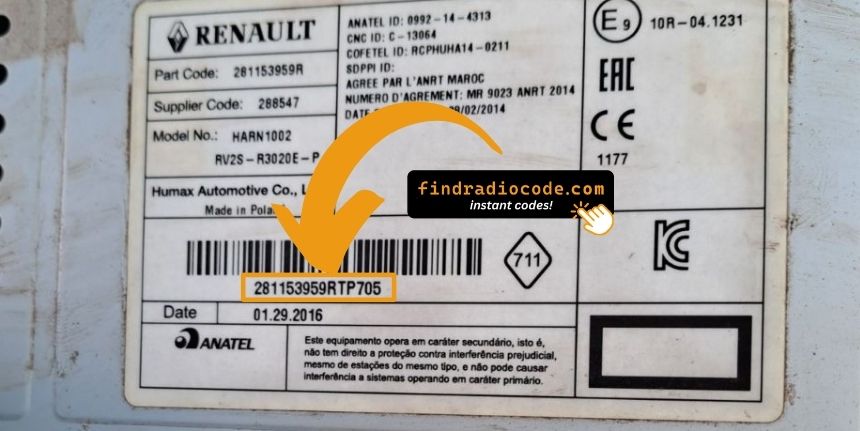
Example: Renault Clio serial number label location
These are the Common Serial Formats
The 2018 Renault Clio radio serial prefixes:
BP####– Blaupunkt radio serial (most common)CC####– Continental radio serialPH####– Philips radio serialPR####– Other Renault OEM prefix
The serial is found on the radio casing. Do not mistake it with the Renault part number.
How Serial Numbers Usually Look on These Clio Radios
Serial structure is set by the radio supplier rather than the Clio nameplate. Three patterns apply across the 2018 model year.
Renault-Bosch Tuner List
- Pre-code typically consists of one letter followed by three digits, for example
A123. - The longer Renault part number on the label commonly begins with
2811; the trailing four characters are usually the pre-code. - The relevant block is often marked
Security,SECU, orPRE-CODE.
MediaNav Evolution and R-Link Evolution
- These touchscreen units use internal Renault identifiers and do not consistently expose a clean four-character user-readable pre-code.
- Unlock for these is most commonly retrieved by VIN.
Validation tips: do not submit the long part number, EAN barcode, or option code as the serial. Re-check 0 vs O, 1 vs I, and 8 vs B before submission.
Radio Code Input Guide
After generating the correct unlock code based on the serial number, you can restore normal functionality by entering it into the unit.
The code entry process depends on the head unit design, but most 2018 Clio systems follow a similar structure using preset buttons, touch controls, or rotary knobs - depending on if it's a factory or an aftermarket unit.
You will typically see CODE displayed on screen.
Correct Entering Process
To enter the code on the 2018 Renault Clio:
- Ignition ON. Radio shows "CODE" or four dashes (----).
- Use preset buttons 1-4 to enter each digit of the 4-digit code. Each press advances the digit (0-9).
- Hold button 5 or button 6 to accept.
Lockout: Multiple incorrect entries will trigger a lockout. Turn off the radio for about 30 minutes, then try again.
Step-by-Step Code Input Guide
Once the PIN is issued for the 2018 Clio, enter it slowly and confirm each digit. The procedure depends on the factory radio fitted.
Limited Attempt Warning: Renault head units allow only a small number of incorrect attempts before entering a wait state. Reported delays roughly double with each mistake (commonly 1, 2, 4, 8, 16, 32 minutes). Confirm the code before pressing accept.
Renault Tuner List
- Set the ignition to ACC and power on the radio. The display shows
CODEfollowed by0000. - Press preset 1 repeatedly until the first digit of the PIN appears.
- Press preset 2 for the second digit, preset 3 for the third, and preset 4 for the fourth.
- Press and hold preset 6 for around five seconds until a beep confirms acceptance.
- If a region prompt appears (OTHERS, AMERICA, JAPAN, ASIA, ARABIA), scroll with the seek arrows and long-press preset 5 to confirm.
MediaNav Evolution and R-Link Evolution
- On power up the screen presents an on-screen numeric keypad.
- Tap the four PIN digits in order.
- Tap OK or the confirmation tick to validate.
- If
WAITorERRORis displayed, leave the ignition on and the unit powered until the timer expires before retrying.
Understanding Unlock Issues with Your Clio
The serial number on Renault radios is on a label on the rear or side of the radio unit, only visible after removing the unit.
- Expected format: Look for a string beginning with BP, CC, PH, or PR followed by numbers and letters.
- If the label is hard to read: Labels on higher-mileage vehicles are sometimes worn. Take a well-lit close-up photo — a camera often reveals characters the eye misses.
- How to access the serial: Pin-release extraction tools fit all Renault models. Insert them into the holes on both sides of the radio and pull forward.
Do not use the vehicle VIN or dashboard label number — they are not the radio serial and will generate the wrong result.
Code entry on Renault passenger car radios uses the preset station buttons to build the code digit by digit.
- Button 1 controls the first digit — pressing it cycles from 0 to 9.
- Button 2 sets digit 2, button 3 digit 3, button 4 digit 4.
- After setting all digits, press and hold button 5, button 6, or the Enter / AM-FM button to submit the entry.
Important: Newer Renault models with a MediaNav touchscreen use a touchscreen code entry pad. Tap the digits on the on-screen number pad. The touchscreen confirms automatically.
The radio shows "WAIT" / "SAFE" after 3 wrong code attempts, locking out further input until the timer expires.
Clearing the wait: Turn the ignition to ON and leave it there for a full 60 minutes. Turning the ignition off resets the countdown to zero. This is particularly important — the timer does not pause, it restarts.
On Renault models, voltage can drop if the ignition is on for an extended period without the engine running. Run the engine or use a battery maintainer where practical to prevent the timer restarting.
If the radio powers on without prompting for a code, try the following:
- Trigger the code request: Disconnect the battery for 30 seconds, refit, and power up the radio. The radio should then request the code.
- Check if already unlocked: If the radio plays stations and responds to all controls, it is not locked. No code entry is needed.
- MediaNav units: MediaNav does not show a code prompt the same way. Check Settings → System for unlock or serial options.
- Ignition position: Some Blaupunkt/Philips units may only show the code prompt when the ignition is in ACC or ON. Try both.
Should the radio refuse your code, check the following before making another attempt.
- Check the serial format: Renault radios use serials starting with BP, CC, PH, or PR. Confirm you submitted the correct serial from the radio label — not the vehicle part number or chassis number.
- Check for misread characters: With older Blaupunkt/Philips stickers, 0 and O, 1 and I, and 8 and B look similar. Photograph the label and zoom in.
- Entry method: Pressing button 1 cycles digit 1 from 0 to 9. Rapid pressing may go past the right number. Press deliberately and count. Hold button 5 or 6 to confirm only after all four digits are set.
If it keeps failing? Send us your serial and order number and we'll check and reissue if needed.