What Caused the Radio to Lock?
The single most common cause behind a locked radio on Renault vehicles, but there are a few others worth knowing:
- Battery replacement: The most frequent cause by far on Renaults. Renault radios lock every time the battery is disconnected or replaced. It catches many owners off-guard, even when the battery is only disconnected briefly.
- Buying a used Renault: The original code is seldom included when a car changes hands. Private sellers and dealers frequently cannot provide it.
- Flat battery from sitting: A completely flat battery activates the lock on reconnection or recharge.
- Workshop or service work: Service that disconnects the battery — including an MOT, tyre change, or oil change — may activate the code request.
Can't Find Your Unit's Serial Number? Follow These Steps for Renault Clio 2020
The initial step is to find the radio's serial num.
Depending on the radio unit fitted in your 2020 Clio, the serial can be found either through the screen menu or by pulling the unit out and checking the label on the radio itself.
Below are the most common methods to identify your S/N quickly.
2020 Clio - Which Radio Did You Get?
The 2020 model year carries the EASY LINK infotainment lineup forward unchanged from launch, with two head unit variants tied to trim and option pack.
- EASY LINK 7-inch - landscape touchscreen, fitted to entry and mid trims. DAB, Bluetooth, wired Apple CarPlay and Android Auto. Identify by the horizontal screen and the slim capacitive control strip on one side of the bezel.
- EASY LINK 9.3-inch - portrait touchscreen, fitted to higher trims and as an option on mid trims. Embedded TomTom navigation with 3D mapping, OTA map updates, and Renault connected services. Identify by the tall vertical screen that dominates the dashboard center stack.
- E-Tech Hybrid variant note - the new E-Tech full hybrid powertrain launched late in the 2020 model year and carries the same EASY LINK head units, with hybrid-specific power flow and energy menus available inside the infotainment software. The head unit hardware is unchanged.
Access Your Serial on the Radio Display
The method for 2020 Renault Clio is this:
The 2020 Renault Clio features a Blaupunkt OEM radio or MediaNav system. Most Renault radios do not have an on-screen serial display method.
The serial number can be found on a label on the radio unit. The radio must be partially removed to read it. Certain more recent Clio with MediaNav may show the serial in Settings → System.
Clio's Hardware Label Method
If the serial number cannot be accessed through menu, use the removal method.
Most Renault Clio OEM radios include a label with the serial number printed on the housing.
The process:
- Disable power.
- Gently detach surrounding mounting frame.
- Loosen screws holding the radio.
- Pull forward to inspect the label.
To retrieve the serial on the 2020 Renault Clio:
- Turn off the vehicle.
- Find the extraction holes on both sides of the radio. Renault radios typically use DIN-style extraction slots.
- Insert radio release keys and slide the radio forward.
- Read the serial on the barcode label on the casing. It begins with PH.
Tip: Renault radio release keys are the standard DIN-style tools used for Fiat vehicles.
Pulling Out the Radio Unit to See the S/N on the Tag
The 2020 Clio EASY LINK display is part of an integrated dashboard module. Removal is non-trivial and professional service is strongly recommended to avoid damage to the bezel, the climate control surround, and the body CAN wiring.
- Safety first - turn the ignition off, remove the key card from the vehicle, disconnect the negative terminal of the 12V battery, and wait at least five minutes before touching the dashboard.
- Do not disturb yellow wiring - yellow connectors are tied to the SRS airbag system. Disconnecting or moving them under power can deploy an airbag.
- Use plastic trim tools only - the dashboard surrounding the head unit is soft-touch and easily marked by metal screwdrivers. Never lever the bezel with hard tools.
- Tools list - plastic trim removal wedges, a Torx bit set, a small ratchet with extensions, a flashlight, and a phone camera to photograph the chassis label.
- Overview - the screen bezel is unclipped, retaining fasteners behind the bezel are released, the unit is eased forward, and the multi-pin harness is unplugged only after the unit is fully free of the dashboard.
- Where the serial lives - on a manufacturer sticker on the top or side of the metal chassis, labelled S/N or Serial. The unlock code itself is not printed on the radio.
- Photograph and verify - take a clear photo of the label and double-check ambiguous characters (0 versus O, 1 versus I, 8 versus B) before submission.
- If anything resists - stop and consult a qualified auto-electrician. The Mk5 dash is not designed for repeated DIY disassembly.
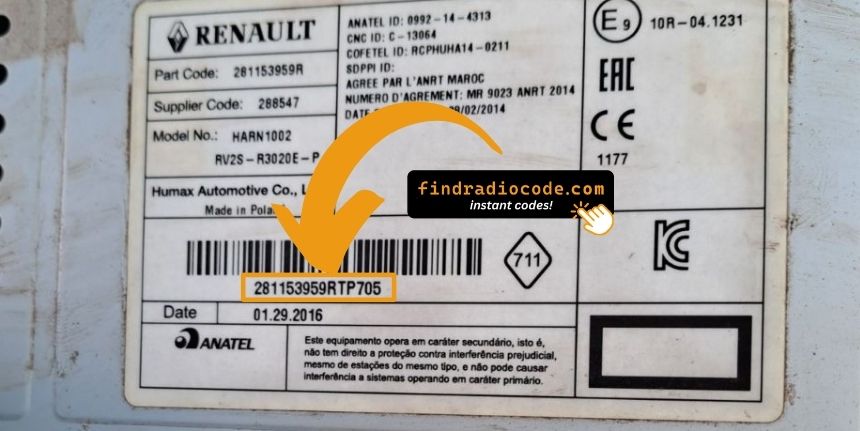
Example: Renault Clio serial number label location
S/N Patterns and Prefixes
The 2020 Renault Clio radio serial prefixes:
BP####– Blaupunkt radio serial (standard)CC####– Continental radio serialPH####– Philips radio serialPR####– Other Renault OEM prefix
The serial is printed on the radio casing. Don't confuse it with the Renault part number.
Common S/N Formats Used on 2020 Clio Units
Serial number format is set by the head unit manufacturer rather than the vehicle. On the 2020 Clio, the EASY LINK chassis label carries an alphanumeric serial of mixed letters and digits, typically labelled S/N, Serial, or SN, and is distinct from the part number and the production barcode.
- The serial is typically an alphanumeric string in the 8 to 14 character range. Length can vary by supplier and production batch.
- The label sits on the metal chassis, usually on the top or side, with the S/N field clearly tagged.
- Common mistakes include submitting the part number, the hardware revision, or the EAN-style barcode below the serial. Only the field labelled S/N or Serial should be submitted.
- Re-check 0 versus O, 1 versus I, and 8 versus B before submission. These are the most frequently misread characters on EASY LINK labels.
Entering Your Unlock Code
Now that you've found the S/N and generated the unlock code, the last step is entering it into your radio.
Renault factory radios display a ENTER CODE message when ready for input.
The process is usually quick, but button layouts and confirmation methods may differ slightly depending on the radio version installed in your Clio.
Detailed Entering Instructions for Clio 2020
To enter the code on the 2020 Renault Clio:
- Ignition ON. Radio shows "CODE" or four dashes (----).
- Press preset buttons 1-4 to enter each digit of the 4-digit code. Each press advances the digit (0-9).
- Press and hold button 5 or button 6 to accept.
Lockout: Several wrong entries will cause a lockout. Turn off the radio for about half an hour, then retry.
Step-by-Step Renault Clio 2020 Radio Code Retrieval Guide
Getting your radio code takes only a few simple steps.
- Locate the radio's serial number - this is the only info required by our side.
The difference with the dealership lookup is that no VIN or paperwork is needed. - Enter the serial number into our generator above.
The system checks it against a database of supported factory radios and automatically finds the matching anti-theft code. - In most cases, the code will appear instantly on the screen after you pay and is also sent to your email , just in case.
If manual verification is required (rare situations), you'll be informed before checkout. - When you receive it, simply enter it into your radio to restore full functionality.
Understanding Unlock Issues with Your Clio
If the radio rejects your code, work through the following before making another attempt.
- Verify the serial prefix: Renault radios use serials starting with BP, CC, PH, or PR. Make sure you submitted the correct serial from the radio label — not any other sticker inside the car.
- Look for digit confusion: With older Blaupunkt/Philips stickers, 0 and O, 1 and I, and 8 and B look similar. Photograph the label and zoom in.
- Entry method: Pressing button 1 cycles digit 1 from 0 to 9. Pressing too quickly can skip over the correct digit. Press deliberately and count. Hold button 5 or 6 to confirm only after all four digits are set.
Still getting the wrong code? Send us your serial and order number and we will re-verify immediately.
When the radio starts but does not ask for a code, try the following:
- Force the code prompt: Disconnect the battery for 30 seconds, refit, and turn the ignition on. The radio should then request the code.
- Check if already unlocked: If the radio plays stations and responds to all controls, it is already unlocked. You do not need to do anything.
- On MediaNav touchscreen versions: Renault MediaNav uses a different interface. Look under Settings and System for unlock-related options.
- Some units need ACC or ON: Some Blaupunkt/Philips units may only show the code prompt when the ignition is in ACC or ON. Try both.
The display shows "WAIT" / "SAFE" after 3 wrong code attempts, preventing further input until the timer resets.
Clearing the wait: Turn the ignition to ON and keep it in that position for a full 60 minutes. Any power interruption resets the countdown to zero. The timer resets every time power is cut.
On Renault models, battery drain during a long wait is possible. Run the engine or use a battery maintainer if possible to keep voltage stable.
The serial number on Renault radios is on a label on the rear or side of the radio unit, only visible after removing the unit.
- What to look for: Look for a string beginning with BP, CC, PH, or PR followed by numbers and letters.
- Label condition: Labels on higher-mileage vehicles are sometimes worn. Take a well-lit close-up photo — detail is easier to read in a zoomed image.
- Removal tools: Standard DIN release keys work on all Renault radios. Insert into the release slots on each side and pull forward.
Do not use the vehicle VIN or dashboard label number — these produce an incorrect code.
Code entry on Renault passenger car radios relies on the preset station buttons to dial in the code digit by digit.
- Button 1 controls the first digit — pressing it cycles from 0 to 9.
- Button 2 controls digit 2, button 3 digit 3, button 4 digit 4.
- Once all four digits are correct, hold down button 5, button 6, or the Enter / AM-FM button to confirm.
Note: Newer Renault models with a MediaNav touchscreen use an on-screen keypad instead of preset buttons. If a number pad appears on screen, tap it directly. No hold-to-confirm is needed.