Where to Find the Serial Number on your Clio
The important fact to know is that factory radios use a unique S/N to identify each unit.
Your anti-theft system matches the code directly to the serial.
Unlike car-specific data such as VIN or registration information, it is not determined by the model or production year, so you'll be able to retrieve it even if you have an aftermarket radio.
Depending on the maker and radio installed in your Renault Clio, the retrieval method is different.
Here are the best ways to find it.
Factory Radios on the 2019 Renault Clio
The launch-year Mk5 Clio (BJA platform) introduced the EASY LINK infotainment family across the lineup, replacing the previous Media Nav and R-Link 2 units. All variants ship with a fully integrated touchscreen head unit, but two display sizes were offered depending on trim and option pack.
EASY LINK 7-inch is fitted to lower trims and entry-level option packs. It is mounted in landscape orientation in the center stack and features a fixed bezel with capacitive controls along the side, with DAB radio, Bluetooth telephony, and standard wired Apple CarPlay and Android Auto.
EASY LINK 9.3-inch is the premium head unit, optional on mid trims and standard on top trims. It is mounted in portrait orientation and is visually unmistakable thanks to its tall vertical layout dominating the dash. This variant adds embedded TomTom navigation with 3D mapping, OTA updates, and the Renault connected services suite.
Quick field test: if the screen is taller than it is wide, the unit is the 9.3-inch EASY LINK. If it is wider than tall, it is the 7-inch EASY LINK.
Check the Display First - Serial Retrieval Without Tools
The method for 2019 Renault Clio is this:
The 2019 Renault Clio is equipped with a Blaupunkt OEM radio or MediaNav system. Many Renault radios do not support an on-screen serial number retrieval method.
The serial number can be found on a sticker on the radio chassis. The radio must be extracted to read it. Certain more recent Clio with MediaNav may show the serial in Settings → System.
Manufacturer Label Inspection
If the serial number cannot be accessed via display, use the hardware method.
Most Renault Clio factory radios include a label with the serial number printed on the chassis.
Process details:
- Disable power.
- Carefully remove surrounding mounting frame.
- Release clips holding the radio.
- Slide outward to inspect the label.
To access the serial on the 2019 Renault Clio:
- Turn off the vehicle.
- Locate the extraction holes on both sides of the radio. Renault radios typically use pin-release removal holes.
- Insert radio release keys and pull the radio out.
- Locate the serial on the manufacturer label on the chassis. It begins with PH.
Note: Renault extraction tools are the standard DIN-style tools used for Fiat vehicles.
Locate the Serial on the 2019 Clio's Radio Chassis
The EASY LINK head unit is deeply integrated into the dashboard structure of the Mk5 Clio. The display module, the computing unit, and the surrounding trim are fastened with concealed clips and brackets, and the unit shares wiring with the climate controls and the connected services antenna. Because of this, professional removal is strongly recommended for serial retrieval. Damage to the dashboard trim, the screen surround, or the CAN bus connectors is a common outcome of DIY removal attempts on this platform.
Mandatory safety notice: turn the ignition off, remove the key card, disconnect the negative terminal of the 12V battery, and wait at least five minutes before touching any dashboard component. Do not pull on or disturb any yellow wiring connector, as these are tied to the SRS airbag system. Always use plastic trim removal tools, never metal screwdrivers, against painted or soft-touch dashboard surfaces.
Tools that a technician will typically use: plastic trim removal wedges, a Torx bit set, a small ratchet with extensions, a flashlight, and a phone camera to photograph the manufacturer label once the unit is freed.
General removal overview as performed in a workshop: the surrounding screen bezel is unclipped, two or more retaining fasteners behind the bezel are removed, the display assembly is eased forward, and the multi-pin connectors at the rear are unplugged only after the unit is fully free. Do not attempt to power the radio while it is partially disconnected, as this can trigger fault codes on the body control module.
Where to find the serial: on a sticker label affixed to the top or side of the metal chassis. Look for a barcode followed by an alphanumeric string labelled S/N, Serial, or SN. The unlock code itself is not printed on the unit. Photograph the label and double-check characters that are easy to confuse, such as 0 versus O and 1 versus I.
If the dashboard does not separate cleanly with light pressure, stop and consult a qualified auto-electrician. The Mk5 dash is not designed for repeated disassembly.
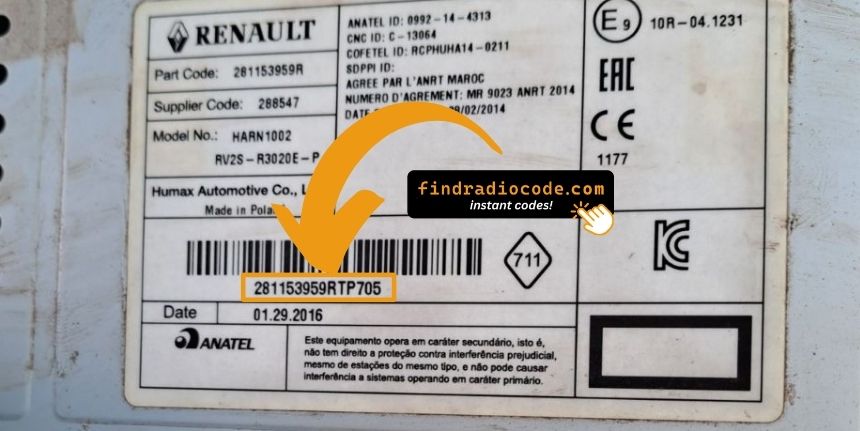
Example: Renault Clio serial number label location
Typical Serial Number Formats for 2019 Clio Radios
The 2019 Renault Clio radio serial prefixes:
BP####– Blaupunkt radio serial (most common)CC####– Continental radio serialPH####– Philips radio serialPR####– Alternate Renault OEM prefix
The serial is printed on the radio unit. Do not mistake it with the Renault part number.
Typical Serial Number Formats for 2019 Clio Radios
Serial number format is determined by the radio manufacturer rather than the vehicle. Knowing the typical pattern helps confirm that the string read from the chassis label is the radio serial, not a part number or production barcode.
The 2019 Clio EASY LINK head unit (both 7-inch and 9.3-inch variants) carries a manufacturer label with a serial number that is typically an alphanumeric string of mixed letters and digits. The string is commonly labelled S/N, Serial, or SN on the chassis sticker, separate from the part number, the hardware revision code, and the production barcode.
Validation tips: serial numbers in this generation are typically in the 8 to 14 character range, although exact length can vary by supplier and production batch. Confirm that the string is the field labelled S/N or Serial, not the part number or the EAN-style barcode beneath it. Re-check similar-looking characters (0 versus O, 1 versus I, 8 versus B) before submission. Do not submit hardware revision codes or barcode-only references.
Locked Clio Radio? Here's Exactly How to Get the Code
Vehicle radios use anti-theft codes dependent on the radio unit itself instead of the model or production year.
- Our lookup service works by matching your Renault Clio radio's serial number.
- Once the serial number is submitted, the system identifies the radio family and retrieves the corresponding code.
- You can then enter the code directly into your Renault radio.
- This approach saves time compared to traditional methods for 2019 Renault Clio.
How Code Entry Works on Your Renault Radio
Now that you've generated 2019 Renault Clio unlock code from the serial, you're ready to reactivate the radio.
Many drivers get stuck at this stage because input methods can look different across radio versions, but it's usually simple.
When the radio shows ENTER CODE, it means the unit is waiting for the correct numbers.
Entering Process
To input the code on the 2019 Renault Clio:
- Ignition ON. Radio displays "CODE" or four dashes (----).
- Press preset buttons 1-4 to enter each digit of the 4-digit code. Each press cycles the digit (0-9).
- Press and hold button 5 or button 6 to submit.
Lockout: Several incorrect entries will cause a lockout. Turn off the radio for about half an hour, then retry.
Understanding Unlock Issues with Your Clio
Finding the serial on Renault radios can be found on a sticker on the rear or side of the radio unit, only visible after removing the unit.
- What to look for: Look for a string beginning with BP, CC, PH, or PR then 8–10 alphanumeric characters.
- Label condition: Older Renault labels can be faded. Photograph under good light and zoom in — a camera often reveals characters the eye misses.
- How to access the serial: Pin-release extraction tools fit all Renault radios. Insert them into the holes on both sides of the radio and pull forward.
Do not use the vehicle VIN or dashboard label number — these produce an incorrect code.
Should the radio refuse your code, check these points before entering it again.
- Verify the serial prefix: Renault radios take serials starting with BP, CC, PH, or PR. Make sure you submitted the full serial from the radio label — not any other sticker inside the car.
- Check for misread characters: With older Blaupunkt/Philips stickers, 0 and O, 1 and I, and 8 and B look similar. Photograph the label and zoom in.
- Button sequence: Each press of a preset button advances the digit by one. Rapid pressing may go past the right number. Press deliberately and count. Only confirm once all four digits are correct.
If it keeps failing? Contact us with your serial number and we will re-verify immediately.
The radio shows "WAIT" / "SAFE" after 3 wrong code attempts, preventing further input until the timer resets.
To clear the lockout: Turn the ignition to ON and leave it there for a full 60 minutes. Any power interruption resets the countdown to zero. This is particularly important — the timer does not pause, it restarts.
On Renault models, voltage can drop if the ignition is on for an extended period without the engine running. Keep the engine idling or connect a charger where practical to prevent the timer restarting.
If the radio powers on without prompting for a code, work through these steps:
- Force the code prompt: Pull the radio fuse briefly, refit, and power up the radio. The CODE prompt should appear.
- It may already be working: If the radio plays stations and responds to all controls, it is not locked. No code entry is needed.
- MediaNav units: MediaNav uses a different interface. Look under Settings and System for unlock-related options.
- Some units need ACC or ON: Some Blaupunkt/Philips units may only show the code prompt when the ignition is in ACC or ON. Try both.
Entering the unlock code on Renault passenger car radios relies on the preset station buttons to dial in the code digit by digit.
- Button 1 sets the first digit — each press cycles from 0 to 9.
- Button 2 sets digit 2, button 3 digit 3, button 4 digit 4.
- After setting all digits, hold down button 5, button 6, or the Enter / AM-FM button to submit the entry.
Note: Some later Renault models use an on-screen keypad instead of preset buttons. If a number pad appears on screen, tap it directly. No hold-to-confirm is needed.
Why Is the Radio Asking for a Code?
The single most common cause for a locked radio on Renault vehicles, but several other situations to be aware of:
- Battery replacement: Battery replacement is the top reason across all Renault models. Renault radios lock every time the battery is disconnected or replaced. It catches many owners off-guard, even during a very short disconnect.
- Buying a used Renault: The original code is rarely passed on when a car changes hands. Private sellers and dealers frequently cannot provide it.
- Discharged battery: A battery drained from sitting unused activates the lock on reconnection or recharge.
- Workshop or service work: Any work involving the battery — even routine maintenance — can trigger the lock.