Get Your Harman Uconnect 8.4 RA4 VP3 MX Radio Code in 3 Simple Steps
Harman | Chrysler | Instant Retrieval
Our refund policy in full.
Accepted Serial Number Formats
| Serial Prefix | Status |
|---|---|
T00AM |
Supported |
T00BE |
Supported |
T0012 |
Supported |
If your serial starts with one of these, we can recover your code.
What you need to do
Everything runs from the serial number on the radio's own label.
- 1 Read the number on the sticker On the factory sticker on the radio housing, next to the barcode. Most units have to come out of the dash - release keys cost a few dollars.
- 2 Put it in the form on the left Letters and digits exactly as printed - the form validates them first.
- 3 The code is delivered instantly The code appears the moment the payment clears, and a copy goes to your email. Save it - the same four digits work for the life of the radio.
If it does not work, you get your money back.

The sticker on your unit will look similar. Read the serial straight off it.
Sample serials we handle
Examples of serial numbers we see on Chrysler vehicles:
T00AM1801T0282
(prefix: T00AM)
T00BE351823197
(prefix: T00BE)
T0012566327123
(prefix: T0012)
T00AM2244H1937
(prefix: T00AM)
T00BE104477269
(prefix: T00BE)
Usual starting characters: T00AM, T00BE, T0012
How to Identify the Uconnect 8.4 RA4 VP3 MX
Not sure if your vehicle is fitted with the Uconnect 8.4 RA4 VP3 MX? Compare the design, controls, display and features listed below against your factory radio.
Typical identification features:
- 8.4" touchscreen in the centre of the dash
- Built-in navigation with factory map data
- Shipped for the Mexico market
- RA4 VP3 MX printed on the factory label
- A serial that begins with T00AM, T00BE, T0012
It is the Uconnect 8.4 RA4 VP3 MX when:
- RA4 VP3 MX appears as the sales code on the label
- the label serial begins with T00AM, T00BE, T0012
- it came in a car from the 2013-2017 range
- the display matches the Uconnect 8.4 8.4" touchscreen
RA4 has working navigation. If tapping NAV on your screen returns "Feature not available" you have RA3, not RA4.
Uconnect 8.4 RA4 VP3 MX Overview
The Uconnect 8.4 RA4 VP3 MX is a factory-fitted Chrysler audio and multimedia unit. Alongside standard radio and audio playback it may include touchscreen controls, Bluetooth, CD/DVD playback or factory navigation, depending on how the vehicle left the factory.
Uconnect 8.4 RA4 (VP3 Mexico) is the early-spec 8.4-inch navigation Uconnect for the Mexican market - 8.4-inch touchscreen with built-in maps, Mexican Spanish defaults. NAV tile appears on the home screen and draws maps when tapped.
Look for the Uconnect 8.4 RA4 VP3 MX in Chrysler vehicles from 2013-2017. It came with the Harman multimedia platform and is still widely fitted from that period.
Common features on this unit:
8.4" touchscreen
AM/FM radio
Navigation built in, with factory map data
Bluetooth hands-free and audio streaming
Media playback over USB
SiriusXM satellite radio*
Steering wheel control support
Anti-theft security code
*Availability varies with the vehicle configuration.
The Uconnect 8.4 RA4 VP3 MX carries the same anti-theft protection as most factory units. Once power is cut - a flat battery, a battery swap, or the radio being removed - it will ask for the original code before it comes back to life.
Background on the platform itself is published by the official Uconnect site.
Step One: The Serial Number
The code is calculated from the radio's own serial number, so that number is the only thing you need before ordering. It is printed on the factory sticker of the unit itself, not in the vehicle documents.
Where exactly: Top of the chassis. Pull the radio.
Getting to the label:
- Pull the unit forward with release keys (cheap online) - the wiring can stay plugged in.
- Find the white label on the housing and read the serial off it - it sits beside the barcode.
- Enter it character for character - no spaces, no dashes.
Where the label sits on this radio
Two minutes of video instead of a page of text

Our own clip of the process - more videos are on the channel.
The Situations That Lock a Uconnect 8.4 RA4 VP3 MX
Nearly all of the Uconnect 8.4 RA4 VP3 MX codes we generate follow one of these four events.
After mechanical work
The repair went fine - the locked radio is just the side effect of the battery being off the car for a while.
The previous owner had no code
Used cars very often arrive with a locked radio and no code card in the glovebox. The serial number on the unit is all that is needed to recover it.
The battery was disconnected
Whether the battery was replaced or just ran flat, the radio sees a power loss and asks for the code when it starts.
A different unit is in the dash now
A radio from a scrapyard or an online sale comes with its own serial, so it needs its own code - use the serial on the newly installed unit.
All four roads lead to the same fix - read the serial off the unit, enter it above, and the original code arrives instantly.
Technical Overview
| Specification | Value |
|---|---|
| Manufacturer | Harman |
| Radio Family | Uconnect 8.4 |
| Variant | RA4 VP3 MX |
| Market | Mexico |
| Vehicle Brand | Dodge / Jeep / Ram |
| Production Years | 2013-2017 |
| Display | 8.4" touchscreen |
| Navigation | Yes |
| Serial Prefixes | T00AM, T00BE, T0012 |
Equipment on the Uconnect 8.4 RA4 VP3 MX differs with the car it came in: navigation, Bluetooth, USB and media playback depend on trim, market and model year.
Which Vehicles Use the Uconnect 8.4 RA4 VP3 MX?
| Vehicle Model | Typical Production Years | Notes |
|---|---|---|
| Dodge Durango, Charger, Challenger (Mexico, navigation trims) | 2013-2017 | |
| Jeep Grand Cherokee WK2 (Mexico, Limited/Overland with nav) | 2013-2017 | |
| Ram 1500/2500/3500 (Mexico, Laramie/Limited with nav) | 2013-2017 |
Some vehicle models were available with more than one factory radio depending on trim level, production year or regional market. Always verify your radio model before ordering a code.
Supported Factory Identifiers 14
All of the part numbers listed here are supported. Match the one printed on your unit's label and you are in the right place.
68224535AA 68224535AB 68224535AC 68224535AD 68224535AE 68224535AF 68224535AG 68224535AH 68224535AI 68224535AJ 68224535AK 68224535AL 68224535AM 68224535AN Look for the part number on the radio's identification sticker, typically beside the serial number. Any reference listed here is supported by this service.
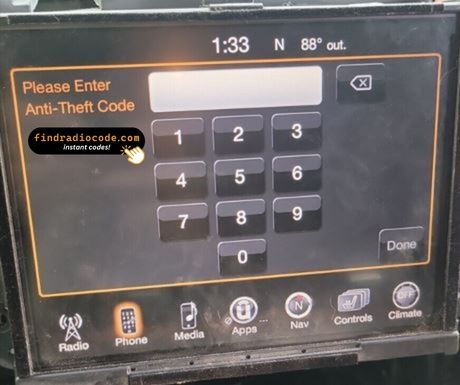
Typing the code into your Uconnect 8.4 RA4 VP3 MX
Nothing to install and no tools needed - just the four digits.
- Turn the ignition on so the radio powers up and shows the locked screen.
- A keypad for the code fills the middle of the screen.
- Tap the four digits of your code in order.
- There is no separate OK button - the radio checks the code on the last tap.
- A correct code clears the lock screen and the audio comes straight back.
Common problems
The screen shows a wait timer
The timer is the radio protecting itself after failed entries - power on, patience, then try again. 30-minute WAIT after three wrong attempts.
The label is not where I expected
Only the radio itself carries it - slide the unit forward and the label is right there. Top of the chassis. Pull the radio.
Locked again after it was fine
Nothing is broken. Any interruption to the 12V supply brings the lock screen back. Loss of 12V supply.
Making sure it is the right unit
The differences are easy to miss, so check this before ordering. RA4 has working navigation. If tapping NAV on your screen returns "Feature not available" you have RA3, not RA4.
Write the code down - the same four digits work for the life of the unit.
Uconnect 8.4 RA4 VP3 MX FAQ
Recent Customer Reviews
A few of the most recent reviews left after an unlock - the full list is on the reviews page.
"I paid the $20 with hesitation but this worked perfect, got my code immediately. Thanks!!!"
Paid the money I got the code before I could make it out the house thank you so much 👋🏾
Yolonda Bridgeman - Chrysler
Wow I got my radio code and less than three minutes
Martin Murillo - Chrysler
What You Get
Your original code arrives the moment you pay, with an email copy for safe keeping.
Full money-back guarantee if the code does not unlock your radio.
Runs around the clock, so a locked radio never waits for opening hours.
Works again and again - the code stays valid for the life of the radio.
Compare with Similar Models
Still unsure? These closely related units use much of the same hardware as the Uconnect 8.4 RA4 VP3 MX and may be what you actually have.
Not sure this is your unit? Browse every Harman radio we support on the Harman radio code overview.