
Fast Ram ProMaster City Radio Unlock Process Explained
Vehicle radios use security codes tied to the radio unit itself instead of the model or production year.
- The system uses the ProMaster City's radio serial to retrieve the unlock code.
- After entering the serial into the form above, the system identifies the radio unit and retrieves the corresponding code.
- Use the code to unlock the radio immediately.
- Compared to Ram dealer retrieval, this method is faster and more convenient.
Can't Locate Your Unit's S/N? Follow The Steps Below for Ram ProMaster City 2015
Very important fact to know is that factory radios use a unique S/N to identify each unitindividually.
The security system links the code directly to the serial.
Different from car-specific data like VIN or registration info, it is not determined by the model or production year, so you'll be able to get it even if you have a radio that you installed afterwards.
Depending on the maker and radio installed in your Ram ProMaster City, the retrieval method is different.
Here are the best ways to find it.
Factory Radios on the 2015 Ram ProMaster City
The 2015 ProMaster City launched as the US-market version of the Italian-built Fiat Doblo, and its head-unit lineup reflects that European platform rather than the US Mopar Uconnect 8.4 family used in the larger ProMaster van. There were two main factory radios offered, split by trim:
- Base AM/FM (no touchscreen) - standard on the entry-level Tradesman cargo van and the base Wagon. A simple Mopar/Magneti Marelli 1-DIN unit with a small monochrome display, hard preset and tune buttons, USB input and four speakers; no Bluetooth, no screen graphics, no NAV.
- Uconnect 5.0 (VP2, 5-inch touchscreen) - standard on the Tradesman SLT and Wagon SLT trims, optional elsewhere. A 5-inch color touchscreen developed jointly with Fiat (Microsoft-based OS rather than the QNX used on the Uconnect 8.4 platform). Identifiable by the small 5-inch screen flanked by hard buttons. Ships with Bluetooth, voice command, USB and AUX inputs; TomTom navigation and SiriusXM were available as further options.
An optional six-speaker package was available with the Uconnect 5.0 on SLT trims; lower-tier vans kept the four-speaker layout regardless of head unit.
View Your Serial Number on the Radio Screen
The method for 2015 Ram ProMaster City is this:
The 2015 Ram ProMaster City is a small commercial van based on the Fiat Doblo platform. It features the Uconnect 5.0" (RA1) touchscreen in most trims. The ProMaster City's radio doesn't always support the Dealer Mode screen diagnostic.
To find the serial number, the best approach is to extract the radio and find the serial from the manufacturer label on the unit casing.
Manufacturer Label Inspection
If the serial does not appear on display, the next step is checking the radio itself.
Many Ram radios require physical access to the serial sticker attached to the unit.
Usual approach:
- Start by completely shutting off the engine - pull the key out.
- Then detach the radio surround.
- Next, unscrew the mounting points and pull the radio forward.
- Look for a factory sticker showing the serial number.
To remove the radio from the 2015 Ram ProMaster City:
- Switch off the vehicle.
- Look for release holes on both sides of the radio faceplate. The ProMaster City sometimes features European-style extraction slots.
- If release holes are present: Insert radio extraction keys into the holes and ease the unit out.
- If no release holes: Pry off the center stack trim with a plastic pry tool, then remove the fasteners and slide the unit out.
ProMaster City Tip: The smaller dashboard of the ProMaster City gives you access to the radio relatively easy. The radio unit is smaller than in larger Ram vehicles.
Identify Your 2015 ProMaster City's Factory Radio Serial
The 2015 ProMaster City uses an Italian-platform dash (the cabin is shared with the Fiat Doblo), so the bezel/radio fastener layout is different from the US Mopar minivans. The serial number on both the base AM/FM unit and the Uconnect 5.0 (VP2) touchscreen is printed on a chassis sticker on the side or top of the head unit, so the radio has to come out for it to be read.
- Safety first: turn the ignition off, remove the key, disconnect the negative battery terminal and wait several minutes before touching wiring; avoid the yellow airbag/SRS connectors and use plastic trim tools so nothing shorts or breaks.
- Tools you will need: plastic trim removal kit, T-25 Torx bit (for the bezel/upper retainers), T-10 Torx bit (for the radio bracket screws), Phillips screwdriver and a flashlight.
- Open any small storage tray above the radio and ease the centre dash bezel forward at the lower edge using a plastic pry tool; on this Doblo-style dash the bezel is held in by retainer clips and a small number of visible Torx fasteners rather than the four-clip arrangement used on US Chrysler/Dodge minivans.
- Once the clips and any visible T-25 Torx screws are released, lift the bezel away and unplug any wire harnesses that run to it (for example the hazard switch).
- The radio chassis is held to the dash by metal brackets - back out the four T-10 Torx screws securing those brackets to free the unit.
- Slide the radio forward and disconnect the antenna lead and the multi-pin power/data harnesses on the rear of the unit.
- The serial number is printed on a barcode/sticker label on the top or side of the chassis next to the part number and supplier markings; on the Uconnect 5.0 (VP2) units it sits on the metal case rather than appearing on the touchscreen.
- Photograph the label up close in good light and double-check ambiguous characters such as 0/O and 1/I before submitting the serial.
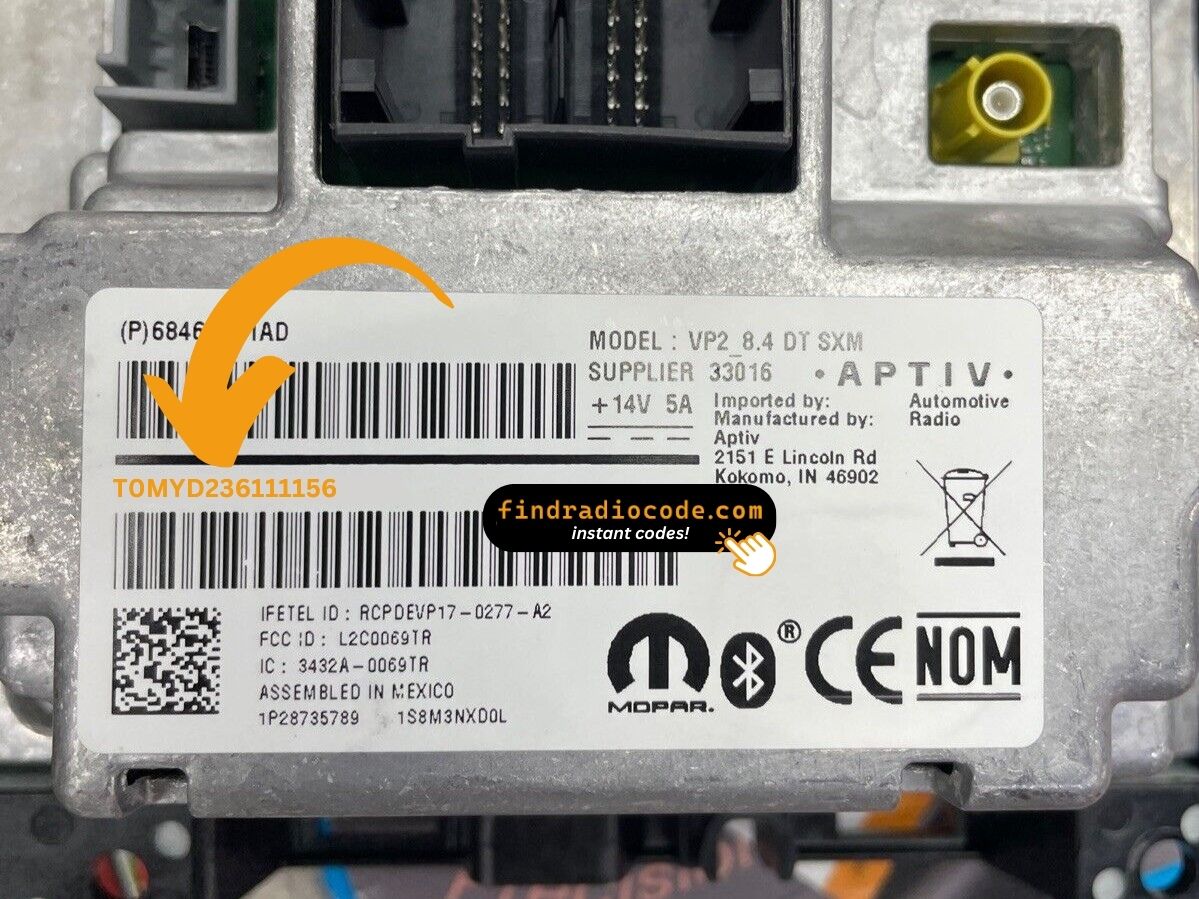
Example: Ram ProMaster City serial number label location
How Serial Numbers Usually Look on These ProMaster City Radios
The 2015 Ram ProMaster City radio features the same Stellantis serial format:
T00AM– Harman-manufactured Uconnect unitsT00BE– Continental-manufactured unitsTM9– Earlier production Harman units
The ProMaster City most commonly features the RA1 (Uconnect 5.0") radio. The serial number is 14 characters and can be located on a barcode sticker on the chassis.
Note Like the larger ProMaster, the ProMaster City is derived from a Fiat platform (Doblo). However, the Uconnect serial format is consistent with other Stellantis vehicles.
Serial Number Patterns on 2015 ProMaster City Radios
Because the 2015 ProMaster City is built on an Italian platform with a Fiat-derived radio fitment, the prefix on the chassis label depends on which head unit was specified and which supplier built it. As always, treat the printed sticker on the unit itself as the authoritative reference rather than relying on a guessed prefix.
Uconnect 5.0 (VP2, 5-inch touchscreen)
- The VP2 platform shares hardware with Fiat 500/500L Uconnect 5.0 units and is supplied through Mopar/Continental.
- VP2 serials are typically a 14-character alphanumeric string, often beginning with a
T-style prefix; copy each character exactly as printed on the case sticker. - The serial usually runs as a continuous block of letters and digits with no dashes or spaces.
Base AM/FM (1-DIN, no touchscreen)
- The base 1-DIN radio fitted to Tradesman and base Wagon trims is supplied through Mopar/Magneti Marelli for the European platform; some markets received slightly different variants of this unit.
- Its serial is also printed on the chassis label rather than displayed on the screen; transcribe the label exactly without guessing unclear characters.
Inputting the Security Code
After receiving 2015 Ram ProMaster City unlock code from the serial number, you're ready to reactivate the radio.
Some drivers hesitate at this stage because input process can look different across radio versions, but it's usually simple.
When the radio shows CODE, it means the unit is waiting for the correct numbers.
Entering Process
To input the unlock code on the 2015 Ram ProMaster City:
- Turn ignition ON. The Uconnect screen shows "ENTER CODE" or "CODE".
- Tap the touchscreen keypad to type each digit of the 4-digit unlock code.
- The radio confirms after the 4th digit is entered.
Lockout: Entering 3 wrong codes results in a 60-minute lockout. The ignition must be left ON for the entire lockout countdown.
How to Enter the Code on a 2015 ProMaster City
Once the unlock code has been retrieved for a 2015 ProMaster City radio, the digits are entered straight at the head unit - no scan tool or dealer visit is required for the entry step itself.
- Limited attempts: these head units only accept a small number of incorrect tries before going into a long lockout/WAIT state - owner reports on this generation cite a 30-minute timeout after too many wrong codes - so confirm every digit before pressing it.
- Place the ignition in RUN/ACC so the radio powers up but the engine stays off.
- Wait for the display to show
CODE,Enter Anti-Theft Codeor a similar prompt. - On the Uconnect 5.0 (VP2) 5-inch touchscreen, key in the four digits using the on-screen number pad and confirm with the on-screen OK/Enter button.
- On the base 1-DIN AM/FM radio, use the numbered preset buttons (1-4) in sequence to enter each digit and confirm with the labelled enter or tune knob as prompted on the small display.
- If the screen shows
WAITor a similar timeout after the failed-attempt limit is reached, leave the radio powered with the ignition in RUN for a continuous 30 minutes before trying the correct code again.
Why Did the Radio Lock and Ask for a Code?
The ProMaster City's Uconnect activates anti-theft after any power interruption. Small commercial vans frequently go through battery service and fitout work, making this a common event.
Common causes: battery replacement (most frequent), blown fuse after accessory installation, buying pre-owned without a known unlock code, or battery completely discharged from storage.
The code is tied to the radio's serial number — not the vehicle VIN.
ProMaster City 2015 Common Radio Problems
No code screen means the radio isn't locked yet. To force the code prompt: pull and reinsert the radio fuse, then restore power and turn ignition ON. "ENTER CODE" appears on startup.
As a compact van, its radio sometimes has DIN-style extraction holes, making removal faster than in larger vehicles. The serial label is on the rear of the unit: 14 chars starting with T00AM, T00BE, or TM9.
The ProMaster City uses a touchscreen (Uconnect 5.0" RA1). Tap each digit on the virtual number pad. No physical preset buttons are involved. The radio unlocks automatically after the 4th digit is entered.
The ProMaster City radio label has both the serial number (14 chars: T00AM, T00BE, or TM9 prefix) and a part number (P05... or 68...). Be sure to use the 14-character serial — not the part number.
After 3 wrong attempts, the radio locks out for 60 minutes. The display keeps showing "ENTER CODE" but ignores input during the wait.
To reset: Ignition ON, wait 60 full minutes without turning off. Any power interruption restarts the 60-minute countdown.