
How the Code Retrieval Process Works for Ram ProMaster City 2021
Getting your radio code takes only a few simple steps.
- Find the radio's serial number - this is the only information required to generate the correct unlock code.
The difference with the dealership lookup is that no VIN is needed. - Enter the serial number into our generator above.
Our system checks it against a database of supported units and automatically catches the matching radio code. - In most cases, the code will appear instantly on the screen after you pay and is also sent to your email for backup.
If we need to check it manually, you'll be informed before checkout. - When you get it, simply enter it into your radio to restore full functionality.
Got the Code? Here's How to Enter It
Once you receive the correct unlock code based on the S/N, you can restore default functionality by entering it into the unit.
The code entry process depends on the head unit design, but most 2021 ProMaster City systems follow a similar structure using preset buttons, touch controls, or rotary knobs - depending on if it's a factory or an aftermarket unit.
You will typically see ENTER CODE displayed on screen.
Detailed Entering Instructions for ProMaster City 2021
To enter the unlock code on the 2021 Ram ProMaster City:
- Turn ignition ON. The Uconnect screen displays "ENTER CODE" or "CODE".
- Use the touchscreen keypad to type each digit of the 4-digit unlock code.
- The radio restores after the final digit is entered.
Lockout: Entering 3 incorrect codes results in a 60-minute lockout. The ignition must stay ON for the full lockout period.
Correct Entering Process
Once the unlock code has been retrieved for a 2021 ProMaster City Uconnect 3 head unit, it can be keyed in directly at the dash - no scan tool or dealer visit is required. Before paying for a code, it is worth checking the small storage compartment on the top right side of the dash (and the glovebox), as Mopar shipped many ProMaster City vans with the original anti-theft code printed on a card in a plastic bag stowed in that area.
Limited attempts. Mopar/Uconnect head units only accept three incorrect tries before the radio enters a WAIT state, so confirm every digit before pressing it.
Entering the code. Place the ignition in RUN/ACC so the radio powers up but the engine stays off. Wait for the display to show CODE, Please enter Anti-Theft Code, or a similar prompt. On the Uconnect 3 5-inch touchscreen, tap the on-screen number pad to enter each digit of the 4-digit code and confirm with the on-screen OK/Enter button. If the on-screen keypad is unavailable on a particular software build, the numbered preset buttons (1-6) on the fascia can be used in sequence as the unit prompts.
If a wrong code was entered. If WAIT appears after wrong attempts, leave the radio powered with the ignition in RUN for a continuous 30 minutes before trying the correct code again; some owners also report success after disconnecting the battery for around 30 minutes and reconnecting.
How to Find the Serial Number on Your 2021 Ram ProMaster City Radio?
The first step is to find and write down the radio's serial num.
Depending on the radio unit fitted in your 2021 ProMaster City, the serial can be found either through the screen menu or by pulling the unit out and checking the label on the radio itself.
Follow the steps below to identify your S/N the right way.
Identify Your 2021 Ram ProMaster City's Factory Radio
The 2021 ProMaster City still carries the single-tier Uconnect 3 lineup used since the mid-cycle refresh. There is one factory head unit, plus an optional Mopar/Garmin navigation card. According to industry coverage, 2021 was the model year that produced the largest year-on-year sales spike for the nameplate, but the radio specification was unchanged.
Uconnect 3.0 with 5-inch touchscreen (RA2-style) is the standard and only factory infotainment unit on 2021 Tradesman and Tradesman SLT trims. The fascia carries a small 5-inch colour touchscreen at the top of the centre stack with hard buttons running along the bottom edge of the screen, AM/FM/SiriusXM with Bluetooth streaming audio, integrated Voice Command and a single USB port. Apple CarPlay and Android Auto are not supported on this generation Uconnect 3.
Uconnect 3.0 with 5-inch touchscreen plus Mopar Navigation uses the same 5-inch hardware activated with the optional Mopar/Garmin navigation SD card; the fascia is identical to the standard unit, but the home screen carries a NAV/Map tile and a Mopar SD card sits in the dash slot.
Field check: 5-inch screen with hard buttons below it, no Apple CarPlay or Android Auto on the home screen, and an upper dash clipboard tray sitting directly above the radio.
Find Your Serial Number on the Radio Display
Try the following for your 2021 Ram ProMaster City:
The 2021 Ram ProMaster City is a small commercial van based on the Fiat Doblo platform. It comes with the Uconnect 5.0" (RA1) touchscreen in most trims. The ProMaster City's radio may not support the Dealer Mode screen diagnostic.
To find the serial number, you will likely need to extract the radio and find the serial from the barcode sticker on the unit casing.
Pulling Out the Radio to View the S/N on the Tag
If the serial does not appear on display, the next step is checking the radio itself.
Many Ram radios require physical access to the serial sticker attached to the unit.
Typical approach:
- Start by completely shutting off the engine - pull the key out.
- Then remove the dashboard bezel.
- Next, loosen the mounting points and slide the radio forward.
- Look for a factory sticker showing the serial number.
To remove the radio from the 2021 Ram ProMaster City:
- Turn off the vehicle.
- Look for release holes on both sides of the radio faceplate. The ProMaster City sometimes features DIN-style extraction holes.
- If release holes are present: Insert thin release tools into the holes and slide the unit forward.
- Without release holes: Detach the dashboard trim with a plastic pry tool, then unscrew the mounting screws and pull the unit out.
ProMaster City Tip: The compact dashboard of the ProMaster City makes access to the radio fairly straightforward. The radio unit is smaller than in full-size Ram trucks.
Pulling Out the Radio Unit to See the S/N on the Tag
For the 2021 ProMaster City the most reliable way to read the radio serial is to pull the head unit and read the printed sticker on the chassis. The Doblo-based dash uses an upper clipboard storage tray directly above the radio, so a careful, methodical removal is important.
Safety first. Turn the ignition off, take out the key, disconnect the negative battery terminal, and wait several minutes before touching wiring. Avoid any yellow airbag/SRS connectors entirely and use plastic trim tools so nothing shorts or breaks.
Tools you will need. Plastic trim removal kit, Phillips screwdriver, T-25 and T-10 Torx bits, flashlight, and a pair of DIN radio release keys (Mopar/Metra 86-3528 or equivalent); bent coat-hanger wire shaped to match the release-key profile can substitute in a pinch.
Removal overview. Deal with the upper dash clipboard/storage tray above the radio first - lift the lid, back out the visible Torx screws and ease the tray forward to expose the upper mounting points around the radio. Then insert the DIN release keys into the small holes either side of the head unit fascia until the internal clips release, and pull the radio straight out using the keys as handles. With the radio just clear of the dash, release the antenna lead and the multi-pin power/data connectors on the back of the unit before lifting it fully out.
Where the serial sits. The serial number is printed on a barcode/sticker label on the top, side, or rear of the radio chassis next to the part number and supplier markings (commonly a Mopar/Magneti Marelli or Continental code).
Tips. Photograph the label up close in good light and double-check ambiguous characters such as 0/O, 1/I and B/8 before submitting the serial. If the DIN keys do not release the radio cleanly, reseat them rather than forcing the unit and risking the internal latches.
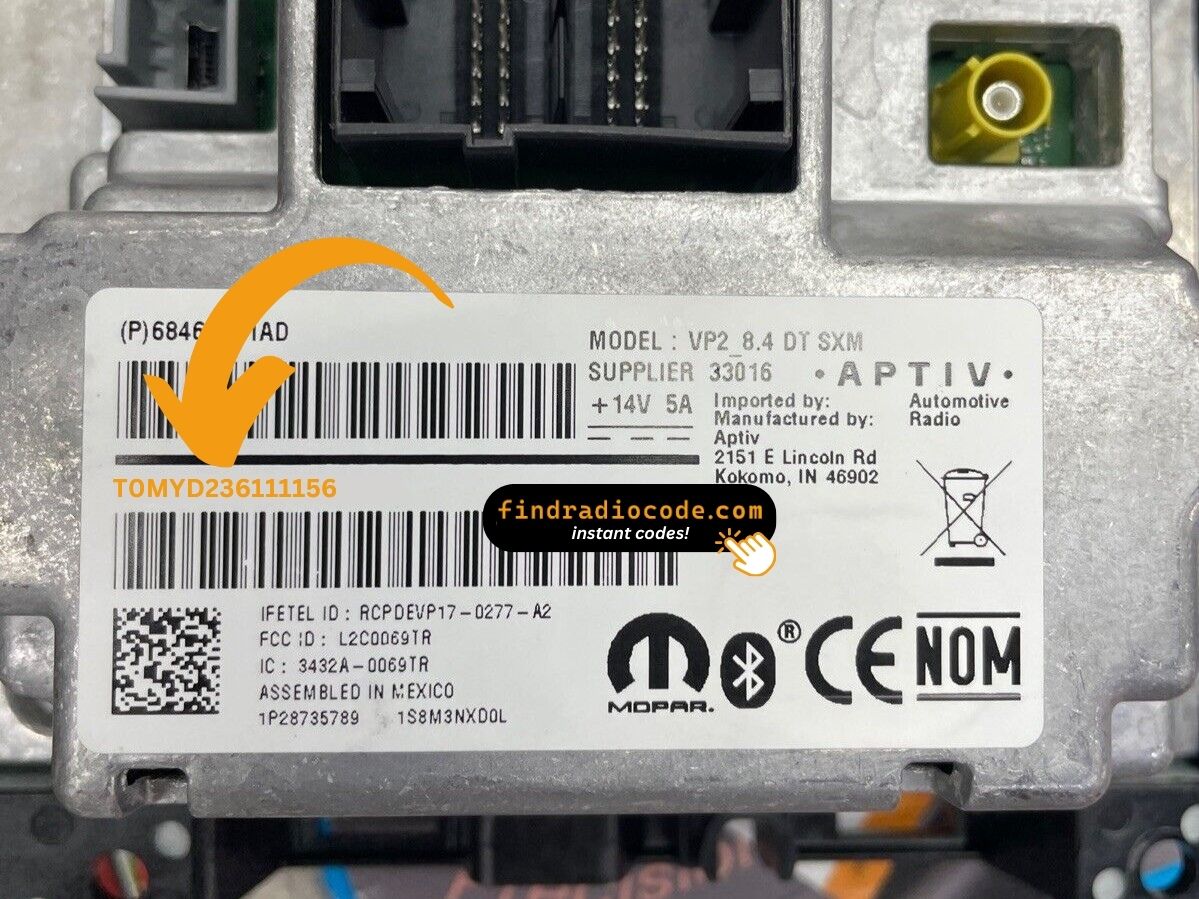
Example: Ram ProMaster City serial number label location
How Serial Numbers Usually Look on These ProMaster City Radios
The 2021 Ram ProMaster City radio has the same Stellantis serial format:
T00AM– Harman-manufactured Uconnect unitsT00BE– Continental-manufactured modulesTM9– Older production Harman units
The ProMaster City generally comes with the RA1 (Uconnect 5.0") radio. The serial number is 14 characters and can be located on a barcode sticker on the radio body.
Note Similar to the larger ProMaster, the ProMaster City is derived from a Fiat platform (Doblo). However, the Uconnect serial format is identical with all Stellantis vehicles.
Common Serial Number Structures
The 2021 ProMaster City still rides on the Italian/Turkish Fiat Doblo platform, so the head-unit supplier mix is closer to a European Fiat than to a US-built Mopar truck. The exact prefix on the chassis label depends on which supplier built the Uconnect 3 unit, and the printed sticker on the chassis is always the authoritative reference.
Uconnect 3.0 5-inch (with or without Mopar Navigation)
The 5-inch Uconnect 3 unit fitted to the 2021 ProMaster City is often seen with a 14-character alphanumeric string printed on the chassis label. Mopar-style units may begin with T (for example T00AM, TM9 or TQ1), while Continental-built variants are commonly seen with an A2C prefix on Doblo-platform radios. The serial is usually a continuous run of letters and digits with no dashes or spaces.
Doblo-platform supplier notes
Because the ProMaster City shares its dash and electronics with the Fiat Doblo, owner reports also describe shorter numeric serials and Magneti Marelli supplier codes on some units. Copy the serial exactly as printed on the unit and avoid guessing characters that look unclear; a misread 0/O or 1/I is enough to derail the code lookup.
Troubleshooting Common Radio Problems - ProMaster City 2021
The ProMaster City radio label shows both the serial number (14 chars: T00AM, T00BE, or TM9 prefix) and a part number (P05... or 68...). Be sure to use the 14-character serial — not the part number.
The ProMaster City features a touchscreen (Uconnect 5.0" RA1). Tap each digit on the virtual number pad. No physical preset buttons are involved. The radio unlocks automatically after the last digit is tapped.
No code screen means the radio isn't locked yet. Trigger the lock: briefly disconnect the battery, then restore power and turn ignition ON. "ENTER CODE" comes up on startup.
After 3 wrong attempts, the radio locks out for 60 minutes. The screen still shows "ENTER CODE" but ignores input during the wait.
To reset: Ignition ON, wait 60 full minutes without cutting power. Any power interruption resets the 60-minute countdown.
As a compact van, its radio may use European-style extraction holes, making removal faster than in pickup trucks. The serial label is on the side or back of the unit: 14 chars starting with T00AM, T00BE, or TM9.
Why Did the Radio Lock and Ask for a Code?
The ProMaster City's Uconnect locks automatically after losing power. Small commercial vans frequently go through battery service and upfit work, making this a common event.
Common causes: battery replacement (most frequent), fuse failure after accessory installation, buying pre-owned without a known unlock code, or battery fully drained from sitting unused.
The code is derived from the radio's serial number — not the vehicle VIN.