Jeep Radio Anti-Theft Code: The Complete Guide (Cherokee, Renegade, Patriot, Wrangler)
Every Jeep locks the same way but not every Jeep asks the same question. Here is how to tell a code prompt from a frozen unit, how to read the serial without pulling the dash apart, and what "bypass" actually means in practice.
September 10, 2026 Updated: October 5, 2026
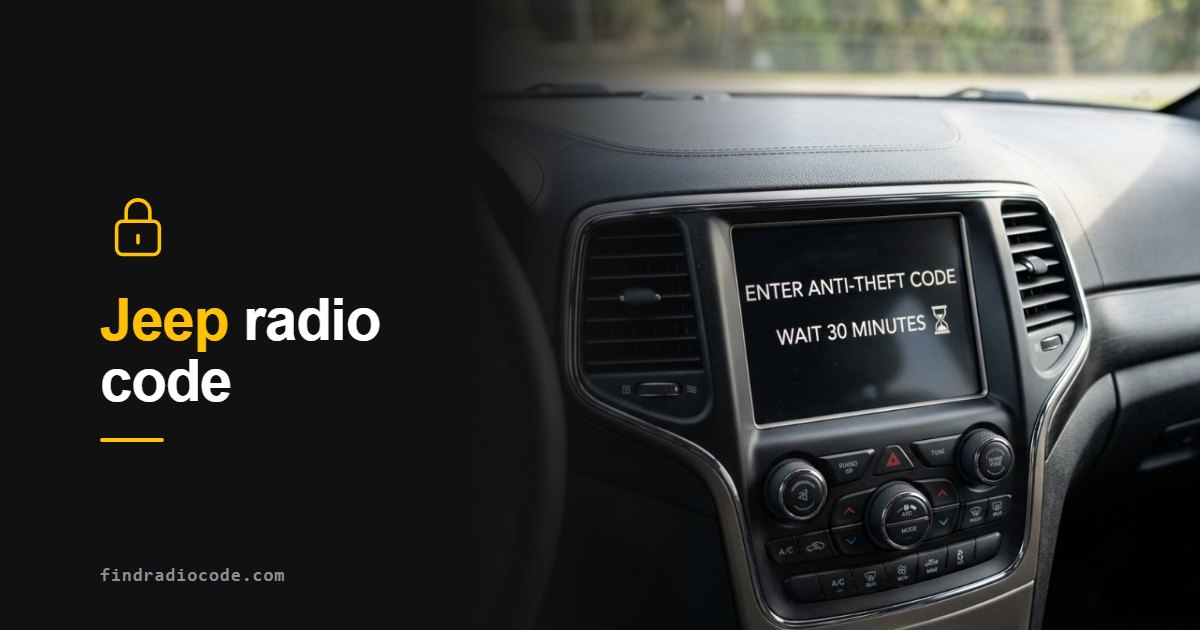
Quick answer: A Jeep radio anti-theft code cannot be reset or bypassed - a locked Uconnect only plays after the 4-digit code derived from its serial number. Read the serial without tools: hold temperature UP + temperature DOWN + front defrost for about 5 seconds, open Radio Part Information in dealer mode, then type the code on the touchscreen. Three wrong attempts start a 30 minute lockout.
Radio Code or Vehicle Anti-Theft? Check This First
Jeep uses the words "anti-theft" and "security" for two separate systems. The radio lock silences the stereo; the Sentry Key immobilizer stops the engine. A radio code cannot fix the immobilizer, and a new key cannot unlock the radio.
Radio anti-theft code
- The engine starts and runs normally.
- The radio shows Enter Anti-Theft Code, CODE or WAIT, and there is no sound.
- It started after battery work, a blown fuse or a radio swap.
What to do: read the radio serial number, get the matching code and enter it once. Everything on this page is about this case.
Vehicle anti-theft (Sentry Key immobilizer, often called SKIM)
- The engine will not keep running: it starts, then shuts off after about two seconds.
- The Vehicle Security Light flashes after the three-second bulb check at key-on (the key or fob is not recognized) or stays on (a fault in the electronics).
- The radio may work perfectly well.
What to do: try your other programmed key or fob. A key that has not been programmed to your Jeep counts as invalid even if it is cut to fit. If the spare does not help, or the light stays on, the vehicle needs a Jeep dealer or an automotive locksmith with a diagnostic tool. A radio code changes nothing here.
Why are they separate? Our guide to how car radio anti-theft codes work explains the difference.
First, Work Out What Your Jeep Is Actually Asking For
A silent Jeep radio after a battery change looks like one problem but is usually one of four, and they have completely different fixes. Spending ten seconds identifying which one you have saves you from resetting a radio that only needed a code, or hunting a code for a radio that has simply crashed.
- The screen asks for an anti-theft code. This is the normal case. The unit works, it just wants four digits derived from its serial number. Everything below applies.
- The screen says to wait 30 minutes and never counts down. That is a frozen lockout timer after three wrong attempts, not a code problem. The unit needs rebooting first - our guide to the stuck 30 minute timer covers the seven resets in order.
- The screen asks for a dealer PIN rather than a radio code. Different prompt, different lock. Note the exact year, model and radio type before going any further, because the path splits by model year.
- The screen is black or stuck on the Jeep logo. Not locked - hung. Pull the radio fuse for ten minutes or disconnect the negative battery terminal for fifteen, and see what it asks for once it boots properly.
What the Screen Says, and What It Means
| The screen shows | What it means | What to do |
|---|---|---|
| Enter Anti-Theft Code | Normal lock - the unit works and wants its 4-digit code | Read the serial in dealer mode and get the code from it |
| Wait 30 minutes (never counts down) | Frozen lockout timer after three wrong attempts | Reboot the unit first - see the stuck timer guide |
| Enter dealer PIN | A service-level lock, not the radio code | Note year, model and radio type, then contact support |
| Black screen or stuck Jeep logo | The head unit has hung - it is not locked | Pull the radio fuse 10 min or the negative terminal 15 min |
Which Radio Is in Your Jeep?
Jeep has used a long line of Uconnect units built by Harman, Continental, Delphi, Panasonic and Aptiv. You do not need to know the supplier, but you do need to know the screen, because it determines how you read the serial and how you type the code.
- Uconnect 430 / 430N (RB5, RHB): 6.5 inch screen surrounded by physical buttons and two knobs. Common in 2009-2016 Grand Cherokee, Wrangler, Liberty, Compass and Patriot.
- Uconnect 5.0 / 8.4 (RA2, RA3, RA4, VP2): 5 or 8.4 inch touchscreen with climate buttons underneath, roughly 2013-2017. Cherokee KL, Grand Cherokee WK2, Renegade.
- Uconnect 4 / 4C: gloss edge-to-edge 7, 8.4 or 12 inch screen, roughly 2017-2021. Wrangler JL, Gladiator, later Cherokee and Compass.
- Uconnect 5: 2021 onward, Android based, screens up to 12.3 inches.
Where Is the Jeep Radio Code?
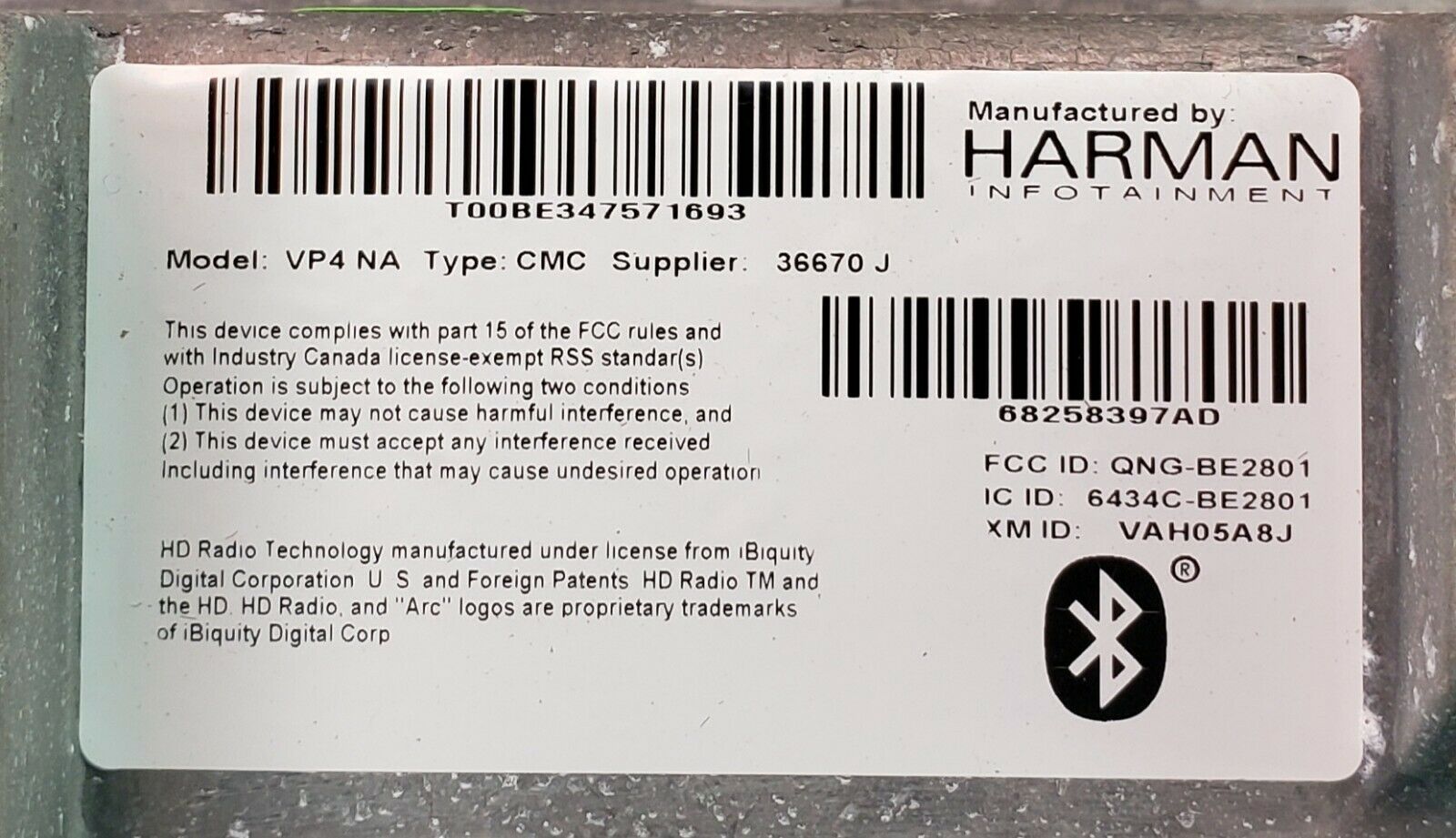
Short answer: on most Jeeps it is not written anywhere you can look it up. The code is not printed in the owner's manual, and the label on the radio carries the serial number and the Mopar part number, not the code. The code is calculated from the radio serial number. Chrysler's own service bulletins tell technicians to write down the serial of a replacement radio before fitting it, because they need that serial to obtain the anti-theft code.
- The glovebox and the manual wallet. Worth 30 seconds: a previous owner, a dealer or a shop may have left the code on a card or a note. Many Jeeps have nothing there.
- The radio itself. On most touchscreen units the serial is shown in dealer mode (our on-screen serial guide has the button combination for each generation), and it is always printed on the label on the radio chassis. The code itself is not on the label.
- A Jeep dealer. The dealer looks the code up from the radio serial number and uses the VIN and your documents to confirm that you own the vehicle.
- A serial-based code service. The same factory code, calculated from the serial you read in dealer mode or on the label, from $9.99.
Once you have the code, write it down and keep it somewhere outside the vehicle. It never changes, so the next battery change takes ten seconds instead of an afternoon.
Finding the Serial Number (Try the Screen Before the Screwdriver)
The code comes from the radio serial number. On most Jeeps you can read that off the screen through dealer mode, without removing anything, which is worth five minutes of your time before you start pulling trim.
- Turn the ignition to RUN or ACC.
- Press and hold temperature UP + temperature DOWN + front defrost together for about 5 seconds.
- Dealer mode opens as a plain text menu. Select Radio Part Information.
- Read the serial number listed there, along with the exact radio model and software version.
If dealer mode does not open or the screen is unresponsive, the serial is printed on a label on the radio chassis and the unit has to come out. Our Uconnect removal walkthrough has the video for each model, and the on-screen serial guide covers the dealer mode route in more depth.

Get the serial number without removing the radio using Uconnect dealer mode
The Serial Formats You Will See
- T-prefix, 14 characters - by far the most common, for example
T00AM1316H1357orTT1AA3192E2346. Fitted across Wrangler, Cherokee and Grand Cherokee from roughly 2008 to 2020. - TM9 - for example
TM930130012 6without the space. Common on Compass, Patriot and some Grand Cherokee units. - A2C - for example
A2C7515960300123. Found on 2018 and newer Wrangler JL, 2019 and newer Cherokee, and Gladiator.
P68150039AD. That is not the serial. If what you copied starts with a P and a long run of digits, you have the part number and it will not generate a code.
Read your serial in dealer mode? Get your Jeep radio code from the serial number - from $9.99, delivered instantly.
About "Bypassing" the Jeep Security Code
This is the search everyone types, so it deserves a straight answer rather than a sales pitch. There is no button sequence that makes a locked Uconnect play without the code. The lock is not a software setting sitting on top of a working radio; the head unit refuses to output audio until it verifies the four digits against what is stored in its own memory. If a trick like that existed, the anti-theft system would be pointless and every stolen radio would be worth full price.
What people usually mean by bypass, and what those actually do
- Pulling the radio fuse or disconnecting the battery. This reboots the head unit. It clears a frozen lockout timer and a hung screen, which genuinely helps - but the radio comes back still asking for the code. It does not erase the requirement.
- The engineering menu reset (temperature arrows). Same story: it restarts or factory-resets the software. Useful when the unit is stuck, useless as a way around the code. If the unit keeps crashing after a reset, Uconnect Support publishes the official software updates for these radios.
- Swapping in a used radio from a breaker. The replacement arrives locked to its own serial, so you have simply moved the problem to a different unit, plus the risk that it is VIN-locked to the car it came from.
- Bench programming or EEPROM work. Real, but it means removing the unit, opening it and reading the memory chip directly. That is a specialist workshop job costing far more than the code, and it risks bricking a working radio.
The route that actually ends with music playing is the boring one: read the serial, get the matching code, type it in once. On a Jeep that is a five minute job, and the only genuinely hard part - getting the serial - is usually solved by dealer mode without touching a tool.
"The route that actually ends with music playing is the boring one: read the serial, get the matching code, type it in once. On a Jeep that is a five minute job."
Jeep Radio Hard Reset: What It Does and Does Not Do
The honest version first: the anti-theft code itself cannot be reset, changed or erased. It is tied to the radio serial number, and the only thing that clears the prompt is typing the right code. When people search for a way to "reset the anti-theft code" they usually mean one of four different things, and only some of them are fixed by a reset.
| What you are trying to do | What actually works |
|---|---|
| Get rid of the Enter Anti-Theft Code prompt | Enter the code for this radio. No reset, fuse pull or battery disconnect removes the prompt. |
| Clear WAIT after three wrong codes | Leave the radio powered with the ignition in RUN for a continuous 30 minutes (driving counts). Reboot only if the timer is frozen. |
| Fix a frozen, black or constantly rebooting screen | A hard reset (below). If that does not help, pull the radio fuse for ten minutes. Neither one touches the code. |
| Make a used radio from another vehicle work | Get the code for that radio's own serial number. The radio notices it is in a different vehicle and stays locked until its code is entered. |
How to hard reset a Uconnect touchscreen
- Put the ignition in RUN with the vehicle in park.
- Press and hold the volume/power knob and the tune/browse knob at the same time.
- Keep holding for about 10 to 20 seconds, until the screen goes dark and the Jeep logo appears. Some units need a little longer.
- Release and let the system boot. Paired phones, presets and settings are normally kept.
This two-knob combination is the one dealers describe for the 8.4-inch Uconnect and later two-knob screens. Radios with a single knob, or with physical buttons around the screen like the 130, 430 and 430N, may use a different method, so check the owner's manual for your year or pull the radio fuse instead.
A factory reset is a different, heavier step. It lives in the Uconnect Settings menu (the exact path varies by generation) and wipes phone pairings, presets and personal settings. Keep it for a unit that keeps crashing. It does not remove the anti-theft code either.
What a hard reset does not do
- It does not remove, skip or reset the anti-theft code prompt.
- It does not shorten a normal WAIT countdown. Only a timer that has frozen benefits from a reboot.
- It does not unlock a radio that came from another vehicle.
- It does nothing for the engine immobilizer. If the security light flashes and the engine will not keep running, go back to the box at the top of this page.
How to Enter the Code
Uconnect units use a touchscreen keypad rather than the preset button counting you see on European radios, so entry is straightforward. Getting it right first time is the part that matters.
- Ignition in RUN or ACC, and let the system finish booting before you touch anything.
- Tap the four digits on the on-screen keypad.
- Confirm with Enter or OK. On 430 and 430N units the digits are entered with the physical buttons beside the screen instead.
- The radio unlocks and plays. Your presets and paired phones survive.
Model by Model
The procedure above holds across the range, but the radio fitted and the dash layout vary by model and year. The Jeep radio code page breaks it down for Wrangler, Cherokee, Grand Cherokee, Renegade, Compass, Patriot, Liberty, Commander and Gladiator, including which serial prefixes turn up in which years.
Because Jeep, Dodge, Chrysler and Ram share the Uconnect platform, almost everything here transfers directly to a Charger, a Ram 1500 or a Chrysler 300 - the serial formats and the dealer mode combination are the same.
It is also the family we know best: of the 14,500+ radio codes this service has generated to date, more than 13,000 were for the T-prefix and A2C serial families used across Jeep, Dodge, Chrysler and Ram.
Jeep Models, Factory Radios and Where to Read the Serial
The factory radios most often found in each Jeep, and the quickest way to read the serial on them. Trim, build date and earlier radio swaps all change what is actually in the dash, so treat this as a starting point: dealer mode or the label on the radio is the final word.
| Model | Generation and years | Factory radios you will usually find | Where to read the serial |
|---|---|---|---|
| Jeep Wrangler | JK, 2007-2018 | 2011-2018: Uconnect 130 (RES), 430 (RBZ) or 430N (RHB) with a 6.5-inch touchscreen | Touchscreen units: try dealer mode or the hidden service menu first. 130 (no touchscreen): the label on the radio, which means taking it out |
| Jeep Wrangler | JL, 2018 on | 2018-2023: Uconnect 3 (5-inch), Uconnect 4 (7-inch) or Uconnect 4C NAV (8.4-inch). 2024 on: Uconnect 5 with a 12.3-inch screen | Try dealer mode on the screen first; the label on the radio if it will not open |
| Jeep Gladiator | JT, 2020 on | 2020-2023: Uconnect with a 5-inch, 7-inch or 8.4-inch NAV screen. 2024 on: Uconnect 5 with a 12.3-inch screen | Try dealer mode on the screen first; the label on the radio if it will not open |
| Jeep Cherokee | KL, 2014-2023 | Early years: Uconnect 5.0 (RA2), 8.4 (RA3) or 8.4 NAV (RA4). 2019 on: Uconnect 4 (7-inch) or 4C (8.4-inch) | Try dealer mode on the screen first; the label on the radio if it will not open |
| Jeep Grand Cherokee | WK2, 2011-2021 | 2011-2013: 130 (RES), 430 (RBZ), 430N (RHB) or 730N (RER, RHR). 2014-2017: Uconnect 5.0 (RA2), 8.4 (RA3) or 8.4 NAV (RA4). 2018-2021: Uconnect 4 (7-inch) or 4C / 4C NAV (8.4-inch) | Touchscreen units: try dealer mode or the hidden service menu first. 130 (no touchscreen): the label on the radio, which means taking it out |
| Jeep Grand Cherokee | WL, 2022 on | Uconnect 5 with an 8.4-inch or 10.1-inch screen | Try dealer mode on the screen first; the label on the radio if it will not open |
| Jeep Compass | MK, 2007-2017 | Media Center 130 (RES), 430 (RBZ) or 430N (RHB) | Touchscreen units: try dealer mode or the hidden service menu first. 130 (no touchscreen): the label on the radio, which means taking it out |
| Jeep Compass | MP, 2017 on | 2017-2021: Uconnect with a 5-inch, 7-inch or 8.4-inch screen. 2022 on: Uconnect 5 with an 8.4-inch or 10.1-inch screen | Try dealer mode on the screen first; the label on the radio if it will not open |
| Jeep Renegade | BU, 2015 on | 2015-2018: Uconnect 5.0 or 6.5AN. 2019 on: Uconnect 4 with a 5-inch, 7-inch or 8.4-inch screen | Try dealer mode on the screen first; the label on the radio if it will not open |
| Jeep Patriot | MK, 2007-2017 | Media Center 130 (RES), 430 (RBZ) or 430N (RHB) | Touchscreen units: try dealer mode or the hidden service menu first. 130 (no touchscreen): the label on the radio, which means taking it out |
A radio that came from another vehicle needs the code for its own serial number, whatever is listed for your model here.

Jeep radio anti-theft code for Cherokee and Wrangler Uconnect VP2

Jeep Wrangler radio unlock code
Get the Code From Your Serial Number
One serial number is all it takes: submit it and the anti-theft code for your Jeep is on your screen and in your inbox within seconds. From $9.99, backed by a refund policy if the code fails.
Not sure which radio you have? Browse Jeep radio codes by model
Radio code pages for these models
Frequently Asked Questions
Related Articles
Stuck on Wait 30 Minutes
Seven resets that clear a frozen Uconnect lockout timer, in order of least invasive.
Read GuideSerial Number From the Screen
Read a Uconnect serial through dealer mode without removing the radio.
Read GuideUnlock Your Uconnect Radio
The full walkthrough from serial number to a working anti-theft code.
Read Guide