Unlock Your Uconnect Radio Using Only the Serial Number
A step-by-step guide to retrieving your Uconnect anti-theft code for Chrysler, Dodge, Jeep, and RAM vehicles - no dealership visit required.
May 18, 2025 Updated: October 14, 2026
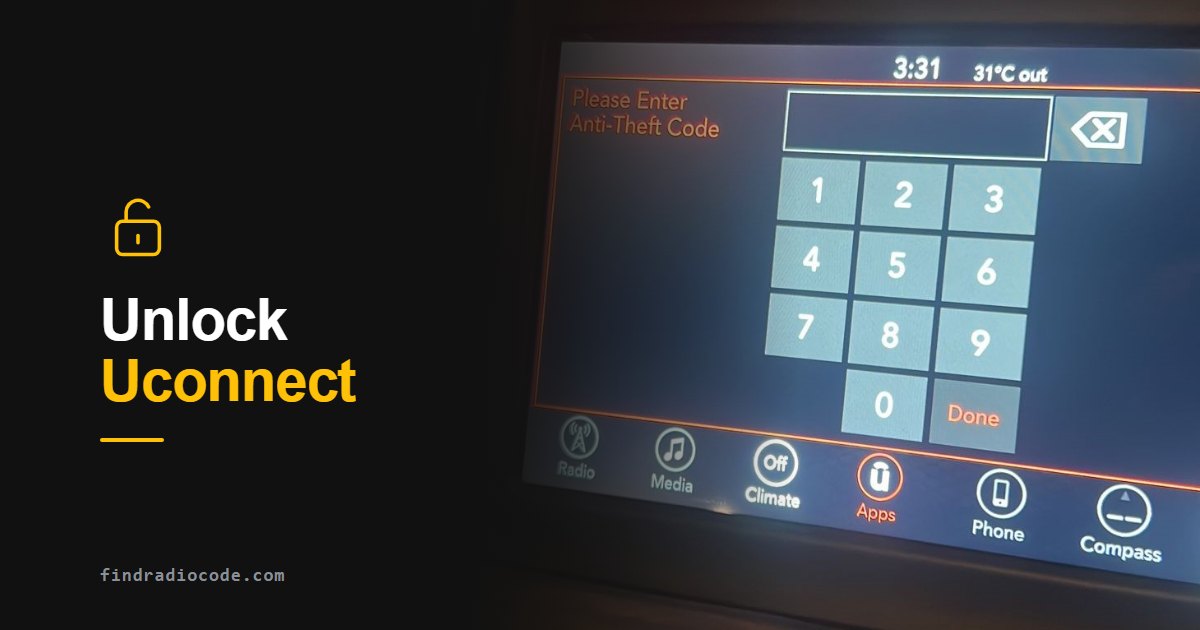
What Is the Uconnect Anti-Theft Code and Why Does It Matter?
So, your car stereo just locked itself and now it is demanding an anti-theft code like it is guarding nuclear launch keys. Welcome to the wonderful world of Uconnect security.
Vehicles from Chrysler, Dodge, Jeep, and RAM use the Uconnect infotainment system, which includes a built-in anti-theft feature designed to deter radio theft. A Uconnect radio anti-theft code unlocks the radio when its security system requests it. Whether a code is needed after a power interruption depends on the installed unit. Check the message on the radio before looking up a code.
Think of it as a 4-digit PIN that protects your infotainment system from being reused by anyone except you. This security measure was introduced by Stellantis (formerly FCA) to make stolen radios worthless on the black market.
Here is the kicker: without that code, your radio is a stylish brick - no music, no Bluetooth, no GPS.
When Do You Need the Uconnect Anti-Theft Code?
Start with the message displayed by your radio. The situations below can help explain a code request, but they do not mean that every Uconnect unit locks in the same circumstances.
Battery Disconnected or Replaced
After a battery disconnection or replacement, check whether the radio actually requests an anti-theft code. The response depends on the radio; a power interruption does not automatically mean that every Uconnect radio needs code entry.
Radio Unit Swapped or Reset
A replacement radio may request an anti-theft code for that unit. Use the serial number of the radio now installed, not the one removed from the vehicle. See our used Uconnect radio guide. A restart or factory reset should not be treated as a universal way to remove an anti-theft request.
Theft Attempt or Wiring Tampering
If someone tampers with the wiring or removes the radio, the unit may ask for its code as a protective measure.
System Glitches or Power Surges
Electrical issues, jump-starting, or power surges can sometimes cause the radio to lock unexpectedly.
How to Find or Recover Your Uconnect Anti-Theft Code
There are three main ways to retrieve your Uconnect radio code. Start by checking whether a code card came with the vehicle or the radio:
Watch: Unlocking a Uconnect Radio With the Serial Number
A quick walkthrough of recovering the anti-theft code from the radio serial number and entering it to unlock the system.

Uconnect unlock code retrieved from the serial number
More radio code tutorials on our YouTube channel
Check Your Owner's Manual or Glove Box
Some vehicles and replacement radios come with a radio code card or sticker that lists the radio serial number and its anti-theft code. Not every Uconnect vehicle has one, and a card only helps if it belongs to the radio in your dash.
- Look inside the owner's manual for a loose card or sticker
- Check the glove box for any dealership documentation
- Review your original purchase paperwork
Ask an Authorized Dealer
An authorized Chrysler, Dodge, Jeep or RAM dealer may be able to retrieve the code for your radio. Ask whether retrieval is available for your unit and what it costs before you book. Expect to provide your VIN (Vehicle Identification Number), proof of ownership and the radio's serial number.
- Ask the dealer whether they can retrieve the code for the radio in your vehicle
- Ask what the retrieval costs and how long it takes - prices and turnaround vary by dealer
- Contact Stellantis customer support if you are not sure which dealer can help
Use FindRadioCode.com - The Fastest Option
The quickest and most affordable way to get your Uconnect radio code is through FindRadioCode.com. All you need is your radio's serial number - no VIN and no dealership appointment. Codes are delivered instantly; if yours is not, the checkout tells you before you pay.
Where to Find Your Uconnect Serial Number
Some Uconnect units display the serial number in a radio-information screen (Dealer Mode). Use the procedure for your exact radio in our on-screen serial guide. If the serial cannot be displayed, read the label on the installed unit using the appropriate radio removal procedure. Copy the complete Serial Number or S/N, not the part number or VIN. If the label is difficult to read, try our radio label scanner.
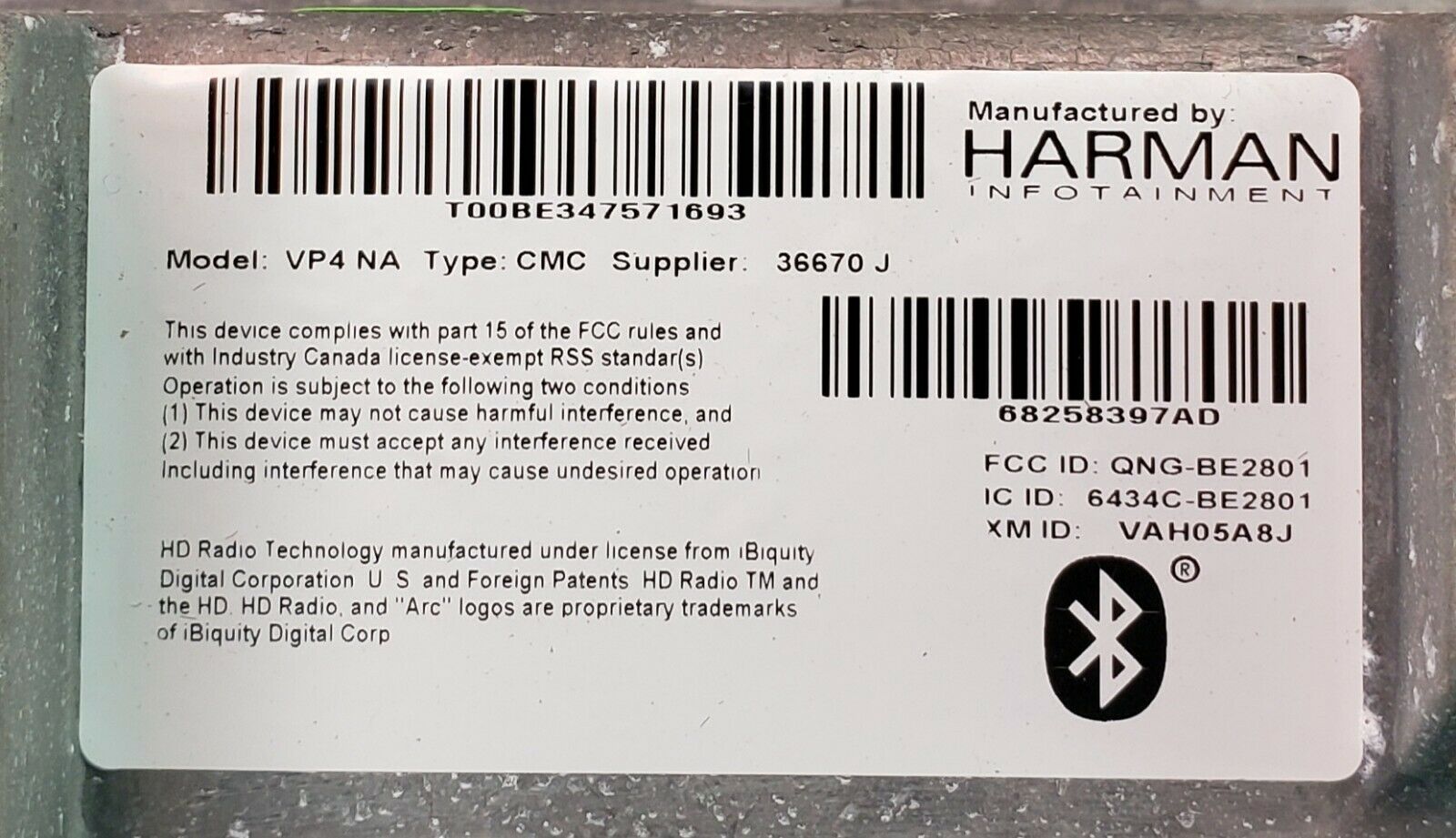
Label on the Uconnect radio with serial number
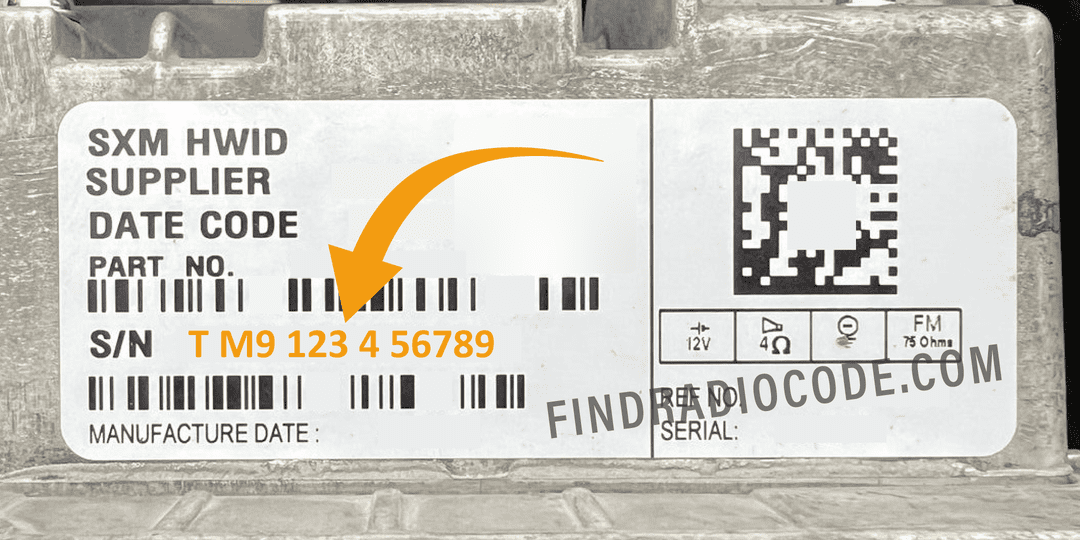
Uconnect 8.4 Panasonic label - serial number for Radio Code
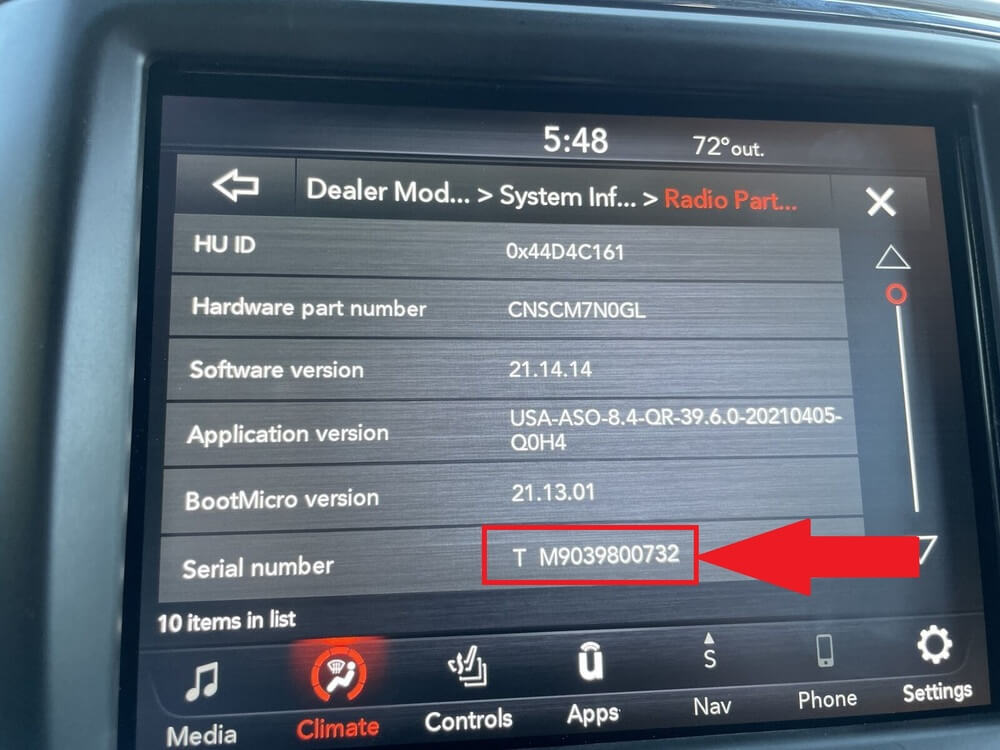
Uconnect serial number on screen - Dealer Mode
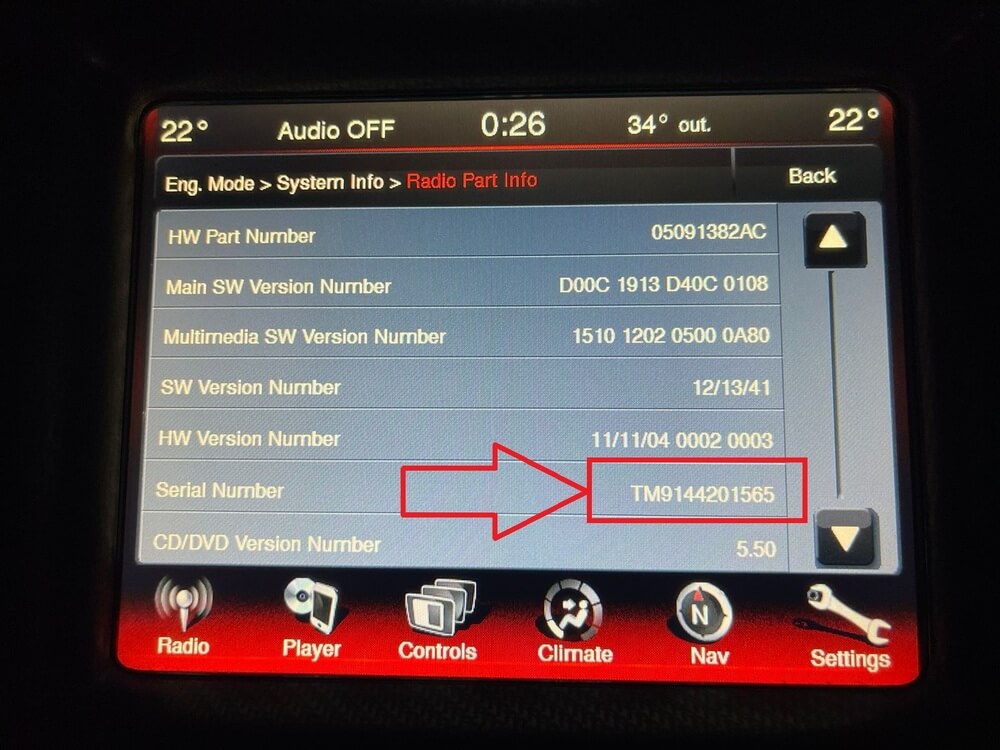
Uconnect serial number on screen - Example 2
Watch: How to read your Uconnect serial number on the screen

Once you have the serial number, our radio code service turns it into the unlock code for that radio.
Know exactly which Uconnect you have?
Each radio model has its own page with the supported serial prefixes, part numbers, and step-by-step code entry for that exact unit:
Uconnect 8.4 RA4 · Uconnect 8.4 UAQ · MyGIG NTG4 RER · MyGIG NTG4 RHR · R1 EXT (2022+)
Radio code pages for these models
Which Uconnect PIN Do You Need?
The PIN you need depends on what you are trying to do. A radio anti-theft code, a Bluetooth pairing PIN and a connected-services PIN serve different purposes.
| Where the request appears | What you need | What to do |
|---|---|---|
| The radio displays "Enter Anti-Theft Code" | The unlock code for that radio unit | Find the radio's serial number, then get your Uconnect radio code |
| Your phone asks for a PIN during Bluetooth pairing | The pairing PIN or confirmation shown by your system | Follow the prompts on your phone and radio. See Mopar's Uconnect pairing instructions |
| The vehicle app or owner portal asks for a PIN before a remote command | Your connected-services security PIN | Use the PIN established for those services. If you have forgotten it, follow the account or support instructions in the official Uconnect FAQ |
Check where the request appears before obtaining a code. A radio unlock code does not replace the PIN used for phone pairing or remote vehicle commands.
Can You Bypass the Uconnect Code?
You may find websites or forums claiming to offer free bypass methods, hacked firmware, or software tools that can unlock your Uconnect radio without the code. We strongly advise against attempting any of these workarounds.
Is There a Free Uconnect Code Generator?
A free serial-number check is not the same as receiving a free unlock code. Check any code supplied with the vehicle or radio, and ask an authorized dealer whether retrieval is available for your unit and what it costs. Before using an online service, confirm what it provides, which serial it requires and whether a charge applies. Do not enter guessed codes or install unverified unlocking software. Our radio code service checks can help you review a provider.
What is free is checking your serial number. On FindRadioCode.com you can enter your serial and confirm it is supported before paying anything. Codes are delivered instantly on screen and by email; if the code for your serial is not instant, the checkout always tells you before you pay. Our money-back guarantee applies if the code does not work.
Final Advice
Let's be real - this system exists to protect you. But it can be frustrating when it works against you. Here's what we recommend:
- Write the code down and keep it in your glove box
- Save it to your phone notes
- Bookmark FindRadioCode.com in case you need it again
Because no one wants to be radio-silent on the highway.
TL;DR - Quick Checklist
Follow these five simple steps to get your Uconnect radio working again:
| Step | Action |
|---|---|
| 1 | Look in your glove box or owner's manual for a radio code card |
| 2 | Retrieve the serial number from the Uconnect screen (Dealer Mode) or the radio chassis label |
| 3 | Visit FindRadioCode.com and enter your serial number |
| 4 | Receive your code on screen and by email - no dealership appointment needed |
| 5 | Store your code somewhere safe for future reference (phone notes, photo, or printed copy) |
Frequently Asked Questions
Still Locked Out?
Head to FindRadioCode.com, enter your serial number, and get the unlock code for your Uconnect radio.
No stress. No calls. No overpriced dealership appointments.
Get Your Code NowRelated Articles
Uconnect Removal Guide
Step-by-step instructions for physically removing your Uconnect radio to access the serial number on the chassis label.
Read GuideScreen Serial Number Guide
How to access Dealer Mode and retrieve your Uconnect serial number directly from the screen - no tools needed.
Read GuideHow to Avoid Scams
12 steps to identify a legitimate radio code service and protect yourself from scam websites.
Learn MoreSerial Number on Any Car
Not a Uconnect radio? Where the serial is on every make - on screen, on the label or behind the unit - with a prefix table.
Read Guide