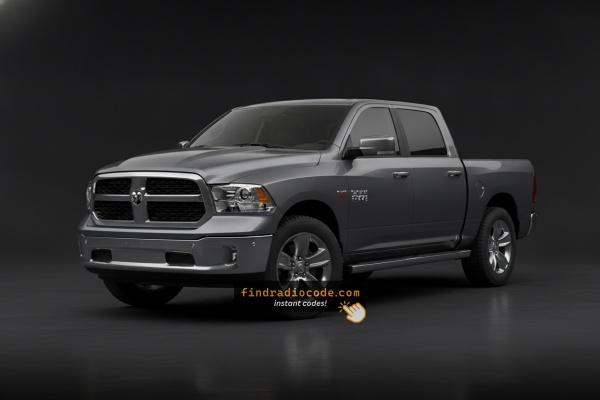
2018 Ram 1500 Stereos and Suppliers
The head unit in a 2018 Ram 1500 varies with the trim level. The pages below cover every matching unit in detail.
| Years | Factory radio | Serial starts with |
|---|---|---|
| 2013-2018 | Uconnect 3.0 RA1 VP1 Continental |
TQN, TVPQN, A2C, A3C
|
| 2013-2018 | Uconnect 8.4 RA3 VP3 MX Harman |
T00AM, T00BE, T0012
|
| 2013-2018 | Uconnect 8.4 RA3 VP3 NA Harman |
T00AM, T00BE, T0012
|
| 2014-2018 | Uconnect 5.0 RA2 VP2 Continental |
TQN, TVPQN, A2C, A3C
|
| 2014-2018 | Uconnect 8.4 RA4 VP4 CA Harman |
T00AM, T00BE, T0012
|
| 2017-2020 | Chrysler Uconnect 8.4 UDQ Panasonic |
TM9
|
| 2017-2020 | Chrysler Uconnect 8.4 UJV Panasonic |
TM9
|
| 2017-2021 | Uconnect 8.4 VP2RFP UAM UCM Continental |
TQN, TVPQN, A2C, A3C
|
How Our Radio Code Generator Works for 2018 Ram 1500
Car radios use anti-theft codes dependent on the radio unit itself instead of the model or production year.
- The generator identifies your Ram radio via serial-based verification.
- When you input the serial into the generator, the system identifies the radio family and generates the code that you need.
- Simply input the digits into the 1500 stereo.
- The online process is quicker and more accessible than visiting the Ram dealer.
Radio Code Input Guide
After locating the serial number and retrieved the unlock code, the last part is entering it into your radio.
Ram OEM units display a CODE prompt when ready for input.
The process is straightforward, but button layouts and confirmation methods may differ slightly depending on the radio version installed in your 1500.
In-depth Input Instructions for 1500 2018
To input the unlock code on the 2018 Ram 1500's Uconnect 8.4":
- The screen shows "ENTER CODE" or ---- after a battery event.
- Tap the on-screen touchscreen keypad to enter each digit of the 4-digit code.
- The radio auto-unlocks after the 4th digit – no confirm button needed.
Lockout: 3 wrong attempts = 60-minute lockout. Keep ignition ON. Turning it off resets the timer.
Step-by-Step Code Input Guide
Once the unlock code has been retrieved, the 2018 Ram 1500 radio can be unlocked directly at the head unit - no scan tool or dealership visit required.
Limited attempts. Mopar/Uconnect units only accept three incorrect tries before going into a WAIT state, so confirm every digit before pressing it.
Entering the code. Place the ignition in RUN/ACC so the radio powers up but the engine stays off. Wait for the display to show CODE, Enter Anti-Theft Code, or a similar prompt. On the 8.4 4C Uconnect units (UAS/UAQ) and the 5-inch RA2, key the digits using the on-screen number pad; on the RA1, press the numbered preset buttons in sequence. Confirm with the on-screen OK/Enter button, or with the tune/menu knob on the RA1.
If a wrong code was entered. If WAIT appears after three incorrect attempts, leave the ignition in RUN with the radio powered for a continuous 30 minutes (the truck may be driven during this time) before trying again with the correct code.
How to Find the Serial Number on Your 2018 Ram 1500 Radio?
The important thing to know is that factory radios use a specific S/N to identify each unit.
Your anti-theft system links the code directly to the serial.
Unlike car-specific data like VIN or registration info, it is not determined by the model or production year, so you'll be able to get it even if you have a radio that you installed afterwards.
Depending on the maker and radio installed in your Ram 1500, the retrieval method is different.
These are the best ways to find it.
Factory Radios on the 2018 Ram 1500
2018 is the model year the Ram 1500 moved off the Harman platform and onto the Panasonic-built Uconnect 4C; the old RA3/RA4 codes were retired and replaced by UAS and UAQ. The base 5-inch Uconnect 5.0 (RA2) and the non-touch RA1 carried over for the entry-level trims. Both 4C variants are easy to spot by their CarPlay and Android Auto support.
Uconnect 3.0 (sales code RA1) remained on the Tradesman: a small non-touch display, no Bluetooth, AUX/USB media only. Uconnect 5.0 (sales code RA2) stayed on SLT/Big Horn entry trims: a 5-inch colour touchscreen with hard buttons and rotary knobs. Uconnect 4C (sales code UAS) is the new 8.4-inch Panasonic touchscreen without built-in navigation; recognisable by the 8.4-inch bezel and Apple CarPlay and Android Auto tiles on the home menu, with no NAV tile. Uconnect 4C NAV (sales code UAQ) is the same 8.4-inch Panasonic touchscreen with built-in navigation; identical bezel to the UAS, but the home menu shows a NAV tile alongside the CarPlay/Android Auto tiles.
Using Hidden Radio Menus to Find the Serial
Try the following for your 2018 Ram 1500:
The 2018 Ram 1500 4th-generation features the Uconnect 8.4" (RA3) touchscreen. Whether your 1500 is a work truck or a Laramie Longhorn, the serial number is accessible without tools via Dealer Mode:
Climate Button Method:
- Turn the ignition to ACC or ON.
- Press and hold the Climate Up, Climate Down, and Front Defrost buttons simultaneously for about 5 seconds.
- Dealer Mode opens on the 8.4" display.
- Navigate to: System Info → Radio Part Info → Serial Number.
Alternative Method: Hold Temperature Up (red) and Temperature Down (blue) together for 5 seconds to open Engineering Mode, then navigate as above.
Before Removing the Radio, Try This Screen Method
2018 Ram 1500 trucks fitted with the 8.4-inch Uconnect 4C screen retain the hidden dealer/diagnostic menu that prints the head-unit serial number directly on the touchscreen, so the radio does not need to come out of the dash. The smaller RA1 (Uconnect 3.0) and RA2 (Uconnect 5.0) head units do not have a publicly documented on-screen serial method.
Uconnect 4C (UAS) and Uconnect 4C NAV (UAQ)
Place the ignition in RUN/ACC and wait for the Uconnect screen to fully load. Press and hold the driver-side temperature UP, the driver-side temperature DOWN, and the front DEFROST buttons together for roughly 7-10 seconds until the dealer/diagnostic interface opens. Open the radio or system info section to view the serial number printed on screen, and capture a photo so the characters can be copied across without errors.
Serial Number on the Unit
If the serial does not appear on display, the next step is checking the radio itself.
Many Ram radios require physical access to the serial tag attached to the unit.
Usual approach:
- Start by completely shutting off the engine - pull the key out.
- Then detach the trim panel.
- Next, loosen the mounting points and slide the radio forward.
- Look for a factory sticker showing the serial number.
If Dealer Mode is not accessible on your 2018 Ram 1500, the RA3 radio must be physically removed to read the serial label:
- Remove the center stack bezel – The Ram 1500's bezel surrounds the 8.4" display and climate controls. Insert a plastic pry tool at the lower edge to release the friction-clipped panel.
- Remove the 4 Torx T20 screws – Securing the radio to the mounting frame.
- Slide the radio forward – Pull the unit forward to inspect the serial label on the side surface.
1500 Note: Laramie and Limited models may have thicker trim pieces. Use steady pressure when prying. Wiring can remain connected.
Manufacturer Label Inspection
If the screen-based shortcut is unavailable - for example on the RA1 or RA2 - the printed serial label can still be reached by carefully extracting the head unit from the centre stack of the 2018 Ram 1500.
Safety first. Turn the ignition off, remove the key, disconnect the negative battery terminal, and wait several minutes before touching wiring. Never disturb the yellow airbag/SRS connectors and use plastic trim tools to keep clips and metal contacts intact.
Tools you will need. Plastic trim removal kit, 7 mm socket, T20 Torx bit, Phillips screwdriver, flashlight.
Removal overview. Lift the rubber beauty plate stamped with the RAM logo at the top of the dash bezel to expose two hidden T20 Torx screws and remove them. Lift the rubber mat in the small cubby above/beside the radio to expose another hidden T20 Torx screw and remove it. If the truck has a centre console, lift the rubber mat in the front console cubby; the centre dash bezel pulls rearward over the gear lever. Once the bezel is loose, unplug the hazard switch and the HVAC/control connectors before laying the trim on a clean cloth. Remove the four 7 mm screws holding the radio cage to the support bracket, then slide the radio straight back and disconnect the antenna and the multi-pin power/data harness on the rear.
Where the serial sits. The serial number lives on a printed barcode/sticker label on the top or side of the radio chassis, alongside the part number and supplier markings.
Tips. Photograph the label and double-check easily confused characters such as 0/O and 1/I before submitting the serial.
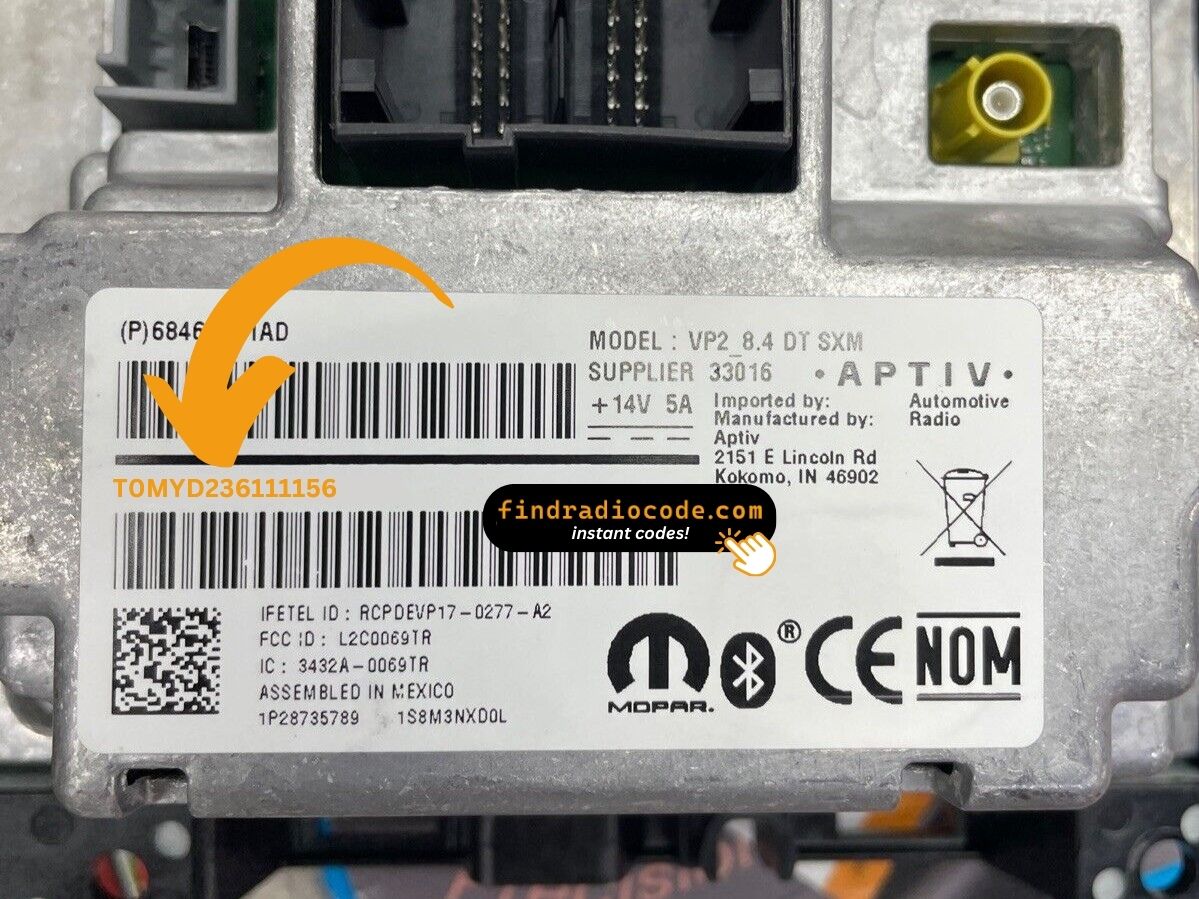
Example: Ram 1500 serial number label location
These are the Common Serial Formats
The 2018 Ram 1500 Uconnect 8.4" (RA3) comes from Harman or Continental. Standard serial number prefixes:
T00AM– Harman VP2 Uconnect 8.4" (primary format)T00BE– Continental Uconnect 8.4" variantTM9– Earlier Harman units
Radio designations: RA3 (standard 8.4"), VP2 (8.4" with Alpine audio). Example: T00AM1801T0282 (14 characters).
Reminder Do not mistake the part number (P05064... or 68...) with the serial number. Only the serial is needed for code generation.
What a Valid Serial Number Looks Like
The factory head units fitted to the 2018 Ram 1500 follow the standard Mopar serial style, with the prefix varying by supplier and Uconnect tier. The 2018 Ram 1500 received the new Panasonic 4C generation of Uconnect 8.4 hardware (UAS / UAQ) that replaced the Harman VP3/VP4 (RA3/RA4) units used in 2013-2017.
Uconnect 4C (UAS) and Uconnect 4C NAV (UAQ)
The serial is typically an alphanumeric string printed on the chassis label - around 14 characters on most units. It commonly begins with T - frequent prefixes include T00AM, TM9, and TQ1 - or with A2C on Continental-supplied variants. The serial is usually a continuous run of letters and digits with no spaces or dashes on the printed sticker.
Uconnect 5.0 (RA2) and Uconnect 3.0 (RA1)
The smaller-screen radios usually carry a Mopar/Harman-style serial on a chassis sticker; the label printed on the unit itself is the authoritative source. Always copy the serial exactly as printed and avoid guessing unclear characters.
Fixing Common Code Entry Problems for 2018 1500
No "ENTER CODE" prompt means the anti-theft hasn't activated yet. It only locks after a power interruption.
Force the lock: pull the radio fuse and reinsert it, then reconnect and turn ignition to ON. The prompt appears on startup.
A rejected code on the Ram 1500's Uconnect 8.4" usually comes down to a serial number mismatch. The RA3 label has the serial number (14 chars, starts with T00AM, T00BE, or TM9) and the part number (P... or 68...) — only the serial generates the code.
Re-check the label, paying attention to 0 vs. O and 1 vs. I. Reach out for a free re-check if needed.
The Ram 1500's Uconnect RA3 locks after 3 wrong entries. The screen continues to display "ENTER CODE" but blocks all taps during the lockout.
To reset: Keep ignition ON for 60 full minutes without turning off. Any power interruption restarts the countdown. Service trucks that get turned off frequently must complete the full wait without interruption.
The Ram 1500 Uconnect 8.4" RA3 uses touchscreen-only code entry. Press each digit directly on the digital keypad. No preset button presses are needed. The radio auto-unlocks after the last digit.
The label on the Ram 1500's RA3 radio shows the serial number (14 chars: T00AM, T00BE, or TM9 prefix) and the part number (P05... or 68...). Just the 14-char serial generates the code.
Also make sure you're reading the label on the radio unit itself, not a service sticker added later.
What Caused the Radio to Lock?
The Ram 1500's Uconnect RA3 locks automatically whenever the radio loses power. These trucks encounter this often because:
- Battery replacement — the single most common trigger. Even briefly pulling the battery triggers the lock.
- Radio fuse failure — common after electrical accessory or audio installation.
- Buying the truck used without a known radio code.
- Truck sitting unused until battery fully discharges.
The code is tied to the radio's serial number — not vehicle-specific.