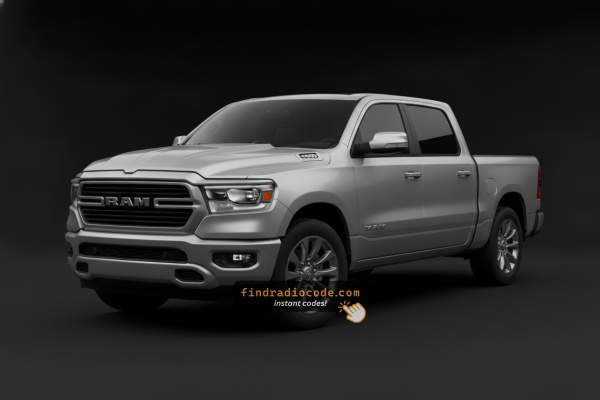
Identify your 2021 Ram 1500 Head Unit
The radio in a 2021 Ram 1500 depends on the trim level. These guides cover each unit we know was fitted separately.
| Years | Factory radio | Serial starts with |
|---|---|---|
| 2017-2021 | Uconnect 8.4 VP2RFP UAM UCM Continental |
TQN, TVPQN, A2C, A3C
|
| 2018-2022 | R1 EXT NA Harman |
T0012, T00BE
|
| 2018-2022 | R1 EXT RW Harman |
T0012, T00BE, T00HL
|
| 2019-2023 | Aptiv Uconnect 5 VP2_5 DT Aptiv |
T0MYD
|
| 2019-2022 | Chrysler Uconnect 12.0 UAX Panasonic |
TM9
|
| 2019-2022 | Chrysler Uconnect 12.0 UCX Panasonic |
TM9
|
| 2019-2022 | Chrysler Uconnect 12.0 UDX Panasonic |
TM9
|
| 2019-2023, 2019-2022 | Delphi Uconnect 8.4 UJM VP2_8.4 DT ROW Delphi |
T0MYD
|
Why Did the Radio Lock and Ask for a Code?
The 5th-gen Ram 1500's Uconnect 4C activates anti-theft after the battery is disconnected or replaced. Fifth-gen 1500 owners encounter this most often because of:
- Battery replacement — the most common trigger across all Uconnect variants.
- A failed fuse — frequent after aftermarket audio or accessory installation.
- Buying pre-owned without a known unlock code.
- Battery fully discharged from long storage.
The code is tied to the radio's own serial number — not the VIN.
From Serial Number to Unlock Code for your Ram 1500 - Explained
To get the code, you'll take only a few simple steps.
- Locate your radio's serial number - this is the only info required to generate the correct unlock code.
Unlike when contacting the dealer, no VIN is needed. - When you've found the S/N, type it into the form above.
The system checks it against a database of supported radios and automatically catches the matching radio code. - In most cases, the code will appear instantly on the screen after payment and is also sent to your email , just in case.
If manual verification is required (rare situations), you'll be notified before checkout. - Once you receive it, just enter it into your radio to restore the functionality.
Radio Serial Number Explained - Finding It on Your Ram
Very important thing to know is that factory radios use a unique S/N to identify each unitindividually.
The anti-theft system links the code directly to the serial.
Unlike vehicle-specific data like VIN or registration information, it is not determined by the model or production year, so you'll be able to generate it even if you have a radio that you installed afterwards.
Depending on the maker and radio installed in your Ram 1500, the retrieval method varies.
Here are the best ways to find it.
Identify Your 2021 Ram 1500's Factory Radio
2021 was the transition year for the DT Ram 1500: Stellantis began rolling out Uconnect 5 onto the 8.4-inch and 12-inch screens, while the base 5-inch unit and some early-build 8.4 / 12-inch trucks continued with Uconnect 4. As a result a 2021 truck can have any of several head units depending on build date.
- Uconnect 3 / 4 5-inch (
UAG) - 5-inch non-touchscreen base radio standard on Tradesman. Visual ID: small 5-inch display with hard buttons and tuning knobs, no CarPlay / Android Auto. Carries over from 2019-2020. - Uconnect 4C 8.4-inch (
UCQnon-NAV /UAQNAV) - early 2021 builds continued with Uconnect 4 8.4-inch. Visual ID: 8.4-inch landscape touchscreen, Uconnect 4 home screen graphics, wired Apple CarPlay / Android Auto, no over-the-air Uconnect 5 update prompts. - Uconnect 5 8.4-inch (
UBM/UBL) - later 2021 builds shipped with Uconnect 5 on the 8.4-inch screen. Visual ID: 8.4-inch landscape glass with the redesigned Uconnect 5 dark / multi-tile home screen, wireless Apple CarPlay and wireless Android Auto, multi-profile support. - Uconnect 4C NAV 12-inch (
UAX) - early 2021 12-inch portrait, optional on Laramie / standard on Longhorn and Limited. - Uconnect 5 12-inch (
UBQ) - later 2021 12-inch portrait, identical glass to UAX but running Uconnect 5 with wireless CarPlay / Android Auto, multi-profile and over-the-air updates.
Quick field test: small 5-inch with knobs = UAG, 8.4 / 12-inch with old Uconnect 4 graphics and wired CarPlay only = UCQ / UAQ / UAX, 8.4 / 12-inch with redesigned multi-tile home screen and wireless CarPlay = UBM / UBL / UBQ.
Screen-Based Serial Lookup Method
These are the steps you should follow for 2021 Ram 1500:
The 2021 Ram 1500 5th-generation is equipped with the Uconnect 4C (RA4) with either the 8.4" standard-option or optional 12" portrait touchscreen in higher trims. The serial number is retrievable via Dealer Mode:
- Turn ignition to ACC or ON.
- Press the bottom-left and bottom-right corners of the physical screen bezel (plastic frame, not the glass) at the same time for about 5 seconds.
- Dealer Mode opens on the display.
- Navigate to: System Info → Radio Part Info → Serial Number.
12" Screen Note: On the 2021 1500 with the 12" portrait display, reach both bottom bezel corners. Try using two fingers at once. The Dealer Mode method is recommended before attempting removal of this larger module.
Quick Method: Find the Serial Number on the Screen
2021 is a split year for the DT Ram 1500, so the on-screen serial method depends on whether the truck shipped with Uconnect 4 or with the newer Uconnect 5.
Uconnect 4C 8.4-inch (UCQ / UAQ) - early 2021 builds
- Switch the ignition to RUN / ACC and wait for the Uconnect interface to finish booting.
- Press and hold the driver-side temperature UP, the driver-side temperature DOWN and the front DEFROST buttons together for roughly 5-10 seconds.
- If the climate-button shortcut does nothing, press and hold the bottom-left and bottom-right corners of the touchscreen at the same time for about 5-10 seconds.
- Browse to Radio Part Information / System Info to read the serial number on screen.
- Photograph the screen before transcribing the characters.
Uconnect 4C NAV 12-inch portrait (UAX) - early 2021 builds
- Place the ignition in RUN / ACC and let the display finish loading.
- Press and hold the first (far-left) and last (far-right) hard buttons along the bottom edge of the 12-inch screen together for about 5-10 seconds until dealer mode opens.
- Open radio / system info to view the serial number on screen.
- Snap a photo of the display before transcribing.
Uconnect 5 builds (UBM / UBL 8.4-inch and UBQ 12-inch) - on-screen serial method not reliably available. Stellantis has restricted dealer-mode access on Uconnect 5 head units via over-the-air updates, and there is no consistently documented hidden-menu shortcut on these units. On 2021 trucks that received Uconnect 5, plan on reading the serial from the chassis label or a professional diagnostic tool instead of the screen.
Locate Serial on 1500's Radio Chassis
If the serial number cannot be accessed on-screen, use the removal method.
Most Ram 1500 OEM radios include a label with the serial number printed on the housing.
Process details:
- Ensure the ignition is off.
- Lift away surrounding panel pieces.
- Remove fasteners holding the radio.
- Slide outward to inspect the label.
If Dealer Mode is not accessible on the 2021 Ram 1500, physical removal is the fallback:
- Turn off the vehicle.
- Pry off the center stack trim using a plastic pry tool. The 5th-gen 1500's modern interior uses friction clips.
- Remove the mounting screws (Torx T20 or T25) securing the infotainment unit.
- Slide the unit out to read the serial label on the side of the module.
12" Screen Note: The 12" portrait module is heavier than the 8.4". Hold it carefully when extracting. Try the on-screen method before removal.
Locate Serial on Ram 1500's Radio Chassis
If the on-screen menu is not available - common on Uconnect 5 builds and on Uconnect 4 trucks where dealer mode has been tightened by a software update - the printed chassis label still carries the radio serial. The DT Ram 1500 centre stack is closely integrated, and the 12-inch portrait screen sits in a deeply integrated bezel.
- Safety first: switch the ignition off, take out the key, disconnect the negative battery terminal and wait a few minutes before touching wiring; never disturb the yellow airbag / SRS connectors and use plastic trim tools so nothing shorts or breaks.
- Tools you will need: plastic trim removal kit, Phillips and small Torx (T20 / T15) bit set, 7 mm socket, flashlight.
- Removal overview - 8.4-inch (UCQ / UAQ / UBM / UBL): lift the rubber mat in the cubby at the top of the centre dash to reveal two T20 Torx screws, and lift the rubber mat in the small cubby above the 12 V / AC outlet for a third T20 screw. Remove all three, then carefully pry the centre stack bezel free with a plastic trim tool.
- Removal overview - 12-inch portrait (UAX / UBQ): the 12-inch portrait screen lives in a much larger integrated bezel that extends across most of the centre stack and is tied into the climate cluster - removal involves more trim panels and connectors than the 8.4-inch unit.
- Once the bezel is free, remove the four 7 mm screws holding the radio cage to the dash support, then slide the head unit rearward.
- Disconnect the antenna lead, the USB / aux harness and the multi-pin power / data connectors before fully extracting the unit.
- The serial number sits on a printed barcode / sticker label on the top or side of the radio chassis, next to the part number and supplier markings.
- Photograph the label and double-check ambiguous characters such as 0 / O, 1 / I and B / 8. Because the 12-inch portrait unit is so deeply integrated with the surrounding bezel and climate cluster, we strongly recommend professional installer or dealership service if you are not experienced with DT-platform interior work.
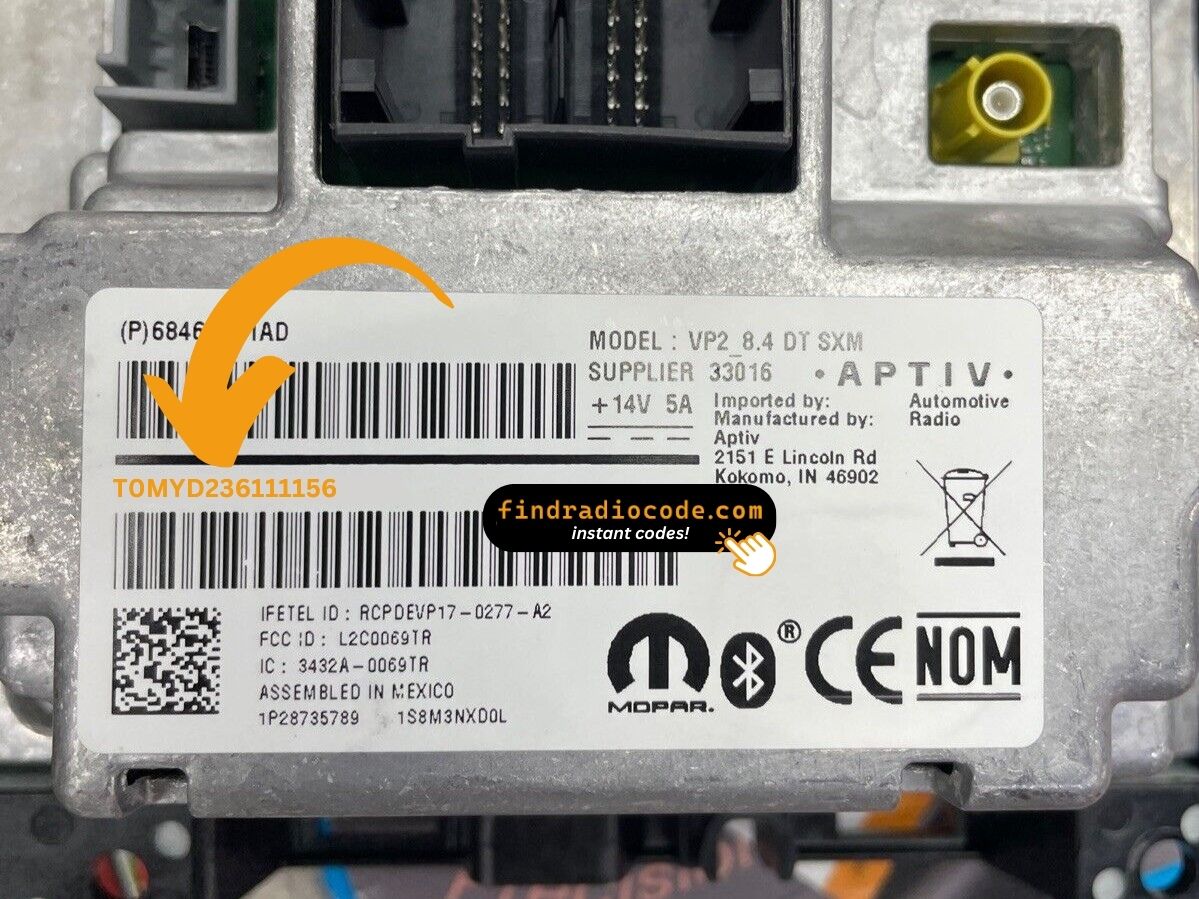
Example: Ram 1500 serial number label location
Common Serial Number Structures
The 2021 Ram 1500 (5th-gen) Uconnect 4C (RA4) serial number formats:
T00AM– Harman Uconnect 4C (most common prefix)T00BE– Continental Uconnect 4C versionT0MYD– Newer Harman production (later models)
Radio designations: RA4 (8.4" Uconnect 4C), UAQ/UAR (12" screen option). Serial: 14 characters alphanumeric.
Important Do not mix up the serial with the part number (P05064... or 68...) on the same label. Only the 14-char serial generates the code.
Standard Serial Number Patterns on This Radio
The factory radios on the 2021 Ram 1500 follow the standard Mopar / Uconnect serial style. The exact prefix depends on the Uconnect tier shipped with the truck and on which supplier (Continental, Harman or Panasonic) built the unit.
Uconnect 4C 8.4-inch (UCQ / UAQ)
- Typically a 14-character alphanumeric string printed on the chassis label.
- Commonly begins with
T- frequent prefixes includeT00AM,TM9andTQ1- or withA2Con Continental-built variants. - Usually a continuous run of letters and digits with no dashes or spaces.
Uconnect 5 8.4-inch (UBM / UBL) and 12-inch (UBQ)
- Continue to use a 14-character Mopar / Uconnect alphanumeric serial printed on the chassis sticker.
- The label on the unit itself is the authoritative reference - because Uconnect 5 hardware is newer there is no published consensus prefix list, so do not assume a particular prefix and copy the printed serial exactly.
Uconnect 3 / 4 5-inch (UAG)
- Usually carries a Mopar / Harman or Panasonic-style serial printed on the chassis sticker.
- Always copy the serial exactly as printed and avoid guessing characters that look unclear.
Final Step - Enter the Radio Code
Once you receive the correct unlock code based on the serial number, you can restore default functionality by entering it into the unit.
The code entry process depends on the control layout, but most 2021 1500 systems follow a similar structure using preset buttons, touch controls, or rotary knobs - depending on if it's a factory or an aftermarket unit.
You will typically see ENTER CODE displayed on screen.
Step-by-Step - The Correct Way to Enter It
To input the unlock code on the 2021 Ram 1500's Uconnect 4C:
- The touchscreen displays "ENTER CODE" after a battery event.
- Tap the touchscreen keypad to enter each digit of the 4-digit code.
- The radio restores after the 4th digit – no confirm button needed.
Lockout Warning: 3 wrong attempts = 60-minute lockout. Keep ignition ON. Cycling the ignition restarts the timer.
The Correct Way to Enter It
Once the unlock code has been retrieved for a 2021 Ram 1500 head unit, it can typically be entered at the dash without a dealer visit. Manual entry is fully documented for the Uconnect 4 builds; on Uconnect 5 trucks the procedure is the same as Uconnect 4 reports it, and code-paired locks remain rare on first-generation Uconnect 5 trucks of this era.
- Limited attempts: Mopar / Uconnect head units only accept three incorrect tries before the radio drops into a
WAITstate, so verify every digit before pressing it. - Place the ignition in RUN / ACC so the radio powers up but the engine stays off.
- Wait for the display to show
CODE,Please enter Anti-Theft Codeor a similar prompt. - On the 8.4-inch and 12-inch screens (both Uconnect 4 and Uconnect 5), tap the on-screen number pad to enter each digit and confirm with the OK / Enter touch button.
- On the 5-inch UAG base radio, press the numbered preset buttons in sequence to enter the four-digit code.
- If
WAITappears after incorrect attempts, leave the radio powered with the ignition in RUN for the documented cool-down period (about 30 minutes; the vehicle may be driven during this time) before trying the correct code again.
Troubleshooting Common Radio Problems - 1500 2021
The Ram 1500 Uconnect 4C uses touchscreen-only code entry — tap each digit on the virtual keypad. No physical preset buttons are involved. The radio auto-unlocks after the 4th digit. On the 12" portrait display: same process — tap each digit as normal.
The Uconnect 4C serial is accessible via Dealer Mode on the 1500's touchscreen (System Info → Radio Part Info → Serial Number), or on the barcode sticker on the unit housing after removal.
Serial: 14 chars starting with T00AM, T00BE, or T0MYD. Skip the part number (P05... or 68...).
No code prompt means the Uconnect 4C hasn't triggered. To force the code screen: briefly disconnect the battery, then turn ignition ON. The prompt shows on startup.
The 5th-gen Ram 1500's Uconnect 4C locks after 3 wrong entries. The screen still shows "ENTER CODE" but ignores all taps during the lockout.
To clear: Keep ignition ON for a full 60 minutes. Turning off restarts the countdown. Work trucks or tow rigs that get turned off at job sites must complete the full wait without interruption.
The Uconnect 4C label on the Ram 1500 shows both the serial number (14 chars: T00AM, T00BE, or T0MYD) and the part number (P05... or 68...). Only the serial produces the unlock code.
On the 12" portrait display: the serial label is on the rear of the module, accessible only after removal. Double-check the label and reach out if the code still fails.