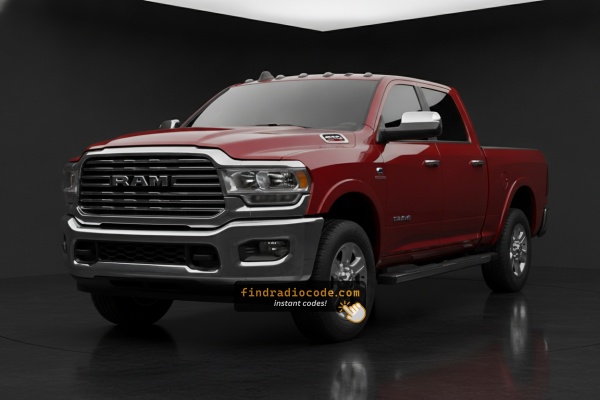
2019 Ram 2500 Stereos and Suppliers
The head unit in a 2019 Ram 2500 depends on the trim level. These guides explain every matching unit separately.
| Years | Factory radio | Serial starts with |
|---|---|---|
| 2017-2019 | Chrysler Uconnect 8.4 UAC Panasonic |
TM9
|
| 2017-2020 | Chrysler Uconnect 8.4 UAQ Panasonic |
TM9
|
| 2017-2020 | Chrysler Uconnect 8.4 UAV Panasonic |
TM9
|
| 2017-2020 | Chrysler Uconnect 8.4 UCQ Panasonic |
TM9
|
| 2017-2020 | Chrysler Uconnect 8.4 UCV Panasonic |
TM9
|
| 2017-2020 | Chrysler Uconnect 8.4 UDQ Panasonic |
TM9
|
| 2017-2021 | Uconnect 8.4 VP2RFP UAM UCM Continental |
TQN, TVPQN, A2C, A3C
|
| 2019-2022 | Chrysler Uconnect 12.0 UAV Panasonic |
TM9
|
Why Did the Radio Lock and Ask for a Code?
The Ram 2500's Uconnect 4C activates anti-theft after any power interruption. HD Ram 2500 owners see this primarily due to:
- Battery replacement — primary cause. HD trucks have higher electrical loads, making battery replacements more frequent.
- Fleet service battery swaps — commercial and fleet 2500s get batteries replaced as part of maintenance.
- Blown fuse — frequent after aftermarket work.
- Buying pre-owned without a known unlock code.
The code is tied to the radio's serial number — not the VIN.
Finding the Radio S/N for Ram
The initial step is finding the radio S/N.
Many drivers assume the code depends on the Ram model or year, but in reality, the unlock process relies on the unique radio's serial number.
The serial is the key used to calculate the correct unlock code.
This is even better, because if you have a used radio, the VIN or other Ram-specific data wouldn't be of much use.
Based on the radio used, you can see the serial directly from the screen or by checking the label on the radio chassis.
Factory Radios on the 2019 Ram 2500
The 2019 Ram 2500 - part of the all-new fifth-generation DT HD platform launched for 2019 with a redesigned dash - shipped with the Uconnect 4 family of head units. Across the trim ladder (Tradesman, Big Horn/Lone Star, Laramie, Power Wagon on the 2500, Limited and on Chassis Cab models Tradesman, SLT, Laramie and Limited) several screen sizes were available.
- Uconnect 3 / Uconnect 4 (sales code
UAG) - 5-inch base touchscreen. Standard on Tradesman and base Chassis Cab. Visual ID: small 5-inch screen mounted high in the centre stack with conventional climate controls below; Bluetooth audio and basic media support. - Uconnect 4C 8.4 NAV (sales code
UAQ, Canadian equivalentUCQ) - 8.4-inch touchscreen with built-in GPS navigation, Apple CarPlay and Android Auto (wired). Standard or part of the upgrade group on most mid trims. Visual ID: 8.4-inch landscape glass dropped into the upper centre stack with a dedicated NAV/Map tile on the home screen. - Uconnect 4C NAV 12-inch (sales code
UAX) - 12-inch portrait touchscreen with split-screen capability, GPS navigation, Apple CarPlay and Android Auto (wired). Optional on Laramie, standard on Limited. Visual ID: large vertical 12-inch glass that fills the upper centre stack and can show two apps stacked on top of one another.
Quick test for the 2019 2500: 5-inch screen means UAG, 8.4-inch landscape means UAQ/UCQ, and a tall 12-inch portrait screen means UAX.
Using Hidden Radio Menus to Find the Serial
Try the following for your 2019 Ram 2500:
The 2019 Ram 2500 heavy-duty 3/4-ton truck features the Uconnect 4C (RA4) 8.4" touchscreen fitted in the work-capable interior. The serial number is retrievable via Dealer Mode:
- Turn ignition to ACC or ON.
- Press the bottom-left and bottom-right corners of the physical screen bezel (plastic frame, not glass) at the same time for approximately 5 seconds.
- Dealer Mode opens on the display.
- Go to: System Info → Radio Part Info → Serial Number.
Note On some 2019 Ram 2500 units, Dealer Mode could be disabled after a software update. If the bezel press fails, physical radio removal is the alternative.
Display-Based Serial Number Retrieval
The 2019 Ram 2500 ships with Uconnect 4 hardware (8.4-inch UAQ/UCQ landscape and the optional 12-inch UAX portrait), and both touchscreens respond to a hidden dealer/diagnostic shortcut that prints the radio serial on screen - no head-unit removal required.
- Switch the ignition to RUN/ACC and let the Uconnect interface finish booting.
- Press and hold the driver-side temperature UP button, the driver-side temperature DOWN button and the front DEFROST button together for roughly 5-10 seconds until the dealer/engineering screen opens.
- If the climate-button shortcut does nothing, press and hold the bottom-left and bottom-right corners of the screen at the same time for about 5-10 seconds.
- Once inside the diagnostic interface, browse to the radio/system info section to read the serial number printed on screen.
- Photograph the screen so each character can be transcribed without typos - treat 0/O, 1/I and B/8 carefully.
The 5-inch UAG base radio is much less consistent with the on-screen shortcut, so for that unit fall back on the chassis-label method described below.
Taking Out the Unit to Access the S/N on the Tag
If the serial number cannot be accessed through menu, use the pull-out method.
Most Ram 2500 original radios include a tag with the serial number printed on the casing.
Basic process:
- Shut down the car.
- Carefully remove surrounding dashboard trim.
- Loosen screws holding the radio.
- Move slightly to inspect the label.
If Dealer Mode is not accessible on your 2019 Ram 2500, the RA4 radio can be removed to read the serial label:
- Turn off the vehicle.
- Pry off the surrounding trim panel using a plastic pry tool. The 2500 HD's dash may have more robust trim pieces than the 1500. Use steady pressure to release the friction clips.
- Unscrew the mounting screws (Torx T20 or T25) securing the radio.
- Slide the unit out to read the serial label on the top surface of the chassis.
Cables can remain connected while you note the serial.
View Serial by Pulling Out the Radio Unit
The factory radio in the 2019 Ram 2500 also carries a printed barcode/sticker label on the chassis. On the fifth-generation DT HD dash the head unit (especially the 12-inch portrait UAX/UBQ) sits inside a wide centre-stack bezel that integrates the screen surround with adjacent climate and storage trim, so the work needs to be done methodically.
- Safety first: turn the ignition fully off, remove the key fob from the cabin, disconnect the negative battery terminal and wait at least 10-15 minutes before touching wiring so the SRS/airbag capacitors can discharge. Avoid yellow airbag/SRS connectors entirely and use plastic trim tools so nothing shorts or breaks.
- Tools you will need: plastic trim/panel removal kit, T20 Torx bit, Phillips #2 screwdriver, 7mm socket and short extension, flashlight, clean microfibre to rest the bezel on.
- Removal overview (2019 Ram 2500 dash): lift the rubber beauty pad on top of the centre stack to expose two T20 Torx screws and remove them; lift the rubber mat in the small cubby behind the 120V outlet to expose a third T20 Torx screw and remove that as well. With those three screws out, pull the centre-stack bezel rearward starting at the lower edge to release the spring clips around its perimeter. The bezel carries the hazard/HVAC switches, so unclip those harnesses before setting it aside on a clean cloth. Remove the four 7mm screws securing the radio cage to the dash support bracket, then slide the head unit straight rearward and disconnect the antenna lead and the multi-pin power/data connectors at the rear.
- Where the serial sits: the serial number is printed on a barcode/sticker label on the top or one side of the radio chassis, alongside the part number and supplier markings. Photograph the label up close and double-check ambiguous characters such as 0/O, 1/I and B/8 before submitting the value.
- Tips and professional advice: the 12-inch UAX/UBQ portrait head unit on the 2500 is deeply integrated into the wider centre-stack trim and shares hardware with the climate cluster, hazard switch and 120V outlet bezel - if the trim resists, stop and double-check for hidden screws rather than pulling harder. Owners who are not comfortable working around airbag wiring or releasing the wide integrated bezel should have a professional installer or dealer technician remove the unit instead; an experienced shop typically completes this in well under an hour.
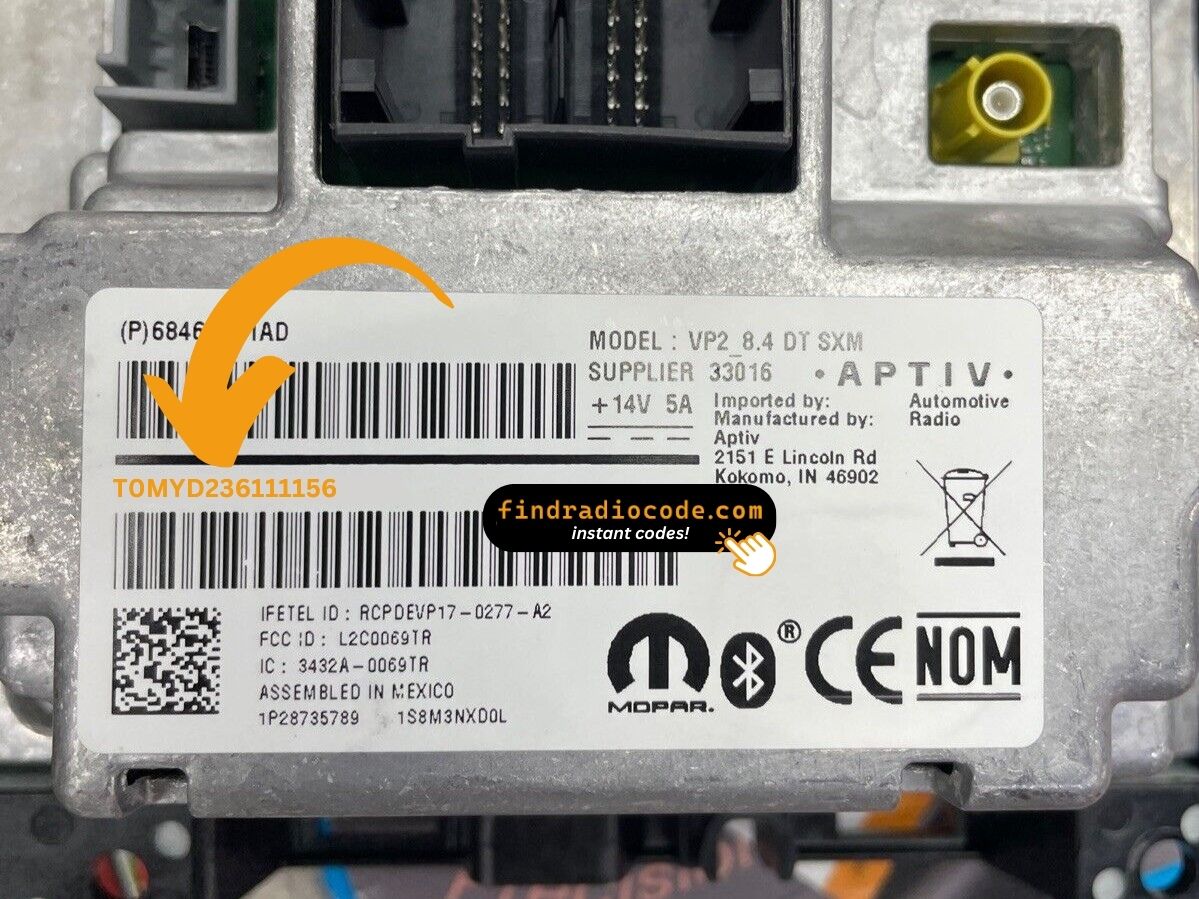
Example: Ram 2500 serial number label location
Typical Serial Number Formats for 2019 2500 Radios
The 2019 Ram 2500 Uconnect 4C (RA4) serial number formats:
T00AM– Harman Uconnect 4C (standard prefix)T00BE– Continental variantT0MYD– Newer Harman units (later models)
Radio designation: RA4 (Uconnect 4C, 8.4"). Serial: 14 characters alphanumeric. The Ram 2500 HD upgraded to Uconnect 4C with the 2019 redesign.
Important Do not mix up the serial with the part number (P05064... or 68...). Only the 14-char serial generates the code.
Typical Serial Number Formats for 2019 Ram 2500 Radios
The factory radios fitted to the 2019 Ram 2500 use the standard Mopar/Uconnect head-unit serial style. The exact prefix depends on the Uconnect tier shipped with the truck and the supplier (Mitsubishi Electric, Continental, Harman or Visteon) that built the unit, so any prefix list found online should be treated as a guide rather than a strict rule.
Uconnect 4C 8.4 (UAQ / UCQ) and 12-inch UAX
- Typically a 14-character alphanumeric string printed on the chassis label.
- Commonly begins with
T- frequent prefixes includeT00AM,TM9andTQ1- or withA2Con Continental-built variants. - Usually a continuous run of letters and digits with no dashes or spaces.
Uconnect 3 / Uconnect 4 5-inch (UAG)
- Usually carries a Mopar/Visteon or Panasonic-style serial on the chassis sticker, so the printed label on the unit itself is the authoritative reference.
- Always copy the serial exactly as printed and avoid guessing characters that look unclear.
From Serial Number to Unlock Code for your Ram 2500 - Explained
- Instead of contacting Ram dealer or searching forums you can generate the code online using the radio S/N.
- Identify the serial number. The best place to search is on the unit itself, and sometimes it can be visible on the 2500's radio screen.
- Enter it into the form above, and the system will identify the correct 2019 2500 unlock code.
- After receiving your code, type it in using 2500's radio buttons to release the blockade successfully.
- The entire process takes only a few minutes and requires zero paperwork and no dealer visit.
How Code Entry Works on Your Ram Radio
After generating the correct unlock code based on the serial number, you can restore normal functionality by entering it into the unit.
The code entry process depends on the control layout, but most 2019 2500 systems follow a similar structure using preset buttons, touch controls, or rotary knobs - depending on if it's a factory or an aftermarket unit.
You will typically see SAFE displayed on screen.
Detailed Entering Instructions for 2500 2019
To input the unlock code on the 2019 Ram 2500's Uconnect 4C:
- The 8.4" screen presents "ENTER CODE" after a battery event.
- Tap the touchscreen keypad to enter each digit of the 4-digit code.
- The radio auto-unlocks after the 4th digit – nothing else needed.
Lockout Warning: 3 wrong attempts = 60-minute lockout. Keep ignition ON. Turning off resets the 60-minute timer. HD work trucks must complete the full wait in one session.
Step-by-Step Code Input Guide
Once the unlock code has been retrieved, the 2019 Ram 2500 Uconnect 4 head unit can be unlocked at the dash without a scan tool or dealer visit.
- Limited Attempt Warning: Mopar/Uconnect head units only accept three incorrect tries before the radio enters a
WAITstate. If the lockout activates, the radio must remain powered with the ignition in RUN for roughly 30 continuous minutes (the vehicle may be driven during this time) before another attempt is allowed. Repeated wrong-code lockouts can extend the wait significantly, so confirm every digit before pressing it. - Place the ignition in RUN/ACC so the radio powers up but the engine stays off.
- Wait for the display to show
CODE,Please enter Anti-Theft Code, or a similar prompt. - On the Uconnect 4C 8.4 (UAQ/UCQ) and 12-inch UAX, tap the on-screen number pad to enter each digit and confirm with the OK/Enter touch button.
- On the 5-inch UAG base radio, use the numbered preset buttons (1-0) to key each digit of the code in sequence; confirm with the OK/Enter soft key if the unit prompts for it.
- If
WAITappears after wrong attempts, leave the radio powered with the ignition in RUN for the documented cool-down period before trying the correct code again.
If a correct-looking code is rejected, double-check the radio serial that was used to retrieve the code, and that the VIN tied to the code matches the truck the radio is currently installed in - a VIN mismatch is the most common reason an apparently correct code is refused.
Troubleshooting Common Radio Problems - 2500 2019
The Ram 2500's Uconnect 4C uses touchscreen-only code entry — press each digit on the virtual number pad. No physical preset buttons are involved. The radio unlocks after the 4th digit.
The Uconnect 4C serial on the Ram 2500 is accessible via Dealer Mode (System Info → Radio Part Info → Serial Number) or on the barcode sticker on the unit housing after removal. Serial: 14 chars starting with T00AM, T00BE, or T0MYD.
Ignore the part number (P05... or 68...) on the same label.
No code prompt means the Uconnect 4C hasn't triggered. To force the code screen: briefly disconnect the battery, then turn ignition ON. The prompt shows on startup.
A rejected code on the Ram 2500's Uconnect 4C typically indicates the wrong serial was submitted. The RA4 label has the serial (T00AM, T00BE, or T0MYD, 14 chars) and the part number (P05... or 68...) — the serial alone generates the code.
Work truck labels may be hard to read. Clean the sticker or photograph it and zoom in. Reach out for a free re-check if needed.
The Ram 2500's Uconnect 4C enters lockout after 3 wrong entries, displaying "ENTER CODE" but ignoring all input during the lockout.
To reset: Keep ignition ON for a full 60 minutes. Turning off restarts the countdown. Fleet-managed 2500s that get turned off frequently must complete the full 60-minute wait in one sitting.