Radio Codes for Auto Repair Shops and Used-Radio Sellers: A Practical Uconnect Workflow
Handling several Uconnect radios for Jeep, Dodge, Chrysler, or Ram vehicles? Keep each unit's serial number, code, and test result together so the right information reaches the technician or buyer.
October 17, 2026 Updated: October 19, 2026
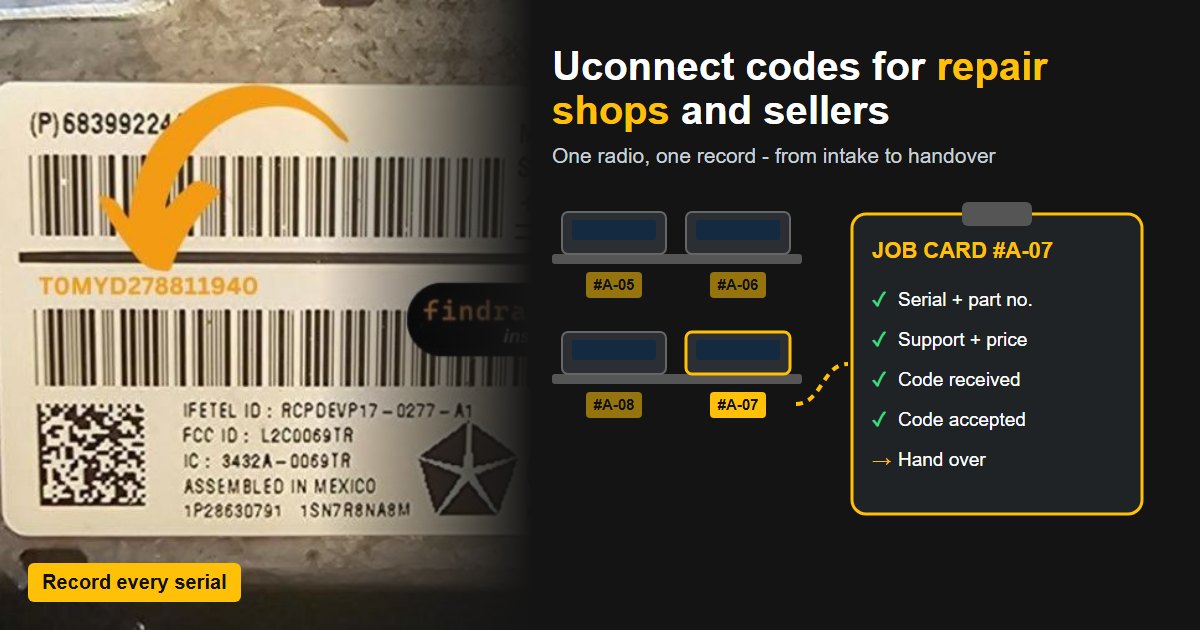
Quick answer: Record each radio's serial and part number, check support and pricing, then save the supplied code with that unit's record. Test it where possible and note whether it was accepted, rejected, or left untested. Give the customer the matching code and explain any checks still needed.
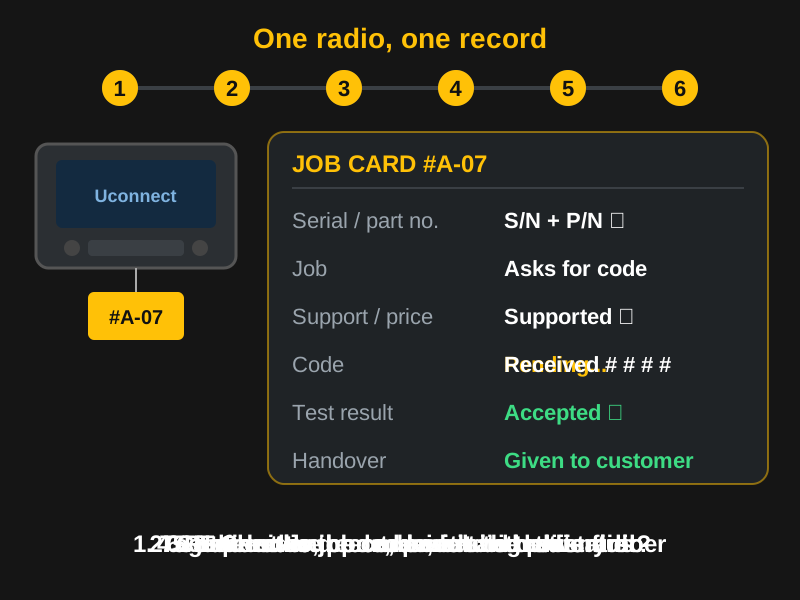
1. Record the radio before installing, shelving, or shipping it
Give each radio a repair-order reference or inventory ID. Photograph the label while it's accessible, then record the complete serial number and part number in separate fields. Keep those details with the unit's tag, bag, or job file. Similar-looking radios on a shelf can easily get mixed up.
Copy the serial exactly, including letters and leading characters, and follow the lookup form's format instructions. Don't shorten or pad it to make it pass. Check scans and photos against the actual serial field, rather than a neighboring number. For supported units, see how to find your Uconnect radio's serial number on screen.
For the 2015 Chrysler 200 with an RA2 radio, FCA's replacement-radio bulletin tells technicians to record the new unit's serial before installation so its anti-theft code can be obtained.
Keep the following details with each radio:
| Record | Keep with this radio |
|---|---|
| Job or stock reference | Repair-order number or inventory ID on the radio's tag or bag and in its record. |
| Radio identification | Full serial number, separate part number, and a clear label photo. |
| Vehicle information | Donor vehicle and intended vehicle, recorded separately where known. Add a VIN if needed for the job or provider's process. |
| Code request | Supplier, order reference, request date, pending or received status, and the code exactly as supplied once it arrives. |
| Test result | Not yet entered, accepted, or rejected, with the date and vehicle or test setup used. |
| Handover details | What was given to the customer or buyer, when, and any checks or work still outstanding. |
2. Confirm what the job needs
Check the screen message and the customer's description of the fault. If the radio asks for an anti-theft code, obtain the code for that unit. For a blank screen, repeated rebooting, or missing features, diagnose the fault before deciding what work to quote.
For a replacement, use the serial number of the unit being fitted or sold. Keep the original radio's details in a separate entry if they're needed for the repair history. Our guide to used and replacement Uconnect radio codes explains how to identify the replacement and obtain its code.
Check the part number against the intended vehicle's requirements before fitting the radio or advertising it as compatible. If you're selling a unit that hasn't been installed in the buyer's vehicle, explain which installation checks still need to be done.
3. Check support, price, and delivery
Before quoting a customer or listing a radio with a code, check whether the Uconnect radio code service supports that unit. Use its current price and delivery estimate when planning the job.
For repeat orders, ask about the volume discounts listed on the business pricing page. These are linked to your email address and used through the regular checkout. Order only for radios you own or are authorized to service. You can supply the code with the used radio you sell. Selling codes on their own, under your own brand, is reserved for approved API partners.
Agree with the customer what the quote covers. Make clear whether it includes code retrieval alone or also installation, diagnosis, repairs, or setup work.
4. Request the code and keep it with that unit
Recheck the serial against the label or supported information screen before submitting it. Look for an existing order under the same job or inventory ID, and follow up on a pending request before ordering again.
Record the supplier, order reference, and request date, and mark the request as pending. When the code arrives, mark it as received and save it exactly as supplied, including any leading zeros. Keep it beside the matching radio's serial and job or inventory reference.
Check a Uconnect serial
Type the serial of the unit you are working on to see whether it is supported, its price and the delivery estimate.
Not sure which radio you have? Browse Uconnect radio codes by model
5. Record the radio's response
When the radio is installed and ready to test, enter the supplied code using the procedure for that unit. If a waiting message appears or the code is rejected, record the exact message and check the radio and order details before another attempt. Follow the guide to the WAIT message or the support instructions for your unit.
Record "code accepted" or "code rejected," along with the date and the vehicle or test setup used. For a unit you can't test, use "code received, not yet entered." Keep any remaining faults separate from the code result so they can be diagnosed. If you contact the supplier for help, include the radio serial, order reference, and observed result, plus any evidence it requests.
6. Hand over the code and its test status
Include the radio's serial number and code in the repair paperwork or the used-radio sale documents. Add the recorded test result and list any compatibility, installation, or setup work still needed. Keep a copy with the job or inventory record for future customer queries.
Where API automation fits
If you want to request codes from your workshop software or sales system, ask about FindRadioCode's radio code API. Approved businesses get prepaid access, free serial validation, and automatic code retrieval for supported units. Some radios require a separate manual request, so check coverage for the units you handle.
The demo sandbox lets you try sample responses before integrating; it doesn't supply real codes. You can also continue ordering through the regular checkout if you prefer to handle requests individually.
Check your business pricing options
Review the current business pricing options and contact FindRadioCode about repeat orders. Tell us which radios you handle and whether you need codes for customer repairs or used-radio sales.
Uconnect Radio Codes for Businesses FAQ
Related Articles
Used or Replacement Uconnect Radio
Why the old code and the VIN do not work after a swap, and which serial gets the right code.
Read GuideUconnect Dealer Mode Serial
Read the serial number on the Uconnect screen without pulling the radio.
Read GuideDealer or Online Service?
What a dealer quote and an online code order each cover, and what to ask before paying.
Read Guide