Volvo Truck Radio Code Reset: FH, FM, VNL and Volvo Cars
On FH and FM trucks the radio normally pairs itself with the truck again, and when a Volvo radio does ask for a code there is no reset that skips it. Here is what Volvo's own manuals say for trucks and cars, what CODE, LOCKED and OFF mean, and where the serial hides.
August 15, 2026 Updated: October 5, 2026
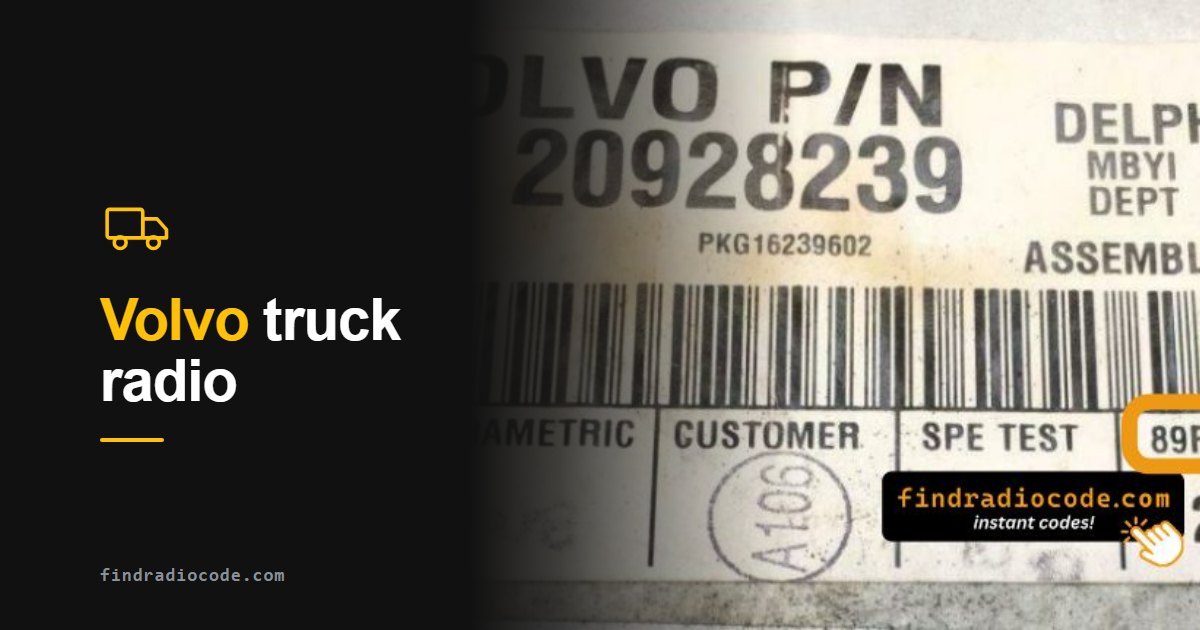
Quick answer: There is no button reset that removes a Volvo radio code. On FH and FM trucks the radio pairs itself with the truck: turn the key to the drive position and wait a moment before starting. If it shows CODE 0000, turn the volume knob to set each digit and press the power button to confirm it. Three wrong tries lock it for 60 minutes; older Volvo car radios show OFF for two hours instead. The code comes from the S/N on the radio label (BP, CC, VO or 89F prefix).
One System, Two Very Different Owners
Volvo radio codes come up in two quite separate situations. On the car side it is usually an S60, V70 or XC90 owner who changed a battery and got a silent dashboard back. On the truck side it is an FH, FM, FL or FE - and there it is routine, because fleet batteries get swapped and jump-started constantly, so the same driver may meet this several times a year.
Mechanically the two are close relatives. Volvo cars and trucks both use Delphi Electronic and Delphi Delco head units, and both keep the identifying serial on a physical label rather than showing it on screen. That single fact shapes everything below: on a Volvo, the job starts with a pair of release keys.
Volvo Truck Radio Code Reset: What Actually Works
Drivers search for a "reset" because the cab radio went silent after a battery change or a jump start. There is no reset that removes the code - but on FH and FM trucks you often do not need one, because the radio is designed to recognize the truck by itself.
FH and FM: the Guard system
Volvo's FH and FM Driver's Handbook describes the radio's anti-theft Guard: the radio is set to work with only one vehicle, the check is automatic, and normally nothing has to be done by hand. The same handbook warns that if the key is turned straight from off to start, the automatic radio code entry may not work. Stop in the drive position for a moment first.
- Switch the main switch on.
- Turn the key to the drive position and wait a moment. Do not go straight from off to start.
- If the radio comes back, you are done - the Guard has recognized the truck.
- If the display shows CODE 0000 with the first digit blinking, turn the volume knob until the right number shows, then press the power button to enter it. The next digit starts blinking; repeat for all four.
- The 4-digit code is on a sticker that Volvo supplies with the Driver's Handbook. No sticker? The code can be recovered from the serial number on the radio label.
VNL and VNM (North America)
Volvo's North American VN range is sold as the VNL (long hood) and the VNM (medium hood, built until 2017). The radio fitted changes with the year, and Volvo's VNL operator's manual does not print the code procedure itself: it tells you to read the radio manufacturer's manual for the theft-deterrent coding. Owners on trucking forums report getting the code from a Volvo Trucks dealer or Volvo's support line - have the radio serial number ready. If the serial on your radio label starts with one of the prefixes listed further down, the form on this page checks it instantly.
CODE, LOCKED or OFF: What the Display Means
The word on the screen tells you what state the radio is in. These are the messages in Volvo's own manuals, plus the one truck drivers report most:
- CODE, COdE, CODE 0000 or input CODE **** - the radio wants its 4-digit code. Nothing is broken; enter the code.
- rPt, EEEE or Error - the last code entered was wrong (the word depends on the radio). Enter the correct code from the beginning.
- OFF (Volvo cars) - three wrong codes in a row. The radio stays locked for two hours, and the wait only counts with the battery connected, the key in position I and the radio switched on.
- LOCKED (reported on Volvo truck radios) - the radio is refusing entries for now, for example after wrong codes. On the FH and FM radio that Volvo documents, three wrong tries mean a 60 minute lock. Wait it out, then enter the correct code once.
Why You Cannot Read the Serial Off the Screen
It is worth stating plainly because a lot of time gets wasted here. Volvo radios have no on-screen serial retrieval. There is no button combination like the Honda 1-and-6 trick, no dealer mode like Uconnect, no engineering menu that prints the number. Both car and truck units must be physically removed so the label on the chassis can be read.
If a site or a forum post tells you to hold some combination of buttons on a Volvo to display the serial, it is describing a different make. Save yourself the attempt and go straight for the release keys.
Removing the Unit
Volvo radios are standard DIN size and among the easier units to extract, which is the one piece of good news in this process.
- Switch the vehicle off and remove the key. On a truck, isolate the battery if the fleet procedure calls for it.
- Find the extraction holes or release slots on each side of the radio faceplate.
- Insert a pair of DIN release keys until you feel the retaining springs click.
- Draw the unit straight forward out of its cage while holding light outward pressure on the keys.
- Read the white or silver barcode label on the rear or side of the housing and find the field marked S/N or Serial.
Standard DIN keys fit most Volvo truck radios, so there is rarely any need for a brand-specific tool. On cars, check whether the surround trim clips off first - forcing the unit against a trapped bezel is how faceplates get broken.
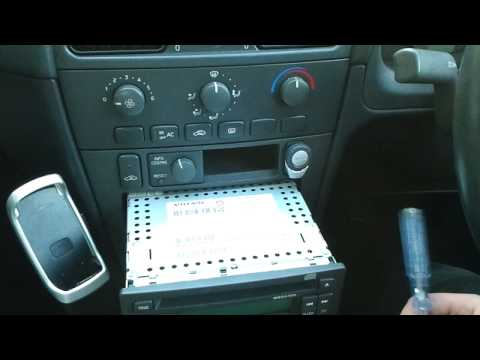
Removing a Volvo radio and entering the security code (video: FixitSam)
The Serial Formats
Which prefix you see depends on who built the unit rather than which Volvo it came out of:
- BP - Blaupunkt-built units
- CC - Continental units
- VO - Philips PSC units, for example
VO652FA9008799 - 89F and 89D - Delphi units found on Volvo and Renault trucks, written as a long run of hexadecimal characters
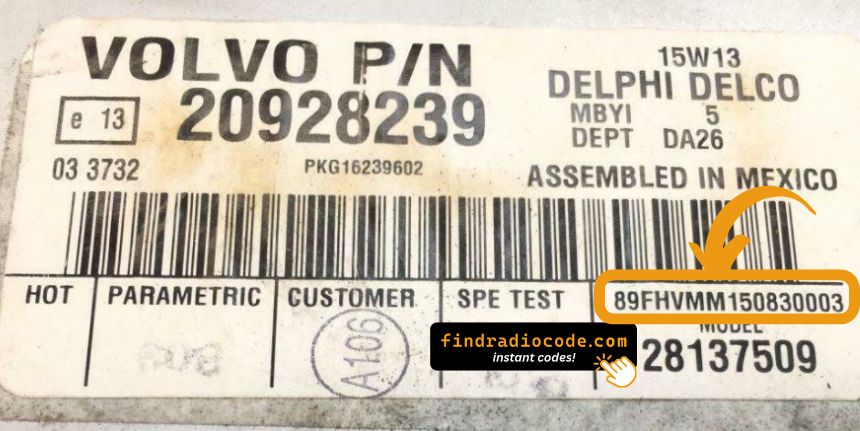
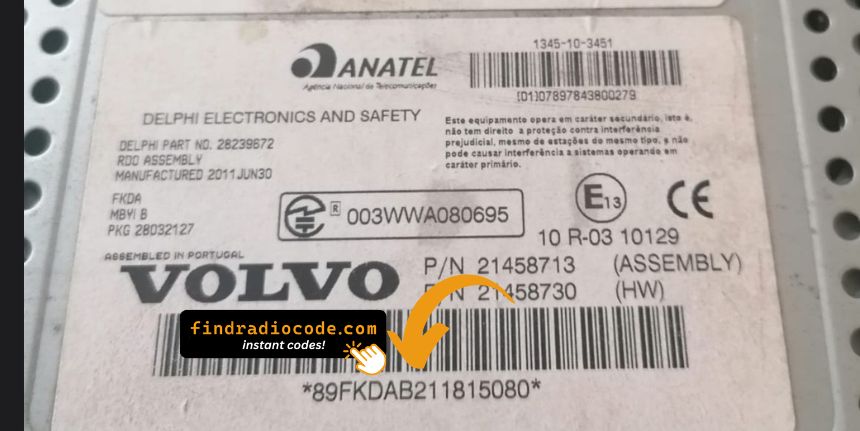
Read the S/N off the label? Check your Volvo serial now - from $9.99, delivered instantly.
How to Enter the Code
On many Volvo radios the code goes in on the preset buttons. Ignition on, radio powered, then:
- The display shows CODE or SAFE.
- Use preset buttons 1 to 4 to set each of the four digits, pressing each button until its digit appears.
- Press button 5 or OK to submit.
- The radio unlocks and plays.
The controls differ by radio. Volvo's manuals give three methods:
- Preset buttons - the 940 (1995) and the S70 / V70 SC-813 unit (1998). The display shows COdE.
- 1-20/DISC knob - the S40 / V40 HU-415 and HU-615 (2003): turn the knob to pick a digit, push it to enter, four times. The display shows input CODE ****.
- Volume knob and power button - the FH / FM truck radio with Guard: turn the volume knob to set the blinking digit, press the power button to enter it. The display shows CODE 0000.

Entering the radio code on Volvo FH, FM and VM trucks (video: Eletricidade Veicular)
Wrong Code Lockouts: 60 Minutes on Trucks, 2 Hours on Cars
Volvo radios give you three tries. What happens after the third wrong code depends on the radio, and both timers are long enough that guessing is a bad idea:
- FH and FM trucks (radio with Guard): locked for 60 minutes, then three new tries are allowed. The handbook does not say whether the timer runs with the power off, so keep the radio powered while you wait.
- Volvo cars (the 940, S70, V70, S40 and V40 manuals): the display shows OFF for two hours. The wait only counts with the battery connected, the key in position I and the radio switched on.
- When the time is up, enter the correct code from the beginning.
Volvo Car Radios: Reset vs Code (850, 940, S70, V70, S40, V40)
On Volvo cars a "reset" that skips the code does not exist either. Disconnecting the battery is exactly what makes the radio ask for its code: Volvo's 850 and 940 manuals say so directly and tell you to switch the radio off before disconnecting the battery. What you can clear yourself is the OFF lockout. Here is what Volvo's owner's manuals say, model by model:
- 940 (1995 manual): the display shows COdE and the code goes in on the preset buttons. A wrong code shows EEEE; three wrong codes show OFF for two hours.
- S70 and V70 (1998 manual, SC-813 unit): COdE on the display, code entered on the preset buttons, rPt after a wrong code, and OFF for two hours after three wrong codes.
- S40 and V40 (2003 manual, HU-415 and HU-615): the display shows input CODE ****. Turn the 1-20/DISC knob to pick each digit and push it to enter; a wrong code shows Error, and three wrong codes show OFF for two hours.
- 850 (1995 manual): if the radio has an anti-theft code and the battery is disconnected, the code has to be re-entered before the radio works.
- Keep the battery connected.
- Turn the key to position I.
- Switch the radio on so it shows OFF, and switch the headlights off to save the battery.
- Wait two hours, then enter the correct code once.
The code itself comes from the radio serial number, not from the VIN. Get the code for your Volvo radio from the serial on its label.
A Note for Fleet and Truck Operators
If you run trucks, this stops being an occasional annoyance and becomes a process problem. Batteries are swapped on schedule, jump starts are routine, and every one of those events can send a cab radio into SAFE. Two habits remove most of the pain: record the radio serial number in the vehicle file the first time the unit is ever out of the dash, and store the code alongside it. The serial never changes for the life of that radio, so reading it once means never removing the unit again.
It is also worth knowing that Volvo and Renault trucks share the Delphi 89F and 89D family, so a mixed fleet often needs only one procedure rather than two.
Cars and Trucks
The Volvo radio code page covers both sides: passenger cars including S40, V40, S60, S70, V70 and XC90, and the truck range - FH, FM, FL and FE - with photos of the serial labels for each. Whichever you have, the identifier is the radio serial number and nothing else: the VIN does not generate a Volvo radio code, on a car or a truck.
Get the Code From Your Volvo Serial
Read the serial once and you never need to pull the radio again: submit it, get the code instantly on screen and by email, and keep both on file for the next battery swap. From $9.99, refunded if it does not work.
Not sure which radio you have? Browse Volvo radio codes by model
Frequently Asked Questions
Related Articles
How Anti-Theft Codes Work
Why a battery swap or a jump start puts the radio into SAFE in the first place.
Read GuideRadio Code From the VIN?
The only two makes where the VIN works, and what everything else needs instead.
Read GuideIs Buying a Code Online Safe?
How to check a code retrieval service before you hand over any money.
Read Guide