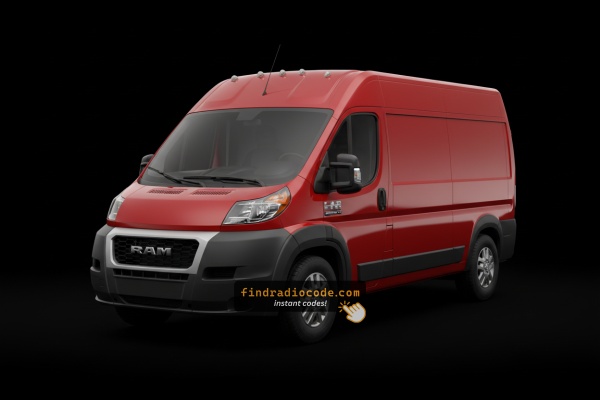
Which head unit could the 2014 Ram ProMaster have?
The following radio models shipped in the 2014 Ram ProMaster. Choose the one that matches your dash to check how to identify it and how the code is retrieved.
| Years | Factory radio | Serial starts with |
|---|---|---|
| 2013-2018 | Chrysler Uconnect 8.4 Panasonic |
TM9
|
| 2013-2018 | Uconnect 8.4 RA3 VP3 NA Harman |
T00AM, T00BE, T0012
|
| 2014-2018 | Uconnect 5.0 RA2 VP2 Continental |
TQN, TVPQN, A2C, A3C
|
| 2014-2017 | Uconnect 5.0 RA2 VP2H NA Harman |
T00AM, T00BE, T0012
|
Where to Find the Serial Number on your ProMaster
The first step is to find the radio's serial num.
Depending on the radio unit installed in your 2014 ProMaster, the serial can be found either through the screen menu or by pulling the unit out and checking the label on the radio itself.
Follow the steps below to identify your serial the right way.
Factory Radios on the 2014 Ram ProMaster
The 2014 ProMaster launched the Ducato-derived van in North America with two head-unit choices, both built on the Italian-platform infotainment hardware rather than the US Mopar Uconnect 8.4 found in Ram 1500/2500/3500 trucks. Base AM/FM/CD/MP3 radio (sometimes referred to as the R3, OEM part numbers in the P5QM. family) was the standard non-touchscreen unit on Tradesman-tier ProMasters - a 1-DIN-sized fascia with a small monochrome display, six numbered preset buttons across the bottom, hard tune/volume knobs, and no Bluetooth or screen graphics. Uconnect 5.0 (RA2 / VP2-NA) was the touchscreen option - a 5-inch resistive colour screen with hardware buttons flanking the display (Radio, Media, Phone, Nav/Compass, More); units fitted without the navigation option show a Compass button instead of NAV, while units with the optional navigation upgrade show a NAV soft key. The Uconnect 5.0 was supplier-built (Italian platform shared with Fiat Ducato), so it looks visually different from the Uconnect 8.4 RA3/RA4 found in contemporary Ram trucks. The base AM/FM/CD radio remained the most common factory fit on cargo vans, with Uconnect 5.0 more typical on passenger/window van trims.
Find the S/N via the Radio Display
These are the steps you need to follow for 2014 Ram ProMaster:
The 2014 Ram ProMaster is based on the Fiat Ducato and uses the Uconnect 5.0" (RA1) or Uconnect 7.0" infotainment system, depending on the trim level. Unlike full-size Ram pickups, the ProMaster's radio might not support Dealer Mode.
Method 1 (7" Uconnect): Try pressing the bottom-left and bottom-right corners of the screen bezel for 5 seconds to access Dealer Mode.
Method 2 (all models): If Dealer Mode doesn't activate, the radio must be physically removed to read the serial number label. See removal instructions below.
View the S/N by Pulling Out the Unit
If the serial does not appear on screen, the next step is checking the radio itself.
Many Ram radios require physical access to the ID label attached to the unit.
Usual approach:
- Start by completely shutting off the engine - pull the key out.
- Then detach the dashboard bezel.
- Next, loosen the mounting points and slide the radio forward.
- Look for a printed tag showing the serial number.
Removing the radio from the 2014 Ram ProMaster involves a different approach compared to other Ram models:
- Turn off the vehicle.
- Locate the radio unit in the center stack area. The ProMaster's dashboard layout is van-style.
- Certain ProMaster radios have small release holes on each side of the radio face. Insert two thin release keys into these holes to disengage the locking mechanism.
- In the event that there are no release holes, pry off the dashboard bezel using a plastic pry tool, then remove the Torx screws and slide the unit forward.
ProMaster Tip: The 2014 ProMaster may use a Fiat-style radio mounting system with extraction holes rather than the bolt-in system found in other Ram trucks. Check the release holes before resorting to trim removal.
ProMaster's Hardware Label Method
The factory radios offered on the 2014 ProMaster - the base AM/FM/CD/MP3 head unit and the optional Uconnect 5.0 (RA2/VP2-NA) 5-inch touchscreen - both carry their serial number on a printed chassis label rather than exposing it through any screen menu. Because this Italian-platform infotainment hardware does not share the US Uconnect 8.4 dealer-mode shortcut, the head unit needs to come out so the sticker can be read directly.
Safety first. Switch the ignition off, remove the key, disconnect the negative battery terminal, and wait several minutes before touching wiring. Steer clear of any yellow airbag/SRS connectors and stick to plastic trim tools so nothing shorts or pops loose.
Tools you will need. A set of four DIN radio release keys (the U-shaped pins designed for European-platform head units), or as a workaround a 3 mm Allen wrench or four short lengths of stiff wire (for example 12 gauge solid copper) bent in the right shape. A flashlight and a soft cloth to set the unit on are also useful.
Removal overview. Unlike the bezel-clip-and-screw method used on Ram trucks, the ProMaster's Italian-platform radio uses face-mounted release latches. Look for four small slots/holes on the front fascia of the radio - one near each corner of the unit, just inside the bezel edge. Insert the four DIN release keys (curved edge inwards, locking lugs facing outwards) fully into all four holes; this depresses the internal spring latches that hold the radio in the dash cage. With all four keys engaged, pull outward on the keys evenly to slide the radio forward out of the dash. Once the chassis clears the fascia, reach behind the unit and disconnect the antenna lead and the multi-pin power/data harnesses on the rear.
Where the serial sits. The serial number is printed on a barcode/sticker label on the top or side of the radio chassis, alongside the part number and supplier markings (commonly Magneti Marelli or Continental for the Uconnect 5.0; the base AM/FM/CD radio carries its own Mopar/supplier label).
Tips. Photograph the label up close in good light and double-check ambiguous characters such as 0/O, 1/I and 8/B before transcribing the serial. If a single key will not engage, try working one latch at a time with a 3 mm Allen wrench while keeping outward tension on the chassis with the other hand.
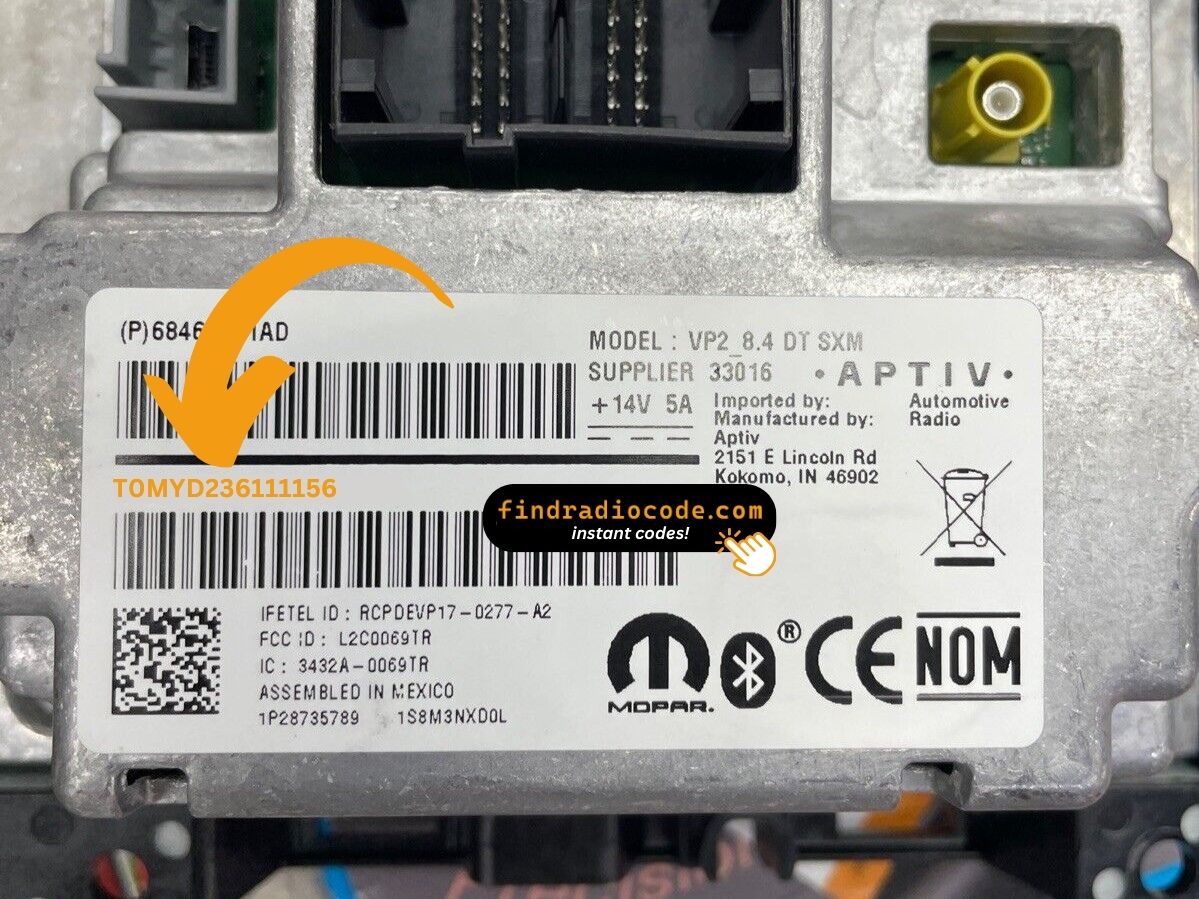
Example: Ram ProMaster serial number label location
How Serial Numbers Usually Look on These ProMaster Radios
The 2014 Ram ProMaster radio comes from Harman or Continental, the same as other Stellantis vehicles. Expected serial number prefixes:
T00AM– Harman Uconnect units (most common prefix)T00BE– Continental versionsTM9– Older Harman production units (earlier models)
Radio models for the ProMaster: RA1 (Uconnect 5.0" base), RA2 (Uconnect 4.3"), or a 7.0" Uconnect (upgraded option). Serial numbers are 14 characters alphanumeric.
Note Because the ProMaster is Fiat Ducato-based, some earlier models may have Fiat-sourced radio components. The serial format is still the same regardless.
Typical Serial Number Formats for 2014 ProMaster Radios
The factory radios fitted to the 2014 ProMaster sit on the Italian Ducato-derived platform, so the prefix on the chassis label depends on which head unit was specified and which supplier built it - and these prefixes are different from the US-market Uconnect 8.4 RA3/RA4 patterns seen on Ram trucks of the same era.
Uconnect 5.0 (RA2 / VP2-NA)
The 5-inch touchscreen unit was supplier-built on the Italian/European platform (commonly Magneti Marelli or Continental). Continental-built units carry serials that typically begin with A2C or A3C followed by a long string of digits. Magneti Marelli-built units use a different alphanumeric pattern that varies by production run. Treat the printed label on the chassis itself as the authoritative reference - copy it character-for-character rather than guessing the format.
Base AM/FM/CD/MP3 radio
The base 1-DIN head unit usually carries a Mopar/supplier-style serial on its chassis sticker. The exact prefix varies by production batch and supplier, so transcribe what is printed on the label rather than relying on any assumed pattern. Double-check ambiguous characters such as 0/O and 1/I before submitting the serial.
How to Unlock a Ram ProMaster Radio After Power Loss
To get the code, you'll take only 4 easy steps.
- Locate the radio's serial number - this is the only information required by our side.
The difference with the dealership lookup is that no VIN is needed. - Enter the serial number into our generator above.
Our system checks it against a database of supported factory radios and automatically finds the matching security code. - In most cases, the code will appear instantly on the screen after you pay and is also sent to your email for backup.
If we need to check it manually, you'll be notified before checkout. - Once you get it, just enter it into your radio to restore full functionality.
Final Step - Enter the Radio Code
Once you receive the correct unlock code based on the serial number, you can restore normal functionality by entering it into the unit.
The code entry process depends on the control layout, but most 2014 ProMaster systems follow a similar structure using preset buttons, touch controls, or rotary knobs - depending on if it's a factory or an aftermarket unit.
You will typically see CODE displayed on screen.
Step-by-Step - Correct Entering Process
To input the unlock code on the 2014 Ram ProMaster's radio:
- Turn the ignition to ON. The screen presents "ENTER CODE" or "CODE".
- Touchscreen models (5.0"/7.0" Uconnect): Press the on-screen keypad to enter each digit of the 4-digit code.
- Non-touchscreen models: Press preset buttons 1-4 to cycle through each digit. Hold Enter/OK to confirm.
Lockout: Three failed attempts trigger a 60-minute lockout. Keep the ignition ON for the entire lockout duration. Do not turn the key off or the timer restarts.
Detailed Input Instructions for ProMaster 2014
Once the unlock code has been retrieved for a 2014 ProMaster radio, the four-digit code can be keyed in directly at the head unit - no scan tool or dealer visit is required for the code-entry step itself.
Limited attempts. The radio only accepts a small number of incorrect tries before going into a long lockout/WAIT state, so verify every digit before pressing it. If the unit times out, leave the radio powered with the ignition in RUN for an extended period (commonly cited as around an hour) before trying the correct code again.
Entering the code. Place the ignition in RUN/ACC so the radio powers up but the engine stays off. Wait for the display to show CODE, COD 0000, or a similar prompt. Use the numbered preset buttons 1, 2, 3 and 4 to enter each of the four digits in sequence (preset 1 = first digit, preset 2 = second digit, and so on), then press the volume/enter knob to confirm the entry. On the Uconnect 5.0 touchscreen, the code can also be entered using the on-screen number pad if one appears - in either case, the four-digit code is the same and is confirmed with the OK/Enter control on the display.
Why Did the Radio Lock and Ask for a Code?
The ProMaster's Uconnect locks automatically after any power interruption. Delivery vans are serviced frequently and batteries are replaced often, making this a common trigger.
Common causes:
- Battery replacement — the most frequent cause
- Failed radio fuse — especially after cargo accessory installation
- Buying used without the unlock code
- Battery fully drained from off-season
The code comes from the radio's own serial number — not the VIN.
Understanding Unlock Issues with Your ProMaster
ProMaster radios differ by trim: touchscreen models (5.0"/7.0" Uconnect) use the virtual keypad; non-touchscreen models use preset buttons 1, 2, 3, 4 to scroll each digit, then Enter/OK to confirm.
If you're unsure: check the display. A touchscreen reacts to touch; a non-touchscreen won't.
The serial label is on the rear or side of the radio unit. As these vans may use European-style radio mounts with release key slots, removing it can be quicker than in pickups.
Serial: 14 alphanumeric characters starting with T00AM, T00BE, or TM9. Don't use the part number (P... or 68...) — it does not generate a valid code.
After 3 wrong entries, the radio goes into a 60-minute lockout. The screen continues showing "CODE" or "ENTER CODE" but blocks all input.
To clear: Keep ignition ON for a full 60 minutes without turning off. ProMasters used in daily routes need to finish the full 60-minute wait in one sitting.
No code prompt means the radio isn't engaged. To force the code screen: briefly disconnect the battery, then turn ignition ON. The "ENTER CODE" prompt shows immediately on boot.
The ProMaster radio label has both a serial number (14 chars, starts with T00AM, T00BE, or TM9) and a part number (P05... or 68...). Only the 14-character serial generates the unlock code.
If the label is hard to read (vans get dusty labels), take a photo with your phone and zoom in to read each character clearly. Reach out to support for a re-check if the code still fails.