How to Enter a Honda Radio Code (All Models and Generations)
Having the code is only half the job. Honda changed the entry method three times, and pressing the wrong buttons burns attempts you cannot get back. Here is the correct method for every dashboard.
September 10, 2026 Updated: October 5, 2026
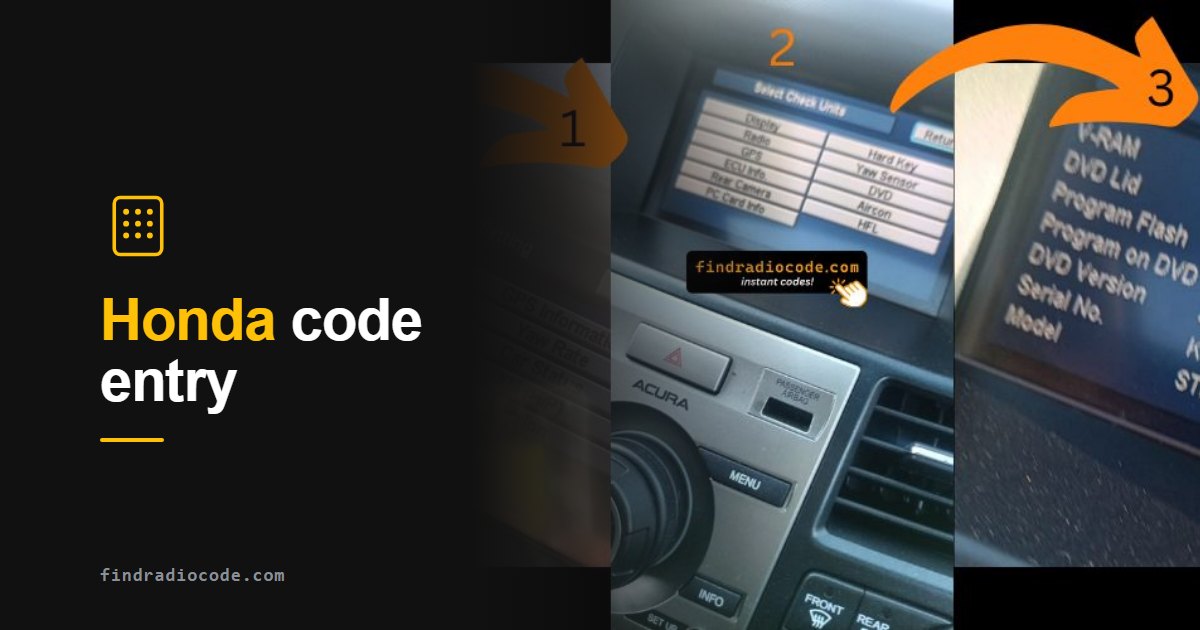
Quick answer: On a Honda radio with preset buttons, press the button for each digit of your 5-digit code once, in order: for 41352 press preset 4, then 1, 3, 5 and 2. On many 2013 and newer Hondas, first hold the power button for 2 seconds with the car ON - the radio often unlocks itself. You get 10 tries; after that it shows ERR or CODE ERROR E until it has been left on for 1 hour.
Start Here: Which Dashboard Do You Have?
Honda and Acura radios all lock the same way after a battery disconnect, but they do not all take the code the same way. Which method you need depends on one thing: what the radio looks like, not what year the car is. Three families cover essentially every Honda on the road.
Look at the unit showing CODE and match it to one of these:
- Physical preset buttons 1 to 6 under a small display (Civic, Accord, CR-V, Fit, Element, Odyssey, most 1998-2015 audio units) - use Method 1. The code is 5 digits.
- Full touchscreen with an on-screen number pad (Display Audio and touchscreen navigation units, on many models from 2013 on) - try the power button first, then use Method 2. The code is usually 5 digits.
- Factory navigation with MAP / MENU / CANCEL buttons (2003-2019 navigation systems) - use Method 3. The navigation code is 4 digits and is often different from the radio code.
On every method the ignition has to be in ACC or ON and the radio powered up showing CODE. On 2012 and newer models use ON: Honda's manuals say that in ACCESSORY the system asks for the code instead of checking itself. If the screen is blank, press the power button first - a radio that shows nothing is not waiting for a code, it has no power.
The Three Methods at a Glance
| Radio | Code | How you enter it | Attempts |
|---|---|---|---|
| Preset-button audio unit | 5 digits | Press the preset button for each digit once, in order | 10, then ERR / CODE ERROR E |
| Touchscreen (Display Audio) | Usually 5 digits | Hold power 2 seconds first, then the on-screen keypad | 10, then CODE ERROR E |
| Factory navigation | 4 digits | Keypad or rotary knob | 10, then CODE ERROR E |
Before You Press Anything
Two minutes of preparation here saves an hour of lockout later.
- Have the exact code in front of you. Honda radios allow only 10 attempts in total before they stop accepting input entirely. Guessing is the single most common reason a simple job turns into an hour-long wait.
- Check the glovebox first. Many Hondas shipped with a small white anti-theft card carrying the code, and dealers often taped it inside the glovebox lid or the owner manual wallet. Free code, zero effort.
- Know whether your code is 4 or 5 digits. Audio units take 5 digits. Navigation units take 4. If you have a 4-digit code and a 5-digit prompt, you are holding the navigation code and still need the radio code (or the other way round).
- Keep the engine running or the ignition in ACC. If power drops mid-entry, some units count that as a failed attempt.
Newer Honda? Try the Power Button First
From about the 2012 Civic and the 2013 Accord on, many Honda audio units can unlock themselves. The unit checks with the car's control unit that it is still in the vehicle it was built for - a Honda/Acura service bulletin describes it as checking that the VIN matches the one saved in the unit - and if it is, no code is needed. You only have to ask it to check:
- Set the car to ON (the engine can run). In ACCESSORY the system asks for the code instead.
- Turn the audio system on and wait until the CODE or Enter code screen is fully up. On cars with two screens, wait for both.
- Press and hold the power button or the VOL/AUDIO knob for about 2 seconds, until you hear a long beep.
- The radio starts playing. If it still asks for a code, enter it with Method 1 or Method 2 below.
The Enter code screen on these cars says it in plain words: "To enter the security code automatically, push and hold the audio power button for 2 seconds. If this does not work, manually enter the security code using the touch panel below." On the newest models (for example the 2017 and newer CR-V, the 2023 Accord and the 2024 Civic) the owner's manual lists only this power-button step, and if the unit is still not recognized it sends you to a dealer to have the audio unit checked. If your radio went straight back to working after a battery change without asking for anything, this same check did its job - there is no code to enter.
Method 1 - Preset Buttons, One Press per Digit (5-Digit Code)
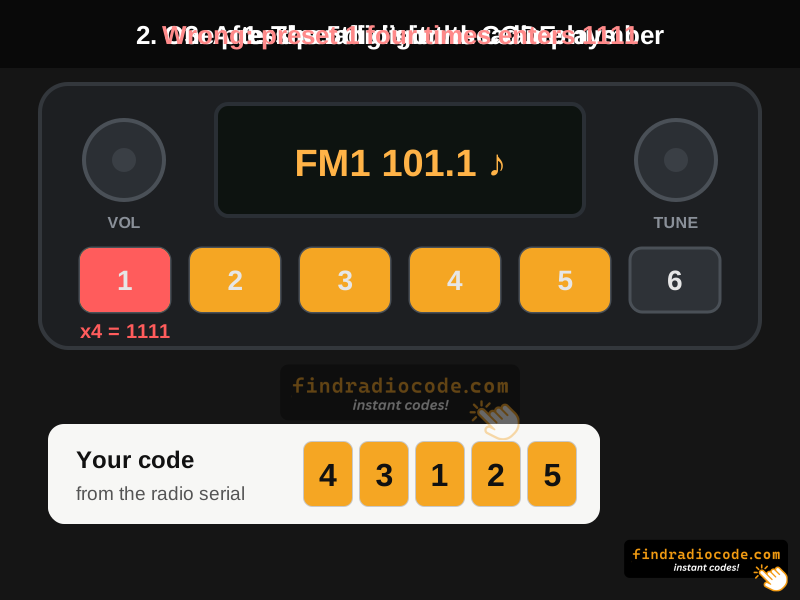
This is the classic Honda method and covers most locked Hondas with physical buttons. The preset buttons work like a small keypad: each press enters one digit, left to right, and the digit is the number printed on the button you press. Honda audio codes normally use only the digits 1 to 6, one for each preset button. Most units have no confirm button - the radio starts playing by itself once the code is right.
- Turn the ignition to ACC or ON. The display should read CODE.
- Press the preset button that matches the first digit of your code, once. For a 4, press preset 4.
- Do the same for the second, third, fourth and fifth digits. A repeated digit means pressing the same button again: 33 is preset 3 twice.
- Pressed a wrong button? Do not start over. Honda's owner's manuals say to complete the five-digit sequence, let it fail, then enter the correct code.
- The radio plays. If it shows CODE again, the entry was wrong - see the mistakes section below before trying once more.
24615 you press preset 2, then 4, then 6, then 1, then 5 - five presses in total. For 33351 you press preset 3 three times, then 5, then 1. If your code contains a 0, 7, 8 or 9, stop and check it before you spend an attempt: you may be holding a navigation code or a code for a different radio.

Unlock any Honda or Acura radio in 2 minutes
Method 2 - Touchscreen Keypad (Display Audio and Touchscreen Navigation)
Hondas with a touchscreen show an Enter code screen with a number pad instead of CODE on a small display. Typing the code is easy. The catch is that on most of these cars you should not need to type anything at all, so do the power-button step first.
- Ignition ON and wait for the system to finish booting until the Enter code screen is up. On cars with two screens, the message does not always appear on both at the same moment - wait for both.
- Press and hold the power button or VOL knob for about 2 seconds until you hear a beep. This is the automatic unlock described above.
- Only if the Enter code screen stays: tap your code on the keypad and confirm with OK (older navigation screens use a Done icon).
- If nothing happens, tap the screen once to wake it, then try again - a sleeping screen swallows the first touch.
If your touchscreen never shows a keypad and instead sits on the Honda logo, the head unit is stuck rather than locked. Disconnect the negative battery terminal for 15 minutes to force a cold boot, then look for the code prompt again.
Method 3 - Navigation Code (4 Digits)
Factory navigation systems carry a second, separate anti-theft code. After a battery disconnect a navigation Honda can ask for the radio code, the navigation code, or both one after the other.
- Ignition ON and wait for the navigation screen to show Enter Code.
- Use the on-screen keypad or the rotary knob to enter the 4-digit navigation code.
- Confirm with Enter, OK or Done, or by pressing the rotary knob.
- If the audio side is still muted afterwards, the unit wants the radio code as well - go back to Method 1 or 2.
Navigation codes and radio codes come from different serial numbers. The navigation serial is read from the Navi ECU (hold MAP + MENU + CANCEL for about 6 seconds, then Diagnosis Items, Unit Check, Navi ECU, Serial No.) and usually starts with three letters, for example GNA21003214.
Five Mistakes That Waste Your Attempts
Almost every "the code does not work" message we get comes down to one of these:
- Counting presses instead of pressing once per digit. On Honda preset radios each press enters one digit. For the code 41352 you press preset 4 once, then 1, 3, 5 and 2 - not preset 1 four times.
- Starting over after a wrong press. Honda's manuals say to finish the five-digit sequence, let it fail, and then enter the correct code.
- Using the navigation code on the radio. A 4-digit code in a 5-digit prompt will always fail, and it still burns an attempt.
- Reading the part number instead of the serial. The number that generates your code is labelled Serial or S/N, not the long Honda part number starting 39100-.
- Trying again immediately after a failure. Once you are wrong twice, stop. Confirm the code from the serial before spending the remaining attempts.
CODE ERROR E: How to Get Your Attempts Back
After 10 failed attempts a Honda radio stops accepting codes and shows Err, E or CODE ERROR E, depending on the unit. It is not permanently dead and your code has not changed. Honda's owner's manuals give one cure: leave the system switched on for an hour.
- Turn the ignition to ON and switch the radio on, so the display shows the error.
- Leave the system on for 1 hour. If the engine stays off for that hour, give the battery a drive or a charger afterwards.
- After the hour the radio accepts a code again and the display goes back to CODE.
- Use the next attempt on a code you have verified from the serial, pressing one button per digit - not on a guess.
ERR or ERROR With a Number (1 to 9)?
Some Honda units show ERR or ERROR followed by a number after a rejected code, instead of the letter E. Honda does not publish a list of these numbers, and the wording differs between radio suppliers and years, so do not try to decode the digit. What it tells you is simple: the radio rejected that entry, and every rejection counts toward the 10-try limit. Stop, check the code against the serial, and if the radio stops taking input, use the one-hour wait above.
Why the Radio Says ERR Right After You Enter the Code
- The digits were counted, not pressed. Pressing preset 1 four times enters 1111, not 4.
- It is the other code. A 4-digit navigation code will not open a 5-digit radio prompt.
- The code was worked out from the part number. The long number starting 39100- is the part number; the code comes from the Serial / S/N.
- The radio has been swapped. The code belongs to the radio, not the car. A used or replacement unit needs the code for its own serial, so the card in the glovebox will not fit it.
Model-by-Model: What Honda's Manuals Say
Honda changed the procedure with the hardware, not the badge, so two cars of the same model can behave differently. These steps come from Honda and Acura owner's manuals, Honda service bulletins and Honda dealer instructions for the years shown:
| Model | Years / unit | What to do |
|---|---|---|
| Civic | 2012 (preset buttons, screen above the radio) | Car ON, hold the power button for 2 seconds. If ENTER CODE appears on the multi-information display, enter the code with the preset buttons, one press per digit. 10 tries, then leave the system on for one hour. |
| Civic | 2024 Sedan | Car ON, hold the VOL/AUDIO knob for 2 seconds. If the unit is not recognized, the manual says to have a dealer check it. |
| Accord | 2011 (preset buttons) | Five-digit code with the preset buttons. 10 tries, then leave the system on for 1 hour. |
| Accord | 2013 (touchscreen) | Wait for the Enter code screens, then hold VOL for 2 seconds until the beep. If that fails, type the code on the keypad and press OK. |
| Accord | 2023 | Car ON, hold the VOL/AUDIO knob for 2 seconds. Dealer if the unit is not recognized. |
| CR-V | 2007 | Preset buttons; on navigation models touch the number icons, then Done. 10 tries, then leave the system on for 1 hour. |
| CR-V | 2017 and newer | Hold the audio power button for more than 2 seconds. Dealer if the unit is not recognized. |
| Fit (Jazz in many markets) | With factory navigation | Car ON, hold VOL for more than 2 seconds. If ENTER CODE appears on the navigation screen, enter the code. 10 tries, then leave the system on for one hour. |
| Odyssey, Pilot | 2013-2014 | No radio code. A silent radio on these years is a fuse, amplifier or unit fault (see below). |
| Element | 2004 EX | Five-digit code with the preset buttons. 10 tries, then leave the system on for 1 hour. |
| Acura TSX | 2007 | Five-digit code with the preset buttons. To show the serial: radio showing CODE, radio off, then press preset 1, preset 6 and power together and release. |
Your year is not listed? Open the "Radio Theft Protection" or "Audio System Theft Protection" page of your owner's manual - it names the exact buttons for your unit.
The Hondas That Do Not Ask for a Code at All
Not every Honda locks. 2013-2014 Odyssey and Pilot models ship without the anti-theft code requirement, so if one of those goes silent after a battery change you are looking at a fuse, an amplifier or a head unit fault - not a lockout. Trying to "enter a code" on those is wasted effort. The same applies to any Honda running an aftermarket head unit: replacement stereos from Pioneer, Kenwood, Alpine and the rest have no factory anti-theft code.
You Do Not Have the Code Yet
If the glovebox card is gone and the previous owner cannot help, the code is recovered from the radio serial number - never from the VIN. A radio code from the VIN only exists for Renault and Dacia; on a Honda the VIN tells you nothing about the radio. The good news is that you almost never have to pull the unit out of the dash.
- Turn the ignition ON, then turn the radio OFF.
- Hold preset buttons 1 and 6 together while switching the radio back ON.
- The serial appears as
U1234 L5678across two screens, or as 8 digits such as12345678. - Write it down exactly, including both halves. That string is what generates your code.
When you type it into our form, put HONDA: (or ACURA:) in front and leave out the U and the L: U1234 L5678 becomes HONDA:12345678. A label serial with letters goes in as it is, for example HONDA:HBM23001513.

Older navigation units use a different key combination, and a handful of units only carry the serial on a physical label. Our Honda and Acura serial number guide walks through all four methods with photos, and the Honda radio code page covers the model-by-model detail for Civic, Accord, CR-V, Pilot and the rest.
Prefer to go through Honda? In the US, Honda's own radio and navigation code lookup now lives on Honda MyGarage (the old radio-navicode.honda.com address redirects there). It asks for the VIN, ZIP code, phone number, email and the unit serial number - the VIN proves the car is yours, the code itself still comes from the serial. In Canada, Honda Canada's owner FAQ says Customer Relations will not give a radio code over the phone; the code goes through an authorized Honda dealership, which needs your radio serial number.

Acura TL radio unlock code with instant retrieval, plus Honda
Already have your serial number? Check it now and get your Honda code - from $9.99, delivered instantly.
Get the Right Code Before You Spend an Attempt
Type in the serial you just read off the display and the matching Honda or Acura code appears on screen and lands in your inbox within seconds. Pricing starts from $9.99, and if the code does not work it is refunded.
Not sure which radio you have? Browse Honda radio codes by model
Radio code pages for these models
Frequently Asked Questions
Related Articles
Find Your Honda Serial Number
All four ways to read a Honda or Acura radio and navigation serial, with photos and video.
Read GuideHow Anti-Theft Codes Work
Why a battery change locks the radio in the first place, and what the code actually protects.
Read GuideRadio Code From the VIN?
Which makes really can be unlocked from the VIN, and why Honda is not one of them.
Read Guide