
Which factory radio does the 2013 Ram 1500 have?
The head unit in a 2013 Ram 1500 varies with the trim level. The pages below cover each unit we know was fitted separately.
| Years | Factory radio | Serial starts with |
|---|---|---|
| 2008-2013 | Chrysler REL Alpine Alpine |
TQ1AA, TT1AA, TH1AA, THAAA, TCAAA
|
| 2008-2013 | MyGIG NTG4 REN Harman |
T00AM, T00BE, T0012
|
| 2013-2015 | Chrysler Uconnect 8.4 RE2 Panasonic |
T00AM, T00BE
|
| 2013-2018 | Uconnect 3.0 RA1 VP1 Continental |
TQN, TVPQN, A2C, A3C
|
| 2013-2017 | Uconnect 4.3 REB Continental |
TQN, TVPQN, A2C, A3C
|
| 2013-2018 | Uconnect 8.4 RA3 VP3 MX Harman |
T00AM, T00BE, T0012
|
| 2013-2018 | Uconnect 8.4 RA3 VP3 NA Harman |
T00AM, T00BE, T0012
|
| 2013-2017 | Uconnect 8.4 RA4 VP3 MX Harman |
T00AM, T00BE, T0012
|
What Caused the Radio to Lock?
The Ram 1500's Uconnect RA3 self-locks whenever the battery is removed or replaced. These trucks encounter this often because:
- Battery replacement — by far the primary cause. Even briefly pulling the battery causes the code prompt.
- A blown fuse — frequent after electrical accessory or audio installation.
- Buying the truck used without a known radio code.
- Truck stored until battery fully discharges.
The code is tied to the radio's serial number — not vehicle-specific.
Understanding the Radio Serial Number and How to Locate It on 2013 1500
The first part is to find and write down the radio's serial number.
Depending on the radio unit used in your 2013 1500, the S/N can be found either through the screen menu or by pulling the unit out and checking the label on the radio itself.
Below are the most common methods to identify your S/N the right way.
Factory Radios on the 2013 Ram 1500
The 2013 Ram 1500 (DS, fourth-gen facelift) shipped with one of four Harman-built head units. Identification comes down to screen size, presence of a touchscreen, and whether a NAV tile appears on the home menu.
- Uconnect 3.0 (sales code RA1) - the base radio on the Tradesman; recognisable by a small monochrome/colour non-touch display flanked by hard buttons and rotary tune/volume knobs, with no Bluetooth and only AUX/USB media inputs.
- Uconnect 5.0 (sales code RA2) - typical on SLT/Big Horn; a 5-inch colour touchscreen flanked by hard buttons with rotary knobs, adds Bluetooth hands-free over the RA1.
- Uconnect 8.4 (sales code RA3) - mid-tier 8.4-inch touchscreen filling the centre stack with no surrounding hard buttons and no NAV tile on the home menu.
- Uconnect 8.4N (sales code RA4) - top-tier head unit on Laramie/Limited and option packages; identical 8.4-inch bezel to the RA3, but the home menu carries a NAV tile and the FM screen displays an HD Radio logo.
Display-Based Serial Number Retrieval
The method for 2013 Ram 1500 is this:
The 2013 Ram 1500 DS-body features the Uconnect 8.4" (RA3) touchscreen. Whether your 1500 is a work truck or a Laramie Longhorn, the serial number is retrievable without tools via Dealer Mode:
Climate Button Method:
- Turn the ignition to ACC or ON.
- Press and hold the Climate Up, Climate Down, and Front Defrost buttons together for approximately 5 seconds.
- Dealer Mode appears on the 8.4" screen.
- Navigate to: System Info → Radio Part Info → Serial Number.
Alternative Method: Hold Temperature Up (red) and Temperature Down (blue) together for 5 seconds to enter Engineering Mode, then navigate as above.
Find Your Serial Number on the Radio Display
On 2013 Ram 1500 trucks fitted with the 8.4-inch Uconnect screen, a hidden dealer/diagnostic menu can print the head-unit serial number directly on the touchscreen, so the unit usually does not have to come out of the dash. The smaller RA1 (Uconnect 3.0) and RA2 (Uconnect 5.0) head units do not have a publicly documented on-screen serial routine.
Uconnect 8.4 (RA3) and Uconnect 8.4N (RA4)
- Set the ignition to RUN/ACC and let the Uconnect screen finish booting.
- Press and hold the driver-side temperature UP, the driver-side temperature DOWN, and the front DEFROST buttons together.
- Keep all three buttons held for roughly 7-10 seconds until the dealer/diagnostic interface opens.
- Browse to the radio or system information section and read the serial number listed on screen.
- Photograph the screen so the characters can be transcribed without typos.
Access the S/N by Pulling Out the Unit
If the serial number cannot be accessed through menu, use the pull-out method.
Most Ram 1500 original radios include a sticker with the serial number printed on the casing.
The process:
- Shut down the car.
- Gently detach surrounding panel pieces.
- Remove fasteners holding the radio.
- Pull forward to inspect the label.
If Dealer Mode is unavailable on your 2013 Ram 1500, the RA3 radio needs to be physically removed to access the serial label:
- Remove the center stack bezel – The Ram 1500's center trim covers the 8.4" display and climate controls. Use a plastic pry tool around the edges to pop off the friction-clipped panel.
- Remove the 4 Torx T20 screws – Securing the radio to the dash bracket.
- Slide the radio forward – Pull the unit out far enough to inspect the serial label on the top or side.
1500 Note: Higher trim models may have heavier trim pieces. Apply even pressure when prying. Cables can stay plugged in.
View Serial by Pulling Out the Radio Unit
If the screen-based shortcut is unavailable - for example on the RA1 or RA2 head units - the printed serial label on the radio chassis is the next reliable source on a 2013 Ram 1500.
- Safety first: turn the ignition off, remove the key, disconnect the negative battery terminal, and wait several minutes before touching wiring; never disturb the yellow airbag/SRS connectors and use plastic trim tools so nothing shorts or breaks.
- Tools you will need: plastic trim removal kit, 7 mm socket with short extension, T20 Torx bit, Phillips screwdriver, flashlight.
- Lift the rubber beauty plate at the top of the dash bezel - the one stamped with the RAM logo - to expose two hidden T20 Torx screws, then remove them.
- Lift the rubber mat in the small cubby above/beside the radio to expose another hidden T20 Torx screw and remove it as well.
- If a centre console is fitted, remove the rubber mat in the front console cubby; the centre dash trim then pulls rearward over the gear lever.
- Pull the centre dash bezel rearward; the lower clips release with firm hand pressure - work from the bottom up the sides.
- Disconnect the hazard switch and any HVAC/control connectors at the rear of the bezel before setting it aside on a clean cloth.
- Remove the four 7 mm screws securing the radio chassis to the dash support bracket.
- Slide the radio straight rearward and unplug the antenna lead and the multi-pin power/data connectors on the back of the unit.
- The serial number is printed on a thermal/barcode label on the top or side of the radio chassis, alongside the part number and supplier markings.
- Photograph the label up close and double-check ambiguous characters such as 0/O and 1/I before submitting the serial.
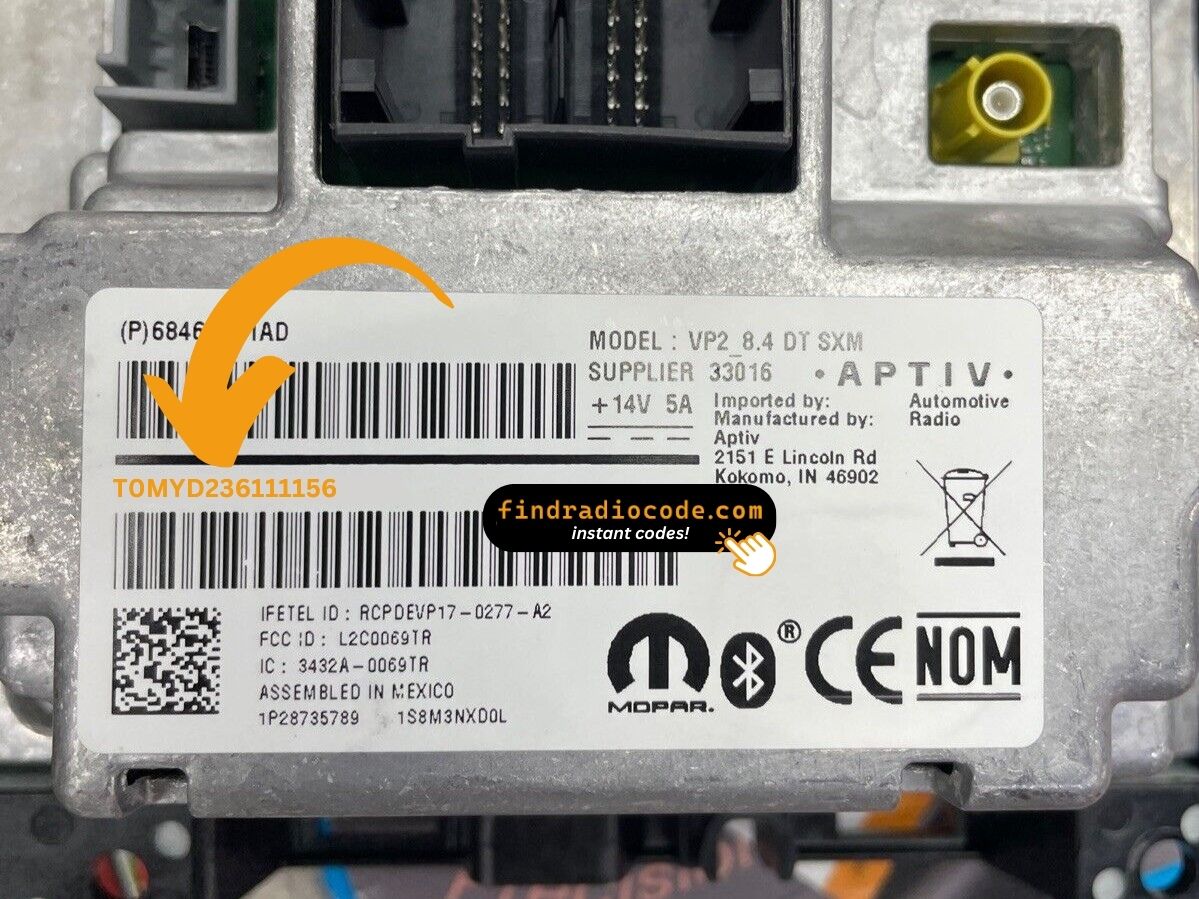
Example: Ram 1500 serial number label location
Common S/N Formats Used on 2013 1500 Units
The 2013 Ram 1500 Uconnect 8.4" (RA3) comes from Harman or Continental. Common serial number prefixes:
T00AM– Harman VP2 Uconnect 8.4" (most common format)T00BE– Continental Uconnect 8.4" variantTM9– Older Harman units
Radio designations: RA3 (standard 8.4"), VP2 (8.4" with Alpine audio). Example: T00AM1801T0282 (14 characters).
Reminder Do not mistake the part number (P05064... or 68...) with the serial number. Only the serial is used for code generation.
Typical Serial Number Formats for 2013 Ram 1500 Radios
The factory radios fitted to the 2013 Ram 1500 use the standard Mopar/Continental/Harman head-unit serial style. The exact prefix depends on which Uconnect tier the truck shipped with and which supplier built the unit.
Uconnect 8.4 (RA3) and Uconnect 8.4N (RA4)
- Typically printed as a 14-character alphanumeric string on the chassis label.
- Commonly begins with
T- frequent prefixes includeT00AM,TM9, andTQ1- or withA2Con Continental-built variants. - Often a continuous run of letters and digits with no dashes or spaces on the printed sticker.
Uconnect 5.0 (RA2) and Uconnect 3.0 (RA1)
- Usually carries a Mopar/Harman-style serial on the chassis sticker; treat the printed label on the unit itself as the authoritative reference.
- Copy the serial exactly as printed and avoid guessing letters or digits that look unclear.
Entering Your Unlock Code
Once the system gives you 2013 Ram 1500 anti-theft code from the serial, you're ready to reactivate the radio.
Many drivers hesitate at this stage because input methods can look different across radio versions, but it's usually simple.
When the radio shows CODE, it means the unit is waiting for the correct numbers.
In-depth Input Instructions for 1500 2013
To enter the unlock code on the 2013 Ram 1500's Uconnect 8.4":
- The screen shows "ENTER CODE" or ---- after a battery event.
- Tap the on-screen touchscreen keypad to enter each digit of the 4-digit code.
- The radio auto-unlocks after the 4th digit – nothing else needed.
Lockout: 3 wrong attempts = 60-minute lockout. Leave ignition ON. Turning it off resets the timer.
Step-by-Step Code Input Guide
After retrieving the unlock code for a 2013 Ram 1500 radio, the digits can be entered directly at the head unit - no scan tool or dealer visit is required.
- Limited attempts: Mopar/Uconnect units accept only three incorrect tries before entering a WAIT state, so verify every digit before pressing it.
- Turn the ignition to RUN/ACC so the radio powers up while the engine stays off.
- Wait for the display to show
CODE,Enter Anti-Theft Code, or a similar prompt. - On the 8.4 Uconnect units (RA3/RA4) and the 5-inch RA2, key in the digits using the on-screen number pad; on the RA1, press the numbered preset buttons in sequence to enter each digit.
- Confirm the entry with the on-screen OK/Enter button or with the tune/menu knob, depending on the radio variant.
- If the screen displays
WAITafter three wrong attempts, leave the ignition in RUN with the radio powered for a continuous 30 minutes (the truck may be driven during this time) before trying the correct code again.
Step-by-Step Ram 1500 2013 Radio Code Retrieval Guide
To get the code, you'll take only 4 simple steps.
- Find your radio's serial - this is the only info required to generate the correct unlock code.
The difference with the dealership lookup is that no VIN or paperwork is needed. - Enter the serial number into our generator above.
Our system checks it against a database of supported radios and automatically catches the matching radio code. - In most cases, the code appears instantly on the screen after payment and is also sent to your email , just in case.
If manual verification is required (rare situations), you'll be notified before checkout. - Once you receive the code, simply enter it into the radio to restore the functionality.
Fixing Common Code Entry Problems for 2013 1500
A rejected code on the Ram 1500's Uconnect 8.4" almost always means a serial number mismatch. The RA3 label shows both the serial number (14 chars, starts with T00AM, T00BE, or TM9) and the part number (P... or 68...) — only the serial generates the code.
Re-check the label, paying attention to 0 vs. O and 1 vs. I. Reach out for a free re-check if needed.
The label on the Ram 1500's RA3 radio has the serial number (14 chars: T00AM, T00BE, or TM9 prefix) and the part number (P05... or 68...). Just the 14-char serial is used for the code.
Also make sure you're reading the label on the radio unit itself, not a service sticker added later.
The Ram 1500 Uconnect 8.4" RA3 uses touchscreen-only code entry. Tap each digit directly on the on-screen number pad. No preset button presses are needed. The radio unlocks without a confirm step after the 4th digit.
No "ENTER CODE" prompt means the anti-theft hasn't activated yet. It only locks after a power interruption.
To trigger the code screen: pull the radio fuse and reinsert it, then reconnect and turn ignition to ON. The prompt appears within seconds.
The Ram 1500's Uconnect RA3 locks after 3 wrong entries. The screen keeps showing "ENTER CODE" but blocks all taps during the lockout.
To reset: Keep ignition ON for 60 full minutes without cutting power. Turning the ignition off resets the 60-minute wait. Service trucks that get turned off frequently must complete the full wait in one session.