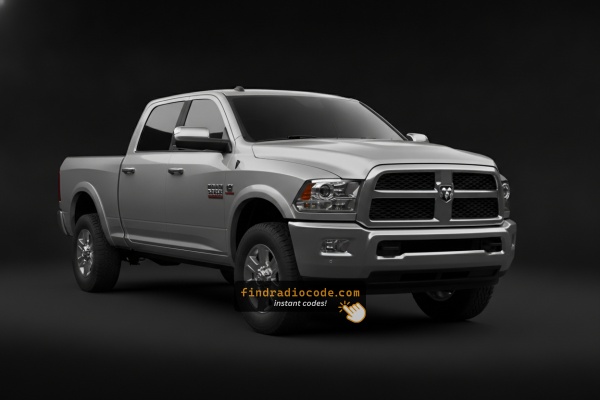
2015 Ram 2500 Stereos by Manufacturer
The following radio models were installed in the 2015 Ram 2500. Pick yours to see where its serial number is and how to get the code.
| Years | Factory radio | Serial starts with |
|---|---|---|
| 2013-2018 | Uconnect 3.0 RA1 VP1 Continental |
TQN, TVPQN, A2C, A3C
|
| 2013-2018 | Uconnect 8.4 RA3 VP3 MX Harman |
T00AM, T00BE, T0012
|
| 2013-2018 | Uconnect 8.4 RA3 VP3 NA Harman |
T00AM, T00BE, T0012
|
| 2013-2018 | Uconnect 8.4 RA3 VP3 ROW Harman |
T00AM, T00BE, T0012
|
| 2013-2017 | Uconnect 8.4 RA4 VP3 MX Harman |
T00AM, T00BE, T0012
|
| 2014-2018 | Uconnect 5.0 RA2 VP2 Continental |
TQN, TVPQN, A2C, A3C
|
| 2014-2017 | Uconnect 5.0 RA2 VP2H NA Harman |
T00AM, T00BE, T0012
|
| 2015-2017 | Chrysler Uconnect 8.4 RB5 Panasonic |
T00AM, T00BE
|
Steps to Unlock Your 2015 Ram 2500 Radio
- Rather than relying on Ram dealership lookup or online threads you can retrieve the code online with the radio serial number.
- Identify the serial number. You will always find it on the unit itself, and sometimes it can be visible on the 2500's radio screen.
- Enter it into the form above, and our system will retrieve the correct 2015 2500 unlock code.
- After receiving your code, type it in using 2500's radio controls to unlock the system successfully.
- The entire process takes less than a minute for most users and requires minimal effort.
Where to Find the Serial Number on your 2500
The initial step is writing down the radio serial.
Many people assume the code depends on the Ram model or year, but in reality, the whole process depends on the unique radio unit's serial number.
This number identifies the exact head unit installed in your Ram 2500.
This is actually better, because if you have bought a used radio, the VIN or other Ram-specific data wouldn't help.
Based on the radio version used, you can see the serial directly from the display or by looking at the label on the radio chassis.
Identify Your 2015 Ram 2500's Factory Radio
The 2015 Ram 2500 continues the 2013-2014 Uconnect lineup unchanged - same four head units, same sales codes, only the underlying software builds have moved on. Trucks left the factory with one of these radios depending on trim and option boxes.
- Uconnect 3.0 / RA1 - base AM/FM/CD radio on fleet-spec Tradesman builds. Small monochrome strip display, hard knobs, no touchscreen.
- Uconnect 5.0 / RA2 - 5-inch colour touchscreen, common on Tradesman and entry SLT. No CD slot, no NAV button, AM/FM, Bluetooth, USB and aux.
- Uconnect 8.4 / RA3 - 8.4-inch landscape touchscreen, optional on SLT and standard on Laramie. Capacitive shortcut row along the bottom of the display. No Nav tile on the home screen.
- Uconnect 8.4N / RA4 - same 8.4-inch hardware as the RA3 with the Garmin nav engine enabled. A Nav tile is present on the home screen and a SiriusXM Traffic/Travel Link badge appears at startup. Standard on Longhorn, optional elsewhere.
Quick tell: no screen = RA1; 5-inch screen = RA2; 8.4-inch screen with no Nav tile = RA3; 8.4-inch screen with a Nav tile = RA4. The sales code is printed on the label on top of the radio chassis.
Access Your S/N on the Radio Screen
These are the steps you should follow for 2015 Ram 2500:
The 2015 Ram 2500 heavy-duty truck uses the same Uconnect infotainment system as the Ram 1500. Depending on trim level, you'll find a Uconnect 3.0/5.0" (base trims) or Uconnect 8.4" (upper trims).
For 8.4" Uconnect (RA3): Hold the Climate Up, Climate Down, and Front Defrost buttons at the same time for 5 seconds to launch Dealer Mode. Then navigate to: System Info → Radio Part Info → Serial Number.
For base Uconnect: Dealer Mode is not available. Removing the radio is necessary to read the serial label.
View the Serial via the Hidden Menu
For the 2015 Ram 2500, the 8.4-inch Uconnect head units support a hidden dealer/diagnostic menu that displays the radio's internal serial number on screen. Reading it on the touchscreen is much faster than pulling the unit out of the dash. The smaller RA1 and RA2 radios do not have a reliably documented on-screen serial readout for this generation.
Uconnect 8.4 (RA3) and Uconnect 8.4N (RA4)
- Place the ignition in the RUN position so the 8.4-inch touchscreen is fully booted.
- Press and hold the driver's temperature UP, temperature DOWN and front DEFROST buttons together for roughly 7 seconds.
- When the dealer/diagnostic menu appears, select the radio-information entries near the top of the list - they list serial numbers and hardware/software revisions.
- Note the full serial exactly as printed, including any letters at the start such as
T00AMorTM9. - Press Done, or cycle the ignition, to exit the menu.
Uconnect 5.0 (RA2) and Uconnect 3.0 (RA1)
- An equivalent on-screen serial readout for these smaller radios is not consistently documented for the 2015 Ram 2500.
- If the dealer-mode shortcut does not surface a serial on these units, fall back to the chassis-label method.
Serial Number on the Unit
If the serial number cannot be accessed on-screen, use the pull-out method.
Most Ram 2500 original radios include a label with the serial number printed on the casing.
Basic process:
- Shut down the car.
- Gently detach surrounding dashboard trim.
- Loosen screws holding the radio.
- Move slightly to inspect the label.
To remove the radio from the 2015 Ram 2500:
- Turn off the vehicle and disconnect the negative battery cable as a precaution.
- Remove the dashboard trim panel using a trim removal tool. Ram heavy-duty trucks tend to have more robust trim pieces than the 1500.
- Unscrew the four Phillips mounting screws securing the radio to the mounting frame.
- Slide the radio forward and find the serial label on the radio casing.
HD Truck Note: Base W/T trims of the 2015 2500 may have a more basic dash layout that makes radio removal slightly easier than higher trims.
Reading the S/N by Pulling the Head Unit
If the on-screen method is unavailable, or the radio is locked at the CODE prompt and you cannot reach the dealer menu, the printed chassis label is the most reliable source for the serial number on a 2015 Ram 2500.
Safety preparation
- Turn the ignition fully off and remove the key.
- Disconnect the negative terminal of the 12V battery and wait several minutes before working near the dash.
- Avoid pulling on yellow airbag-related wiring while removing trim.
Tools to have ready
- Plastic trim/panel pry tools to free the dash bezel without marks.
- A T20 Torx driver for the screws hidden behind the rubber beauty plates at the top of the bezel.
- A Phillips driver for the two screws inside the lower console cubby (if your truck has the centre floor console).
- A 7 mm socket or driver for the four radio retaining screws.
- A phone/camera to photograph the chassis label clearly.
Removal overview
- At the top of the dash bezel, lift the rubber RAM-branded beauty plate with a fingernail or plastic pick to expose two T20 Torx screws and back them out.
- Lift the rubber pad inside the cubby above the centre HVAC vents to expose a single T20 screw and remove it.
- If the truck has the centre floor console, lift the rubber pad at the front of the console well and remove the two Phillips screws below.
- Starting at a lower edge, gently pry the bezel outward - it is held by retaining clips. Work the tool around the perimeter to release each clip.
- Pull the bezel forward and unplug any small switch/HVAC connectors on its back.
- Undo the four 7 mm screws at the corners of the radio chassis.
- Slide the head unit out and unplug the main wiring harness and antenna lead.
Where the serial sits
- Look for a printed label on the metal housing - typically on the top or side face of the chassis.
- Copy the long alphanumeric string next to the barcode and double-check ambiguous characters (O vs 0, I vs 1).
Tips
- Photograph the label so the serial is preserved as a permanent reference.
- Reinstallation is the reverse: harnesses on, four 7 mm screws home, bezel pressed in until each clip seats, T20 and Phillips screws restored, then reconnect the battery.
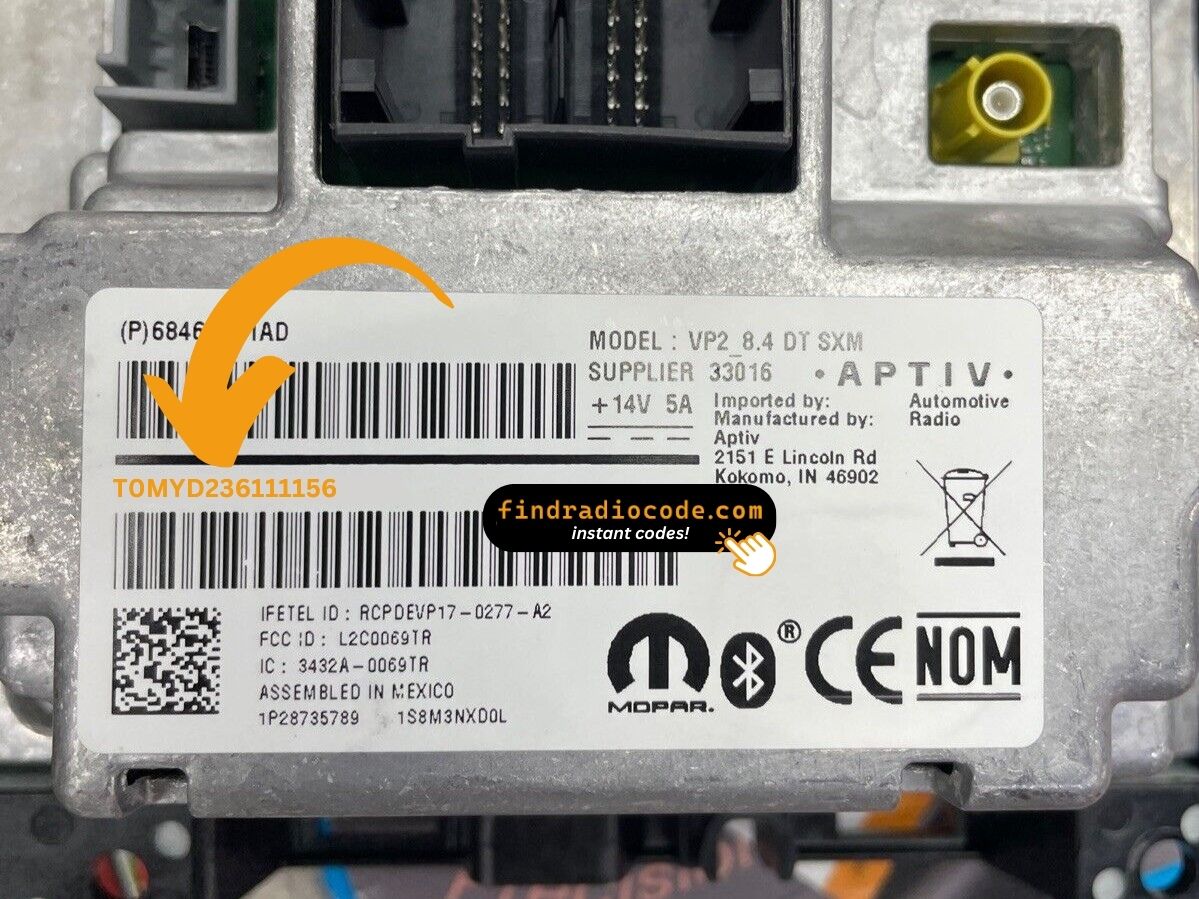
Example: Ram 2500 serial number label location
These are the Common Serial Formats
The 2015 Ram 2500 features the same radio components as other Ram trucks. Serial number prefixes:
T00AM– Harman Uconnect (primary prefix)T00BE– Continental Uconnect variantTM9– Older Harman unitsT0MYD– Newer Harman units (2019+)
The 2015 2500 may have: RA2 (4.3" base), RA1 (5.0"), RA3 (8.4" Classic), or RA4 (8.4" 4C, newer). Serial is 14 characters.
Reminder Your serial number starts with a code prefix (T00AM, T00BE, etc.) – don't confuse it with the radio part number (starts with P05064 or 68).
What Serial Numbers Look Like on This Generation
The 2015 Ram 2500 could leave the factory with several different Uconnect head units, each from a different supplier, so the serial-number style depends on which radio is in your truck. The patterns below are the ones most often reported by owners and unlock services for this generation.
Continental-supplied Uconnect 8.4 (RA3 / RA4)
- Often shown with a
T00AMprefix followed by a numeric tail, for example a string resemblingT00AM1234567. - The prefix sits inline with the rest of the serial on the chassis label.
Panasonic-supplied Uconnect units
- Frequently start with
TM9followed by additional digits or letters. - This pattern has been widely associated with Panasonic-built Mopar radios from the Uconnect 8.4 era.
Uconnect 5.0 (RA2) and Uconnect 3.0 (RA1) base radios
- Also carry a printed serial label on the chassis, but the prefix can vary by supplier batch.
- Read the full string off the label rather than assume a fixed format.
If the alphanumeric you read does not fit any of these examples, double-check that you have copied the serial line and not the part number. The serial is normally the longest string on the label and is the one tied to the barcode.
Entering the Radio Security Code
Once you have the serial number and received the unlock code, the last part is entering it into your radio.
Ram original head units display a ENTER CODE message when ready for input.
The process is simple, but button layouts and confirmation methods may change depending on the radio version installed in your 2500.
Step-by-Step - The Correct Way to Enter It
To input the unlock code on the 2015 Ram 2500:
- Turn ignition to ON. The screen displays "ENTER CODE" or "CODE".
- Touchscreen models (8.4" Uconnect): Tap the on-screen keypad to enter each digit of the 4-digit code.
- Non-touchscreen (base Uconnect): Press preset buttons 1-4 to select each digit, then press Enter/OK to confirm.
Lockout: 3 wrong attempts = 60-minute lockout. Ignition must stay ON. Commercial vehicles that often have battery disconnects may see this lock more often.
Step-by-Step Code Input Guide
Once you have the correct anti-theft code for your 2015 Ram 2500 radio, entry is quick - but the radio will lock itself for half an hour if you keep guessing, so verify before you start.
Limited Attempt Warning
Three attempts is the limit. Three wrong codes in a row place the radio in a WAIT state and the display reads WAIT. To clear it, the radio must remain powered with the ignition in RUN for a continuous 30 minutes. Switching the key off does not shortcut the timer (the truck may be driven during this time).
Entering the code
- Turn the ignition to RUN or ACC so the radio powers up and shows the CODE / Anti-Theft prompt.
- On the 8.4-inch Uconnect (RA3/RA4), tap each digit on the touchscreen number pad.
- On the 5-inch Uconnect 5.0 (RA2), enter the digits using the on-screen keypad.
- On the base Uconnect 3.0 (RA1), enter the four-digit code using the preset (1-6) buttons in sequence.
- Confirm with the OK/Enter on-screen control or the equivalent hardware button.
- When accepted, the radio returns to the normal home screen and audio resumes.
If it does not unlock
- Stop after the second wrong attempt and re-verify the serial used to obtain the code.
- Make sure no leading letters or trailing digits were dropped from the serial.
- If
WAITappears, leave the radio powered for the full 30 minutes before retrying.
Understanding Unlock Issues with Your 2500
No code prompt means power hasn't been interrupted. To trigger it: briefly disconnect the battery, then restore power and turn ignition ON. The "ENTER CODE" prompt shows on startup.
The Uconnect locks after 3 wrong entries. The screen still shows "ENTER CODE" or "CODE" but won't register all input.
To reset: Ignition ON, 60 full minutes without turning off. Commercial heavy-duty trucks used in rotation must finish the full wait without power interruption. Turning off the ignition resets the 60-minute timer.
HD Ram radios may have the serial accessible via Dealer Mode (8.4" RA3: hold Climate Up + Climate Down + Front Defrost 5 sec; then System Info → Radio Part Info → Serial Number) or on the barcode sticker on the unit housing.
Serial: 14 chars starting with T00AM, T00BE, TM9, or T0MYD. Never mistake this with the part number (P05... or 68...).
HD Ram code entry varies by radio trim: 8.4" Uconnect (RA3/RA4) uses touchscreen-only entry — tap each digit on the on-screen keypad. Base Uconnect (RA1/RA2) uses preset buttons 1–4 to scroll to each digit, then Enter/OK to confirm.
HD Ram trucks have a mix of radios (RA1/RA2/RA3/RA4 depending on trim and year). Each unit's label contains both the serial (14 chars: T00AM, T00BE, TM9, or T0MYD prefix) and the part number (P05... or 68...). Only the serial produces the unlock code.
Base trim radios often have dirty labels. Clean the label before reading, or take a picture and zoom in to check every digit.
Why Did the Radio Lock and Ask for a Code?
Uconnect activates anti-theft after any power interruption. HD Ram trucks see this more than most because batteries are replaced as part of regular fleet maintenance.
Common causes:
- Battery replacement — the most frequent trigger
- Blown fuse — common after upfit installation
- Buying the truck pre-owned without any unlock documentation
- Battery fully drained from storage
The code is derived from the radio's serial number — not the truck's VIN.