
2013 Jeep Grand Cherokee Radio Units by Manufacturer
The following radio models were installed in the 2013 Jeep Grand Cherokee. Choose the one that matches your dash to check its serial format and how to get the code.
| Years | Factory radio | Serial starts with |
|---|---|---|
| 2008-2013 | MyGIG NTG4 REN Harman |
T00AM, T00BE, T0012
|
| 2008-2013 | MyGIG NTG4 RER Harman |
T00AM, T00BE, T0012
|
| 2011-2013 | MyGIG NTG4 REZ Harman |
T00AM, T00BE, T0012
|
| 2011-2013 | Uconnect 735N NTG4 Refresh JNAV RHP Harman |
T00AM, T00BE, T0012
|
| 2013-2015 | Chrysler Uconnect 8.4 RB4 Panasonic |
T00AM, T00BE
|
| 2013-2018 | Uconnect 8.4 RA3 VP3 MX Harman |
T00AM, T00BE, T0012
|
| 2013-2018 | Uconnect 8.4 RA3 VP3 ROW Harman |
T00AM, T00BE, T0012
|
| 2013-2017 | Uconnect 8.4 RA4 VP3 MX Harman |
T00AM, T00BE, T0012
|
How to Unlock a Jeep Grand Cherokee Radio After Power Loss
To get the code, you'll take only a few simple steps.
- Find your radio's serial number - this is the only information required by our side.
The difference with the dealership lookup is that no VIN or paperwork is needed. - When you've found the S/N, type it into the form above.
Our system checks it against a database of supported units and automatically finds the matching anti-theft code. - In most cases, the code appears instantly on the screen after you pay and is also sent to your email , just in case.
If we need to check it manually, you'll be notified before checkout. - Once you receive it, just enter it into the radio to restore full functionality.
Entering Your Unlock Code
Now that you've found the S/N and generated the unlock code, the last part is entering it into your radio.
Jeep OEM units display a ENTER CODE message when ready for input.
The process is quick, but button layouts and confirmation methods may differ slightly depending on the radio version installed in your Grand Cherokee.
Step-by-Step - The Correct Way to Enter It
To input the code on the 2013 Grand Cherokee's radio:
- Turn ignition to ON. The MyGIG touchscreens show the Security Screen; the base CD radio shows "CODE".
- Touchscreen models (MyGIG 430, 430N, 730N): Tap the on-screen keypad to enter each digit.
- Non-touchscreen (base CD radio): Press preset button 1 multiple times for the first digit, button 2 for the second, etc. Press and hold Enter/OK to confirm.
Warning: Three incorrect entries activate a lockout. Keep the radio powered on for about 60 minutes to reset.
Detailed Input Instructions for Grand Cherokee 2013
Once you have the correct 4-digit anti-theft code for your 2013 Grand Cherokee's radio, entering it is straightforward, but you only get a limited number of attempts before the unit forces a cooldown.
Limited Attempt Warning (read first). Mopar MyGIG units (and the base RES) for the 2013 Grand Cherokee typically allow up to three attempts to enter a valid 4-digit anti-theft code. After three successive invalid entries the radio enters a WAIT (LOCK) state and shows WAIT on the display. The recovery procedure is to leave the ignition in RUN with the radio powered for a continuous 30 minutes (the vehicle may be driven during this time), after which the CODE prompt returns. Power-cycling the radio during the wait generally resets the timer, so leave it alone.
Power up. Turn the ignition to RUN or ACC and wait for the radio to finish booting and display the CODE / ENTER CODE prompt.
Entry on a MyGIG touchscreen (RBZ / RHB / RHR / RB5). Use the on-screen numeric keypad to tap each of the four digits of your code in order. Once the fourth digit is in place, an OK / GO button becomes active on screen. Tap OK / GO to submit. A correct code clears the prompt and the radio resumes normal operation; an incorrect code is counted as one of your three attempts.
Entry on the base RES (single-CD) radio. With the ignition in RUN and the display showing CODE, use the station preset buttons (1-4) to dial each of the four digits, then press the labelled enter/OK button to submit (or briefly hold the assigned preset, depending on the unit's labelling). The display returns to play mode when the code is accepted.
If the code is rejected. Stop after the second failed attempt, re-verify the digits against your paperwork, and start a fresh entry from the first digit on the next attempt. It is much cheaper to take the 30-minute wait than to risk further escalation.
Tip. Tap each digit deliberately - rapid double-taps on the MyGIG touchscreen can register an extra digit and inadvertently submit an incorrect entry.
Radio Serial Number Explained - Finding It on Your Jeep
The first step is to find and write down the radio's S/N.
Based on the head unit type used in your 2013 Grand Cherokee, the serial can be found either through the display menu or by pulling the unit out and checking the label on the radio itself.
Below are the most common methods to identify your serial the right way.
Identify Your 2013 Grand Cherokee's Factory Radio
For 2013 the WK2 Grand Cherokee continued with the MyGIG-era radio lineup before the broader Uconnect 3C / RA3-RA4 transition rolled across the Mopar range later in the platform's life. The four sales codes you will encounter on a 2013 Grand Cherokee are RES, RBZ, RHB, and RHR (RB5).
Base AM/FM/CD (sales code RES). Entry-level Media Center 130 single-CD receiver fitted to the lower-trim 2013 Grand Cherokees (typically Laredo). Small non-touchscreen monochrome display with hard buttons, MP3/WMA support, and no Bluetooth or navigation from the factory on the lowest-spec version. This was the highest-volume factory radio in 2013 because it shipped on the entry trim.
MyGIG Media Center 430 (sales code RBZ). Optional MyGIG touchscreen with a 6.5-inch color display, internal hard drive, USB, SiriusXM, and Bluetooth (where equipped). The home screen shows tiles for Radio, Media, and Phone but no Nav tile and no Garmin splash at boot. Common upgrade on the 2013 Limited trim.
MyGIG Navigation 430N with Garmin (sales code RHB). Same 6.5-inch MyGIG hardware as the RBZ but adds Garmin-based GPS navigation - the boot splash shows the Garmin logo and a Nav button is present on the home screen. Available factory option on 2013 Grand Cherokees.
MyGIG Navigation 730N with NAVTEQ (sales code RHR / RB5). Top-tier MyGIG nav radio with NAVTEQ maps and the Harman Becker user interface, fitted to Overland and SRT8 trims. The SRT8 cars optionally pair the RHR with the 825-watt 19-speaker Harman Kardon premium audio. Adds SiriusXM Traffic and Travel Link.
Bottom line: small non-touch display with a CD slot = RES; 6.5-inch touchscreen with no Nav icon = RBZ; 6.5-inch touchscreen with a Garmin boot splash = RHB; 6.5-inch touchscreen with NAVTEQ-style maps and Harman Becker UI = RHR / RB5.
Quick Method: Find the Serial Number on the Screen
Try the following for your 2013 Jeep Grand Cherokee:
The 2013 Jeep Grand Cherokee (WK2) was fitted with either a base CD radio or a MyGIG touchscreen (430, 430N or 730N). On the MyGIG touchscreens the radio displays its own serial on the Security Screen while it is locked, so you do not need to pull it out:
- Switch the ignition to ON and give it 10 to 20 seconds for the radio to boot.
- The display opens Security Screen with Enter Security Code and a number keypad.
- Read the 14 characters under Serial Number, for example
T00AM0326T0528orT00BE027470932. Type it without spaces - that is the number we need for the code.
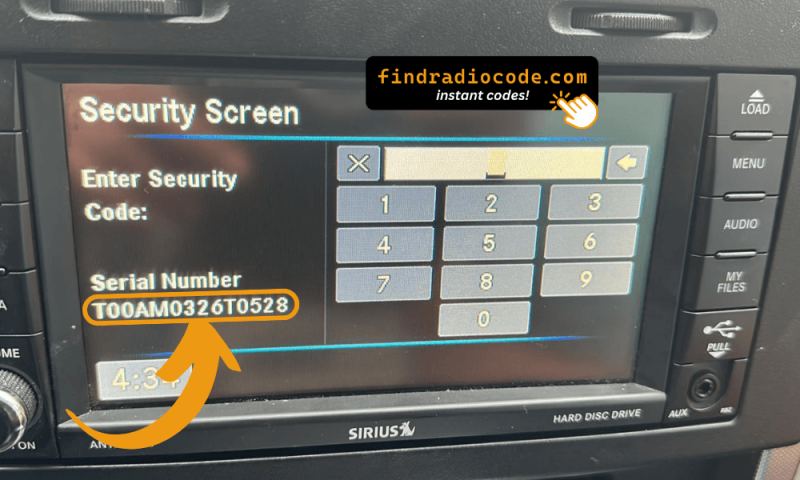
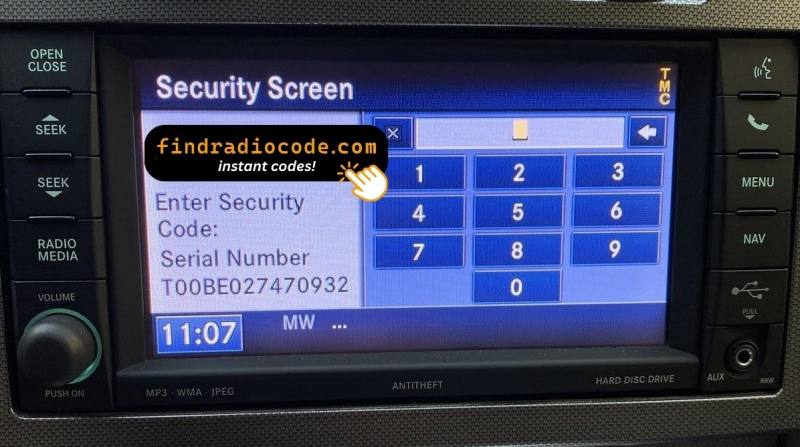
The base CD radio (sales code RES) has no touchscreen and does not show the serial - it is printed on the chassis label using the removal steps below. Use the label too if the MyGIG screen stays dark.
Grand Cherokee's Hardware Label Method
If the serial number cannot be accessed via display, use the removal method.
Most Jeep Grand Cherokee OEM radios include a sticker with the serial number printed on the casing.
Process details:
- Disable power.
- Lift away surrounding panel pieces.
- Remove fasteners holding the radio.
- Slide outward to inspect the label.
To extract the radio from the 2013 Grand Cherokee (WK2):
- Switch off the vehicle completely.
- Pry off the large dashboard bezel surrounding the radio and HVAC controls. The WK2's wide center stack trim is held by friction clips – begin at the top or bottom edge and pry along the perimeter.
- Remove the 4 Torx T20 bolts holding the radio to the bracket.
- Slide the radio out. The Grand Cherokee has sufficient clearance for removal.
WK2 Note: Certain Grand Cherokee trims have a larger climate control cluster beneath the radio — both come off together as one panel on most trims.
Pulling Out the Radio Unit to See the S/N on the Tag
On the 2013 Grand Cherokee (WK2, MyGIG era), the RBZ MyGIG, the Garmin-based RHB and the NAVTEQ-based RHR/RB5 show the 14-character serial on the Security Screen while they are locked, so the radio usually stays in the dash. The serial is also printed on a manufacturer label on the chassis, and that label is where you read it on the base RES single-CD receiver, or when the touchscreen stays dark.
Safety first. Turn the ignition fully off and remove the key. Disconnect the negative battery terminal and wait several minutes before working in the dash so any SRS / airbag capacitors can discharge. Avoid yellow airbag wiring and release every connector by its lock tab rather than tugging on the wires.
Tools you should have ready. A set of plastic pry/trim tools (or a small flat-blade screwdriver wrapped in tape to protect the soft-touch finish), a 7mm socket with ratchet and short extension, a #2 Phillips screwdriver, and a small parts tray for the four chassis screws.
Removal overview for the WK2 center stack. The radio bezel on the 2013 Grand Cherokee is held in place by perimeter spring clips. Start at the bottom edge with a plastic trim tool and work outward, freeing the metal retaining clips along the entire perimeter. Some clips can stay behind in the dash holes - retrieve them and re-seat them on the bezel. Once the bezel is loose, tilt it toward you and disconnect any harnesses attached to it (hazard switch and any climate or display connectors), then set the bezel aside on a soft surface. With the bezel out of the way, you will see four 7mm hex-head screws holding the radio chassis to the dash brackets - remove all four, slide the unit straight out, then release the locking antenna connector and disconnect the multi-pin electrical harness(es) at the rear.
Where to find the S/N. The 14-character serial number (commonly starting with T) is printed on a white or silver manufacturer label on the chassis - typically on the top, side, or rear surface - alongside a Chrysler/Mopar part number and a barcode. Write it down exactly as it appears: characters are case-sensitive, and the digit zero is easy to confuse with the letter O.
Tips. Photograph the label with your phone for a clear, zoomable copy; use a piece of painter's tape on the dash to set the trim tool against and avoid scuffing the soft-touch finish; and label the harness connectors if you plan to leave the radio out for any length of time.

Example: Jeep Grand Cherokee serial number label location
Typical Serial Number Examples for 2013 Grand Cherokee
Common radios in the 2013 Grand Cherokee WK2 and where to read the serial:
- MyGIG 430 / 430N (RBZ, RHB - 6.5-inch touchscreen, hard drive) - serial most often begins with
T00AMorT00BEand appears on the Security Screen while locked. - MyGIG 730N (RHR / RB5, navigation with NAVTEQ maps) - the same Security Screen; some units use
TM9. - Base CD radio (RES, non-touch display) - serial only on the chassis label.
All of these serials are 14 characters long, e.g. T00AM0326T0528. The part number starts with P05064... or 68... - the 14-character serial alone is used for the code.
Typical Serial Number Formats for 2013 Grand Cherokee Radios
Serial numbers on the 2013 Grand Cherokee's factory radios are typically 14 characters long and commonly begin with the letter T, printed on the chassis label together with a Chrysler/Mopar part number. The exact prefix usually depends on which sales-code radio is installed, and prefixes can vary slightly between production runs and supplier batches.
RES (Base AM/FM/CD)
Typically a 14-character alphanumeric serial that commonly starts with the letter T, followed by a family identifier and a production sequence printed on the chassis label. Treat any leading S/N prefix, whitespace, or dashes on the label as formatting only - they are not part of the serial value you submit.
RBZ / RHB (MyGIG 430 and 430N)
Commonly begins with T00-style prefixes such as T00AM or T00BE, followed by alphanumeric digits to make up the full 14-character string. These Mitsubishi-built MyGIG units are the most common factory option on 2013 Grand Cherokees.
RHR / RB5 (MyGIG 730N with NAVTEQ Nav)
Commonly begins with TM9 followed by a numeric sequence to fill the 14-character format. These units are typically encountered on Overland and SRT8 trims for 2013.
Important caveat: capitalisation matters, and an entry that is one character off will be rejected by the radio - always verify the value as printed on the label rather than assuming a fixed prefix from another car.
Why Did the Radio Lock and Ask for a Code?
Grand Cherokee models from this era frequently experience radio lockouts because of:
- Battery disconnect or replacement — the most common reason on these older radios. Each battery event activates the anti-theft.
- Electrical service work — the WK2 has a complex electrical system and service requiring a battery disconnect locks the radio.
- Aging battery failure — older batteries die suddenly, which arms the anti-theft.
- Used purchase — these are widely traded second-hand, and the code is often not passed on.
Your code is linked to the radio serial and does not change.
Troubleshooting Common Radio Problems - Grand Cherokee 2013
Three wrong entries on a MyGIG or early Uconnect Grand Cherokee radio trigger a ~60-minute lockout. The display displays "WAIT" or stops responding. To clear the lockout:
- Keep the ignition ON — engine doesn't need to run, but the key must stay in ON.
- Avoid turning the ignition off — the clock restarts from zero.
- After the wait, the code prompt reappears.
On the 430, 430N and 730N touchscreens the radio does not have to come out: the serial is printed under Serial Number on the Security Screen while the radio is locked. Only the base RES CD radio has to be pulled to read the label. Look for:
- Serial number - 14 alphanumeric characters, starting with
T00AM,T00BEorTM9, for exampleT00AM0326T0528. Submit this. - Part number - begins with
P05064or68on the chassis label. Not the serial.
WK2 Grand Cherokees often go through multiple battery changes over their lifespan - note the serial somewhere safe the first time you see it and the next lockout takes a minute.
Input method on the Grand Cherokee WK2 depends on which radio is fitted:
- Touchscreen (MyGIG 430, 430N, 730N) - Tap digits on the Security Screen.
- Non-touchscreen (base CD radio) - Press preset buttons 1–4 to cycle each digit, then hold Enter/OK.
If unsure: a touchscreen means touchscreen entry; a physical display with no touch response means preset button entry.
Code failure on a MyGIG or base Grand Cherokee radio typically indicates the wrong serial number was submitted. Compare what you sent with the value under Serial Number on the Security Screen (or on the chassis label of the base CD radio): 14 characters, usually starting with T00AM, T00BE or TM9. The part number (P05064... or 68...) does not produce a code.
If the code was rejected, take a photo of the Security Screen and contact support for a free re-check.
If the Grand Cherokee's radio does not show a code prompt after reconnecting the battery:
- Confirm the ignition is in the ON position and wait 15–20 seconds for the radio to boot.
- Inspect the radio fuse — fuse failure stops any display.
- The WK2's prominent center stack can seat a partially loose radio connector — reseat the harness if nothing displays.