
Which factory radio could the 2017 Chrysler 200 use?
Every link below is a radio model that shipped in the 2017 Chrysler 200. Compare the display and buttons to pick the right one, then check the serial prefix.
| Years | Factory radio | Serial starts with |
|---|---|---|
| 2013-2018 | Uconnect 3.0 RA1 VP1 Continental |
TQN, TVPQN, A2C, A3C
|
| 2013-2018 | Uconnect 8.4 RA3 VP3 CA Harman |
T00AM, T00BE, T0012
|
| 2014-2018 | Uconnect 5.0 RA2 VP2 Continental |
TQN, TVPQN, A2C, A3C
|
| 2014-2018 | Uconnect 8.4 RA4 VP4 NA Harman |
T00AM, T00BE, T0012
|
| 2015-2017 | Chrysler Uconnect 8.4 RB5 Panasonic |
T00AM, T00BE
|
| 2017-2020 | Chrysler Uconnect 8.4 UAQ Panasonic |
TM9
|
| 2017-2020 | Chrysler Uconnect 8.4 UCQ Panasonic |
TM9
|
| 2017-2020 | Chrysler Uconnect 8.4 UDM Panasonic |
TM9
|
Why Did the Radio Lock and Ask for a Code?
When your 2017 Chrysler 200 shows an anti-theft code request, identify the radio currently installed before obtaining a code. A replacement unit may need its own code. A battery or electrical issue should be assessed from the actual radio message rather than treated as proof that every unit has locked.
The code is derived from the radio's serial number - not the VIN. It's specific to the radio unit, not the vehicle.
Can't Locate Your Unit's Serial Number? Follow The Steps Below for Chrysler 200 2017
The first step is locating the radio S/N.
Many people assume the code depends on the Chrysler model or year, but in reality, the whole process depends on the unique radio's serial number.
Each radio has its own serial tied to the security system.
This is even better, because if you have an aftermarket radio, the VIN or other vehicle-specific data wouldn't be of much use.
Depending on the radio used, you may be able to see the serial directly from the display or by looking at the label on the radio chassis.
Serial Number on the Radio Information Screen
Supported Uconnect 8.4 RA3 and RA4 units in the 2017 Chrysler 200 can show the serial on a radio-information screen. Open it with the procedure for your system in our Uconnect on-screen serial guide, then record the Serial Number or S/N exactly as displayed. Do not carry the same shortcut over to a Uconnect 5.0 RA2 unit without checking. If the screen offers no serial entry, the label on the installed radio is the fallback.
For the 8.4-inch RA3 and RA4, the Dealer Mode combination in Stellantis service bulletin 08-111-19 is the driver temp up, temp down and front defrost buttons, pressed and held together until the dealer mode screen appears; then look under Radio Part Information.
Reading the Serial From the Radio Label
If the serial is not available on screen, the label on the radio chassis carries it. Access the label using the service procedure for a 2017 Chrysler 200 and the radio fitted to it, or have a qualified technician do it, and photograph the complete serial-number field. See our radio removal guide for why this step may be needed; the vehicle-specific service instructions set out the tools and electrical precautions.
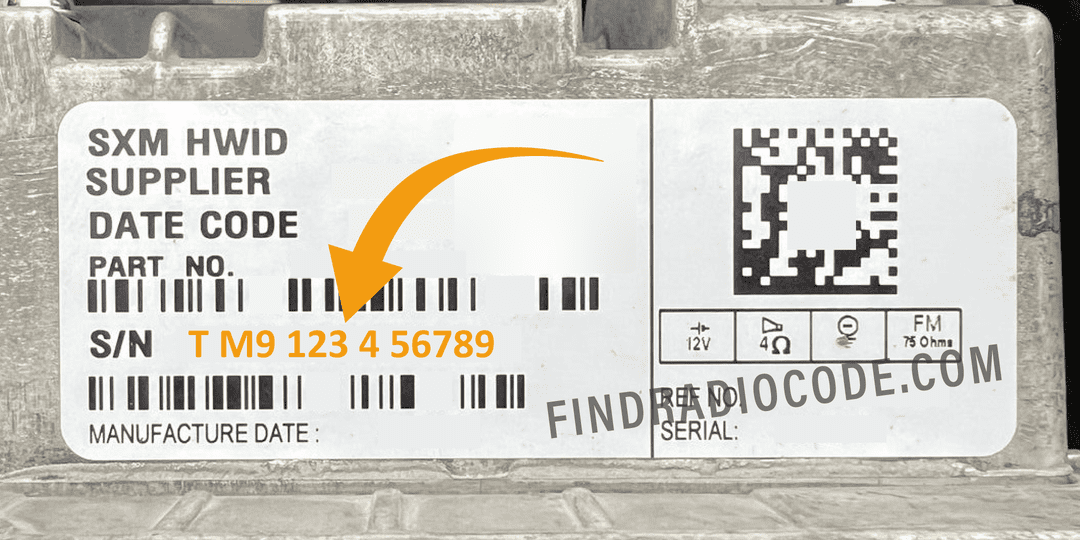
Example: Chrysler 200 serial number label location
Finding the Right Serial Field on Your Radio
The code is tied to the complete value in the Serial Number or S/N field. Do not pick a string because of its length or because it is the longest one on the label, and do not confuse it with the part number, which is a different field. Check the radio installed in the car instead of assuming a supplier or prefix from the 2017 model year.
How to Enter the Radio Code
Use the code-entry instructions for the radio fitted to your 2017 Chrysler 200. The confirmation method and lockout rules are not determined by screen size or model year alone.
- Turn the radio on following its operating instructions and confirm the screen is requesting an anti-theft code.
- Key in the supplied code with the controls the code-entry screen shows. Press a confirmation control only if the screen or the unit instructions call for it.
- If the code is not accepted, stop and recheck the serial number and the code issued for that unit before the next attempt.
- If the radio shows WAIT, follow the on-screen instructions and see our WAIT troubleshooting guide. Do not assume a universal 30-minute or 60-minute period.
Unlock Your 2017 Chrysler 200 Radio in Minutes - How It Works
Car radios use security codes tied to the radio unit itself instead of the vehicle model or production year.
- The generator identifies your Chrysler radio via serial-based verification.
- Once the serial number is submitted, the system identifies the radio unit and retrieves the corresponding code.
- Use the code to unlock the radio immediately.
- The online process is quicker and more accessible than visiting the Chrysler dealer.
200 2017 Common Radio Problems
Use the controls and prompts on your radio. Some code-entry screens complete the process after the last digit; others request confirmation. Do not substitute a preset-button procedure or a guessed confirmation key when it is not documented for your unit.
Copy the full Serial Number or S/N from the installed unit. Its format depends on the radio; do not trim or pad it to a fixed length or swap in the part number. Check the prefix and every character against a sharp photograph.
Check that the code was supplied for the serial number of the radio currently in your 200. If it is rejected, recheck both values and contact support before another attempt. Send a clear photo of the serial-number field and the exact message displayed.
If the radio is working normally and does not request a code, there is no code-entry step to carry out. If the screen is blank or frozen, diagnose that fault for that radio. Do not disconnect power or remove a fuse just to force an anti-theft prompt.
Do not keep entering codes while the unit is blocked. Wait under the conditions the radio displays or its instructions specify. Before another attempt, confirm that the code matches the radio's serial number. The attempt limit and waiting period have to be confirmed for the exact unit.